• Re: new PC. Cooling, mice, ODs?

    From David Chmelik@3:633/10 to All on Sunday, November 16, 2025 00:21:13
    On Sun, 13 Jul 2025 10:58:01 -0400, Paul wrote:

    On Sun, 7/13/2025 3:22 AM, David Chmelik wrote:
    Thanks to help here, I'm building new desktop, meaning at desk in
    general and new tower workstation PC. This is some including new old
    stock (NOS).

    * Tripp Lite SU1500XL UPS; Belkin 11223408, TrippLite Super 7 surge
    protectors * SilverStone SETA D1 ATX case & Noctua or generic fans *
    SeaSonic PRIME TX-1600 Noctua Edition PSU * GigaByte X870E Aorus Xtreme
    AI Top system-/logic-board * AMD Ryzen 9 9950X CPU with Noctua air CPU
    cooler * 96 GB G.Skill 8.4 GT/s DDR5 SDRAM * Crucial Micron T500 2 TB
    SSD/M2/NVMe: Slackware GNU/Linux (current), FreeBSD UNIX, etc. (Windows
    10 to disable LEDs, warm-boot)
    * HGST UltraStar He8 HDD & Vantec NexStar SuperSpeed3.1 external backup
    WD Red Pro 16 TB HDDs * two LG WH16NS60 CD/DVD/BDHDXL-REs (ODs)
    * 5.25" bay Alcor multi-function (media card, USB, audio ports, etc.)
    hub * 101-key IBM model M keyboard & NOS 1990s Microsoft optical
    (Intelli)mouse * GigaByte AMD Radeon 5700 XT OC (upgrade to newer AMD
    or Nvidia later)
    * ASUS MG28UQ 4K LED & Samsung Syncmaster 204B UXGA & Wacom Cintiq 22HD
    Touch drawing pad 1080p LCD or LED monitors (upgrade to this year's
    Cintiq, someday QSXGA & 5K or 6K or 8K)
    * PC systemboard speaker, PCI riser with Creative Labs SoundBlaster
    Audigy 2ZS Platinum card & 5.25" bay, Yamaha receiver/radio & Aiwa
    Dolby Surround Sound 6.1 speakers, Sony MDR7506 studio monitor
    headphones, Shure SM57 microphone (rest of Aiwa radio/tape-/CD-player
    in box)
    * Adaptec 2248700-RSCSI & UMAX PowerLook 2100XL scanner * Logitech
    QuickCam Pro 9000 webcam * Belkin OmniView Pro 2 KVM PS/2 & USB switch
    (with main & classic/P3/686 PCs, mini-ITX & NUC servers)
    * cooling pads for laptop & pads/tablets & telephone (one on desk)
    * ThinkPad: Slackware GNU/Linux (stable), FreeBSD UNIX, Android/BlissOS
    * Casio, HP, (with shells) Ti graphing calculators * clocks (Garmin
    wrist, hOmeLabs sun, Now & Zen chime, Sangean & (bedside)
    Sony radios)
    * bedside, sometimes desk, etc.: Samsung Galaxy Tab S3 (rooted), Chuwi
    HiPad+ (too late to root) with keyboards * FairPhone 5 (Android you can
    root) (FairPhone 6?)

    Some are already in use: calculators, UPS & surge protectors, clocks,
    HDDs & ODs, keyboard & mouse & monitors & KVM switch, pads/tablets/
    telephone, multi-function hub, audio, though got NOS of this SB and
    will get more multi-function hubs for family... brand isn't Alcor
    (typically chips): hubs are no-brand Chinese, and are getting harder to
    find with most memory card slots (rather than fan controller or more
    USB ports).

    My local computer sales/repair/build shop will build most the rest for/
    with me (I'll do some in garage). Seems MicroSoft USB optical mouse
    (two-
    button) lasts longer or works better than their IntelliMouse Explorer 2
    (five-button, side-scroll) which might be nice if I want to play
    Wolfenstein 3D or Doom or Heretic again... unlikely these days.

    I wish the Garmin wristwatch snaps-in to FairPhone snaps-in to ThinkPad
    docks to workstation, but unfortunately no manufacturer made something
    as neat. I did try connecting a desktop PC & laptop with USB... didn't
    work (ethernet's easier).

    questions...

    Should I get water CPU cooler if I'm number-crunching for BOINC (
    http:// boinc.berkeley.edu to help scientific research) and mining
    cryptocurrencies (still some CPU ones)?

    What about Logitech MX Master: good for all-day usage or too
    new-fangled?

    Does anyone still make 5.25" ODs as good as WH16NS60? USB ODs aren't
    an option: clutter. I know I don't need them for PCs in almost 10
    years, but I used to like to copy CDs and might try with newer (legally
    allowed one backup copy)... mostly they're to make *BSD & GNU/Linux
    boot installation CDs/DVDs for older PCs we still use, and maybe do
    extra data backups.


    https://www.pugetsystems.com/labs/articles/power-draw-cooling-and-
    efficiency-amd-ryzen-9000-series-processors/? srsltid=AfmBOoqsyeV_MFoBXgOcnT5UqHEafLCsNLQnhEIFVw04bJjfTretUR3Z

    Noctua NH-U12A 191W (CPU package power)
    83C <=== IDK, they should have been able to do
    better than this really.

    The U12A is a bit better than the Dark Rock 4.
    There is at least one water cooler mixed in with the results, that beats
    the Noctua entrant.

    The shop put in NH-D15 for me.

    https://www.techpowerup.com/review/noctua-nh-u12a/6.html

    AMD "recommends water cooling". And the warning about "use an adequate cooling solution"
    is a good warning. I should have taken this warning, as NOT a casual suggestion.

    I can tell you, that on an under-rated air cooler, the CPU is actually behaving OK, but the Ryzen Master shows "thermal spikes"
    in the graphs which should not be there. Are the spikes real, or not ? Spending a hundred bucks for a Dark Rock, fixed that issue (5950X).

    The question is one of your tolerance of noise. Noise is on the log
    scale,
    human hearing is really really sensitive. It's almost impossible to keep
    a picky human, happy. Some water coolers, have a bit of cavitation
    noise,
    others are fine.

    I run much louder fans such as very fast server fans in some computers,
    and generally doesn't bother me even with six computers with fans in a
    room (most not server fans, and some just mini/laptop though one mini has larger and faster fans than one might expect).

    As a policy, I neither use water, nor am I interested in discovering a
    system with a water leak.

    Here is an example of one rated at 270W. You have to watch the mass of
    these,
    and come up with a way to neutralize the mass. On my older system (the
    one with a Noctua in it), I came up with some adjustable plastic posts,
    to support the end of the heatsink. That scheme does not work on my
    latest build, due to overhang and the need to make a really weird shaped
    leg to not get in the way. Overhead securing (drilling a hole in a top
    member of the case, and making a bracket to hold up the heatsink)
    remains an option. I would have to take the build all apart again, drill
    the hole, vacuum out the filings and so on, to make a mount now. But
    never the less, if you're exceeding the max mass allowed on a socket
    area, you have to do something. When you make a bracket, it needs some screw-adjustments on the working end of the bracket, to "precisely"
    lift the heatsink, just enough so it is not twisting the socket area any more.

    https://www.bequiet.com/en/cpucooler/4466

    Some people love water. I just happen to not be interested in it :-)
    And when you mount a rad, don't point the rad exhaust back inside the
    casing, OK ? The case does not need an extra 200 watts of heating, then
    more and more case cooling fans to get rid of that heat.

    I used a "big case" for my last build, and I'm not entirely satisfied
    with it because of... fan noise. It takes a lot of fans, to achieve
    almost inperceptible air velocity over surfaces inside the PC. Using a
    big case,
    you should only make the case big enough to hold the components. If it
    is 20 liters larger than need be, the nine fans you'll be running will
    make you crazy.

    After the PC was build, I started Memtest running, and when I got home,
    the PC had almost overheated. I never expected a Memtest to get quite
    that warm.

    The big machine does not run that often, because of... fan noise.
    You get the idea. [...]

    I used to like water-cooling--it's more efficient--but mine largely wore
    out after at most four years, though I used it for a little after. I've
    had air-cooling fans last much longer at least if not used full-speed most
    the time. Premade water coolers have little risk of actually breaking to spill water unless you're rough with them, but they do generally wear out after two or three years.

    PC shops generally don't have distributors anymore, so they told me buy
    most parts from Amazon or New Egg, etc., then they build it. Mid-2010s
    the one I go to even had a technician who let me build it with him, since
    I first figured out something about new hardware installation. Now I'm
    not on schedule I could so this year let them do 'barebones' (it's in my interest a place to buy computer stuff--including used without shipping
    and with help--remains in business) and added more hardware at home.

    Aforementioned SoundBlaster hasn't been detected in GNU/Linux; only its PCIe-to-PCI bridge was detected. LinuxQuestions.org people told me test
    in a known good PCI slot on another computer but I suspect the PCIe slot
    and bridge are working and so is the (sealed NOS) soundcard (in there
    pretty snug) but that it's incompatibility. Might have to switch to ESIO MARA44 XTe2 with volume knobs on cables despite would be inconvenient
    mess.

    If that's the case, I might switch from the SETA D1 back to white Corsair Carbide 500R but heard with EATX you can't connect all SATA ports in it?

    --- PyGate Linux v1.5
    * Origin: Dragon's Lair, PyGate NNTP<>Fido Gate (3:633/10)
  • From Paul@3:633/10 to All on Sunday, November 16, 2025 00:11:11
    On Sat, 11/15/2025 7:21 PM, David Chmelik wrote:
    On Sun, 13 Jul 2025 10:58:01 -0400, Paul wrote:

    On Sun, 7/13/2025 3:22 AM, David Chmelik wrote:
    Thanks to help here, I'm building new desktop, meaning at desk in
    general and new tower workstation PC. This is some including new old
    stock (NOS).

    * Tripp Lite SU1500XL UPS; Belkin 11223408, TrippLite Super 7 surge
    protectors * SilverStone SETA D1 ATX case & Noctua or generic fans *
    SeaSonic PRIME TX-1600 Noctua Edition PSU * GigaByte X870E Aorus Xtreme
    AI Top system-/logic-board * AMD Ryzen 9 9950X CPU with Noctua air CPU
    cooler * 96 GB G.Skill 8.4 GT/s DDR5 SDRAM * Crucial Micron T500 2 TB
    SSD/M2/NVMe: Slackware GNU/Linux (current), FreeBSD UNIX, etc. (Windows
    10 to disable LEDs, warm-boot)
    * HGST UltraStar He8 HDD & Vantec NexStar SuperSpeed3.1 external backup
    WD Red Pro 16 TB HDDs * two LG WH16NS60 CD/DVD/BDHDXL-REs (ODs)
    * 5.25" bay Alcor multi-function (media card, USB, audio ports, etc.)
    hub * 101-key IBM model M keyboard & NOS 1990s Microsoft optical
    (Intelli)mouse * GigaByte AMD Radeon 5700 XT OC (upgrade to newer AMD
    or Nvidia later)
    * ASUS MG28UQ 4K LED & Samsung Syncmaster 204B UXGA & Wacom Cintiq 22HD
    Touch drawing pad 1080p LCD or LED monitors (upgrade to this year's
    Cintiq, someday QSXGA & 5K or 6K or 8K)
    * PC systemboard speaker, PCI riser with Creative Labs SoundBlaster
    Audigy 2ZS Platinum card & 5.25" bay, Yamaha receiver/radio & Aiwa
    Dolby Surround Sound 6.1 speakers, Sony MDR7506 studio monitor
    headphones, Shure SM57 microphone (rest of Aiwa radio/tape-/CD-player
    in box)
    * Adaptec 2248700-RSCSI & UMAX PowerLook 2100XL scanner * Logitech
    QuickCam Pro 9000 webcam * Belkin OmniView Pro 2 KVM PS/2 & USB switch
    (with main & classic/P3/686 PCs, mini-ITX & NUC servers)
    * cooling pads for laptop & pads/tablets & telephone (one on desk)
    * ThinkPad: Slackware GNU/Linux (stable), FreeBSD UNIX, Android/BlissOS
    * Casio, HP, (with shells) Ti graphing calculators * clocks (Garmin
    wrist, hOmeLabs sun, Now & Zen chime, Sangean & (bedside)
    Sony radios)
    * bedside, sometimes desk, etc.: Samsung Galaxy Tab S3 (rooted), Chuwi
    HiPad+ (too late to root) with keyboards * FairPhone 5 (Android you can
    root) (FairPhone 6?)

    Some are already in use: calculators, UPS & surge protectors, clocks,
    HDDs & ODs, keyboard & mouse & monitors & KVM switch, pads/tablets/
    telephone, multi-function hub, audio, though got NOS of this SB and
    will get more multi-function hubs for family... brand isn't Alcor
    (typically chips): hubs are no-brand Chinese, and are getting harder to
    find with most memory card slots (rather than fan controller or more
    USB ports).

    My local computer sales/repair/build shop will build most the rest for/
    with me (I'll do some in garage). Seems MicroSoft USB optical mouse
    (two-
    button) lasts longer or works better than their IntelliMouse Explorer 2
    (five-button, side-scroll) which might be nice if I want to play
    Wolfenstein 3D or Doom or Heretic again... unlikely these days.

    I wish the Garmin wristwatch snaps-in to FairPhone snaps-in to ThinkPad
    docks to workstation, but unfortunately no manufacturer made something
    as neat. I did try connecting a desktop PC & laptop with USB... didn't
    work (ethernet's easier).

    questions...

    Should I get water CPU cooler if I'm number-crunching for BOINC (
    http:// boinc.berkeley.edu to help scientific research) and mining
    cryptocurrencies (still some CPU ones)?

    What about Logitech MX Master: good for all-day usage or too
    new-fangled?

    Does anyone still make 5.25" ODs as good as WH16NS60? USB ODs aren't
    an option: clutter. I know I don't need them for PCs in almost 10
    years, but I used to like to copy CDs and might try with newer (legally
    allowed one backup copy)... mostly they're to make *BSD & GNU/Linux
    boot installation CDs/DVDs for older PCs we still use, and maybe do
    extra data backups.


    https://www.pugetsystems.com/labs/articles/power-draw-cooling-and-
    efficiency-amd-ryzen-9000-series-processors/? srsltid=AfmBOoqsyeV_MFoBXgOcnT5UqHEafLCsNLQnhEIFVw04bJjfTretUR3Z

    Noctua NH-U12A 191W (CPU package power)
    83C <=== IDK, they should have been able to do
    better than this really.

    The U12A is a bit better than the Dark Rock 4.
    There is at least one water cooler mixed in with the results, that beats
    the Noctua entrant.

    The shop put in NH-D15 for me.

    https://www.techpowerup.com/review/noctua-nh-u12a/6.html

    AMD "recommends water cooling". And the warning about "use an adequate
    cooling solution"
    is a good warning. I should have taken this warning, as NOT a casual
    suggestion.

    I can tell you, that on an under-rated air cooler, the CPU is actually
    behaving OK, but the Ryzen Master shows "thermal spikes"
    in the graphs which should not be there. Are the spikes real, or not ?
    Spending a hundred bucks for a Dark Rock, fixed that issue (5950X).

    The question is one of your tolerance of noise. Noise is on the log
    scale,
    human hearing is really really sensitive. It's almost impossible to keep
    a picky human, happy. Some water coolers, have a bit of cavitation
    noise,
    others are fine.

    I run much louder fans such as very fast server fans in some computers,
    and generally doesn't bother me even with six computers with fans in a
    room (most not server fans, and some just mini/laptop though one mini has larger and faster fans than one might expect).

    As a policy, I neither use water, nor am I interested in discovering a
    system with a water leak.

    Here is an example of one rated at 270W. You have to watch the mass of
    these,
    and come up with a way to neutralize the mass. On my older system (the
    one with a Noctua in it), I came up with some adjustable plastic posts,
    to support the end of the heatsink. That scheme does not work on my
    latest build, due to overhang and the need to make a really weird shaped
    leg to not get in the way. Overhead securing (drilling a hole in a top
    member of the case, and making a bracket to hold up the heatsink)
    remains an option. I would have to take the build all apart again, drill
    the hole, vacuum out the filings and so on, to make a mount now. But
    never the less, if you're exceeding the max mass allowed on a socket
    area, you have to do something. When you make a bracket, it needs some
    screw-adjustments on the working end of the bracket, to "precisely"
    lift the heatsink, just enough so it is not twisting the socket area any
    more.

    https://www.bequiet.com/en/cpucooler/4466

    Some people love water. I just happen to not be interested in it :-)
    And when you mount a rad, don't point the rad exhaust back inside the
    casing, OK ? The case does not need an extra 200 watts of heating, then
    more and more case cooling fans to get rid of that heat.

    I used a "big case" for my last build, and I'm not entirely satisfied
    with it because of... fan noise. It takes a lot of fans, to achieve
    almost inperceptible air velocity over surfaces inside the PC. Using a
    big case,
    you should only make the case big enough to hold the components. If it
    is 20 liters larger than need be, the nine fans you'll be running will
    make you crazy.

    After the PC was build, I started Memtest running, and when I got home,
    the PC had almost overheated. I never expected a Memtest to get quite
    that warm.

    The big machine does not run that often, because of... fan noise.
    You get the idea. [...]

    I used to like water-cooling--it's more efficient--but mine largely wore
    out after at most four years, though I used it for a little after. I've
    had air-cooling fans last much longer at least if not used full-speed most the time. Premade water coolers have little risk of actually breaking to spill water unless you're rough with them, but they do generally wear out after two or three years.

    PC shops generally don't have distributors anymore, so they told me buy
    most parts from Amazon or New Egg, etc., then they build it. Mid-2010s
    the one I go to even had a technician who let me build it with him, since
    I first figured out something about new hardware installation. Now I'm
    not on schedule I could so this year let them do 'barebones' (it's in my interest a place to buy computer stuff--including used without shipping
    and with help--remains in business) and added more hardware at home.

    Aforementioned SoundBlaster hasn't been detected in GNU/Linux; only its PCIe-to-PCI bridge was detected. LinuxQuestions.org people told me test
    in a known good PCI slot on another computer but I suspect the PCIe slot
    and bridge are working and so is the (sealed NOS) soundcard (in there
    pretty snug) but that it's incompatibility. Might have to switch to ESIO MARA44 XTe2 with volume knobs on cables despite would be inconvenient
    mess.

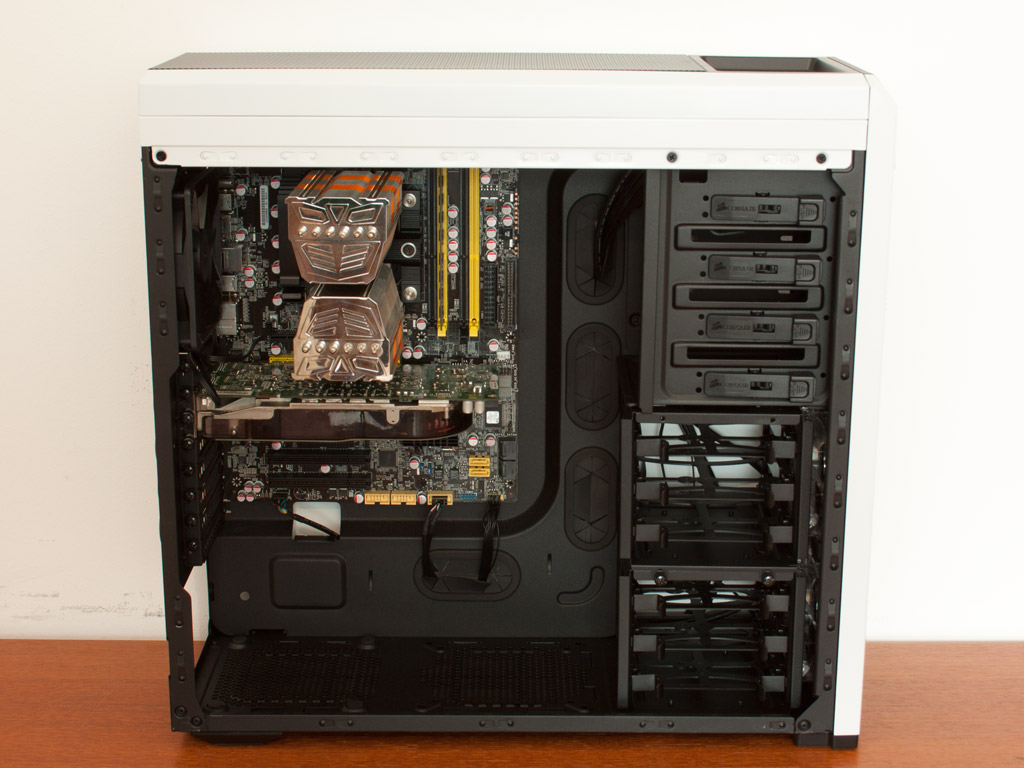
    If that's the case, I might switch from the SETA D1 back to white Corsair Carbide 500R but heard with EATX you can't connect all SATA ports in it?


    You would have to start with a picture of an ordinary motherboard
    sitting in it, to imagine how or whether it would be blocked.

    https://www.techpowerup.com/review/corsair-carbide-500r/images/instmb.jpg

    ( https://www.techpowerup.com/review/corsair-carbide-500r/5.html )

    If the motherboard was a bit wider, the side-mount sata are getting closer
    to the drive cages. You need a bit of room for bend radius. And if cables
    have to be routed through the grommits, the connector cannot start too close
    to those, if you expect to safely route the cable. SATA cables do not
    like to be "kinked" so you cannot make sharp-90 degree bends. The cables
    must have smooth curves so the insulation does not get crushed.

    If you don't want to do the install right now, you can always do a mockup
    of the EATX mobo with a piece of cardboard, sketch in the SATA and then imagine how the cables will bend when the thing is installed.

    You have to decide how many of the SATA you will be using. The side-mount connectors, you can fit three of six connectors pretty easily. But fitting
    all six ports is a bit of a challenge. Maybe when you're inserting the board, is your best chance to fit all the cables. There may not be sufficient clearance to add or remove SATA cables once the system is assembled.

    Paul


    --- PyGate Linux v1.5
    * Origin: Dragon's Lair, PyGate NNTP<>Fido Gate (3:633/10)