• Thunderbird Mobile

    From croy@3:633/10 to All on Thursday, November 19, 2026 22:42:25
    Is it just me, or is Thunderbird Mobile a bit on the messy side?

    --
    croy

    --- PyGate Linux v1.5.19
    * Origin: Dragon's Lair, PyGate NNTP<>Fido Gate (3:633/10)
  • From Nuno Silva@3:633/10 to All on Friday, November 20, 2026 07:35:22
    On 2026-11-20, croy wrote:

    Is it just me, or is Thunderbird Mobile a bit on the messy side?

    You *will* have to expand and clarify what are you talking about, be it
    what do you mean by "messy";

    or whether you mean Thunderbird-branded K-9 mail or something else by "Thunderbird Mobile".

    --
    Nuno Silva

    --- PyGate Linux v1.5.19
    * Origin: Dragon's Lair, PyGate NNTP<>Fido Gate (3:633/10)
  • From Dave Royal@3:633/10 to All on Friday, November 20, 2026 08:06:50
    Nuno Silva <nunojsilva@invalid.invalid> Wrote in message:

    On 2026-11-20, croy wrote:

    Is it just me, or is Thunderbird Mobile a bit on the messy side?

    You *will* have to expand and clarify what are you talking about, be it
    what do you mean by "messy";

    ...

    And also what device size you have. I run it (still K9) on a
    tablet: it might be more cluttered on a phone.

    --
    Remove numerics from my email address.

    --- PyGate Linux v1.5.19
    * Origin: Dragon's Lair, PyGate NNTP<>Fido Gate (3:633/10)
  • From s|b@3:633/10 to All on Friday, November 20, 2026 16:02:02
    On Thu, 19 Nov 2026 22:42:25 -0800, croy wrote:

    Is it just me, or is Thunderbird Mobile a bit on the messy side?

    It takes some getting used to.

    --
    Horum omnium fortissimi sunt Belgae.
    - Julius Caesar

    --- PyGate Linux v1.5.19
    * Origin: Dragon's Lair, PyGate NNTP<>Fido Gate (3:633/10)
  • From VanguardLH@3:633/10 to All on Friday, November 20, 2026 10:57:45
    croy <croy@spam.invalid.net> wrote:

    Is it just me, or is Thunderbird Mobile a bit on the messy side?

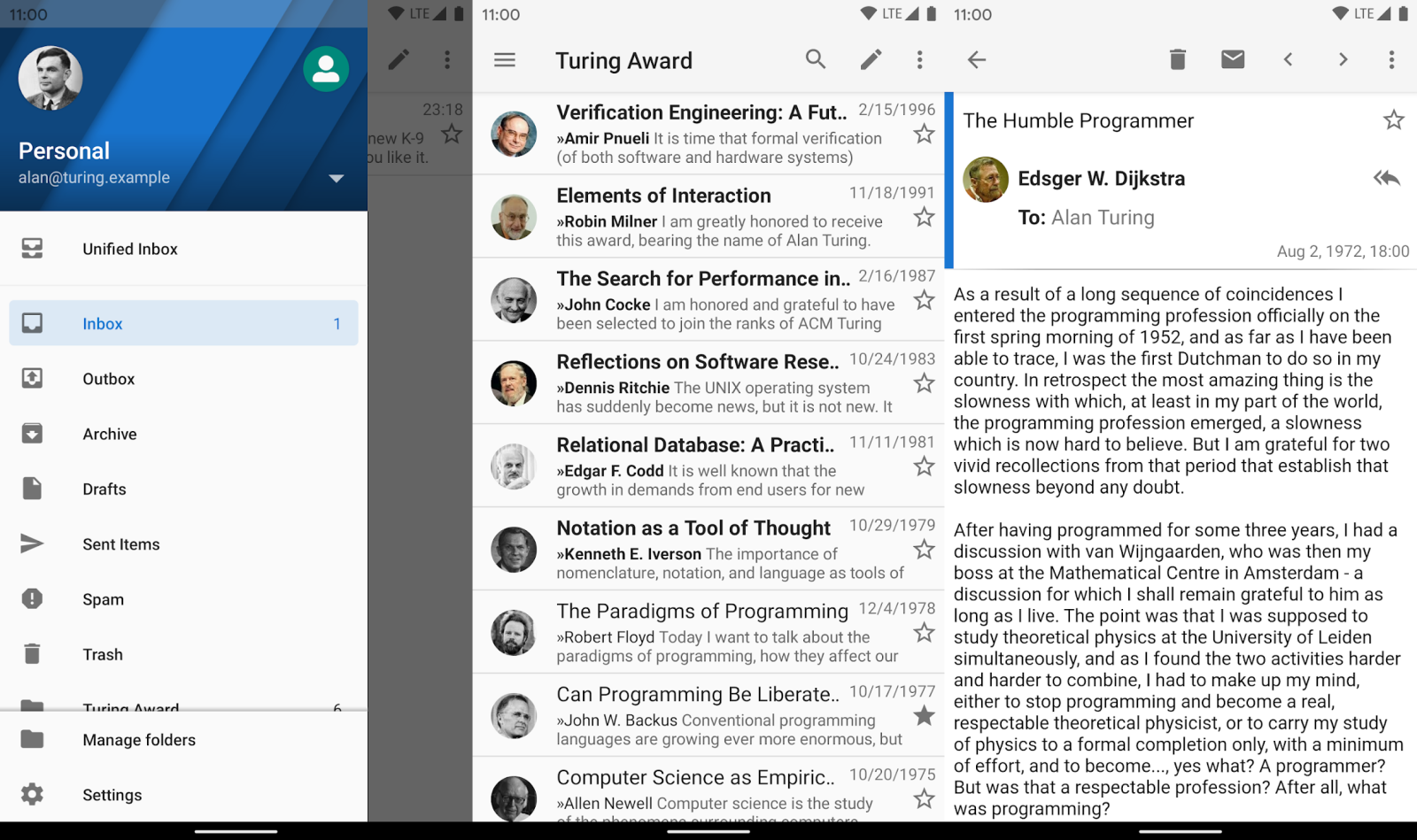
    Is it more "messy", whatever that means, than described at its web site?

    https://k9mail.app/

    or shown at:

    https://www.ghacks.net/wp-content/uploads/2022/06/k-9-mail-android.png

    I don't use K9/Tbird on Android, so I couldn't know what you might mean
    by messy? Is it the 3-pane view that is traditional among many e-mail
    clients of which you ask? I suspect there is an option to hide or
    collapse the folder pane if you don't want to always see it.

    --- PyGate Linux v1.5.19
    * Origin: Dragon's Lair, PyGate NNTP<>Fido Gate (3:633/10)
  • From Jeff Layman@3:633/10 to All on Friday, November 20, 2026 17:20:43
    On 20/11/2026 06:42, croy wrote:
    Is it just me, or is Thunderbird Mobile a bit on the messy side?

    Try something else. I use FairEmail, and it's pretty good.

    --
    Jeff

    --- PyGate Linux v1.5.19
    * Origin: Dragon's Lair, PyGate NNTP<>Fido Gate (3:633/10)
  • From Jim the Geordie@3:633/10 to All on Friday, November 20, 2026 18:03:29
    On 20/11/2026 17:20, Jeff Layman wrote:
    On 20/11/2026 06:42, croy wrote:
    Is it just me, or is Thunderbird Mobile a bit on the messy side?

    Try something else. I use FairEmail, and it's pretty good.

    FWIW I use Edison Mail in preference to Thunderbird.
    I have compared with most of the others.

    --
    Jim the Geordie

    --- PyGate Linux v1.5.19
    * Origin: Dragon's Lair, PyGate NNTP<>Fido Gate (3:633/10)
  • From Dave Royal@3:633/10 to All on Friday, November 20, 2026 19:55:12
    Andy Burns <usenet@andyburns.uk> Wrote in message:

    VanguardLH wrote:

    I don't use K9/Tbird on Android, so I couldn't know what you might mean
    by messy? Is it the 3-pane view

    No there isn't room on a phone for that, the main view is the message
    list for your current folder, once you select a message you view it (more-or-less) full screen ...

    I've never run K9/TB on a tablet so don't know if it adapts to larger screen?


    Ish. In landscape you can have 2 panes - message list and selected
    message - but the account/folder list always slides in from the
    left over part of the left pane.

    It's fine. Not messy IMO.
    --
    Remove numerics from my email address.

    --- PyGate Linux v1.5.19
    * Origin: Dragon's Lair, PyGate NNTP<>Fido Gate (3:633/10)
  • From VanguardLH@3:633/10 to All on Friday, November 20, 2026 14:15:38
    Jim the Geordie <Jim@geordieland.uk> wrote:

    On 20/11/2026 17:20, Jeff Layman wrote:
    On 20/11/2026 06:42, croy wrote:
    Is it just me, or is Thunderbird Mobile a bit on the messy side?

    Try something else. I use FairEmail, and it's pretty good.

    FWIW I use Edison Mail in preference to Thunderbird.
    I have compared with most of the others.

    Edison Mail is freemium-ware. What more do you get with the paid
    version? Couldn't find how much the paid version costs. Presumably the
    in-app ads are to upgrade to the paid version.

    https://mailsupport.edison.tech/hc/en-us/articles/360045739791-What-is-Edison-Mail
    https://mailsupport.edison.tech/hc/en-us/articles/360048245452-What-is-the-value-that-Edison-Mail-100-per-year-15-per-month-provides-consumers

    Not sure if those are service-side features you pay extra to get, or if
    some are implemented in a premium/paid app version.

    If the AI features are in the free version, can they be disabled to keep
    them out of the way?

    https://www.edisonmail.com/privacy
    "We collect the content you create, upload, or receive when you connect
    your accounts to and/or use our Services, such as the emails you send or receive."

    Sounds similar to what Google does with Gmail. Is that only when
    connecting their app to their e-mail service, or when connecting their
    app to anyone's e-mail service? Reading your e-mails, in or out, might
    be tolerated for personal use, but not for business use where your
    client's messages should be sacrosanct.

    --- PyGate Linux v1.5.19
    * Origin: Dragon's Lair, PyGate NNTP<>Fido Gate (3:633/10)
  • From Jörg Lorenz@3:633/10 to All on Saturday, November 21, 2026 10:03:54
    On 20.11.26 16:02, s|b wrote:
    Horum omnium fortissimi sunt Belgae.
    - Julius Caesar


    Do you know why Caesar said this?

    --
    "Ave! Morituri te salutant!"

    --- PyGate Linux v1.5.19
    * Origin: Dragon's Lair, PyGate NNTP<>Fido Gate (3:633/10)
  • From Nuno Silva@3:633/10 to All on Saturday, November 21, 2026 12:35:53
    On 2026-11-20, Dave Royal wrote:

    Andy Burns <usenet@andyburns.uk> Wrote in message:

    VanguardLH wrote:

    I don't use K9/Tbird on Android, so I couldn't know what you might mean
    by messy? Is it the 3-pane view

    No there isn't room on a phone for that, the main view is the message
    list for your current folder, once you select a message you view it
    (more-or-less) full screen ...

    I've never run K9/TB on a tablet so don't know if it adapts to larger
    screen?


    Ish. In landscape you can have 2 panes - message list and selected
    message - but the account/folder list always slides in from the
    left over part of the left pane.

    It's fine. Not messy IMO.

    (The following concerns K-9 Mail specifically, while the current
    behaviour is shared with Thunderbird, the older behaviour I write about predates the MZLA acquisition.)

    Having used an older release for a long time, the current folder list
    view is something that often confuses me. Is there a way to make it not auto-hide when I select an account? If I want to look at a specific
    folder, I keep having to open the folder pane twice.

    I'll have to check, I think previously this was a view similar to the
    message list, where either you clicked the account to enter a defined
    folder (so, at least usually, INBOX), or a folder icon to see the folder
    list for that account.

    --
    Nuno Silva

    --- PyGate Linux v1.5.19
    * Origin: Dragon's Lair, PyGate NNTP<>Fido Gate (3:633/10)
  • From Dave Royal@3:633/10 to All on Saturday, November 21, 2026 18:41:34
    J”rg Lorenz <hugybear@gmx.net> Wrote in message:

    On 20.11.26 16:02, s|b wrote:
    Horum omnium fortissimi sunt Belgae.
    - Julius Caesar


    Do you know why Caesar said this?


    'Omnium' only referred to the tribes in Gaul, not for example the
    Germans. Or the British, I suppose, though after the Romans left
    the Belgae were among the tribes that drove them
    out.
    --
    Remove numerics from my email address.

    --- PyGate Linux v1.5.19
    * Origin: Dragon's Lair, PyGate NNTP<>Fido Gate (3:633/10)
  • From croy@3:633/10 to All on Saturday, November 21, 2026 13:18:01
    On Fri, 20 Nov 2026 07:35:22 +0000, Nuno Silva <nunojsilva@invalid.invalid> wrote:

    On 2026-11-20, croy wrote:

    Is it just me, or is Thunderbird Mobile a bit on the messy side?

    You *will* have to expand and clarify what are you talking about, be it
    what do you mean by "messy";

    or whether you mean Thunderbird-branded K-9 mail or something else by >"Thunderbird Mobile".

    Yeah, sorry for the lack of substance.

    Messy #1: When I get a message on "Thunderbird-branded K-9 mail" (I
    guess), I see it in the list of messages, with only the subject, time, and sender. When I poke it, to see the actual message, it takes me to the reply window, and I still don't see the body of the message.

    Messy #2: When there is an attachment, I see no option to save it.

    --
    croy

    --- PyGate Linux v1.5.19
    * Origin: Dragon's Lair, PyGate NNTP<>Fido Gate (3:633/10)
  • From Theo@3:633/10 to All on Sunday, November 22, 2026 00:45:16
    croy <croy@spam.invalid.net> wrote:
    On Fri, 20 Nov 2026 07:35:22 +0000, Nuno Silva <nunojsilva@invalid.invalid> wrote:

    On 2026-11-20, croy wrote:

    Is it just me, or is Thunderbird Mobile a bit on the messy side?

    You *will* have to expand and clarify what are you talking about, be it >what do you mean by "messy";

    or whether you mean Thunderbird-branded K-9 mail or something else by >"Thunderbird Mobile".

    Yeah, sorry for the lack of substance.

    Messy #1: When I get a message on "Thunderbird-branded K-9 mail" (I
    guess), I see it in the list of messages, with only the subject, time, and sender.

    You can change that via:
    Settings -> General settings -> Display -> Preview lines
    from 0 to 6 lines of body text.

    When I poke it, to see the actual message, it takes me to the reply
    window, and I still don't see the body of the message.

    Mine does. I can't see a way to make it start a reply directly from the message list - various long presses and swipes don't.

    Messy #2: When there is an attachment, I see no option to save it.

    K9: Tap on the attachment and then each attachment has a download button, or 'Save All'.

    Thunderbird: Each attachment has a download button

    If the attachment is an image being shown inline, long press on it and you
    have the option to save it.

    Theo

    --- PyGate Linux v1.5.19
    * Origin: Dragon's Lair, PyGate NNTP<>Fido Gate (3:633/10)
  • From Nuno Silva@3:633/10 to All on Sunday, November 22, 2026 00:58:57
    On 2026-11-21, croy wrote:

    On Fri, 20 Nov 2026 07:35:22 +0000, Nuno Silva <nunojsilva@invalid.invalid> wrote:

    On 2026-11-20, croy wrote:

    Is it just me, or is Thunderbird Mobile a bit on the messy side?

    You *will* have to expand and clarify what are you talking about, be it >>what do you mean by "messy";

    or whether you mean Thunderbird-branded K-9 mail or something else by >>"Thunderbird Mobile".

    Yeah, sorry for the lack of substance.

    Messy #1: When I get a message on "Thunderbird-branded K-9 mail" (I
    guess), I see it in the list of messages, with only the subject, time, and sender. When I poke it, to see the actual message, it takes me to the reply window, and I still don't see the body of the message.

    When I click on a message in the message list, it shows the message to
    me. I'm not using a three-pane view or anything like that, maybe there
    is a difference? Any chance there's some reply icon you're clicking on?

    (I don't see a way to enable such a thing on the message entries, nor do
    I see e.g. a way to make a swipe action do "reply", but I guess it's
    better to ask to make sure it isn't possibly that...)

    Messy #2: When there is an attachment, I see no option to save it.

    Heh, I had the opposite problem, I kept clicking on the icon on the
    right side and I was wondering why can't I open instead of saving.

    Turns out you click on the attachment *name* to open it, and the icon is
    for saving. The icon I see here is an arrow pointing downwards toward a horizontal bar (so "download"), this screenshot shows an icon that is
    maybe trying to be a floppy disk, but it'd be the same thing. Do you get
    such an icon on the right side of the attachment entry? Does it prompt
    for saving when clicked?

    <https://user-images.githubusercontent.com/1756255/92413764-75ff8800-f106-11ea-8f1e-c4334c615831.jpg>

    --
    Nuno Silva

    --- PyGate Linux v1.5.19
    * Origin: Dragon's Lair, PyGate NNTP<>Fido Gate (3:633/10)
  • From Nuno Silva@3:633/10 to All on Sunday, November 22, 2026 01:04:34
    On 2026-11-21, Nuno Silva wrote:

    On 2026-11-20, Dave Royal wrote:

    Andy Burns <usenet@andyburns.uk> Wrote in message:

    VanguardLH wrote:

    I don't use K9/Tbird on Android, so I couldn't know what you might mean >>>> by messy? Is it the 3-pane view

    No there isn't room on a phone for that, the main view is the message
    list for your current folder, once you select a message you view it
    (more-or-less) full screen ...

    I've never run K9/TB on a tablet so don't know if it adapts to larger
    screen?


    Ish. In landscape you can have 2 panes - message list and selected
    message - but the account/folder list always slides in from the
    left over part of the left pane.

    It's fine. Not messy IMO.

    (The following concerns K-9 Mail specifically, while the current
    behaviour is shared with Thunderbird, the older behaviour I write about predates the MZLA acquisition.)

    Having used an older release for a long time, the current folder list
    view is something that often confuses me. Is there a way to make it not auto-hide when I select an account? If I want to look at a specific
    folder, I keep having to open the folder pane twice.

    I'll have to check, I think previously this was a view similar to the
    message list, where either you clicked the account to enter a defined
    folder (so, at least usually, INBOX), or a folder icon to see the folder
    list for that account.

    Good thing I mentioned this. I just found out what was going on, in fact
    I meanwhile also noticed that didn't happen when clicking "Unified
    Account", in hindsight another sign pointing to something account settings-specific...

    It's actually... what's described above for the older version, the
    per-account "defined folder" ("auto-select folder") setting still
    exists, and with the current design, it hides the folder pane. So I just
    have to set it to "None" everywhere to get what I want.

    --
    Nuno Silva

    --- PyGate Linux v1.5.19
    * Origin: Dragon's Lair, PyGate NNTP<>Fido Gate (3:633/10)
  • From croy@3:633/10 to All on Saturday, November 21, 2026 21:00:19
    On 22 Nov 2026 00:45:16 +0000 (GMT), Theo
    <theom+news@chiark.greenend.org.uk> wrote:

    Yeah, sorry for the lack of substance.

    Messy #1: When I get a message on "Thunderbird-branded K-9 mail" (I
    guess), I see it in the list of messages, with only the subject, time, and >> sender.

    You can change that via:
    Settings -> General settings -> Display -> Preview lines
    from 0 to 6 lines of body text.

    Thanks for the reply.

    Ok. Now I can see the first 6 lines of each message, but still can't get to message view. When I poke the message in the list, I get the reply screen, which I see now will show me the message body.

    When I poke it, to see the actual message, it takes me to the reply
    window, and I still don't see the body of the message.

    I was wrong about that--I do see the body in the reply screen.

    Mine does. I can't see a way to make it start a reply directly from the >message list - various long presses and swipes don't.

    Hmmm. A mystery.

    Messy #2: When there is an attachment, I see no option to save it.

    K9: Tap on the attachment and then each attachment has a download button, or >'Save All'.

    Thunderbird: Each attachment has a download button

    I'm sure not seeing that.

    If the attachment is an image being shown inline, long press on it and you >have the option to save it.

    I haven't tested any messages with inline attachments.

    --
    croy


    --- PyGate Linux v1.5.19
    * Origin: Dragon's Lair, PyGate NNTP<>Fido Gate (3:633/10)
  • From Nuno Silva@3:633/10 to All on Sunday, November 22, 2026 10:08:36
    On 2026-11-22, croy wrote:

    On 22 Nov 2026 00:45:16 +0000 (GMT), Theo
    <theom+news@chiark.greenend.org.uk> wrote:

    Yeah, sorry for the lack of substance.

    Messy #1: When I get a message on "Thunderbird-branded K-9 mail" (I
    guess), I see it in the list of messages, with only the subject, time, and >>> sender.

    You can change that via:
    Settings -> General settings -> Display -> Preview lines
    from 0 to 6 lines of body text.

    Thanks for the reply.

    Ok. Now I can see the first 6 lines of each message, but still can't get to message view. When I poke the message in the list, I get the reply screen, which I see now will show me the message body.

    How are you poking, can you describe it?

    How does that "reply screen" look?

    The message view here has a reply button, but isn't a reply screen.

    The reply screen here has the message body as an editable part, with an
    X button to remove it, the cursor to type the reply is placed at the
    top, above the quoted message, even if it's set to bottom-post (it
    generates a bottom-posted message, it's just the reply "window"
    ("activity"?) that shows it like this).

    I wish finding screenshots on the web for K-9 Mail and Thunderbird for
    Android was a bit easier than it's being right now. Or maybe the problem
    is that the search engines I'm using are a bit less performant...

    It's probably better to confirm that we're indeed talking about the
    reply screen/window/activity, just to rule out something else happening.

    After reaching that view, if you click the "back" soft or hard button in
    the OS interface, do you return to a window containing the message or to
    the message list?

    When I poke it, to see the actual message, it takes me to the reply
    window, and I still don't see the body of the message.

    I was wrong about that--I do see the body in the reply screen.

    Mine does. I can't see a way to make it start a reply directly from the >>message list - various long presses and swipes don't.

    Hmmm. A mystery.

    It's always possible there's something device- or OS-build-specific
    that's triggering this.

    Messy #2: When there is an attachment, I see no option to save it.

    K9: Tap on the attachment and then each attachment has a download button, or >>'Save All'.

    Thunderbird: Each attachment has a download button

    I'm sure not seeing that.

    It occurs to me now that you may not be seeing the usual attachment
    entries with the icon, if clicking on a message opens the reply
    window. So maybe that's why, and first that problem needs to be solved?

    If the attachment is an image being shown inline, long press on it and you >>have the option to save it.

    I haven't tested any messages with inline attachments.

    --
    Nuno Silva

    --- PyGate Linux v1.5.19
    * Origin: Dragon's Lair, PyGate NNTP<>Fido Gate (3:633/10)