Nuno Silva <nunojsilva@invalid.invalid> wrote:
On 2026-11-04, Frank Slootweg wrote:
Nuno Silva <nunojsilva@invalid.invalid> wrote:
On 2026-11-03, Frank Slootweg wrote:
Nuno Silva <nunojsilva@invalid.invalid> wrote:
[...]
Meanwhile on Android 15, I've had to disable Google Drive in order to >> >> >> make the application/activity chooser for PDF files put Fossify
Documents at the top, so that I could choose "Always". Did I miss some >> >> >> other way of doing this? How does one change the order in which options
are presented, and how does one make it so that another one is the top >> >> >> one, and how does one choose "Always" for an option other than the top >> >> >> one?
Note: this isn't after an association has been set, but *before*...
I'm confused! If you're about to choose "Always", why do you *care* >> >> > where the choice-to-be is in the list? It's a one-time action. After
that, you never get the "Open with" popup again (until you remove the >> >> > association in the app's 'App info' page).
If your wish to change the order of the list was for the "Just once" >> >> > choice, I would understand, but for "Always", who cares?
I can only click "Always" for the top one.
Still doesn't compute.
Even if you have a big list, I have never encountered a "top one".
Always one or more lines with each multiple choices/icons.
Also you *first* select/tap the choice/icon you want and *then* tap
"Always".
And what about "Just once"? Can you select/tap the choice/icon you
want and then tap "Just once"?
Tapping any entry other than the top one *is* "just once" for that
entry.
Well, then something is wrong, because both for "Always" and "Just
once", the process is a *two*-step process: *First* tap which app you
want to use, *then* tap if you want to use the selected app "Just once"
or "Always".
N.B. If the desired app *is* already selected (grey border around the
icon) from a previous use, you do not have to select it again. If you
*do* tap on an already selected app/icon, it will act as if you tapped
"Just once". Also a *double*-tap on a not yet selected app/icon, acts as select+just-once.
Of course with "Always", the two-step process is a one-time process, because after the first time, you will no longer get the "Open with"
popup.
On 2026-11-05, Frank Slootweg wrote:
Nuno Silva <nunojsilva@invalid.invalid> wrote:
On 2026-11-04, Frank Slootweg wrote:
Nuno Silva <nunojsilva@invalid.invalid> wrote:
On 2026-11-03, Frank Slootweg wrote:
Nuno Silva <nunojsilva@invalid.invalid> wrote:
[...]
Meanwhile on Android 15, I've had to disable Google Drive in order toI'm confused! If you're about to choose "Always", why do you *care* >> >> > where the choice-to-be is in the list? It's a one-time action. After >> >> > that, you never get the "Open with" popup again (until you remove the >> >> > association in the app's 'App info' page).
make the application/activity chooser for PDF files put Fossify
Documents at the top, so that I could choose "Always". Did I miss some
other way of doing this? How does one change the order in which options
are presented, and how does one make it so that another one is the top
one, and how does one choose "Always" for an option other than the top
one?
Note: this isn't after an association has been set, but *before*... >> >> >
If your wish to change the order of the list was for the "Just once"
choice, I would understand, but for "Always", who cares?
I can only click "Always" for the top one.
Still doesn't compute.
Even if you have a big list, I have never encountered a "top one".
Always one or more lines with each multiple choices/icons.
Also you *first* select/tap the choice/icon you want and *then* tap
"Always".
And what about "Just once"? Can you select/tap the choice/icon you
want and then tap "Just once"?
Tapping any entry other than the top one *is* "just once" for that
entry.
Well, then something is wrong, because both for "Always" and "Just
once", the process is a *two*-step process: *First* tap which app you
want to use, *then* tap if you want to use the selected app "Just once"
or "Always".
N.B. If the desired app *is* already selected (grey border around the icon) from a previous use, you do not have to select it again. If you
*do* tap on an already selected app/icon, it will act as if you tapped "Just once". Also a *double*-tap on a not yet selected app/icon, acts as select+just-once.
Of course with "Always", the two-step process is a one-time process, because after the first time, you will no longer get the "Open with"
popup.
The interface I get on this build of Android 15 is like this:
<https://www.guidingtech.com/wp-content/uploads/Foxit-App-PDF-Editor-Select-App-Menu.jpg>
The "Just once" and "Always" buttons apply to the item above, for the
list below a click is "Just once", and a long press shows the app info
screen for that application.
Nuno Silva <nunojsilva@invalid.invalid> wrote:
On 2026-11-05, Frank Slootweg wrote:
Nuno Silva <nunojsilva@invalid.invalid> wrote:
On 2026-11-04, Frank Slootweg wrote:
Nuno Silva <nunojsilva@invalid.invalid> wrote:
On 2026-11-03, Frank Slootweg wrote:
Nuno Silva <nunojsilva@invalid.invalid> wrote:
[...]
Meanwhile on Android 15, I've had to disable Google Drive in order to >>>>>>>> make the application/activity chooser for PDF files put Fossify >>>>>>>> Documents at the top, so that I could choose "Always". Did I miss some >>>>>>>> other way of doing this? How does one change the order in which optionsI'm confused! If you're about to choose "Always", why do you *care* >>>>>>> where the choice-to-be is in the list? It's a one-time action. After >>>>>>> that, you never get the "Open with" popup again (until you remove the >>>>>>> association in the app's 'App info' page).
are presented, and how does one make it so that another one is the top >>>>>>>> one, and how does one choose "Always" for an option other than the top >>>>>>>> one?
Note: this isn't after an association has been set, but *before*... >>>>>>>
If your wish to change the order of the list was for the "Just once" >>>>>>> choice, I would understand, but for "Always", who cares?
I can only click "Always" for the top one.
Still doesn't compute.
Even if you have a big list, I have never encountered a "top one". >>>>> Always one or more lines with each multiple choices/icons.
Also you *first* select/tap the choice/icon you want and *then* tap >>>>> "Always".
And what about "Just once"? Can you select/tap the choice/icon you >>>>> want and then tap "Just once"?
Tapping any entry other than the top one *is* "just once" for that
entry.
Well, then something is wrong, because both for "Always" and "Just
once", the process is a *two*-step process: *First* tap which app you
want to use, *then* tap if you want to use the selected app "Just once"
or "Always".
N.B. If the desired app *is* already selected (grey border around the >>> icon) from a previous use, you do not have to select it again. If you
*do* tap on an already selected app/icon, it will act as if you tapped
"Just once". Also a *double*-tap on a not yet selected app/icon, acts as >>> select+just-once.
Of course with "Always", the two-step process is a one-time process,
because after the first time, you will no longer get the "Open with"
popup.
The interface I get on this build of Android 15 is like this:
<https://www.guidingtech.com/wp-content/uploads/Foxit-App-PDF-Editor-Select-App-Menu.jpg>
The "Just once" and "Always" buttons apply to the item above, for the
list below a click is "Just once", and a long press shows the app info
screen for that application.
This doesn't look like anything I've ever seen on multiple phones and brands.
Carlos E. R. wrote:
The interface I get on this build of Android 15 is like this:
<https://www.guidingtech.com/wp-content/uploads/Foxit-App-PDF-Editor-Select-App-Menu.jpg>
The "Just once" and "Always" buttons apply to the item above, for the
list below a click is "Just once", and a long press shows the app info >>>> screen for that application.
This doesn't look like anything I've ever seen on multiple phones and >>> brands.
It looks like mine. I have a Motorola G52. In my Lenovo tablet it is
similar to your sample.
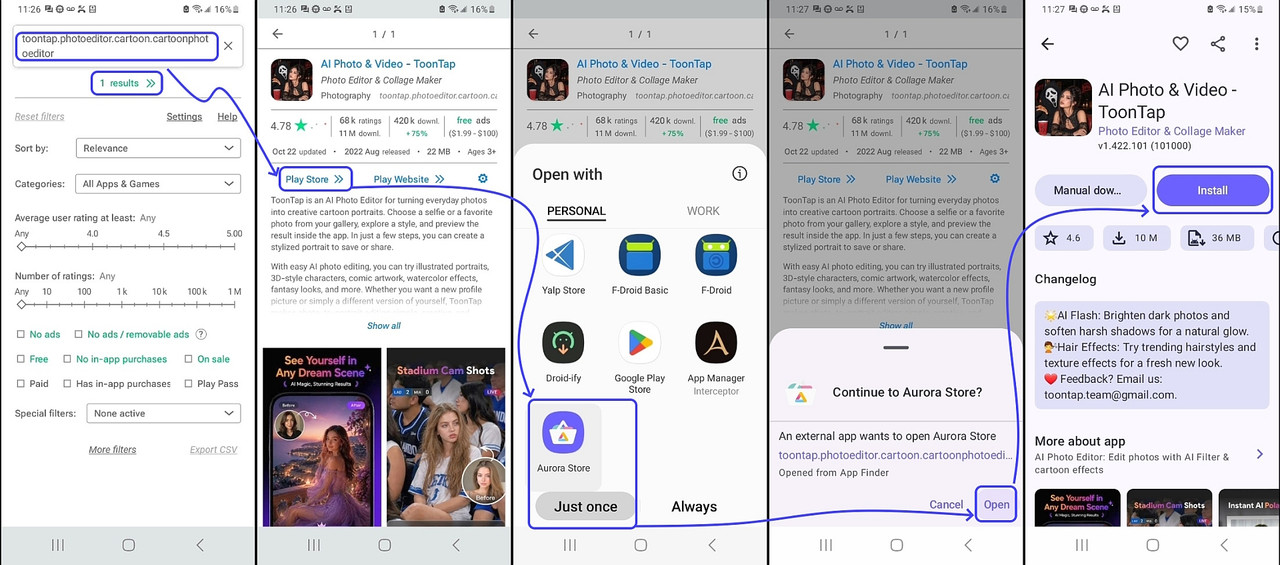
This is what my Samsung Android 13 OpenWith looks like (on Nova Launcher)
<https://i.postimg.cc/k5k5RV9T/aurora-search.jpg>
On 2026-11-06 19:48, Frank Slootweg wrote:[...]
Nuno Silva <nunojsilva@invalid.invalid> wrote:
The interface I get on this build of Android 15 is like this:
<https://www.guidingtech.com/wp-content/uploads/Foxit-App-PDF-Editor-Select-App-Menu.jpg>
The "Just once" and "Always" buttons apply to the item above, for the
list below a click is "Just once", and a long press shows the app info
screen for that application.
This doesn't look like anything I've ever seen on multiple phones and brands.
It looks like mine. I have a Motorola G52. In my Lenovo tablet it is
similar to your sample.
On 2026-11-07, Maria Sophia wrote:
Carlos E. R. wrote:
The interface I get on this build of Android 15 is like this:
<https://www.guidingtech.com/wp-content/uploads/Foxit-App-PDF-Editor-Select-App-Menu.jpg>
The "Just once" and "Always" buttons apply to the item above, for the >>>>> list below a click is "Just once", and a long press shows the app info >>>>> screen for that application.
This doesn't look like anything I've ever seen on multiple phones and >>>> brands.
It looks like mine. I have a Motorola G52. In my Lenovo tablet it is
similar to your sample.
It is, indeed, a Motorola build of Android.
This is what my Samsung Android 13 OpenWith looks like (on Nova Launcher)
<https://i.postimg.cc/k5k5RV9T/aurora-search.jpg>
But is this UI controlled by the launcher? I thought it was part of the >Android system UI.
| Sysop: | Jacob Catayoc |
|---|---|
| Location: | Pasay City, Metro Manila, Philippines |
| Users: | 5 |
| Nodes: | 4 (0 / 4) |
| Uptime: | 498678:21:15 |
| Calls: | 212 |
| Calls today: | 3 |
| Files: | 912 |
| D/L today: |
31 files (22,593K bytes) |
| Messages: | 69,867 |