PSA: The Google Play Store app is NOT a real Android app updater
It might be that people may assume the Google Play Store app >(com.android.vending) is an updater for all installed Android apps.
It isn't.
The Play Store only updates a very narrow set of apps as it completely >ignores sideloaded software, even when the APKs originally came from
the Play Store (& were simply archived by Aurora, Muntashirakon, etc.).
Here's what's actually happening (AFAICT):
1. The Play Store does not track sideloaded apps
That means, if you install apps via:
a. APK files
b. Aurora Store
c. adb
d. backups from another device
e. app managers (e.g., Muntashirakon App Manager)
etc.
Then the Play Store keeps *no record* of those installs.
Even if the APK has the exact signature as the Play Store version, the
Play Store still treats it as a foreign app so it won't update it.
2. The Play Store behaves like a librarian with selective memory
The best analogy is this:
"The Play Store is like a librarian who only updates books she
personally remembers checking out to you."
If she didn't check it out, she won't update it.
And even for the books she *did* check out, she's lazy as she optimizes
for battery life and server load, not completeness. As a result, AFAICT,
updates may be delayed for days or weeks.
3. No Google account on the phone means no library on the phone.
If you never sign into a Google account, the Play Store has:
a. no install history
b. no entitlement list
c. no "library" of apps
So in theory it shouldn't update anything.
But in practice, it *does* update a small set of apps, which are
about a score of apps on my device, which has over a thousand packages,
of which I personally installed about six hundred apps.
4. The Play Store has a second update mechanism for system-adopted packages
Even without a Google account, the Play Store will automatically update
any app that meets special conditions:
a. It is a system app
b. It was preinstalled by the OEM
c. It is signed with the same key as the Play Store version
d. It is bundled by the manufacturer
e. It originally lived in /system or /product
f. It is marked as "Play-updatable" in system metadata
If an app does not meet *every* one of these criteria, the Play Store
ignores it (AFAICT).
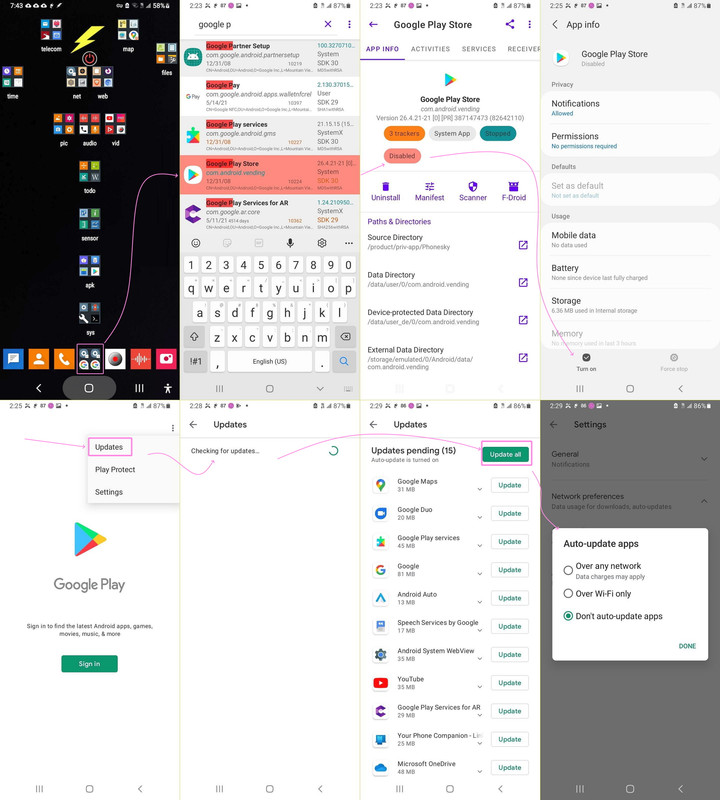
5. Example: the ~15 apps the Play Store updates on my device
In the past, I documented these were updated (screenshot truncated):
<https://i.postimg.cc/HsXKj7WK/updateallapps01.jpg>
i. Google Maps
ii. Google Duo
iii. Google Play Services
iv. Google (the app)
v. Android Auto
vi. Speech Services by Google
vii. Android System WebView
viii. YouTube
ix. Google Play Services for AR
x. Your Phone Companion
xi. Microsoft OneDrive
xii. ...and a few more preinstalled items
These fall into three categories:
A. Google system-level components
(e.g., Play Services, WebView, Speech Services)
B. Google apps that shipped with the ROM
(e.g., Maps, YouTube, Google app, Duo/Meet)
C. OEM-bundled third-party apps
(e.g., Microsoft OneDrive, Your Phone Companion)
These apps satisfy all the "system-adopted" criteria above.
Everything else is ignored.
6. On my device, the Play Store only updates the score of apps,
out of a thousand packages (six hundred of which I installed)
which are...
I. pre-installed
II. signed with the same key as the Play Store version
III. marked as Play-updatable
IV. recognized as system-owned
V. not dependent on a Google account library
If any of those conditions fail, the Play Store simply refuses to update
the app (in my experience).
7. The bottom line
If you always sign into a Google account, and you *only* install apps
through the Play Store on that same device, and you never copy APKs
between devices, then the Play Store should update (all?) your apps.
However, if you sideload, or install from the Google Play Store
repository by alternative means, then the Google Play Store app
will likely update almost nothing.
Maria Sophia wrote:
PSA: The Google Play Store app is NOT a real Android app updater
It might be that people may assume the Google Play Store app (com.android.vending) is an updater for all installed Android apps.
It isn't.
The Play Store only updates a very narrow set of apps as it completely ignores sideloaded software, even when the APKs originally came from
the Play Store (& were simply archived by Aurora, Muntashirakon, etc.).
Here's what's actually happening (AFAICT):
1. The Play Store does not track sideloaded apps
That means, if you install apps via:
a. APK files
b. Aurora Store
c. adb
d. backups from another device
e. app managers (e.g., Muntashirakon App Manager)
etc.
Then the Play Store keeps *no record* of those installs.
Even if the APK has the exact signature as the Play Store version, the
Play Store still treats it as a foreign app so it won't update it.
2. The Play Store behaves like a librarian with selective memory
The best analogy is this:
"The Play Store is like a librarian who only updates books she
personally remembers checking out to you."
If she didn't check it out, she won't update it.
And even for the books she *did* check out, she's lazy as she optimizes
for battery life and server load, not completeness. As a result, AFAICT, updates may be delayed for days or weeks.
3. No Google account on the phone means no library on the phone.
If you never sign into a Google account, the Play Store has:
a. no install history
b. no entitlement list
c. no "library" of apps
So in theory it shouldn't update anything.
But in practice, it *does* update a small set of apps, which are
about a score of apps on my device, which has over a thousand packages,
of which I personally installed about six hundred apps.
4. The Play Store has a second update mechanism for system-adopted packages Even without a Google account, the Play Store will automatically update
any app that meets special conditions:
a. It is a system app
b. It was preinstalled by the OEM
c. It is signed with the same key as the Play Store version
d. It is bundled by the manufacturer
e. It originally lived in /system or /product
f. It is marked as "Play-updatable" in system metadata
If an app does not meet *every* one of these criteria, the Play Store
ignores it (AFAICT).
5. Example: the ~15 apps the Play Store updates on my device
In the past, I documented these were updated (screenshot truncated): https://i.postimg.cc/HsXKj7WK/updateallapps01.jpg
i. Google Maps
ii. Google Duo
iii. Google Play Services
iv. Google (the app)
v. Android Auto
vi. Speech Services by Google
vii. Android System WebView
viii. YouTube
ix. Google Play Services for AR
x. Your Phone Companion
xi. Microsoft OneDrive
xii. ...and a few more preinstalled items
These fall into three categories:
A. Google system-level components
(e.g., Play Services, WebView, Speech Services)
B. Google apps that shipped with the ROM
(e.g., Maps, YouTube, Google app, Duo/Meet)
C. OEM-bundled third-party apps
(e.g., Microsoft OneDrive, Your Phone Companion)
These apps satisfy all the "system-adopted" criteria above.
Everything else is ignored.
6. On my device, the Play Store only updates the score of apps,
out of a thousand packages (six hundred of which I installed)
which are...
I. pre-installed
II. signed with the same key as the Play Store version
III. marked as Play-updatable
IV. recognized as system-owned
V. not dependent on a Google account library
If any of those conditions fail, the Play Store simply refuses to update
the app (in my experience).
7. The bottom line
If you always sign into a Google account, and you *only* install apps
through the Play Store on that same device, and you never copy APKs
between devices, then the Play Store should update (all?) your apps.
However, if you sideload, or install from the Google Play Store
repository by alternative means, then the Google Play Store app
will likely update almost nothing.
--
It's simply not possible to create a Google account and still maintain meaningful privacy. So the Play Store updater will never work with privacy.
Why do they need to make it all so complicated with Android?
This is a response to the post seen at: http://www.jlaforums.com/viewtopic.php?p=701904802#701904802
Arno Welzel wrote:
MummyChunk, 2026-02-25 19:48:
[...]
Why do they need to make it all so complicated with Android?
Why did you quote the whole post just for three lines of comment?
This is a response to the post seen at:
http://www.jlaforums.com/viewtopic.php?p=701904802#701904802
"Your request to this page has been rate limited!"
WTF?
Anyway - the reason is, that package managers can always only update
their own packages. If you use apt, rpm, Flatpak or Snap in Linux you
also don't have one single tool to update everything. There may be
programs which use all package managers to check for updates (like
"Discover" in KDE), but these tools still need to know which package
managers they should check. The same applies to Windows, where winget
may update a lot, but not *all* installed applications. And some even
forbid this, like FileZilla which can not be updated using winget:
https://github.com/microsoft/winget-cli/issues/2513
Quote:
"TimKosse.FileZilla.Client was removed as per the application
developer's request."
--
Arno Welzel
https://arnowelzel.de
| Sysop: | Jacob Catayoc |
|---|---|
| Location: | Pasay City, Metro Manila, Philippines |
| Users: | 5 |
| Nodes: | 4 (0 / 4) |
| Uptime: | 117:54:45 |
| Calls: | 125 |
| Calls today: | 125 |
| Files: | 489 |
| D/L today: |
859 files (365M bytes) |
| Messages: | 76,488 |
| Posted today: | 26 |