Paul wrote:
On Mon, 8/11/2025 10:38 PM, Felix wrote:
video is fine. just no sound :(I tested my audio over HDMI, and one thing I noticed
was the volume had to be 100%, to get any sort of level.
it could be just that the video card digital audio output is low.
maybe switch on over amplification, and see if that helps?
The audio from the RealTek analog output, I only need
30-40% of the slider, to get about the same level from it.
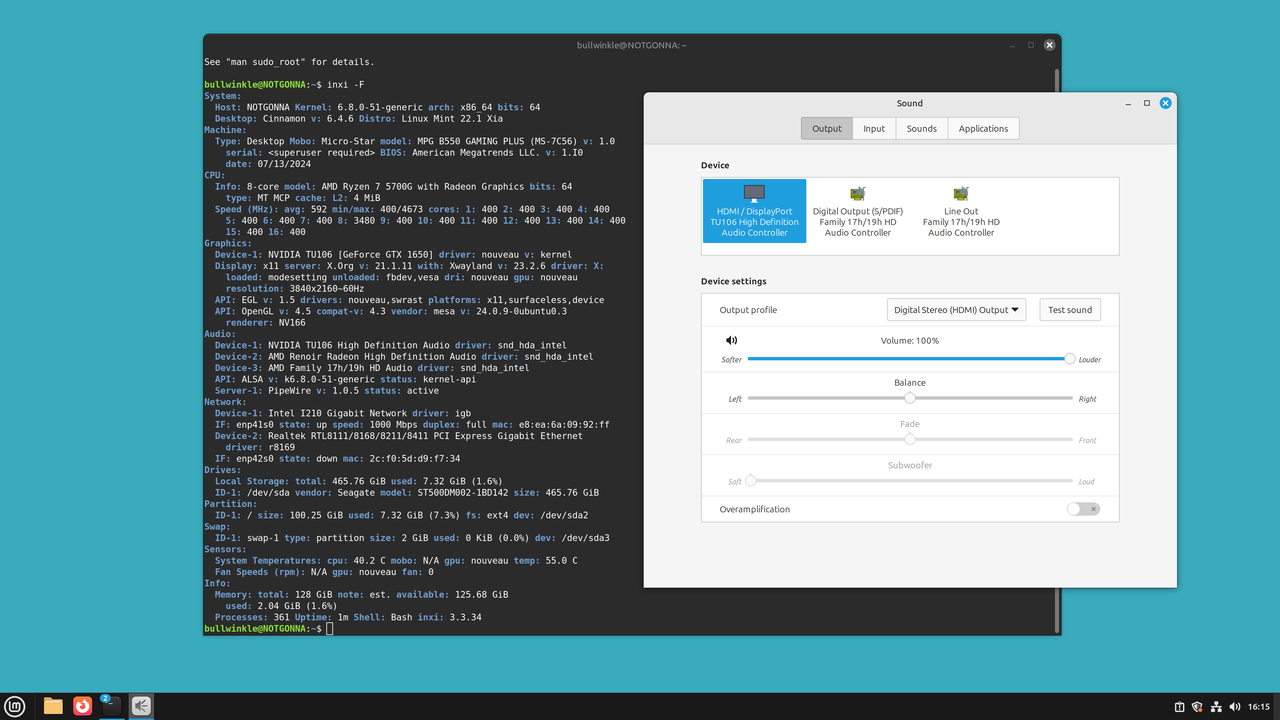
Does your NVidia HDAudio block, show that it is
driven by the Intel item shown in my picture ("snd_hda_intel") ?
yes
I'm guessing, in the audio panel for selecting an output,
you don't have the HDMI entry (on my picture, that's the
button on the left in the Sound control panel).
yes I didn't have it. But wonders will never cease. I fired up the PC tonight and switched the driver back to the Nouveau driver, rebooted,
and I have sound. However that was the driver in use after the upgrade
when the sound didn't work, so I'm guessing that the upgrade affected
that driver somehow. But that wouldn't explain why the Nvidia drivers
didn't produce sound? I checked inxi and the audio entries are
identical for when there was no sound and now that˙ there is.
˙˙˙˙˙ [Picture]
˙˙˙˙˙ https://i.postimg.cc/3xbJ7gyz/LM221-soundworks-HDMI.png
The OS was a fresh install. I tried to update an older disk
with Mint on it, but the upgrade did not proceed, so I had
to blow it away, and just install LM221 in the partition instead.
But Clems little toy script was a bit too brittle to waste
more hours on it. I've had some other Upgrades that went well.
˙˙˙ Paul
| Sysop: | Jacob Catayoc |
|---|---|
| Location: | Pasay City, Metro Manila, Philippines |
| Users: | 5 |
| Nodes: | 4 (0 / 4) |
| Uptime: | 22:28:16 |
| Calls: | 117 |
| Calls today: | 117 |
| Files: | 367 |
| D/L today: |
560 files (257M bytes) |
| Messages: | 70,898 |
| Posted today: | 26 |