In aus.computers Axel <none@not.here> wrote:
Computer Nerd Kev wrote:C'mon you just said: "today I tried an old 320 Gb NTFS HD in the
In aus.computers Axel <none@not.here> wrote:not specifically, but the drive is new, and the problem was present with
So the sad tale thus far. But first, some detail. This PC (specs below) >>>> has LM 22.2 installed on a 1Tb NVME. It also has two mobile racks forconnecting the "files disk" without using the rack, in case the
easy insertion and removal of HD's. The lower rack I use for the
Timeshift disk, and the upper one for the files disk, a WD 1Tb
mechanical disk formatted in Ext4. It also has two external USB cases
for additional hard drives. Following a process of trial and error, I've >>>> discovered that the problem of file errors only occurs when I write to >>>> the files disk in the mobile rack. I can read/write both ways NVME to
USB without errors, and read/write both ways USB to USB without errors. >>> Does any of that mean you tried the most obvious thing of
drive is faulty?
any drive in that bay
rack, and I could write to it without limitation". Which of you do
I believe?
Unfortunately your story changes all the time...no, unfortunatelyI can also read from the files disk to write to either USB withoutSounds like you've just narrowed the issue down to the "files disk"
errors. So my trouble shooting has been focused on the mobile rack. I >>>> replaced it, and also the cable, and swapped the cable to another
motherboard (MB) SATA port. Since USB transfers work, and the USB boxes >>>> have their own power supply, I thought maybe it was a power issue within >>>> the PC. According to the newegg calculator
[https://promotions.newegg.com/tools/power-supply-calculator/v2/ ] I
need 600 -700 watts for this PC. The PS was only 550 watts so I swapped >>>> it out with a 750 watt PS. Having said all this, I can write to the
Files disk if I transfer folders/files in small lots of up to about
10Gb, and today I tried an old 320 Gb NTFS HD in the rack, and I could >>>> write to it without limitation. ???
itself.
Computer Nerd Kev wrote:
In aus.computers Axel <none@not.here> wrote:
Computer Nerd Kev wrote:C'mon you just said: "today I tried an old 320 Gb NTFS HD in the
In aus.computers Axel <none@not.here> wrote:not specifically, but the drive is new, and the problem was present
So the sad tale thus far. But first, some detail. This PC (specsDoes any of that mean you tried the most obvious thing of
below)
has LM 22.2 installed on a 1Tb NVME. It also has two mobile racks for >>>>> easy insertion and removal of HD's. The lower rack I use for the
Timeshift disk, and the upper one for the files disk, a WD 1Tb
mechanical disk formatted in Ext4. It also has two external USB cases >>>>> for additional hard drives. Following a process of trial and
error, I've
discovered that the problem of file errors only occurs when I
write to
the files disk in the mobile rack. I can read/write both ways NVME to >>>>> USB without errors, and read/write both ways USB to USB without
errors.
connecting the "files disk" without using the rack, in case the
drive is faulty?
with
any drive in that bay
rack, and I could write to it without limitation". Which of you do
I believe?
Unfortunately your story changes all the time...no, unfortunatelyI can also read from the files disk to write to either USB withoutSounds like you've just narrowed the issue down to the "files disk"
errors. So my trouble shooting has been focused on the mobile
rack.ÿ I
replaced it, and also the cable, and swapped the cable to another
motherboard (MB) SATA port. Since USB transfers work, and the USB
boxes
have their own power supply, I thought maybe it was a power issue
within
the PC. According to the newegg calculator
[https://promotions.newegg.com/tools/power-supply-calculator/v2/ ] I >>>>> need 600 -700 watts for this PC. The PS was only 550 watts so I
swapped
it out with a 750 watt PS. Having said all this, I can write to the
Files disk if I transfer folders/files in small lots of up to about
10Gb, and today I tried an old 320 Gb NTFS HD in the rack, and I
could
write to it without limitation. ???
itself.
no it doesn't. read the whole thread if you want the full story
Axel wrote:
Computer Nerd Kev wrote:
In aus.computers Axel <none@not.here> wrote:
Computer Nerd Kev wrote:C'mon you just said: "today I tried an old 320 Gb NTFS HD in the
In aus.computers Axel <none@not.here> wrote:not specifically, but the drive is new, and the problem was present
So the sad tale thus far. But first, some detail. This PC (specsDoes any of that mean you tried the most obvious thing of
below)
has LM 22.2 installed on a 1Tb NVME. It also has two mobile racks for >>>>>> easy insertion and removal of HD's. The lower rack I use for the
Timeshift disk, and the upper one for the files disk, a WD 1Tb
mechanical disk formatted in Ext4. It also has two external USB cases >>>>>> for additional hard drives. Following a process of trial and
error, I've
discovered that the problem of file errors only occurs when I
write to
the files disk in the mobile rack. I can read/write both ways NVME to >>>>>> USB without errors, and read/write both ways USB to USB without
errors.
connecting the "files disk" without using the rack, in case the
drive is faulty?
with
any drive in that bay
rack, and I could write to it without limitation". Which of you do
I believe?
Unfortunately your story changes all the time...no, unfortunatelyI can also read from the files disk to write to either USB without >>>>>> errors. So my trouble shooting has been focused on the mobileSounds like you've just narrowed the issue down to the "files disk"
rack. I
replaced it, and also the cable, and swapped the cable to another
motherboard (MB) SATA port. Since USB transfers work, and the USB >>>>>> boxes
have their own power supply, I thought maybe it was a power issue >>>>>> within
the PC. According to the newegg calculator
[https://promotions.newegg.com/tools/power-supply-calculator/v2/ ] I >>>>>> need 600 -700 watts for this PC. The PS was only 550 watts so I
swapped
it out with a 750 watt PS. Having said all this, I can write to the >>>>>> Files disk if I transfer folders/files in small lots of up to about >>>>>> 10Gb, and today I tried an old 320 Gb NTFS HD in the rack, and I
could
write to it without limitation. ???
itself.
no it doesn't. read the whole thread if you want the full story
or in a nutshell.. the question now is why did it write to that drive
and not others? is the size of the drive or it's software/technology relevant?
In aus.computers Axel <none@not.here> wrote:
or in a nutshell.. the question now is why did it write to that drive
and not others? is the size of the drive or it's software/technology
relevant?
Maybe that drive (or the NTFS driver) is just too slow for whatever
signal issue you have with the rack to be triggered.
I'm not sure if they still do it on new HDDs, but maybe there's a
jumper setting on the other drives to limit the speed? https://en.wikipedia.org/wiki/SATA#SATA_1.5_Gbit/s_and_SATA_3_Gbit/s
Paul wrote:
On Tue, 12/23/2025 12:58 PM, Axel wrote:
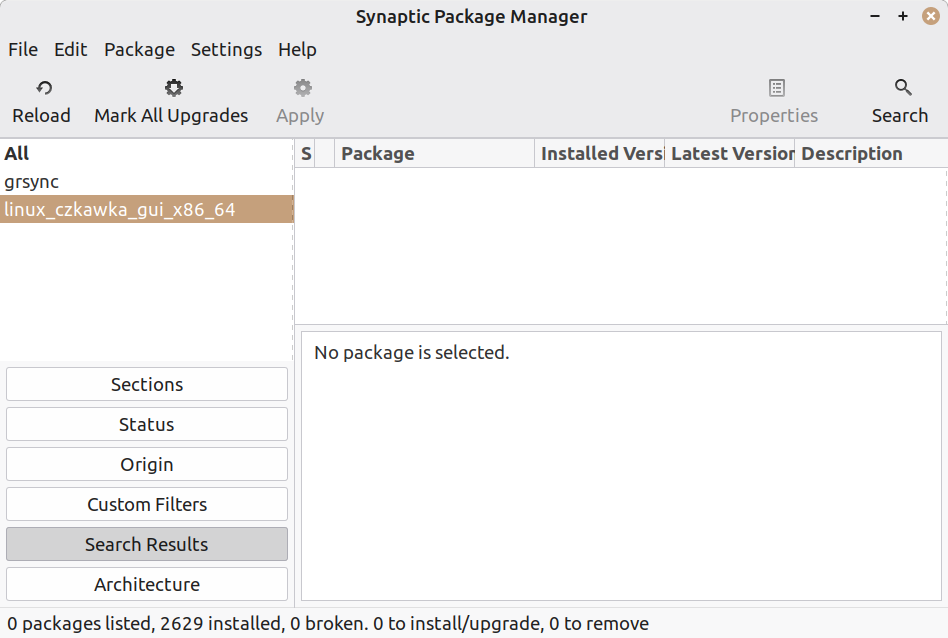
when I do that there's nothing in the right hand pane for grsyncIn your picture, you've just done a search on
https://auslink.info/linux/synaptic.png
grsync is in the menu and loads from the terminal
I appreciate it very much
ÿÿÿÿ linux_czkawka_gui_x86_64
and since that is not a .deb and is a portable ELF
(not packaged properly but still usable), you don't
expect to find it.
In your picture, if you'd cursored up or used the mouse
to select the "grsync" on the left, you would get to review
the search result for that on the right. And, it would be there.
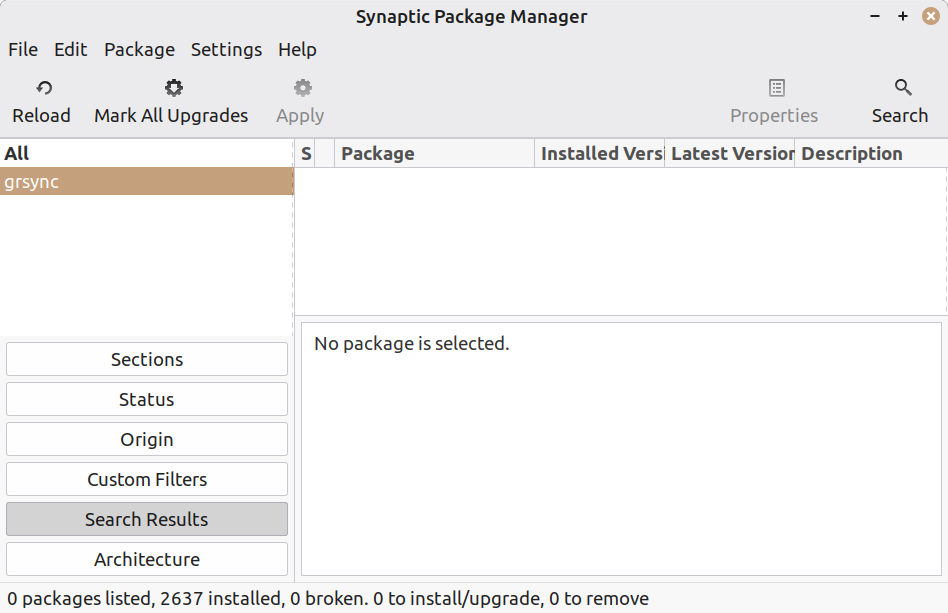
I had tried firstly with grsync, as per your example. the result was the same, nothing on the right side. my mistake by not highlighting grsync for the screenshot.
https://auslink.info/linux/grsync.png
This is LMDE7.
ÿÿÿ [Picture]ÿÿ LMDE7-grsync-synaptic.gif
ÿÿÿÿ https://imgur.com/a/96wnrhS
I can see the state of the package in the example, and it is
not installed right now.
But, the package is available.
ÿÿÿ Paul
On Wed, 12/24/2025 1:41 AM, Computer Nerd Kev wrote:
In aus.computers Axel <none@not.here> wrote:
or in a nutshell.. the question now is why did it write to that drive
and not others? is the size of the drive or it's software/technology
relevant?
Maybe that drive (or the NTFS driver) is just too slow for whatever
signal issue you have with the rack to be triggered.
I'm not sure if they still do it on new HDDs, but maybe there's a
jumper setting on the other drives to limit the speed?
https://en.wikipedia.org/wiki/SATA#SATA_1.5_Gbit/s_and_SATA_3_Gbit/s
No guarantees, but maybe an
lsusb
and check the detection on the rack, would give
some idea of the controller being used.
In aus.computers Paul <nospam@needed.invalid> wrote:
On Wed, 12/24/2025 1:41 AM, Computer Nerd Kev wrote:
In aus.computers Axel <none@not.here> wrote:
or in a nutshell.. the question now is why did it write to that drive >>>> and not others? is the size of the drive or it's software/technology
relevant?
Maybe that drive (or the NTFS driver) is just too slow for whatever
signal issue you have with the rack to be triggered.
I'm not sure if they still do it on new HDDs, but maybe there's a
jumper setting on the other drives to limit the speed?
https://en.wikipedia.org/wiki/SATA#SATA_1.5_Gbit/s_and_SATA_3_Gbit/s
No guarantees, but maybe an
lsusb
and check the detection on the rack, would give
some idea of the controller being used.
He said "swapped the cable to another motherboard (MB) SATA port"
so that must mean the rack uses SATA connection/s to the
motherboard, not USB. In that case "lsusb" won't show it. If the
rack is poorly designed or an old model then maybe it introduces
too much signal noise for operating at higer data speeds. Or maybe
there's a bad connection, but he also said he replaced the rack.
Paul wrote:
On Tue, 12/23/2025 12:58 PM, Axel wrote:
when I do that there's nothing in the right hand pane for grsyncIn your picture, you've just done a search on
https://auslink.info/linux/synaptic.png
grsync is in the menu and loads from the terminal
I appreciate it very much
ÿÿÿÿ linux_czkawka_gui_x86_64
and since that is not a .deb and is a portable ELF
(not packaged properly but still usable), you don't
expect to find it.
In your picture, if you'd cursored up or used the mouse
to select the "grsync" on the left, you would get to review
the search result for that on the right. And, it would be there.
I had tried firstly with grsync, as per your example. the result was
the same, nothing on the right side. my mistake by not highlighting
grsync for the screenshot.
https://auslink.info/linux/grsync.png
This is LMDE7.
ÿÿÿ [Picture]ÿÿ LMDE7-grsync-synaptic.gif
ÿÿÿÿ https://imgur.com/a/96wnrhS
I can see the state of the package in the example, and it is
not installed right now.
But, the package is available.
ÿÿÿ Paul
On Wed, 12/24/2025 1:41 AM, Computer Nerd Kev wrote:
In aus.computers Axel <none@not.here> wrote:No guarantees, but maybe an
or in a nutshell.. the question now is why did it write to that driveMaybe that drive (or the NTFS driver) is just too slow for whatever
and not others? is the size of the drive or it's software/technology
relevant?
signal issue you have with the rack to be triggered.
I'm not sure if they still do it on new HDDs, but maybe there's a
jumper setting on the other drives to limit the speed?
https://en.wikipedia.org/wiki/SATA#SATA_1.5_Gbit/s_and_SATA_3_Gbit/s
lsusb
and check the detection on the rack, would give
some idea of the controller being used.
That would make it easier to quantify what the rack contains.
$ lsusb
Bus 002 Device 004: ID 045e:076c Microsoft Corp. Comfort Mouse 4500
...
Bus 006 Device 002: ID 174c:1053 ASMedia Technology Inc. USB3.0 Device
bullwinkle@Legacy:~$ sudo dmesg
[ 1.681416] scsi host8: uas
[ 1.681686] usbcore: registered new interface driver uas
[ 1.682244] scsi 8:0:0:0: Direct-Access ASMT 2105 0 PQ: 0 ANSI: 6
[ 1.683985] sd 8:0:0:0: [sdb] 15628053168 512-byte logical blocks: (8.00 TB/7.28 TiB)
[ 1.684041] sd 8:0:0:0: [sdb] 4096-byte physical blocks
[ 1.684193] sd 8:0:0:0: [sdb] Write Protect is off
[ 1.684237] sd 8:0:0:0: [sdb] Mode Sense: 43 00 00 00
[ 1.684384] sd 8:0:0:0: [sdb] Write cache: enabled, read cache: enabled, doesn't support DPO or FUA
[ 1.725872] sr 2:0:0:0: [sr0] scsi3-mmc drive: 48x/48x writer dvd-ram cd/rw xa/form2 cdda tray
[ 1.725929] cdrom: Uniform CD-ROM driver Revision: 3.20
[ 1.730920] sd 8:0:0:0: [sdb] Preferred minimum I/O size 4096 bytes
[ 1.730995] sd 8:0:0:0: [sdb] Optimal transfer size 33553920 bytes not a multiple of preferred minimum block size (4096 bytes)
[ 1.777719] sdb: sdb1 sdb2 sdb3 sdb4 sdb5
[ 1.778021] sd 8:0:0:0: [sdb] Attached SCSI disk
*******
The 174c:1053 gives:
ASMedia Technology ASM1053 SATA 3Gb/s bridge
and it is detecting some 8TB drive.
Paul
On Tue, 12/23/2025 9:13 PM, Axel wrote:
Paul wrote:I set my search to "Description and Name".
On Tue, 12/23/2025 12:58 PM, Axel wrote:I had tried firstly with grsync, as per your example. the result was the same, nothing on the right side. my mistake by not highlighting grsync for the screenshot.
when I do that there's nothing in the right hand pane for grsyncIn your picture, you've just done a search on
https://auslink.info/linux/synaptic.png
grsync is in the menu and loads from the terminal
I appreciate it very much
ÿÿÿÿ linux_czkawka_gui_x86_64
and since that is not a .deb and is a portable ELF
(not packaged properly but still usable), you don't
expect to find it.
In your picture, if you'd cursored up or used the mouse
to select the "grsync" on the left, you would get to review
the search result for that on the right. And, it would be there.
https://auslink.info/linux/grsync.png
This is LMDE7.
ÿÿÿ [Picture]ÿÿ LMDE7-grsync-synaptic.gif
ÿÿÿÿ https://imgur.com/a/96wnrhS
I can see the state of the package in the example, and it is
not installed right now.
But, the package is available.
ÿÿÿ Paul
*******
You can also do it from command line.
It does not require sudo.
apt search grsync
It would normally be followed by
sudo apt install grsync
Paul
In aus.computers Paul <nospam@needed.invalid> wrote:
On Wed, 12/24/2025 1:41 AM, Computer Nerd Kev wrote:He said "swapped the cable to another motherboard (MB) SATA port"
In aus.computers Axel <none@not.here> wrote:No guarantees, but maybe an
or in a nutshell.. the question now is why did it write to that driveMaybe that drive (or the NTFS driver) is just too slow for whatever
and not others? is the size of the drive or it's software/technology
relevant?
signal issue you have with the rack to be triggered.
I'm not sure if they still do it on new HDDs, but maybe there's a
jumper setting on the other drives to limit the speed?
https://en.wikipedia.org/wiki/SATA#SATA_1.5_Gbit/s_and_SATA_3_Gbit/s
lsusb
and check the detection on the rack, would give
some idea of the controller being used.
so that must mean the rack uses SATA connection/s to the
motherboard, not USB. In that case "lsusb" won't show it. If the
rack is poorly designed or an old model then maybe it introduces
too much signal noise for operating at higer data speeds. Or maybe
there's a bad connection, but he also said he replaced the rack.
Axel wrote:
Paul wrote:
On Tue, 12/23/2025 12:58 PM, Axel wrote:
when I do that there's nothing in the right hand pane for grsyncIn your picture, you've just done a search on
https://auslink.info/linux/synaptic.png
grsync is in the menu and loads from the terminal
I appreciate it very much
ÿÿÿÿ linux_czkawka_gui_x86_64
and since that is not a .deb and is a portable ELF
(not packaged properly but still usable), you don't
expect to find it.
In your picture, if you'd cursored up or used the mouse
to select the "grsync" on the left, you would get to review
the search result for that on the right. And, it would be there.
I had tried firstly with grsync, as per your example. the result was the same, nothing on the right side. my mistake by not highlighting grsync for the screenshot.
https://auslink.info/linux/grsync.png
why does no package show?
Paul wrote:
On Tue, 12/23/2025 9:13 PM, Axel wrote:
Paul wrote:I set my search to "Description and Name".
On Tue, 12/23/2025 12:58 PM, Axel wrote:I had tried firstly with grsync, as per your example. the result was the same, nothing on the right side. my mistake by not highlighting grsync for the screenshot.
when I do that there's nothing in the right hand pane for grsyncIn your picture, you've just done a search on
https://auslink.info/linux/synaptic.png
grsync is in the menu and loads from the terminal
I appreciate it very much
ÿÿÿÿÿ linux_czkawka_gui_x86_64
and since that is not a .deb and is a portable ELF
(not packaged properly but still usable), you don't
expect to find it.
In your picture, if you'd cursored up or used the mouse
to select the "grsync" on the left, you would get to review
the search result for that on the right. And, it would be there.
https://auslink.info/linux/grsync.png
This is LMDE7.
ÿÿÿÿ [Picture]ÿÿ LMDE7-grsync-synaptic.gif
ÿÿÿÿÿ https://imgur.com/a/96wnrhS
I can see the state of the package in the example, and it is
not installed right now.
But, the package is available.
ÿÿÿÿ Paul
*******
yes, that put it in the package side :)
You can also do it from command line.
It does not require sudo.
ÿÿÿ apt search grsync
It would normally be followed by
ÿÿÿ sudo apt install grsync
peter@ASUS:~$ apt search linux_czkawka_gui_x86_64
peter@ASUS:~$ sudo apt install linux_czkawka_gui_x86_64
[sudo] password for peter:
Reading package lists... Done
Building dependency tree... Done
Reading state information... Done
E: Unable to locate package linux_czkawka_gui_x86_64
peter@ASUS:~$
???
and searching "description and name" doesn't show anything on the package side in Synaptic
| Sysop: | Jacob Catayoc |
|---|---|
| Location: | Pasay City, Metro Manila, Philippines |
| Users: | 5 |
| Nodes: | 4 (0 / 4) |
| Uptime: | 498677:12:36 |
| Calls: | 212 |
| Calls today: | 3 |
| Files: | 910 |
| D/L today: |
31 files (22,593K bytes) |
| Messages: | 69,826 |