i don't why...but i feel windows 11 start quickly !
can we say when windows 11 is off, is really off or they are
a tip, it stay sleeping not really sleep !!!
i'm very happy with the laptop's webcam ! is not 1080p...but
i have a very very large image with windows !?" may be a...
panoramique software result ???
i don't why...but i feel windows 11 start quickly !
On Fri, 19 Jun 2026 17:45:08 +0200, german newsgroups wrote:
i don't why...but i feel windows 11 start quickly !
From power-on (or hard reset) to a logged-in desktop ... how long?
(Linux vs Windows)
On Fri, 6/19/2026 11:45 AM, german newsgroups wrote:
i don't why...but i feel windows 11 start quickly !
can we say when windows 11 is off, is really off or they are
a tip, it stay sleeping not really sleep !!!
i'm very happy with the laptop's webcam ! is not 1080p...but
i have a very very large image with windows !?" may be a...
panoramique software result ???
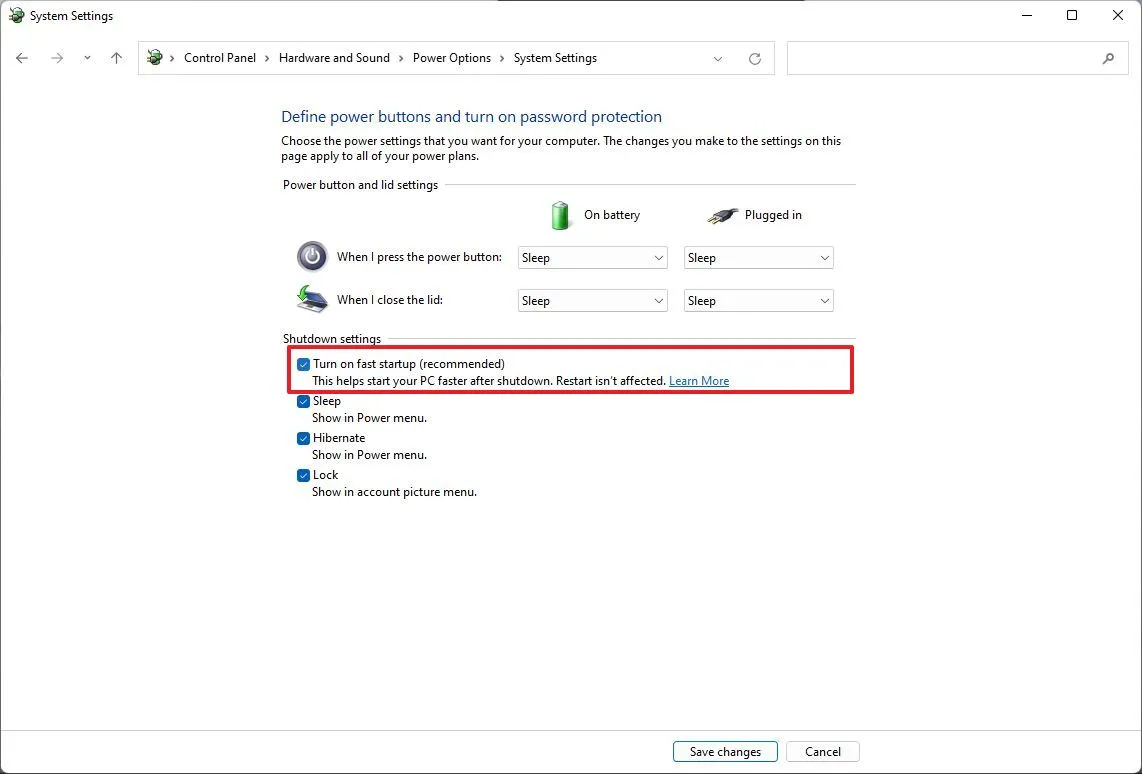
That's fast startup with a hibernated Windows kernel and drivers.
That can interfere with dual booting.
https://www.windowscentral.com/software-apps/windows-11/how-to-enable-or-disable-fast-startup-on-windows-11
https://cdn.mos.cms.futurecdn.net/8hmY5djtsvVnXEFsVQ5gpF-1142-80.jpg.webp # control panel, with button
Paul
On Fri, 19 Jun 2026 17:45:08 +0200, german newsgroups wrote:
i don't why...but i feel windows 11 start quickly !
From power-on (or hard reset) to a logged-in desktop ... how long?
(Linux vs Windows)
Lawrence D?Oliveiro wrote:
On Fri, 19 Jun 2026 17:45:08 +0200, german newsgroups wrote:
i don't why...but i feel windows 11 start quickly !
ÿFrom power-on (or hard reset) to a logged-in desktop ... how long?
(Linux vs Windows)
My personal situation, from pushing the ON button to being completely
logged into the session:
- Linux Mint (on an old Dell Optiplex 5070): 56 seconds (minus a few
secs for typing in my password). Fully ready and usable after that.
- Windows 11 Enterprise (on a brand new HP laptop): About two minutes "Please wait..." before login screen appears(*), 30 more seconds after
that before desktop appears, then 30 or more seconds before icons
appear. Add three or more minutes to this when there are "updates
underway - Please keep your computer on". Even shutting the thing down
can take up to two minutes.
(*) Sometimes there's an overlay on the login screen that can last up
to one minute before it disappears and the actual login fields appear.
Windows is for work only, so it's not that important. I can't imagine
having to deal with this on my personal pc however.
My personal situation, from pushing the ON button to being completely
logged into the session:
- Linux Mint (on an old Dell Optiplex 5070): 56 seconds (minus a few
secs for typing in my password). Fully ready and usable after that.
...
- Windows 11 Enterprise (on a brand new HP laptop): About two minutes
LM almost instant off every time. always consistent.
On Fri, 19 Jun 2026 17:45:08 +0200, german newsgroups wrote:
i don't why...but i feel windows 11 start quickly !
From power-on (or hard reset) to a logged-in desktop ... how long?
(Linux vs Windows)
Monsieur wrote:
Lawrence D?Oliveiro wrote:
On Fri, 19 Jun 2026 17:45:08 +0200, german newsgroups wrote:
i don't why...but i feel windows 11 start quickly !
ÿFrom power-on (or hard reset) to a logged-in desktop ... how long?
(Linux vs Windows)
My personal situation, from pushing the ON button to being completely logged into the session:
- Linux Mint (on an old Dell Optiplex 5070): 56 seconds (minus a few secs for typing in my password). Fully ready and usable after that.
my LM 22.3, auto login, 32 seconds from turn on to desktop fully functional
- Windows 11 Enterprise (on a brand new HP laptop): About two minutes "Please wait..." before login screen appears(*), 30 more seconds after that before desktop appears, then 30 or more seconds before icons appear. Add three or more minutes to this when there are "updates underway - Please keep your computer on". Even shutting the thing down can take up to two minutes.
I used to hate that with windows (among other thing). press the off button and then sit there waiting and wondering how long will it take this time to shut down. LM almost instant off every time. always consistent.
(*) Sometimes there's an overlay on the login screen that can last up to one minute before it disappears and the actual login fields appear.
Windows is for work only, so it's not that important. I can't imagine having to deal with this on my personal pc however.
On Fri, 6/19/2026 10:47 PM, Lawrence D?Oliveiro wrote:
On Fri, 19 Jun 2026 17:45:08 +0200, german newsgroups wrote:
i don't why...but i feel windows 11 start quickly !
From power-on (or hard reset) to a logged-in desktop ... how long?
(Linux vs Windows)
This is a game-able benchmark, as benchmarks go.
I can probably pick a set of conditions to make
either platform look bad.
For this, I used the fastest box I've got (16C 32T), an NVMe,
and cloned over some OSes onto the NVMe (in case you think
this is easy, it was not easy, it took hours). the NVMe is to
take laggard storage out of the picture. Windows loses
the boat race pretty well instantly, if it has to use
slow storage like a HDD. I don't even need to test that.
The Windows Defender scan then slows things down (all those seeks).
Here are some results:
Linux Mint Cinnamon NVidia 535 DKMS 11 seconds
Win11 Pro 25H2 (no Fast Start) 11 seconds [powercfg /h off, removes hiberfile, no fast start]
Those two, were set up to blow through the password prompt,
so neither OS requires typing the password. When the desktop
appears, the stopwatch stops.
If you run Windows 11 on a 4th gen machine, Windows loses
again, as the missing MBEC support, sucks the life out of performance.
Win10 22H2 was also tested, and because it blocks waiting
for the password, the number is only approximate and
it could be around 10 to 11 seconds. There used to be a
tick box on netplwiz to remove the password prompt, but the tick box was removed some time ago.
Summary: A shocker, but they're the same. 11 seconds.
Fast start might shave a bit off the Windows time, but then
it would be a test of Hibernation behaviors in both camps. And
at that point, the time is really too short to care.
Tomshardware claimed years ago, they had achieved 5 seconds on Windows tests,
but that might have been Fast Start.
Paul
for w11
powercfg /hibernate off
??
On Sat, 6/20/2026 11:38 AM, german newsgroups wrote:
for w11
powercfg /hibernate off
??
You can shorten the command to
powercfg /h off
That disables both hibernation and fast start, using only one command.
It is faster than finding that GUI dialog.
I don't typically use hibernate.
And Fast Start is just a bad idea, when dual booting is the objective.
Any hibernation operation can interfere with dual booting.
So I turn them all off at once.
Paul
Le 20/06/2026 … 04:47, Lawrence D?Oliveiro a ‚critÿ:
On Fri, 19 Jun 2026 17:45:08 +0200, german newsgroups wrote:
i don't why...but i feel windows 11 start quickly !
From power-on (or hard reset) to a logged-in desktop ... how long?
(Linux vs Windows)
i'm logged in 7" seconde on windows 11 desktop !
Here are some results:
Linux Mint Cinnamon NVidia 535 DKMS 11 seconds
Win11 Pro 25H2 (no Fast Start) 11 seconds [powercfg /h off, removes hiberfile, no fast start]
Those two, were set up to blow through the password prompt, so
neither OS requires typing the password. When the desktop appears,
the stopwatch stops.
OR not.... my lappy (mint 22.2) uses wifi and nfs automounted file
systems. It all too frequently hangs during shutdown waiting for an
unmount job to time out. It can be stuck for a couple of minutes.
(My suspicion is the network shuts down too early; I tend to resort
to 'leaning' on the 'off' button.)
I open the lid on my Linux laptop, and it?s ready to use just a second
or two later.
Why does yours take so long?
I would count to ?when the desktop is responsive to clicks, the
stopwatch stops?.
Le 21/06/2026 … 00:28, Lawrence D?Oliveiro a ‚critÿ:
I open the lid on my Linux laptop, and it?s ready to use just a second
or two later.
Why does yours take so long?
:)
it's not a sleep mode !
On Sat, 20 Jun 2026 10:34:14 -0400, Paul wrote:
Here are some results:
Linux Mint Cinnamon NVidia 535 DKMS 11 seconds
Win11 Pro 25H2 (no Fast Start) 11 seconds [powercfg /h off, removes hiberfile, no fast start]
Those two, were set up to blow through the password prompt, so
neither OS requires typing the password. When the desktop appears,
the stopwatch stops.
I would count to ?when the desktop is responsive to clicks, the
stopwatch stops?.
Pretending to test for click responses, is not a very precise
analysis method.
On 20/06/2026 07:58, Axel wrote:
LM almost instant off every time. always consistent.
OR not.... myÿ lappy (mint 22.2) uses wifi and nfs automounted file
systems. It all too frequently hangs during shutdown waiting for an
unmount job to time out. It can be stuck for a couple of minutes. (My suspicion is the network shuts down too early; I tend to resort to
'leaning' on the 'off' button.)
On Sun, 21 Jun 2026 06:54:47 -0400, Paul wrote:
Pretending to test for click responses, is not a very precise
analysis method.
It proves that the desktop is not only visible, but actually working.
On Sun, 6/21/2026 6:05 PM, Lawrence D?Oliveiro wrote:
On Sun, 21 Jun 2026 06:54:47 -0400, Paul wrote:
Pretending to test for click responses, is not a very precise
analysis method.
It proves that the desktop is not only visible, but actually
working.
On a slow Windows machine, the taskbar is the last thing to paint.
On Sun, 6/21/2026 6:05 PM, Lawrence D?Oliveiro wrote:
On Sun, 21 Jun 2026 06:54:47 -0400, Paul wrote:On a slow Windows machine, the taskbar is the last thing to paint.
Pretending to test for click responses, is not a very preciseIt proves that the desktop is not only visible, but actually working.
analysis method.
On a fast Windows machine, they all appear at the same time
(desktop background, taskbar and its icons).
So if we were testing older machines, I would be waiting
for the Taskbar to show up. At least they can make that
now, so the Taskbar all appears when it is ready to make an appearance.
Some of those icons on the taskbar are just pinned, and
it's a matter of looking up their icon and plunking it down.
For example, I have one Snippingtool icon (which is a blank)
and if you click it, nothing happens. This was left behind
by some sort of failed uninstall thing :-)
Paul
Paul wrote:
On Sun, 6/21/2026 6:05 PM, Lawrence D?Oliveiro wrote:
On Sun, 21 Jun 2026 06:54:47 -0400, Paul wrote:On a slow Windows machine, the taskbar is the last thing to paint.
Pretending to test for click responses, is not a very preciseIt proves that the desktop is not only visible, but actually working.
analysis method.
On a fast Windows machine, they all appear at the same time
(desktop background, taskbar and its icons).
So if we were testing older machines, I would be waiting
for the Taskbar to show up. At least they can make that
now, so the Taskbar all appears when it is ready to make an appearance.
Some of those icons on the taskbar are just pinned, and
it's a matter of looking up their icon and plunking it down.
For example, I have one Snippingtool icon (which is a blank)
and if you click it, nothing happens. This was left behind
by some sort of failed uninstall thing :-)
this software is good at cleaning up windows .. https://www.iobit.com/ They have free and paid versions
I am good at cleaning up Windows too, and I work for nothing.
On Mon, 22 Jun 2026 09:39:19 -0400, Paul wrote:
I am good at cleaning up Windows too, and I work for nothing.
Windows does need a lot of cleaning up, doesn?t it. Yet nobody wants
to pay for that.
On Mon, 6/22/2026 6:31 PM, Lawrence D?Oliveiro wrote:
On Mon, 22 Jun 2026 09:39:19 -0400, Paul wrote:
I am good at cleaning up Windows too, and I work for nothing.
Windows does need a lot of cleaning up, doesn?t it. Yet nobody
wants to pay for that.
Point of fact, anything which is a "rolling release" needs cleaning
up.
It doesn't matter what the ecosystem is, if your aim is to make
everything be unstable, guess what Timmy, it will be unstable.
On Tue, 23 Jun 2026 00:25:52 -0400, Paul wrote:
On Mon, 6/22/2026 6:31 PM, Lawrence D?Oliveiro wrote:
On Mon, 22 Jun 2026 09:39:19 -0400, Paul wrote:
I am good at cleaning up Windows too, and I work for nothing.
Windows does need a lot of cleaning up, doesn?t it. Yet nobody
wants to pay for that.
Point of fact, anything which is a "rolling release" needs cleaning
up.
It doesn't matter what the ecosystem is, if your aim is to make
everything be unstable, guess what Timmy, it will be unstable.
I run Debian Unstable, because I like being on the bleeding edge. I
run it on my main machine, on my backup machine, and on my laptop. All
with regular dist-upgrade runs.
Guess how much ?cleaning up? I?ve had to do across all those systems
in the past year?
None. Even in an ?unstable? state, Debian still maintains enough
system integrity to manage its usual level of consistency and lack of leftover clutter.
Windows is supposed to be a stable, production system. You?re saying
it has to be excused its foibles, because it is unstable. That?s a
stupid excuse, because it?s *not* supposed to be unstable, and its
users are *not* choosing to run an unstable system.
I've run vanilla Debian too pal, and it's not a picnic.
On an average day, I can waste 8 hours fixing stuff.
On Tue, 23 Jun 2026 04:14:36 -0400, Paul wrote:
I've run vanilla Debian too pal, and it's not a picnic.
On an average day, I can waste 8 hours fixing stuff.
Some people might be disaster-prone without realizing it ...
On Tue, 6/23/2026 4:28 AM, Lawrence D?Oliveiro wrote:
It seems the thing had two Windows Boot Manager entries, and it was alternating between them. If you select the "old" Boot Manager
On Tue, 23 Jun 2026 04:14:36 -0400, Paul wrote:
I've run vanilla Debian too pal, and it's not a picnic.
On an average day, I can waste 8 hours fixing stuff.
Some people might be disaster-prone without realizing it ...
entry, the kernel on Windows tips over.
The AI tells me "this is normal", in other words, it happens
frequently enough for the AI to recognize the pattern. Yet the AI
recipe for fixing it, is far from convincing.
On Tue, 23 Jun 2026 07:14:36 -0400, Paul wrote:
On Tue, 6/23/2026 4:28 AM, Lawrence D?Oliveiro wrote:
It seems the thing had two Windows Boot Manager entries, and it was
On Tue, 23 Jun 2026 04:14:36 -0400, Paul wrote:
I've run vanilla Debian too pal, and it's not a picnic.
On an average day, I can waste 8 hours fixing stuff.
Some people might be disaster-prone without realizing it ...
alternating between them. If you select the "old" Boot Manager
entry, the kernel on Windows tips over.
So, nothing to do with Debian, then.
The AI tells me "this is normal", in other words, it happens
frequently enough for the AI to recognize the pattern. Yet the AI
recipe for fixing it, is far from convincing.
AI is like a holy book, isn?t it? You believe the parts that you like,
and disregard the parts you don?t like.
The purpose of an AI, is to generate lists of ideas and
proportionalities. Because the AI does not think, the fact it is a text-completion savant means it cannot "think outside the box". If I
were to play back my solution to the AI, it would confidently tell
me it knew this all along.
On Wed, 24 Jun 2026 01:01:22 -0400, Paul wrote:
The purpose of an AI, is to generate lists of ideas and
proportionalities. Because the AI does not think, the fact it is a
text-completion savant means it cannot "think outside the box". If I
were to play back my solution to the AI, it would confidently tell
me it knew this all along.
Regardless of what you think its purpose should be, its effect in
practice is to be a stupidity amplifier.
Lawrence D˜Oliveiro wrote:
On Wed, 24 Jun 2026 01:01:22 -0400, Paul wrote:
The purpose of an AI, is to generate lists of ideas and
proportionalities. Because the AI does not think, the fact it is a
text-completion savant means it cannot "think outside the box". If I
were to play back my solution to the AI, it would confidently tell
me it knew this all along.
Regardless of what you think its purpose should be, its effect in
practice is to be a stupidity amplifier.
Imho that's too hard a judgement. Think of AI as the guy resposible
for a library, knowing every single line of text in it by heart, and
gifted to answer even the stupidest question about the content.
I wonder, who came up with the "intelligence".
Regards,
H.
On Wed, 24 Jun 2026 07:07:34 -0000 (UTC), Lawrence D?Oliveiro wrote:
Regardless of what you think [AI?s] purpose should be, its effect in
practice is to be a stupidity amplifier.
Imho that's too hard a judgement. Think of AI as the guy resposible
for a library, knowing every single line of text in it by heart, and
gifted to answer even the stupidest question about the content.
On Thu, 25 Jun 2026 11:22:44 +0200, Heinz Schmitz wrote:
On Wed, 24 Jun 2026 07:07:34 -0000 (UTC), Lawrence D?Oliveiro wrote:
Regardless of what you think [AI?s] purpose should be, its effect in
practice is to be a stupidity amplifier.
Imho that's too hard a judgement. Think of AI as the guy resposible
for a library, knowing every single line of text in it by heart, and
gifted to answer even the stupidest question about the content.
It?s worse than that. Instead of merely quoting bits of the book back
at you, it makes up entire new passages from putting together text at
random, making them sound so plausible that you believe they are true.
| Sysop: | Jacob Catayoc |
|---|---|
| Location: | Pasay City, Metro Manila, Philippines |
| Users: | 4 |
| Nodes: | 4 (0 / 4) |
| Uptime: | 495145:25:33 |
| Calls: | 165 |
| Files: | 574 |
| D/L today: |
29 files (9,998K bytes) |
| Messages: | 78,198 |