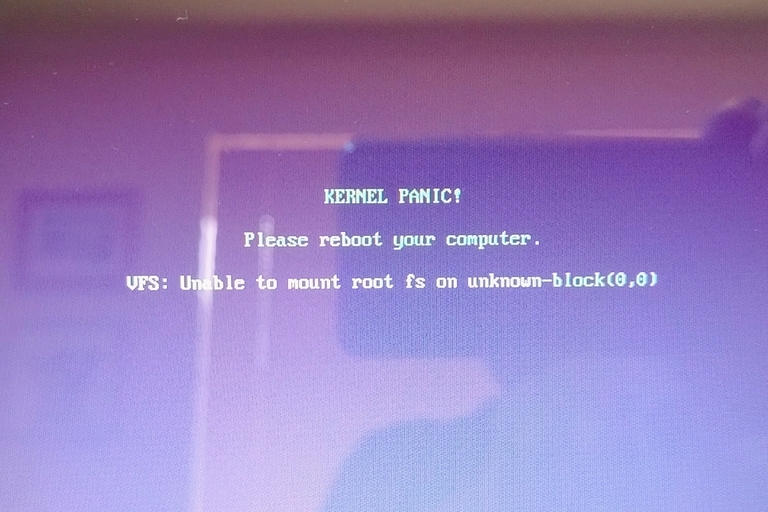
Asked Google, and AI said run "sudo grub-update" and reboot, which I
did. It produced this..ÿ https://auslink.info/linux/panic.jpg
On Wed, 11 Feb 2026 15:52:49 +1100, Axel wrote:
Asked Google, and AI said run "sudo grub-update" and reboot, which IWorth trying to see if SystemRescue can make any sense of it.
did. It produced this..ÿ https://auslink.info/linux/panic.jpg
Always keep a copy handy on a bootable USB stick.
Lawrence D?Oliveiro wrote:
On Wed, 11 Feb 2026 15:52:49 +1100, Axel wrote:
Asked Google, and AI said run "sudo grub-update" and reboot, which IWorth trying to see if SystemRescue can make any sense of it.
did. It produced this..ÿ https://auslink.info/linux/panic.jpg
Always keep a copy handy on a bootable USB stick.
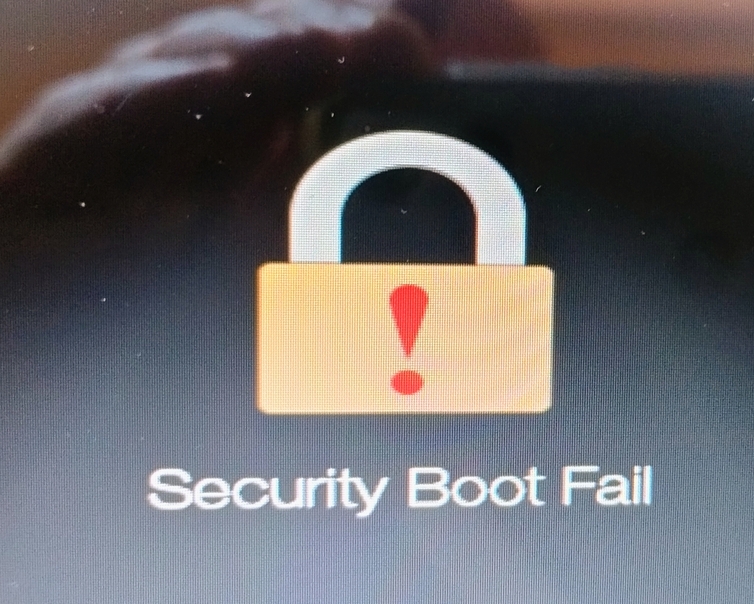
so I downloaded the ISO and burnt it to a DVD on the main PC, and booted the laptop from it, and I get this .. https://auslink.info/linux/security.jpg
On Wed, 2/11/2026 12:31 AM, Axel wrote:
Lawrence D?Oliveiro wrote:AI Overview
On Wed, 11 Feb 2026 15:52:49 +1100, Axel wrote:so I downloaded the ISO and burnt it to a DVD on the main PC, and booted the laptop from it, and I get this .. https://auslink.info/linux/security.jpg
Asked Google, and AI said run "sudo grub-update" and reboot, which IWorth trying to see if SystemRescue can make any sense of it.
did. It produced this..ÿ https://auslink.info/linux/panic.jpg
Always keep a copy handy on a bootable USB stick.
A "Security Boot Fail" or "Secure Boot Violation" error usually occurs when the
system BIOS detects unauthorized changes to the boot loader, often caused by
UEFI updates, new hardware, or booting from an unsigned USB drive. To fix it,
enter the BIOS (usually F2, F12, or Del at startup), disable Secure Boot in
the Boot/Security menu, or set BIOS to UEFI mode.
Note that Ubuntu has screwed around with the UEFI materials in the BIOS.
I noted what looked like some certificates added to my Big Machine by a Ubuntu install attempt. My BIOS offered an opportunity to connect a FAT32
USB stick and "back up" the UEFI metadata, but I had neglected to do this before Ubuntu got in there. I can't say I am too happy about silent changes to the machine... I have still not managed to correct this. I put the BIOS
in some sort of recovery mode and it still didn't clean house.
*******
Assuming you do enough about secure boot settings to allow some media to boot,
you can work on your boot problem of the original disk.
https://askubuntu.com/questions/41930/kernel-panic-not-syncing-vfs-unable-to-mount-root-fs-on-unknown-block0-0
"You are missing the initramfs for that kernel. Choose another kernel from the
GRUB menu under Advanced options for Ubuntu and run
sudo update-initramfs -u -k version
to generate the initrd for version (replace version with the kernel version string
such as
4.15.0-36-generic
) then
sudo update-grub
it does have to do with the rootfs. The kernel can't mount the rootfs because it
isn't configured correctly to do so. Instead it is assumed that the kernel will
use an initramfs to mount the rootfs. In the days before initramfs, you had to
configure the kernel to know a hard coded block number for the rootfs to mount,
and this is the behavior it falls back to when it has no initramfs.
"
*****
"In my situation the problem was that /boot was at 100% capacity, so the last
2 kernel updates had not completed successfully, hence on reboot when GRUB2
selected the latest Kernel, it failed."
At a time like this, starting using the Install Media in a Live Session, gives an opportunity to examine the partitions for fullness. You don't want to be attempting to repair something, without space to do the repair. I'm more
willing to believe this all started with a space problem, than something else.
****************************
https://help.ubuntu.com/community/Boot-Repair
https://sourceforge.net/projects/boot-repair-cd/files/
boot-repair-disk-64bit.iso 2023-12-23 2.6 GB
That's just the equivalent of a Live DVD plus the .ppa with the
Boot Repair package in it. The ISO is convenient for a person with
optical media capability, but you can also use your favorite ISO to USB
stick utility to put that media on USB. I have both that particular
version and a CD sized one (much older, not appropriate). So that
tool is in my kit bag of odds and sods and I have used it, more than
once (when lazy). I know how to chroot, as I was doing that back
in Gentoo days.
Sometimes, Boot Repair can do the thing itself, but just as often,
it will tell you to open a Terminal and issue forth with text
commands. Then, while you stare at those instructions, you think
about whether the syntax looks reasonable, any disk identifiers
are OK and so on.
One of the rules of "boot repair", is ONLY the disk with the OS and
the boot information should be present during the Repair. It does
you no good, if the Boot Repair puts the starting materials
on Disk 4, the OS is on Disk 1, Thursday morning you unplug
Disk 4 and the thing gives another boot error scenario. You need
simple setups, self contained ones, where boot materials are "next to"
the OS. When I give you advice like this, my assumption is that the
boot disk was *already* self contained and in perfect shape. Now
is not the time to be introducing additional curve balls such
as "I broke my boot" and "by the way, I never did this correctly
in the first place". We call that a "double fault"! And that
requires more cleverness and extra shoveling to escape.
From your Live Media, make sure you have enough space before you
start the repair. Make sure. We don't want to turn this into a
clown show, where you ask GOogle and it tells you to reinstall the OS :-)
Paul
I had already started a fresh install before i saw your comprehensive post, thank you. it seemed the best option to avoid a possibly corrupted system. thankfully all is working well now. btw.. this laptop has the most rudimentary BIOS I have ever seen. there are very few settings, and
most cannot be changed. It has UEFI with secure boot, but there's no way to disable SB.
Paul wrote:
On Wed, 2/11/2026 12:31 AM, Axel wrote:[...]
[...]
[...]
[...]
[...]
[...]
I had already started a fresh install before i saw your comprehensive
post, thank you. it seemed the best option to avoid a possibly corrupted system. thankfully all is working well now. btw.. this laptop has the
most rudimentary BIOS I have ever seen. there are very few settings, and most cannot be changed. It has UEFI with secure boot, but there's no way
to disable SB.
On Thu, 2/12/2026 12:08 AM, Axel wrote:
I had already started a fresh install before i saw your comprehensive post,
thank you. it seemed the best option to avoid a possibly corrupted system. thankfully all is working well now. btw.. this laptop has the most rudimentary BIOS I have ever seen. there are very few settings, and
most cannot be changed. It has UEFI with secure boot, but there's no way to disable SB.
This is the era I feared. We were promised what is basically "optionless" machines for the year 2026 or so, removing the ability to turn off Secure Boot
and the ability to do Legacy Boot.
That's going to cause a lot of problems, and your example is just the beginning.
The thing is, if the scheme was "perfect", I can see this transition
making sense. But the scheme is far from perfect, holes galore to fall
in, and why limit the escape hatches on a thing which is a mess ?
There is one less reason to buy a new computer.
Take my 11 year old computer. The kids can't break it. No MOK. No
Secure Boot materials. Ability to boot from Legacy media and UEFI media.
Will be able to run its copies of W10 and W11 past June 2026 (when
one of the keys on the other machine expire). Right now, that's my most defensively designed computer in the room. 11 years old. If a boot
breaks on a Linux there, I can fix it. Whereas a 3 year old machine
that Ubuntu injected two certificates into, I can't get them out!
Even in recovery mode for the materials.
On Thu, 2/12/2026 12:08 AM, Axel wrote:I would bet money you know this but, even efibootmgr won't allow you to remove those boot
I had already started a fresh install before i saw your comprehensive post, >> thank you. it seemed the best option to avoid a possibly corrupted system. >> thankfully all is working well now. btw.. this laptop has the most
rudimentary BIOS I have ever seen. there are very few settings, and
most cannot be changed. It has UEFI with secure boot, but there's no way to disable SB.
This is the era I feared. We were promised what is basically "optionless" machines for the year 2026 or so, removing the ability to turn off Secure Boot
and the ability to do Legacy Boot.
That's going to cause a lot of problems, and your example is just the beginning.
The thing is, if the scheme was "perfect", I can see this transition
making sense. But the scheme is far from perfect, holes galore to fall
in, and why limit the escape hatches on a thing which is a mess ?
There is one less reason to buy a new computer.
Take my 11 year old computer. The kids can't break it. No MOK. No
Secure Boot materials. Ability to boot from Legacy media and UEFI media.
Will be able to run its copies of W10 and W11 past June 2026 (when
one of the keys on the other machine expire). Right now, that's my most defensively designed computer in the room. 11 years old. If a boot
breaks on a Linux there, I can fix it. Whereas a 3 year old machine
that Ubuntu injected two certificates into, I can't get them out!
Even in recovery mode for the materials.
Paul
I would bet money you know this but, even efibootmgr won't allow you to remove those boot names on that one problematic PC?ÿÿ Or is the issue
more that what that command fixes?
| Sysop: | Jacob Catayoc |
|---|---|
| Location: | Pasay City, Metro Manila, Philippines |
| Users: | 5 |
| Nodes: | 4 (0 / 4) |
| Uptime: | 117:51:37 |
| Calls: | 125 |
| Calls today: | 125 |
| Files: | 489 |
| D/L today: |
859 files (365M bytes) |
| Messages: | 76,472 |
| Posted today: | 26 |