It is now available from Microsoft's Official website:So far I have seen NO difference with the upgrade
<https://www.microsoft.com/en-gb/software-download/windows11>
Good Luck and hope you will all start the blame game!
It is now available from Microsoft's Official website:
<https://www.microsoft.com/en-gb/software-download/windows11>
Good Luck and hope you will all start the blame game!
On 30/09/2026 23:07, John Smith wrote:
It is now available from Microsoft's Official website:
<https://www.microsoft.com/en-gb/software-download/windows11>
Good Luck and hope you will all start the blame game!
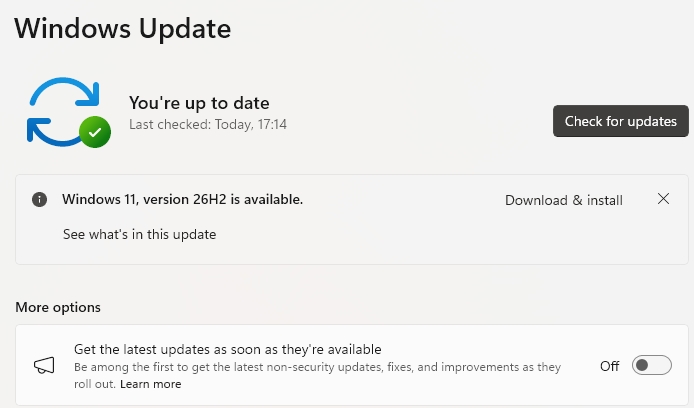
or you could just use the "Download and Install" button in Windows update ?
knuttle wrote:
So far I have seen NO difference with the upgrade
I've always hated that Explorer hides file extensions (notavirushonest.pdf.exe anyone?) the traditional way of using
ÿÿÿÿ[...] > Folder options > View > Hide extensions for known types
is not very discoverable by 'normal' people, there's now
ÿÿÿÿView > Show > Filename extensions
Is this new?
On 09/30/2026 6:07 PM, John Smith wrote:
It is now available from Microsoft's Official website:
<https://www.microsoft.com/en-gb/software-download/windows11>
Good Luck and hope you will all start the blame game!
So far I have seen NO difference with the upgrade
knuttle <keith_nuttle@yahoo.com> wrote:
On 09/30/2026 6:07 PM, John Smith wrote:
It is now available from Microsoft's Official website:
<https://www.microsoft.com/en-gb/software-download/windows11>
Good Luck and hope you will all start the blame game!
So far I have seen NO difference with the upgrade
I assume the information pointed to by the 'See what's in this update'
link [1] is correct and complete.
And no, I will not update/'upgrade' to 26H2 in the forseeable future.
Microsoft broke enough stuff in this (at last) year's 'normal'
(24H2/)25H2 updates, that I'm not going to try yet another excursion
into the unknown any time soon. (For example, I delayed 25H2 for 4
months and then it was force installed.)
[1] 'Inside this update'/'The latest Windows 11 2026 Update...' <https://support.microsoft.com/en-gb/windows/deployment/updates-lifecycle/inside-this-update?OCID=WUSettings#windowsupdate=26100>
On Thu, 10/1/2026 7:09 AM, Frank Slootweg wrote:[...]
[...]And no, I will not update/'upgrade' to 26H2 in the forseeable future.
Microsoft broke enough stuff in this (at last) year's 'normal' (24H2/)25H2 updates, that I'm not going to try yet another excursion
into the unknown any time soon. (For example, I delayed 25H2 for 4
months and then it was force installed.)
You can use GRC incontrol, to attempt to freeze the version.
Which is setting four registry values.
https://www.grc.com/incontrol.htm
Oh lord, is it that time again ????
Weird name for the ISO download:
Windows11_Client_x64_en-us_26300_9457.iso
"Client" ????
Any word if Rufus is supporting it yet?
It is now available from Microsoft's Official website:
<https://www.microsoft.com/en-gb/software-download/windows11>
Good Luck and hope you will all start the blame game!
knuttle wrote:
So far I have seen NO difference with the upgrade
I've always hated that Explorer hides file extensions (notavirushonest.pdf.exe anyone?)
the traditional way of using
[...] > Folder options > View > Hide extensions for known types
is not very discoverable by 'normal' people, there's now
View > Show > Filename extensions
Is this new?
It is now available from Microsoft's Official website:
<https://www.microsoft.com/en-gb/software-download/windows11>
Good Luck and hope you will all start the blame game!
or you could just use the "Download and Install" button in Windows update ?
On 30/09/2026 23:07, John Smith wrote:
It is now available from Microsoft's Official website:
<https://www.microsoft.com/en-gb/software-download/windows11>
Good Luck and hope you will all start the blame game!
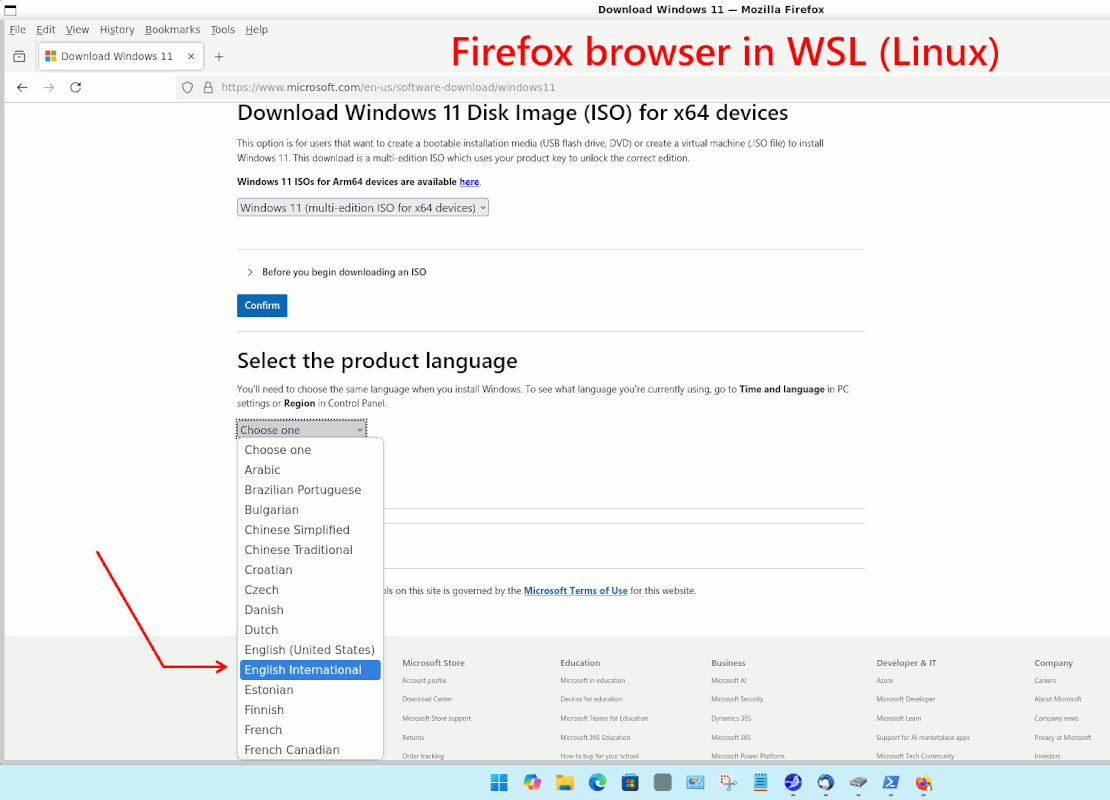
There is still no ISO file available for the international version of English. The English United States version may not offer users with
other English versions, such as the United Kingdom version, the true
upgrade option. I think so, but I haven't tried it yet.
By 'true upgrade', I mean upgrading while keeping all apps and documents rather than doing a clean upgrade.
On Thu, 1 Oct 2026 07:24:54 +0100, Abandoned Trolley wrote:
or you could just use the "Download and Install" button in Windows update ?
<https://blogs.windows.com/windowsexperience/2026/09/29/how-to-get-windows-11-2026-update/>
<quote>
To be among the first to receive the update, go to Settings > Windows
Update and turn on Get the latest updates as soon as they?re
available. Once your device is eligible, you?ll see the option to
download and install Windows 11, version 26H2.
</quote>
On 30/09/2026 23:07, John Smith wrote:
It is now available from Microsoft's Official website:
<https://www.microsoft.com/en-gb/software-download/windows11>
Good Luck and hope you will all start the blame game!
There is still no ISO file available for the international version of English. The English United States version may not offer users with
other English versions, such as the United Kingdom version, the true
upgrade option. I think so, but I haven't tried it yet.
By 'true upgrade', I mean upgrading while keeping all apps and documents rather than doing a clean upgrade.
When using Edge in Incognito mode, the Wi11 multi-edition ISO for x64devices is available for the en-us and en-gb download site.
s|b <me@privacy.invalid> wrote:
On Thu, 1 Oct 2026 07:24:54 +0100, Abandoned Trolley wrote:
or you could just use the "Download and Install" button in Windows update ? >><https://blogs.windows.com/windowsexperience/2026/09/29/how-to-get-windows-11-2026-update/>
<quote>
To be among the first to receive the update, go to Settings > Windows
Update and turn on Get the latest updates as soon as they?re
available. Once your device is eligible, you?ll see the option to
download and install Windows 11, version 26H2.
</quote>
Is there also a setting for "To be among the last to receive the
update, ..."!? :-) c.q. :-(
On 10/01/2026 2:34 PM, Frank Slootweg wrote:[...]
Is there also a setting for "To be among the last to receive the
update, ..."!? :-) c.q. :-(
:)
Good luck with that.
I don't follow! Why can't you just 'upgrade' ('update' actually) via
Windows Update (as mentioned before, just click 'Download & install)?
That of course will "keep all apps and documents". No need for ISOs.
Atm, only the ARM 64 bit 26H2 ISO is available when using a browser in normal mode.
The Win11 multi-editon ISO for x64 devices currently is not available
from the en-us or the en-gb download site when using normal browser mode.
But....
When using Edge in Incognito mode, the Wi11 multi-edition ISO for x64devices is available for the en-us and en-gb download site.
On 10/1/26 8:49 AM, s|b wrote:
On Wed, 30 Sep 2026 20:52:18 -0700, T wrote:
Oh lord, is it that time againÿ ????
Weird name for the ISO download:
ÿÿÿÿÿ Windows11_Client_x64_en-us_26300_9457.iso
"Client"ÿ ????
I was wondering about that as well:
I am surprised Paul did no answer that one!
Windows11_Client_x64_en-gb_26300_9457.iso
Any word if Rufus is supporting it yet?
Have you tried running it, see if it downloads the new ISO?
Not yet.ÿ I was going to wait for the dust to settle first
This is ChatGPT's take on it:
Yes. Rufus 4.15 supports the Windows 11 26H2 ISO, build 26300.9457, which is the build corresponding to the file you mentioned. The current Rufus release is 4.15, released June 30, 2026. RRufus+1
More importantly for what you're trying to do:
ÿÿÿ Rufus still provides its Windows 11 hardware-requirement bypass when creating the installation USB.
ÿÿÿ Its Windows User Experience dialog includes ?Remove requirement for 4GB+ RAM, Secure Boot and TPM 2.0.? GGitHub
ÿÿÿ Rufus specifically documents bypassing the TPM 2.0 and Secure Boot requirements. GGitHub
ÿÿÿ There is an important limitation with 26H2/24H2-and-later: very old CPUs lacking SSE4.2 and POPCNT cannot be bypassed by Rufus, because those CPU features are required by Windows itself. GGitHub
So if your machine's issue is TPM 2.0, Secure Boot, or the normal Windows 11 hardware eligibility checks, I'd use Rufus 4.15 + your Windows11_Client_x64_en-gb_26300_9457.iso.
When you hit Start in Rufus, you should get the Windows User Experience dialog where you can select the relevant requirement-removal options.
Download Rufus 4.15 from the official site
If you tell me what CPU/motherboard the target PC has, I can also tell you whether 26H2 is likely to install successfully on it?particularly whether it has the SSE4.2/POPCNT issue.
Yes ? Rufus can create the installation media with a local-account option, including an option specifically called ?Remove requirement for an online Microsoft account? and ?Create a local account with username.? Rufus's current documentation still lists both options
John Smith <invalid@invalid.invalid> wrote:
On 30/09/2026 23:07, John Smith wrote:
It is now available from Microsoft's Official website:
<https://www.microsoft.com/en-gb/software-download/windows11>
Good Luck and hope you will all start the blame game!
There is still no ISO file available for the international version of
English. The English United States version may not offer users with
other English versions, such as the United Kingdom version, the true
upgrade option. I think so, but I haven't tried it yet.
By 'true upgrade', I mean upgrading while keeping all apps and documents
rather than doing a clean upgrade.
I don't follow! Why can't you just 'upgrade' ('update' actually) via Windows Update (as mentioned before, just click 'Download & install)?
That of course will "keep all apps and documents". No need for ISOs.
As to 'English (United Kingdom)': I have that on my system and got
offered the 26H2 update in Windows Update (at least) yesterday.
Is there also a setting for "To be among the last to receive the
update, ..."!? :-) c.q. :-(
On 1 Oct 2026 18:34:02 GMT, Frank Slootweg wrote:
Is there also a setting for "To be among the last to receive the
update, ..."!? :-) c.q. :-(
Worse! I haven't chosen 'install latest updates' and W11 25H2 is nagging
to install.
<https://i.postimg.cc/GtXT2mV8/26H2.jpg>
And the taskbar keeps showing that an update is available. I had the
same thing when 25H2 was available. I had to uncheck that update a dozen times before it stopped nagging (and then it installed anyway after a
long time).
Inside this update <https://support.microsoft.com/en-gb/windows/deployment/updates-lifecycle/inside-this-update?OCID=WUSettings#windowsupdate=26100>
On 1 Oct 2026 18:34:02 GMT, Frank Slootweg wrote:
Is there also a setting for "To be among the last to receive the
update, ..."!? :-) c.q. :-(
Worse! I haven't chosen 'install latest updates' and W11 25H2 is nagging
to install.
<https://i.postimg.cc/GtXT2mV8/26H2.jpg>
And the taskbar keeps showing that an update is available. I had the
same thing when 25H2 was available. I had to uncheck that update a dozn
times before it stopped nagging (and then it installed anyway after a
long time).
Inside this update <https://support.microsoft.com/en-gb/windows/deployment/updates-lifecycle/inside-this-update?OCID=WUSettings#windowsupdate=26100>
s|b <me@privacy.invalid> wrote:
And the taskbar keeps showing that an update is available. I had the
same thing when 25H2 was available. I had to uncheck that update a dozn times before it stopped nagging (and then it installed anyway after a
long time).
What *exactly* do you mean by "I had to uncheck that update"? Do you
click on the 'X" at the end of
"(i) Windows 11, version 26H2 is available Download & install X"
If so, what happens then? Does the update go away and come back later (when?)? Other?
I want the update to go away for now, but I do not want to have to
jump through hoops to get it back when/if I'm ready for it.
N.B. If you hover over the 'X", it says 'Close', but doesn't say what 'Close' actually does.
My work machine runs Win11 Pro without the "be first" setting, it hasn't mentioned 26H2 yet. My home machine runs Win11 Home with the "be first" setting, it offered 26H2 on 30th, I upgraded and haven't seen anything negative so far ...
You can use this to set the release to lock to. 11 25H2 (to avoid 26H2).8< snip >8
https://www.grc.com/incontrol.htm
One problem is, the enablement package (745KB) is likely
already on the machine. It's not clear whether the four
or so registry locations InControl loads, will be enough
to cause that nag to go away.
It is now available from Microsoft's Official website:
<https://www.microsoft.com/en-gb/software-download/windows11>
Good Luck and hope you will all start the blame game!
Java Jive wrote:
John Smith wrote:
It is now available from Microsoft's Official website:<https://www.microsoft.com/en-gb/software-download/windows11>
Good Luck and hope you will all start the blame game!
Wants to delete all my applications and programs, sod that for a laugh!
Have you downloaded a different locale of .iso file compared to the installed version you're running? e.g. en-US vs en-GB
Java Jive wrote:
John Smith wrote:
It is now available from Microsoft's Official website:
<https://www.microsoft.com/en-gb/software-download/windows11>
Good Luck and hope you will all start the blame game!
Wants to delete all my applications and programs, sod that for a laugh!
Have you downloaded a different locale of .iso file compared to the installed version you're running?ÿ e.g. en-US vs en-GB
And why do you (Java Jive) need an ISO in the first place? I.e. why
not let Windows Update update your system to 26H2? (Yes, I know there
are exception scenarios [1], but they are exceptions, not the general
rule.)
[1] See for example Jack Lemmon's response to my response:
Message-ID: <119mbb8$2knlg$1@paganini.bofh.team>
And why do you (Java Jive) need an ISO in the first place? I.e. why
not let Windows Update update your system to 26H2? (Yes, I know there
are exception scenarios [1], but they are exceptions, not the general
rule.)
On 2026-10-06 18:23, Frank Slootweg wrote:
And why do you (Java Jive) need an ISO in the first place? I.e. why
not let Windows Update update your system to 26H2? (Yes, I know there
are exception scenarios [1], but they are exceptions, not the general rule.)
[1] See for example Jack Lemmon's response to my response:
Message-ID: <119mbb8$2knlg$1@paganini.bofh.team>
I checked for updates, but it didn't show.
Java Jive <java@evij.com.invalid> wrote:
On 2026-10-06 18:23, Frank Slootweg wrote:
I checked for updates, but it didn't show.
Be patient, grasshopper! :-)
I don't know what the rollout schedule looks like. The update was
offered on our systems, the day before this thread started (September
30).
On 10/06/2026 3:07 PM, Frank Slootweg wrote:I checked for updates on Oct 6th, installed all the offered updates,
Java Jive <java@evij.com.invalid> wrote:The rollout schedule is an open-ended time frame.
On 2026-10-06 18:23, Frank Slootweg wrote:Be patient, grasshopper! :-)
I checked for updates, but it didn't show.
I don't know what the rollout schedule looks like. The update was
offered on our systems, the day before this thread started (September
30).
- typically for supported devices that are not blocked or having
known issues can be up to 6 months or even longer. Also, the offer
for the feature update for a supported device can be pulled(no
longer available in Windows Update) if a new issue appears.
| Sysop: | Jacob Catayoc |
|---|---|
| Location: | Pasay City, Metro Manila, Philippines |
| Users: | 3 |
| Nodes: | 4 (0 / 4) |
| Uptime: | 497991:42:08 |
| Calls: | 190 |
| Files: | 850 |
| D/L today: |
12 files (6,003K bytes) |
| Messages: | 72,138 |