On Wed, 9/23/2026 4:29 AM, ....winston wrote:
On 09/22/2026 5:57 PM, knuttle wrote:
I had file history working on two laptop computers, I did not use it for about 15 days. During that time Windows two security updates, KB5129195 and KB5124008.
Since then the external drive will not connect to the external drive. PS: I have tried all of the fixes that I could find and still no connection.
Is there a fix or did MS decide my external drive was insecure.
Affected platforms
Windows 11, version 25H2
Windows Health Article: WI1474331
- (article atm, only available to admin with support contract)
Cause: KB5124008
Resolved: KB5124010
Windows 11, version 24H2
Windows Health Article: WI1474332
Cause: KB5124008
Resolved: KB5124010
<qp>
Resolution: This issue was resolved by Windows updates released September 22, 2026 (the Resolved KBs listed above), and updates released after that date. We recommend you install the latest update for your device as it contains important improvements and issue resolutions, including this one.
</qp>
Which is the preview update.
https://www.askwoody.com/forums/topic/file-history-might-stop-working-after-installing-september-2026-windows-update/
Paul
On 09/23/2026 6:29 AM, Paul wrote:
On Wed, 9/23/2026 4:29 AM, ....winston wrote:
On 09/22/2026 5:57 PM, knuttle wrote:
I had file history working on two laptop computers, I did not use it
for about 15 days. During that time Windows two security updates,
KB5129195 and KB5124008.
Since then the external drive will not connect to the external
drive. PS: I have tried all of the fixes that I could find and still
no connection.
Is there a fix or did MS decide my external drive was insecure.
Affected platforms
Windows 11, version 25H2
Windows Health Article: WI1474331
- (article atm, only available to admin with support contract)
Cause: KB5124008
Resolved: KB5124010
Windows 11, version 24H2
Windows Health Article: WI1474332
Cause: KB5124008
Resolved: KB5124010
<qp>
Resolution: This issue was resolved by Windows updates released
September 22, 2026 (the Resolved KBs listed above), and updates
released after that date. We recommend you install the latest update
for your device as it contains important improvements and issue
resolutions, including this one.
</qp>
Which is the preview update.
https://www.askwoody.com/forums/topic/file-history-might-stop-working-
after-installing-september-2026-windows-update/
Paul
Yes.
This one(File History broken) is one of those where trying to fix something in Windows(tweaking, tampering) after broken by an update is destined for instability...in fact, doing so may create more serious
issues for a subsequent fix to reverse or repair the broken.
I learned along time ago...if suspecting an update broke something, uninstall it(when possible, or revert to an earlier image)...don't
tamper, just wait for additional reports of the same condition, continue
to review the known issues and the Windows Health articles, and listen
to other admins comments(one admin comments and responsibility for
managing a few hundred to thousand of devices can carry a lot of weight).
i.e. Hands off until understood and clarity exists.
Fyi...w2/r to AskWoody
=> no better person to listen to and follow than colleague and *PatchLady* Susan B. One of the few people on the planet that MSFT
highly respects, listens to, and lol(probably on quite a few MSFT folks speed dial!!!).
The Trick is to realize that the update was at fault.
Sometime it takes work to realize the problem
was caused by the update, and not something else.
On Thu, 9/24/2026 7:18 AM, knuttle wrote:For me the problem disappeared when I applied the next update; 2026-09
The Trick is to realize that the update was at fault.
Sometime it takes work to realize the problem
was caused by the update, and not something else.
I ran a Process Monitor trace, and the only hint I can find
as to what is wrong, is I could see some "FIPS" activity, indicating
that maybe some part of the external drive used for File History,
is protected or may attempt to be protected, by crypto. I couldn't
see a trace event that explicitly said what was broken. A lot of the activity, seemed to be one SVCHOST, and using "tasklist /svc",
indicated service host 4468 was FileHistory. But the 4468 activity
stopped, the disk structure on the external drive was left
in a "half finished, insecure state", and after a flurry of
FIPS registry checks, the run was toast.
Without knowing what we know now, I might not have been
able to conclude very much.
My skills with eventvwr.msc , I couldn't find anything there.
I'm just not very good with that.
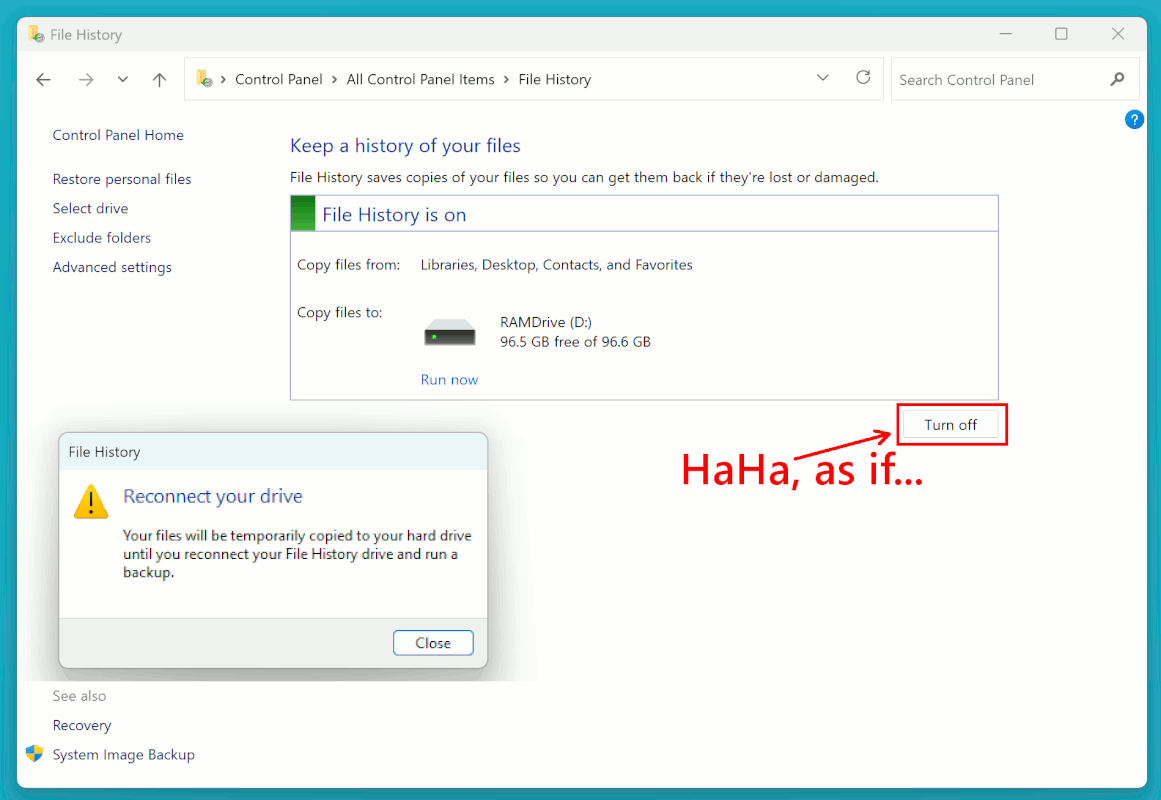
It also took a significant effort, to get the File History
"Turn Off" button to work. Too funny, really. I love buttons
that don't do what it says on the tin. Off means OFF, it's
pretty easy to understand. To turn a thing OFF in computing,
should not really be that hard. Running rm -Rf * is not hard :-)
Building structures is hard. Blowing them up... less so.
Mine is now OFF again. It finally took the hint, after
I pretended to change the storage to a network drive, then
backed out. (I could test the bug, because I have not installed
the update preview yet.)
[Picture] broken-File-History.gif
https://imgur.com/a/1kc7VUt
https://postimg.cc/vDKRPyP6
https://i.postimg.cc/RVSMZVKG/broken-File-History.gif
I agree, that being logical about it this time, would
have not got you very far.
Paul
On 09/24/2026 4:14 AM, ....winston wrote:
On 09/23/2026 6:29 AM, Paul wrote:The Trick is to realize that the update was at fault. Sometime it takes work to realize the problem was caused by the update, and not something else.
On Wed, 9/23/2026 4:29 AM, ....winston wrote:
On 09/22/2026 5:57 PM, knuttle wrote:
I had file history working on two laptop computers, I did not use
it for about 15 days. During that time Windows two security
updates, KB5129195 and KB5124008.
Since then the external drive will not connect to the external
drive. PS: I have tried all of the fixes that I could find and
still no connection.
Is there a fix or did MS decide my external drive was insecure.
Affected platforms
Windows 11, version 25H2
Windows Health Article: WI1474331
- (article atm, only available to admin with support contract)
Cause: KB5124008
Resolved: KB5124010
Windows 11, version 24H2
Windows Health Article: WI1474332
Cause: KB5124008
Resolved: KB5124010
<qp>
Resolution: This issue was resolved by Windows updates released
September 22, 2026 (the Resolved KBs listed above), and updates
released after that date. We recommend you install the latest update
for your device as it contains important improvements and issue
resolutions, including this one.
</qp>
Which is the preview update.
https://www.askwoody.com/forums/topic/file-history-might-stop-
working- after-installing-september-2026-windows-update/
Paul
Yes.
This one(File History broken) is one of those where trying to fix
something in Windows(tweaking, tampering) after broken by an update is
destined for instability...in fact, doing so may create more serious
issues for a subsequent fix to reverse or repair the broken.
I learned along time ago...if suspecting an update broke something,
uninstall it(when possible, or revert to an earlier image)...don't
tamper, just wait for additional reports of the same condition,
continue to review the known issues and the Windows Health articles,
and listen to other admins comments(one admin comments and
responsibility for managing a few hundred to thousand of devices can
carry a lot of weight).
i.e. Hands off until understood and clarity exists.
Fyi...w2/r to AskWoody
=> no better person to listen to and follow than colleague and
*PatchLady* Susan B. One of the few people on the planet that MSFT
highly respects, listens to, and lol(probably on quite a few MSFT
folks speed dial!!!).
On 09/24/2026 7:18 AM, knuttle wrote:[...]
The Trick is to realize that the update was at fault.? Sometime it takes work to realize the problem was caused by the update, and not something else.
That's one way of looking at it, though in this case the easiest initial diagnostic was to image the device, then either uninstall the update, or restore to a prior image - although the latter does require some good housekeeping skill by creating a recent image preferably after the
previous month update.
Past history and pattern of Microsoft and community reports is quite consistent. Takes about a one to two days for reports to surface about problems caused by an update in the managed devices community(forums,
social media, etc.), another day or so of validation, and usually a few
more days for MSFT to acknowledge.
Glad to see the Sept 22 update resolved your(and many other's) File
History issue.
....winston <winstonmvp@gmail.com> wrote:
On 09/24/2026 7:18 AM, knuttle wrote:[...]
The Trick is to realize that the update was at fault. Sometime it takes >>> work to realize the problem was caused by the update, and not something
else.
That's one way of looking at it, though in this case the easiest initial
diagnostic was to image the device, then either uninstall the update, or
restore to a prior image - although the latter does require some good
housekeeping skill by creating a recent image preferably after the
previous month update.
But as Keith mentions, you have to have a *reason* to suspect a recent update (and if so, which one)!
Apparently Keith connected an external drive and then got a failure,
so he had a reason to look at the failure.
In my case, I backup to a Network Share (NAS) and File History
*silently* failed for two weeks (on two computers) and only then I saw
this thread and the resolution/solution. If it wasn't for this thread,
the silent backup failure would have continued much longer. :-(
Past history and pattern of Microsoft and community reports is quite
consistent. Takes about a one to two days for reports to surface about
problems caused by an update in the managed devices community(forums,
social media, etc.), another day or so of validation, and usually a few
more days for MSFT to acknowledge.
But Microsoft doesn't tell the affected *users* (like us), does it!?
(BTW, the AskWoody report came after 10 days.)
Glad to see the Sept 22 update resolved your(and many other's) File
History issue.
It did here as well (on one computer, second still to go).
I must say that of late, Microsoft goes out of its way to break backup software. First stuff like Macrium with VSS/VSC and mounting problems,
also affecting other software that uses VSC (like my Cobian backup
software) in April, and now this File History one.
| Sysop: | Jacob Catayoc |
|---|---|
| Location: | Pasay City, Metro Manila, Philippines |
| Users: | 3 |
| Nodes: | 4 (0 / 4) |
| Uptime: | 497991:44:25 |
| Calls: | 190 |
| Files: | 850 |
| D/L today: |
12 files (6,003K bytes) |
| Messages: | 72,138 |