https://www.hk01.com/%E6%95%B8%E7%A2%BC%E7%94%9F%E6%B4%BB/60316988/(Had to use Google Translate. If there is a languages button, they
"Mr. Man-wai Chang" <toylet.toylet@gmail.com> wrote:
https://www.hk01.com/%E6%95%B8%E7%A2%BC%E7%94%9F%E6%B4%BB/60316988/(Had to use Google Translate. If there is a languages button, they
didn't use the alternate language as text on the button.)
"Your device has encountered a problem and needs to restart. You can
restart." At this point, the device cannot complete the boot process
and requires manual recovery steps.
Microsoft did not provide specific steps.
Wonder what are the manual recovery steps? Restore using an image
backup, maybe? And then disable or postpone any further updates for
months? You know, those scheduled (not manual) image backups that users
are supposed to do, but most don't.
The only solution is to enter the Windows recovery environment and
uninstall the latest security patches.
Presumes you can get that far in a bootup. We're supposed to permit
Secure Boot, TPM, and Memory Integrity as protections against hackers,
but the most likely source of attack is Microsoft.
VanguardLH wrote:
"Mr. Man-wai Chang" <toylet.toylet@gmail.com> wrote:
https://www.hk01.com/%E6%95%B8%E7%A2%BC%E7%94%9F%E6%B4%BB/60316988/(Had to use Google Translate. If there is a languages button, they
didn't use the alternate language as text on the button.)
"Your device has encountered a problem and needs to restart. You can
restart." At this point, the device cannot complete the boot process
and requires manual recovery steps.
Microsoft did not provide specific steps.
Wonder what are the manual recovery steps? Restore using an image
backup, maybe? And then disable or postpone any further updates for
months? You know, those scheduled (not manual) image backups that users
are supposed to do, but most don't.
The only solution is to enter the Windows recovery environment and
uninstall the latest security patches.
Presumes you can get that far in a bootup. We're supposed to permit
Secure Boot, TPM, and Memory Integrity as protections against hackers,
but the most likely source of attack is Microsoft.
But look at the evidence though.
Normally, the stop code would be "Inaccessible Boot Volume".
And it has a numeric value, like 0x7b or so. Something like that.
Notice in the screenshots of this one, there is no numeric
stop code, and the message is more of a
"Cannot mount Boot Volume" # That means the volume seems trashed
^^^^^ # as if it is a BitLocker failure
which is not the same thing.
To me, the Cannot mount Boot Volume means the volume was
encrypted, and the attempt to unlock it has failed.
If you had this failure, you would be researching the info
on BitLocker recoveries.
*******
Yesterday, I installed Windows 11 Pro in QEMU-KVM on Linux, as
a virtual machine. I used ByPassNRO on it, so there was no MSA
associated with the install. I installed using 24H2, with the
network cable disconnected.
What did it do ? I caught it in the process of encrypting C: :-/
I wonder when they were planning on giving me the recovery key ???
The virtual machine in that case, has "swtpm" from IBM, so the
key information could be installed in the TPM.
Note that, Microsoft is <cough> preparing to attack UEFI
and add the 2023 certificate and remove the 2011 certificate.
If it removes the 2011 certificate, it's always possible
your old copy of Windows 10 would not boot. Also, the signing
shim on your Linux Dual Boot (secure boot) depends on the
certificate, and that could be busted too (but this is only if
you are using Secure Boot or Secure Boot is the only option
on your shiny-new year-2026 computer).
At the very least then, as part of defensive computing, you should
keep a FAT USB key handy, and enter the BIOS screen where the MOK
is stored. There is an option there to back up UEFI materials.
The BIOS will write out to a FAT filesystem.
In an emergency, your backup of the content may be brought
into play, if something seems broken beyond repair.
That doesn't back up the TPM. A TPM that could be physical,
or a TPM that is emulated as BIOS code (and uses a secure enclave
on the CPU).
On Wed, 28 Jan 2026 21:28:42 +0800, "Mr. Man-wai Chang" <toylet.toylet@gmail.com> wrote:
I have, over the past 3-4 months, been seeing weird Chrome stuff
("can't find chrome" in a search that somehow began overnight, when
the system is running to do auto-updates, etc--but nobody using system
to so a search or anything else).
System runs 24/7 on UPS, Win11, 25H2 seems to be running fine, and so
on. No other computers connected to a network (straight out via
Comcast gateway to Internet) and my own domain--used for e-mail
forwarding. All current patches/updates installed.
Anyone else seeing something similar with "chrome" search not found?
Microsoft Investigates Windows 11 25H2 Boot Failures After January Update <https://cyberpress.org/microsoft-investigates-windows-11-25h2/>
Microsoft has launched an urgent investigation into severe stability
issues plaguing the January 2026 security update for Windows 11 after
the patch triggered critical boot failures on physical devices.
The update, identified as KB5074109, was intended to deliver security enhancements to Windows 11 versions 25H2 and 24H2 but instead caused widespread ?UNMOUNTABLE_BOOT_VOLUME? errors that render affected systems unusable.
"Mr. Man-wai Chang" <toylet.toylet@gmail.com> wrote:
https://www.hk01.com/%E6%95%B8%E7%A2%BC%E7%94%9F%E6%B4%BB/60316988/(Had to use Google Translate. If there is a languages button, they
didn't use the alternate language as text on the button.)
"Your device has encountered a problem and needs to restart. You can
restart." At this point, the device cannot complete the boot process
and requires manual recovery steps.
Microsoft did not provide specific steps.
Wonder what are the manual recovery steps? Restore using an image
backup, maybe? And then disable or postpone any further updates for
months? You know, those scheduled (not manual) image backups that users
are supposed to do, but most don't.
The only solution is to enter the Windows recovery environment and
uninstall the latest security patches.
Presumes you can get that far in a bootup. We're supposed to permit
Secure Boot, TPM, and Memory Integrity as protections against hackers,
but the most likely source of attack is Microsoft.
On Wed, 1/28/2026 2:22 PM, jerryab wrote:
On Wed, 28 Jan 2026 21:28:42 +0800, "Mr. Man-wai Chang"
<toylet.toylet@gmail.com> wrote:
I have, over the past 3-4 months, been seeing weird Chrome stuff
("can't find chrome" in a search that somehow began overnight, when
the system is running to do auto-updates, etc--but nobody using system
to so a search or anything else).
System runs 24/7 on UPS, Win11, 25H2 seems to be running fine, and so
on. No other computers connected to a network (straight out via
Comcast gateway to Internet) and my own domain--used for e-mail
forwarding. All current patches/updates installed.
Anyone else seeing something similar with "chrome" search not found?
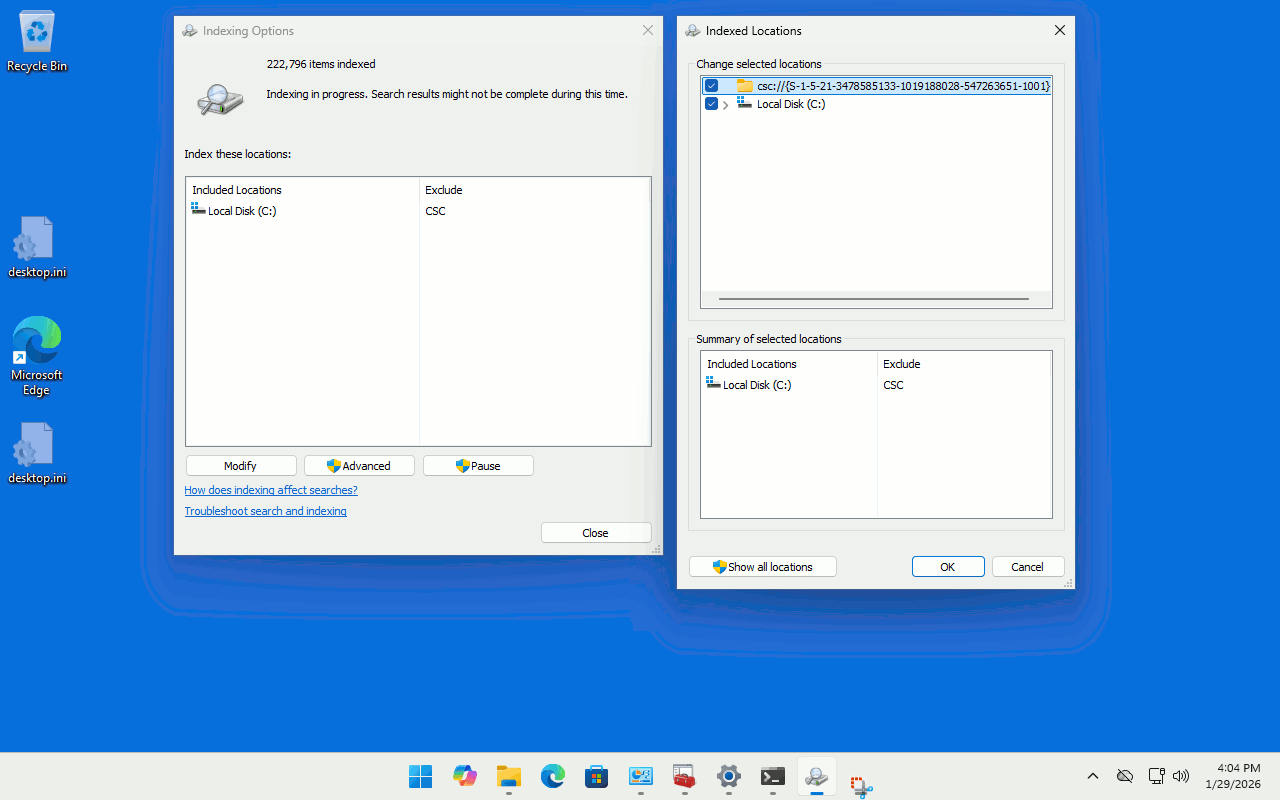
https://i.postimg.cc/ht059W0z/Indexing-Options-Modify-For-Thoroughness.gif
I indexed my latest install, and the Windows.db was ~1.4GB.
And that took hours to generate.
Paul wrote:
https://i.postimg.cc/ht059W0z/Indexing-Options-Modify-For-Thoroughness.gif
csc://{S-1-5-21- ... -1001}
That's some weird URI with an unknown scheme (csc) and a SID, presumably
for a user account. I had a similar one there but when hovered over with
the mouse, said "this [something] is no longer available" or similar. I didn't take much notice and can't recall the exact wording. I just
unchecked it and it disappeared, never to return. I'm wondering what it
was for.
I indexed my latest install, and the Windows.db was ~1.4GB.
And that took hours to generate.
Mine's about 23MB but doesn't include the whole drive.
On Sat, 1/31/2026 6:10 AM, Apd wrote:[...]
Paul wrote:
https://i.postimg.cc/ht059W0z/Indexing-Options-Modify-For-Thoroughness.gif >>csc://{S-1-5-21- ... -1001}
That's some weird URI with an unknown scheme (csc) and a SID, presumably
for a user account.
CSC is apparently "Client Side Caching", whatever that means.
Paul wrote:
On Sat, 1/31/2026 6:10 AM, Apd wrote:[...]
Paul wrote:
https://i.postimg.cc/ht059W0z/Indexing-Options-Modify-For-Thoroughness.gif
csc://{S-1-5-21- ... -1001}
That's some weird URI with an unknown scheme (csc) and a SID, presumably >>> for a user account.
CSC is apparently "Client Side Caching", whatever that means.
That sounds like a reasonable interpretation. Presenting what appears to
be an internal implementation detail to the user is a bad idea (or a
bug)!
On Sun, 2/1/2026 5:11 AM, Apd wrote:
Paul wrote:
On Sat, 1/31/2026 6:10 AM, Apd wrote:[...]
Paul wrote:
https://i.postimg.cc/ht059W0z/Indexing-Options-Modify-For-Thoroughness.gif
csc://{S-1-5-21- ... -1001}
That's some weird URI with an unknown scheme (csc) and a SID, presumably >>>> for a user account.
CSC is apparently "Client Side Caching", whatever that means.
That sounds like a reasonable interpretation. Presenting what appears to
be an internal implementation detail to the user is a bad idea (or a
bug)!
If you asked me where that was, I doubt I could find it.
Googling, says it is here.
C:\Windows\CSC
I can see it in an NFI output from Windows 10.
File 101681
\Windows\CSC\v2.0.6\NAMESP~1 [probably NAMESPACE]
There don't seem to be any files in there.
Paul
On Sun, 2/1/2026 5:11 AM, Apd wrote:
Paul wrote:
On Sat, 1/31/2026 6:10 AM, Apd wrote:[...]
csc://{S-1-5-21- ... -1001}
That's some weird URI with an unknown scheme (csc) and a SID, presumably >>>> for a user account.
CSC is apparently "Client Side Caching", whatever that means.
That sounds like a reasonable interpretation. Presenting what appears to
be an internal implementation detail to the user is a bad idea (or a
bug)!
If you asked me where that was, I doubt I could find it.
Googling, says it is here.
C:\Windows\CSC
I can see it in an NFI output from Windows 10.
File 101681
\Windows\CSC\v2.0.6\NAMESP~1 [probably NAMESPACE]
There don't seem to be any files in there.
| Sysop: | Jacob Catayoc |
|---|---|
| Location: | Pasay City, Metro Manila, Philippines |
| Users: | 5 |
| Nodes: | 4 (0 / 4) |
| Uptime: | 24:11:02 |
| Calls: | 117 |
| Calls today: | 117 |
| Files: | 368 |
| D/L today: |
560 files (257M bytes) |
| Messages: | 70,913 |
| Posted today: | 26 |