I suppose most of the readers of these newsgroups know that for a full
start from scratch it's required to run Restart, instead of Shutdown
followed by starting later. Even though I only learned this a year ago
and even though it's a bit counter-intuitive, you all know that, right, (because if you're running with Fast Startup*** shutdown saves the
kernel and reuses it, but Restart never uses Fast Startup and it
rebuilds the kernel, with new values if the values have changed).
But maybe you did not know that you can get the benefit of Restart and
still turn your machine off if you press Shift while clicking on
Shutdown. How about that!!
micky wrote on 1/22/2026 4:26 PM:
I suppose most of the readers of these newsgroups know that for a full
start from scratch it's required to run Restart, instead of Shutdown
followed by starting later.? Even though I only learned this a year ago
and even though it's a bit counter-intuitive, you all know that, right,
(because if you're running with Fast Startup*** shutdown saves the
kernel and reuses it, but Restart never uses Fast Startup and it
rebuilds the kernel, with new values if the values have changed).
But maybe you did not know that you can get the benefit of Restart and
still turn your machine off if you press Shift while clicking on
Shutdown.?? How about that!!
If Hibernation (and by extension, Fast Startup) is disabled (e.g., via powercfg -h off), the "Shutdown" button functions as a full, traditional shutdown - clears the system state(shuts down all processes) and clears
temp memory and powers Off. Subsequent Powering on, re-initializes the o/s
?- which, incidentally is the same results as Shift-Shutdown.
?i.e. you don't need to the keystroke combo if Hibernation is disabled.
Restart(when Hiberation is disabled) does the exact same clearing but instead of shutting down, powers the device back on and re-initializes
the o/s.
micky wrote on 1/22/2026 4:26 PM:I have Hibernation set to never in my power profile. However, I have an
I suppose most of the readers of these newsgroups know that for a full
start from scratch it's required to run Restart, instead of Shutdown
followed by starting later.ÿ Even though I only learned this a year ago
and even though it's a bit counter-intuitive, you all know that, right,
(because if you're running with Fast Startup*** shutdown saves the
kernel and reuses it, but Restart never uses Fast Startup and it
rebuilds the kernel, with new values if the values have changed).
But maybe you did not know that you can get the benefit of Restart and
still turn your machine off if you press Shift while clicking on
Shutdown.ÿÿ How about that!!
If Hibernation (and by extension, Fast Startup) is disabled (e.g., via powercfg -h off), the "Shutdown" button functions as a full, traditional shutdown - clears the system state(shuts down all processes) and clears
temp memory and powers Off. Subsequent Powering on, re-initializes the o/s
ÿ- which, incidentally is the same results as Shift-Shutdown.
ÿi.e. you don't need to the keystroke combo if Hibernation is disabled.
Restart(when Hiberation is disabled) does the exact same clearing but instead of shutting down, powers the device back on and re-initializes
the o/s.
On 1/23/2026 12:44 AM, ...w¤?ñ?¤ wrote:
micky wrote on 1/22/2026 4:26 PM:I have Hibernation set to never in my power profile. However, I have an
I suppose most of the readers of these newsgroups know that for a full
start from scratch it's required to run Restart, instead of Shutdown
followed by starting later.ÿ Even though I only learned this a year ago
and even though it's a bit counter-intuitive, you all know that, right,
(because if you're running with Fast Startup*** shutdown saves the
kernel and reuses it, but Restart never uses Fast Startup and it
rebuilds the kernel, with new values if the values have changed).
But maybe you did not know that you can get the benefit of Restart and
still turn your machine off if you press Shift while clicking on
Shutdown.ÿÿ How about that!!
If Hibernation (and by extension, Fast Startup) is disabled (e.g., via
powercfg -h off), the "Shutdown" button functions as a full,
traditional shutdown - clears the system state(shuts down all
processes) and clears temp memory and powers Off. Subsequent Powering
on, re-initializes the o/s
ÿÿ- which, incidentally is the same results as Shift-Shutdown.
ÿÿi.e. you don't need to the keystroke combo if Hibernation is disabled.
Restart(when Hiberation is disabled) does the exact same clearing but
instead of shutting down, powers the device back on and re-initializes
the o/s.
APC UPS that will hibernate the machine in case of an extended power
outage; in other words, the APC software is able to work around that setting. Does this setup change anything said in this thread so far?
On 1/23/2026 12:44 AM, ...w¤?ñ?¤ wrote:
micky wrote on 1/22/2026 4:26 PM:I have Hibernation set to never in my power profile. However, I have an APC UPS that will hibernate the machine in case of an extended power outage; in other words, the APC software is able to work around that setting. Does this setup change anything said in this thread so far?
I suppose most of the readers of these newsgroups know that for a full
start from scratch it's required to run Restart, instead of Shutdown
followed by starting later.ÿ Even though I only learned this a year ago
and even though it's a bit counter-intuitive, you all know that, right,
(because if you're running with Fast Startup*** shutdown saves the
kernel and reuses it, but Restart never uses Fast Startup and it
rebuilds the kernel, with new values if the values have changed).
But maybe you did not know that you can get the benefit of Restart and
still turn your machine off if you press Shift while clicking on
Shutdown.ÿÿ How about that!!
If Hibernation (and by extension, Fast Startup) is disabled (e.g., via powercfg -h off), the "Shutdown" button functions as a full, traditional shutdown - clears the system state(shuts down all processes) and clears temp memory and powers Off. Subsequent Powering on, re-initializes the o/s
ÿÿ- which, incidentally is the same results as Shift-Shutdown.
ÿÿi.e. you don't need to the keystroke combo if Hibernation is disabled.
Restart(when Hiberation is disabled) does the exact same clearing but instead of shutting down, powers the device back on and re-initializes the o/s.
Jeff Barnett wrote on 1/24/2026 9:07 AM:
On 1/23/2026 12:44 AM, ...w¤?ñ?¤ wrote:
micky wrote on 1/22/2026 4:26 PM:I have Hibernation set to never in my power profile. However, I have
I suppose most of the readers of these newsgroups know that for a full >>>> start from scratch it's required to run Restart, instead of Shutdown
followed by starting later.ÿ Even though I only learned this a year ago >>>> and even though it's a bit counter-intuitive, you all know that, right, >>>> (because if you're running with Fast Startup*** shutdown saves the
kernel and reuses it, but Restart never uses Fast Startup and it
rebuilds the kernel, with new values if the values have changed).
But maybe you did not know that you can get the benefit of Restart and >>>> still turn your machine off if you press Shift while clicking on
Shutdown.ÿÿ How about that!!
If Hibernation (and by extension, Fast Startup) is disabled (e.g.,
via powercfg -h off), the "Shutdown" button functions as a full,
traditional shutdown - clears the system state(shuts down all
processes) and clears temp memory and powers Off. Subsequent Powering
on, re-initializes the o/s
ÿÿ- which, incidentally is the same results as Shift-Shutdown.
ÿÿi.e. you don't need to the keystroke combo if Hibernation is disabled. >>>
Restart(when Hiberation is disabled) does the exact same clearing but
instead of shutting down, powers the device back on and re-
initializes the o/s.
an APC UPS that will hibernate the machine in case of an extended
power outage; in other words, the APC software is able to work around
that setting. Does this setup change anything said in this thread so far?
Afaik, the UPS Hibernation feature requires enabling Windows hibernation.
ÿi.e. When a power outage occurs, the UPS has to communicate with
Windows and validate Windows hibernation state(enabled/disabled), if
enabled instruct Windows to hibernate, once done the UPS provides backup battery power for the duration of its capability.
Lacking Windows hibernation, the UPS only provides battery power for the device(and Windows) for the duration of its backup battery capability.
ÿ - no Windows hibernation
On 1/24/2026 10:07 AM, ...w¤?ñ?¤ wrote:
Jeff Barnett wrote on 1/24/2026 9:07 AM:
On 1/23/2026 12:44 AM, ...w¤?ñ?¤ wrote:Afaik, the UPS Hibernation feature requires enabling Windows hibernation.
micky wrote on 1/22/2026 4:26 PM:I have Hibernation set to never in my power profile. However, I have
I suppose most of the readers of these newsgroups know that for a full >>>>> start from scratch it's required to run Restart, instead of Shutdown >>>>> followed by starting later.ÿ Even though I only learned this a year ago >>>>> and even though it's a bit counter-intuitive, you all know that, right, >>>>> (because if you're running with Fast Startup*** shutdown saves the
kernel and reuses it, but Restart never uses Fast Startup and it
rebuilds the kernel, with new values if the values have changed).
But maybe you did not know that you can get the benefit of Restart and >>>>> still turn your machine off if you press Shift while clicking on
Shutdown.ÿÿ How about that!!
If Hibernation (and by extension, Fast Startup) is disabled (e.g.,
via powercfg -h off), the "Shutdown" button functions as a full,
traditional shutdown - clears the system state(shuts down all
processes) and clears temp memory and powers Off. Subsequent Powering >>>> on, re-initializes the o/s
ÿÿ- which, incidentally is the same results as Shift-Shutdown.
ÿÿi.e. you don't need to the keystroke combo if Hibernation is disabled. >>>>
Restart(when Hiberation is disabled) does the exact same clearing but >>>> instead of shutting down, powers the device back on and re-
initializes the o/s.
an APC UPS that will hibernate the machine in case of an extended
power outage; in other words, the APC software is able to work around
that setting. Does this setup change anything said in this thread so far? >>
ÿÿi.e. When a power outage occurs, the UPS has to communicate with
Windows and validate Windows hibernation state(enabled/disabled), if
enabled instruct Windows to hibernate, once done the UPS provides
backup battery power for the duration of its capability.
Lacking Windows hibernation, the UPS only provides battery power for
the device(and Windows) for the duration of its backup battery capability. >> ÿÿ - no Windows hibernation
I've not enabled hibernation (as said above) but the APC software seems
to be able to do it anyway. Perhaps it changes the power profile when necessary. I remember one of the disk tester/diagnostic packages that
turned sleep off when it was called and never bothered to restore it on
its way out. So there is certainly some way to diddle the settings.
Jeff Barnett wrote on 1/24/2026 12:56 PM:
On 1/24/2026 10:07 AM, ...w¤?ñ?¤ wrote:
Jeff Barnett wrote on 1/24/2026 9:07 AM:
On 1/23/2026 12:44 AM, ...w¤?ñ?¤ wrote:
micky wrote on 1/22/2026 4:26 PM:I have Hibernation set to never in my power profile. However, I have
I suppose most of the readers of these newsgroups know that for a >>>>>> full
start from scratch it's required to run Restart, instead of Shutdown >>>>>> followed by starting later.ÿ Even though I only learned this a
year ago
and even though it's a bit counter-intuitive, you all know that,
right,
(because if you're running with Fast Startup*** shutdown saves the >>>>>> kernel and reuses it, but Restart never uses Fast Startup and it
rebuilds the kernel, with new values if the values have changed).
But maybe you did not know that you can get the benefit of Restart >>>>>> and
still turn your machine off if you press Shift while clicking on
Shutdown.ÿÿ How about that!!
If Hibernation (and by extension, Fast Startup) is disabled (e.g.,
via powercfg -h off), the "Shutdown" button functions as a full,
traditional shutdown - clears the system state(shuts down all
processes) and clears temp memory and powers Off. Subsequent
Powering on, re-initializes the o/s
ÿÿ- which, incidentally is the same results as Shift-Shutdown.
ÿÿi.e. you don't need to the keystroke combo if Hibernation is
disabled.
Restart(when Hiberation is disabled) does the exact same clearing
but instead of shutting down, powers the device back on and re-
initializes the o/s.
an APC UPS that will hibernate the machine in case of an extended
power outage; in other words, the APC software is able to work
around that setting. Does this setup change anything said in this
thread so far?
Afaik, the UPS Hibernation feature requires enabling Windows
hibernation.
ÿÿi.e. When a power outage occurs, the UPS has to communicate with
Windows and validate Windows hibernation state(enabled/disabled), if
enabled instruct Windows to hibernate, once done the UPS provides
backup battery power for the duration of its capability.
Lacking Windows hibernation, the UPS only provides battery power for
the device(and Windows) for the duration of its backup battery
capability.
ÿÿ - no Windows hibernation
I've not enabled hibernation (as said above) but the APC software
seems to be able to do it anyway. Perhaps it changes the power profile
when necessary. I remember one of the disk tester/diagnostic packages
that turned sleep off when it was called and never bothered to restore
it on its way out. So there is certainly some way to diddle the settings.
See Paul's response, that echo's my input.
Hibernation needs to be enabled in Windows.
On 1/24/2026 5:37 PM, ...w¤?ñ?¤ wrote:
Jeff Barnett wrote on 1/24/2026 12:56 PM:
On 1/24/2026 10:07 AM, ...w¤?ñ?¤ wrote:
Jeff Barnett wrote on 1/24/2026 9:07 AM:
On 1/23/2026 12:44 AM, ...w¤?ñ?¤ wrote:
micky wrote on 1/22/2026 4:26 PM:I have Hibernation set to never in my power profile. However, I have an APC UPS that will hibernate the machine in case of an extended power outage; in other words, the APC software is able to work around that setting. Does this setup change anything said in this thread so far?
I suppose most of the readers of these newsgroups know that for a full >>>>>>> start from scratch it's required to run Restart, instead of Shutdown >>>>>>> followed by starting later.ÿ Even though I only learned this a year ago >>>>>>> and even though it's a bit counter-intuitive, you all know that, right, >>>>>>> (because if you're running with Fast Startup*** shutdown saves the >>>>>>> kernel and reuses it, but Restart never uses Fast Startup and it >>>>>>> rebuilds the kernel, with new values if the values have changed). >>>>>>>
But maybe you did not know that you can get the benefit of Restart and >>>>>>> still turn your machine off if you press Shift while clicking on >>>>>>> Shutdown.ÿÿ How about that!!
If Hibernation (and by extension, Fast Startup) is disabled (e.g., via powercfg -h off), the "Shutdown" button functions as a full, traditional shutdown - clears the system state(shuts down all processes) and clears temp memory and powers Off. Subsequent Powering on, re-initializes the o/s
ÿÿ- which, incidentally is the same results as Shift-Shutdown.
ÿÿi.e. you don't need to the keystroke combo if Hibernation is disabled. >>>>>>
Restart(when Hiberation is disabled) does the exact same clearing but instead of shutting down, powers the device back on and re- initializes the o/s.
Afaik, the UPS Hibernation feature requires enabling Windows hibernation. >>>> ÿÿi.e. When a power outage occurs, the UPS has to communicate with Windows and validate Windows hibernation state(enabled/disabled), if enabled instruct Windows to hibernate, once done the UPS provides backup battery power for the duration of its capability.
Lacking Windows hibernation, the UPS only provides battery power for the device(and Windows) for the duration of its backup battery capability.
ÿÿ - no Windows hibernation
I've not enabled hibernation (as said above) but the APC software seems to be able to do it anyway. Perhaps it changes the power profile when necessary. I remember one of the disk tester/diagnostic packages that turned sleep off when it was called and never bothered to restore it on its way out. So there is certainly some way to diddle the settings.
See Paul's response, that echo's my input.
Hibernation needs to be enabled in Windows.
I believe (from my own experience) that Paul is incorrect in this specific case. The APC software (OS level stuff) can when it decides it's time to shutdown because of battery drain, etc, can arrange that hibernation works whether the user has enabled it or not. I've noted it's happening a few times.
On 1/24/2026 5:37 PM, ...w¤?ñ?¤ wrote:
Jeff Barnett wrote on 1/24/2026 12:56 PM:
On 1/24/2026 10:07 AM, ...w¤?ñ?¤ wrote:See Paul's response, that echo's my input.
Jeff Barnett wrote on 1/24/2026 9:07 AM:
On 1/23/2026 12:44 AM, ...w¤?ñ?¤ wrote:
micky wrote on 1/22/2026 4:26 PM:I have Hibernation set to never in my power profile. However, I have >>>>> an APC UPS that will hibernate the machine in case of an extended
I suppose most of the readers of these newsgroups know that for a >>>>>>> full
start from scratch it's required to run Restart, instead of Shutdown >>>>>>> followed by starting later.ÿ Even though I only learned this a
year ago
and even though it's a bit counter-intuitive, you all know that, >>>>>>> right,
(because if you're running with Fast Startup*** shutdown saves the >>>>>>> kernel and reuses it, but Restart never uses Fast Startup and it >>>>>>> rebuilds the kernel, with new values if the values have changed). >>>>>>>
But maybe you did not know that you can get the benefit of Restart >>>>>>> and
still turn your machine off if you press Shift while clicking on >>>>>>> Shutdown.ÿÿ How about that!!
If Hibernation (and by extension, Fast Startup) is disabled (e.g., >>>>>> via powercfg -h off), the "Shutdown" button functions as a full,
traditional shutdown - clears the system state(shuts down all
processes) and clears temp memory and powers Off. Subsequent
Powering on, re-initializes the o/s
ÿÿ- which, incidentally is the same results as Shift-Shutdown.
ÿÿi.e. you don't need to the keystroke combo if Hibernation is
disabled.
Restart(when Hiberation is disabled) does the exact same clearing >>>>>> but instead of shutting down, powers the device back on and re-
initializes the o/s.
power outage; in other words, the APC software is able to work
around that setting. Does this setup change anything said in this
thread so far?
Afaik, the UPS Hibernation feature requires enabling Windows
hibernation.
ÿÿi.e. When a power outage occurs, the UPS has to communicate with
Windows and validate Windows hibernation state(enabled/disabled), if
enabled instruct Windows to hibernate, once done the UPS provides
backup battery power for the duration of its capability.
Lacking Windows hibernation, the UPS only provides battery power for
the device(and Windows) for the duration of its backup battery
capability.
ÿÿ - no Windows hibernation
I've not enabled hibernation (as said above) but the APC software
seems to be able to do it anyway. Perhaps it changes the power profile
when necessary. I remember one of the disk tester/diagnostic packages
that turned sleep off when it was called and never bothered to restore
it on its way out. So there is certainly some way to diddle the settings. >>
Hibernation needs to be enabled in Windows.
I believe (from my own experience) that Paul is incorrect in this
specific case. The APC software (OS level stuff) can when it decides it's time to shutdown because of battery drain, etc, can arrange that
hibernation works whether the user has enabled it or not. I've noted it's happening a few times.
On Sat, 1/24/2026 8:29 PM, Jeff Barnett wrote:Paul, the power plan/profile that I've selected specifies "never" for hibernate. However, there is a ~27GB hiberfil.sys for my 64GB memory on
On 1/24/2026 5:37 PM, ...w¤?ñ?¤ wrote:
Jeff Barnett wrote on 1/24/2026 12:56 PM:
On 1/24/2026 10:07 AM, ...w¤?ñ?¤ wrote:
Jeff Barnett wrote on 1/24/2026 9:07 AM:
On 1/23/2026 12:44 AM, ...w¤?ñ?¤ wrote:
micky wrote on 1/22/2026 4:26 PM:I have Hibernation set to never in my power profile. However, I have an APC UPS that will hibernate the machine in case of an extended power outage; in other words, the APC software is able to work around that setting. Does this setup change anything said in this thread so far?
I suppose most of the readers of these newsgroups know that for a full >>>>>>>> start from scratch it's required to run Restart, instead of Shutdown >>>>>>>> followed by starting later.ÿ Even though I only learned this a year ago
and even though it's a bit counter-intuitive, you all know that, right,
(because if you're running with Fast Startup*** shutdown saves the >>>>>>>> kernel and reuses it, but Restart never uses Fast Startup and it >>>>>>>> rebuilds the kernel, with new values if the values have changed). >>>>>>>>
But maybe you did not know that you can get the benefit of Restart and >>>>>>>> still turn your machine off if you press Shift while clicking on >>>>>>>> Shutdown.ÿÿ How about that!!
If Hibernation (and by extension, Fast Startup) is disabled (e.g., via powercfg -h off), the "Shutdown" button functions as a full, traditional shutdown - clears the system state(shuts down all processes) and clears temp memory and powers Off. Subsequent Powering on, re-initializes the o/s
ÿÿ- which, incidentally is the same results as Shift-Shutdown.
ÿÿi.e. you don't need to the keystroke combo if Hibernation is disabled.
Restart(when Hiberation is disabled) does the exact same clearing but instead of shutting down, powers the device back on and re- initializes the o/s.
Afaik, the UPS Hibernation feature requires enabling Windows hibernation. >>>>> ÿÿi.e. When a power outage occurs, the UPS has to communicate with Windows and validate Windows hibernation state(enabled/disabled), if enabled instruct Windows to hibernate, once done the UPS provides backup battery power for the duration of its capability.
Lacking Windows hibernation, the UPS only provides battery power for the device(and Windows) for the duration of its backup battery capability.
ÿÿ - no Windows hibernation
I've not enabled hibernation (as said above) but the APC software seems to be able to do it anyway. Perhaps it changes the power profile when necessary. I remember one of the disk tester/diagnostic packages that turned sleep off when it was called and never bothered to restore it on its way out. So there is certainly some way to diddle the settings.
See Paul's response, that echo's my input.
Hibernation needs to be enabled in Windows.
I believe (from my own experience) that Paul is incorrect in this specific case. The APC software (OS level stuff) can when it decides it's time to shutdown because of battery drain, etc, can arrange that hibernation works whether the user has enabled it or not. I've noted it's happening a few times.
I think there has to be a hiberfile (C:\hiberfil.sys) and
it is typically equal in size to 50% of memory or a larger
percentage. Via compression, the RAM content written out to
the hiberfile is smaller than the physical size. Most sessions
on Windows are quite small, so only a fraction of the reserved
hiberfile space is used.
powercfg /a # check supported ACPI states.
# Hibernation is S4. Mine is disabled right now.
# A shutdown /h would generate an error of some sort.
powercfg /h on # Add Hibernation, then verify with the first command
# Check for hidden file on the root of C: with dir /ah in command prompt
There is also some procedure at startup, which may be writing
something to the header of the hiberfile. The hiberfile is "invalidated"
as part of startup, such that it cannot be reused immediately to
restore the same session ("like it was GroundHog day").
Otherwise, without using the hibernation feature, little in the
way of wear, happens because of the existence of the hiberfile.
If you were installing the APC software, it is possible there is
sufficient elevation at install time, for the APC software to be
using powercfg and switching the hiberfile on and reserving the
necessary space.
Once the hiberfile exists, the normal set of system commands
should work, to generate a hiberfile. The command from the UPS
should be terse -- it isn't always a super-intelligent processing
thing. Any application loaded into the host OS, has to do the
more intelligent part. The UPS should not be sending this
command, as written. That would be an exploit waiting to happen.
shutdown /h
On 1/24/2026 7:23 PM, Paul wrote:
On Sat, 1/24/2026 8:29 PM, Jeff Barnett wrote:Paul, the power plan/profile that I've selected specifies "never" for hibernate. However, there is a ~27GB hiberfil.sys for my 64GB memory on the C disk. I presume that the APC software ensures that such a file exists and knows how to flip bits in the header to inform the BIOS that this is a hibernate. There was no hiberfil.sys with the "same" software and power plan/profile on my prior Windows 7 machines so I assume the necessary structures were consed when needed. I believe that APC takes responsibility to ensure this all works properly - I believe the majority of their users are office works using company machines. It would be lunacy on their part to expect them to know how to dick around with power plans, etc. In fact, their IT department has locked them out of anything at all interesting.
On 1/24/2026 5:37 PM, ...w¤?ñ?¤ wrote:
Jeff Barnett wrote on 1/24/2026 12:56 PM:
On 1/24/2026 10:07 AM, ...w¤?ñ?¤ wrote:
Jeff Barnett wrote on 1/24/2026 9:07 AM:
On 1/23/2026 12:44 AM, ...w¤?ñ?¤ wrote:
micky wrote on 1/22/2026 4:26 PM:I have Hibernation set to never in my power profile. However, I have an APC UPS that will hibernate the machine in case of an extended power outage; in other words, the APC software is able to work around that setting. Does this setup change anything said in this thread so far?
I suppose most of the readers of these newsgroups know that for a full
start from scratch it's required to run Restart, instead of Shutdown >>>>>>>>> followed by starting later.ÿ Even though I only learned this a year ago
and even though it's a bit counter-intuitive, you all know that, right,
(because if you're running with Fast Startup*** shutdown saves the >>>>>>>>> kernel and reuses it, but Restart never uses Fast Startup and it >>>>>>>>> rebuilds the kernel, with new values if the values have changed). >>>>>>>>>
But maybe you did not know that you can get the benefit of Restart and
still turn your machine off if you press Shift while clicking on >>>>>>>>> Shutdown.ÿÿ How about that!!
If Hibernation (and by extension, Fast Startup) is disabled (e.g., via powercfg -h off), the "Shutdown" button functions as a full, traditional shutdown - clears the system state(shuts down all processes) and clears temp memory and powers Off. Subsequent Powering on, re-initializes the o/s
ÿÿÿ- which, incidentally is the same results as Shift-Shutdown. >>>>>>>> ÿÿÿi.e. you don't need to the keystroke combo if Hibernation is disabled.
Restart(when Hiberation is disabled) does the exact same clearing but instead of shutting down, powers the device back on and re- initializes the o/s.
Afaik, the UPS Hibernation feature requires enabling Windows hibernation.
ÿÿÿi.e. When a power outage occurs, the UPS has to communicate with Windows and validate Windows hibernation state(enabled/disabled), if enabled instruct Windows to hibernate, once done the UPS provides backup battery power for the duration of its capability.
Lacking Windows hibernation, the UPS only provides battery power for the device(and Windows) for the duration of its backup battery capability.
ÿÿÿ - no Windows hibernation
I've not enabled hibernation (as said above) but the APC software seems to be able to do it anyway. Perhaps it changes the power profile when necessary. I remember one of the disk tester/diagnostic packages that turned sleep off when it was called and never bothered to restore it on its way out. So there is certainly some way to diddle the settings.
See Paul's response, that echo's my input.
ÿÿÿ=> Hibernation needs to be enabled in Windows.
I believe (from my own experience) that Paul is incorrect in this specific case. The APC software (OS level stuff) can when it decides it's time to shutdown because of battery drain, etc, can arrange that hibernation works whether the user has enabled it or not. I've noted it's happening a few times.
I think there has to be a hiberfile (C:\hiberfil.sys) and
it is typically equal in size to 50% of memory or a larger
percentage. Via compression, the RAM content written out to
the hiberfile is smaller than the physical size. Most sessions
on Windows are quite small, so only a fraction of the reserved
hiberfile space is used.
ÿÿÿ powercfg /aÿÿÿÿ # check supported ACPI states.
ÿÿÿÿÿÿÿÿÿÿÿÿÿÿÿÿÿÿÿ # Hibernation is S4. Mine is disabled right now.
ÿÿÿÿÿÿÿÿÿÿÿÿÿÿÿÿÿÿÿ # Aÿÿ shutdown /hÿÿ would generate an error of some sort.
ÿÿÿ powercfg /h onÿ # Add Hibernation, then verify with the first command
ÿÿÿÿÿÿÿÿÿÿÿÿÿÿÿÿÿÿÿ # Check for hidden file on the root of C: with dir /ah in command prompt
There is also some procedure at startup, which may be writing
something to the header of the hiberfile. The hiberfile is "invalidated"
as part of startup, such that it cannot be reused immediately to
restore the same session ("like it was GroundHog day").
Otherwise, without using the hibernation feature, little in the
way of wear, happens because of the existence of the hiberfile.
If you were installing the APC software, it is possible there is
sufficient elevation at install time, for the APC software to be
using powercfg and switching the hiberfile on and reserving the
necessary space.
Once the hiberfile exists, the normal set of system commands
should work, to generate a hiberfile. The command from the UPS
should be terse -- it isn't always a super-intelligent processing
thing. Any application loaded into the host OS, has to do the
more intelligent part. The UPS should not be sending this
command, as written. That would be an exploit waiting to happen.
ÿÿÿ shutdown /h
On Sat, 1/24/2026 11:26 PM, Jeff Barnett wrote:
On 1/24/2026 7:23 PM, Paul wrote:
On Sat, 1/24/2026 8:29 PM, Jeff Barnett wrote:Paul, the power plan/profile that I've selected specifies "never" for hibernate. However, there is a ~27GB hiberfil.sys for my 64GB memory on the C disk. I presume that the APC software ensures that such a file exists and knows how to flip bits in the header to inform the BIOS that this is a hibernate. There was no hiberfil.sys with the "same" software and power plan/profile on my prior Windows 7 machines so I assume the necessary structures were consed when needed. I believe that APC takes responsibility to ensure this all works properly - I believe the majority of their users are office works using company machines. It would be lunacy on their part to expect them to know how to dick around with power plans, etc. In fact, their IT department has locked them out of anything at all interesting.
On 1/24/2026 5:37 PM, ...w¤?ñ?¤ wrote:
Jeff Barnett wrote on 1/24/2026 12:56 PM:
On 1/24/2026 10:07 AM, ...w¤?ñ?¤ wrote:
Jeff Barnett wrote on 1/24/2026 9:07 AM:
On 1/23/2026 12:44 AM, ...w¤?ñ?¤ wrote:
micky wrote on 1/22/2026 4:26 PM:I have Hibernation set to never in my power profile. However, I have an APC UPS that will hibernate the machine in case of an extended power outage; in other words, the APC software is able to work around that setting. Does this setup change anything said in this thread so far?
I suppose most of the readers of these newsgroups know that for a full
start from scratch it's required to run Restart, instead of Shutdown >>>>>>>>>> followed by starting later.ÿ Even though I only learned this a year ago
and even though it's a bit counter-intuitive, you all know that, right,
(because if you're running with Fast Startup*** shutdown saves the >>>>>>>>>> kernel and reuses it, but Restart never uses Fast Startup and it >>>>>>>>>> rebuilds the kernel, with new values if the values have changed). >>>>>>>>>>
But maybe you did not know that you can get the benefit of Restart and
still turn your machine off if you press Shift while clicking on >>>>>>>>>> Shutdown.ÿÿ How about that!!
If Hibernation (and by extension, Fast Startup) is disabled (e.g., via powercfg -h off), the "Shutdown" button functions as a full, traditional shutdown - clears the system state(shuts down all processes) and clears temp memory and powers Off. Subsequent Powering on, re-initializes the o/s
ÿÿÿ- which, incidentally is the same results as Shift-Shutdown. >>>>>>>>> ÿÿÿi.e. you don't need to the keystroke combo if Hibernation is disabled.
Restart(when Hiberation is disabled) does the exact same clearing but instead of shutting down, powers the device back on and re- initializes the o/s.
Afaik, the UPS Hibernation feature requires enabling Windows hibernation.
ÿÿÿi.e. When a power outage occurs, the UPS has to communicate with Windows and validate Windows hibernation state(enabled/disabled), if enabled instruct Windows to hibernate, once done the UPS provides backup battery power for the duration of its capability.
Lacking Windows hibernation, the UPS only provides battery power for the device(and Windows) for the duration of its backup battery capability.
ÿÿÿ - no Windows hibernation
I've not enabled hibernation (as said above) but the APC software seems to be able to do it anyway. Perhaps it changes the power profile when necessary. I remember one of the disk tester/diagnostic packages that turned sleep off when it was called and never bothered to restore it on its way out. So there is certainly some way to diddle the settings.
See Paul's response, that echo's my input.
ÿÿÿ=> Hibernation needs to be enabled in Windows.
I believe (from my own experience) that Paul is incorrect in this specific case. The APC software (OS level stuff) can when it decides it's time to shutdown because of battery drain, etc, can arrange that hibernation works whether the user has enabled it or not. I've noted it's happening a few times.
I think there has to be a hiberfile (C:\hiberfil.sys) and
it is typically equal in size to 50% of memory or a larger
percentage. Via compression, the RAM content written out to
the hiberfile is smaller than the physical size. Most sessions
on Windows are quite small, so only a fraction of the reserved
hiberfile space is used.
ÿÿÿ powercfg /aÿÿÿÿ # check supported ACPI states.
ÿÿÿÿÿÿÿÿÿÿÿÿÿÿÿÿÿÿÿ # Hibernation is S4. Mine is disabled right now.
ÿÿÿÿÿÿÿÿÿÿÿÿÿÿÿÿÿÿÿ # Aÿÿ shutdown /hÿÿ would generate an error of some sort.
ÿÿÿ powercfg /h onÿ # Add Hibernation, then verify with the first command >>> ÿÿÿÿÿÿÿÿÿÿÿÿÿÿÿÿÿÿÿ # Check for hidden file on the root of C: with dir /ah in command prompt
There is also some procedure at startup, which may be writing
something to the header of the hiberfile. The hiberfile is "invalidated" >>> as part of startup, such that it cannot be reused immediately to
restore the same session ("like it was GroundHog day").
Otherwise, without using the hibernation feature, little in the
way of wear, happens because of the existence of the hiberfile.
If you were installing the APC software, it is possible there is
sufficient elevation at install time, for the APC software to be
using powercfg and switching the hiberfile on and reserving the
necessary space.
Once the hiberfile exists, the normal set of system commands
should work, to generate a hiberfile. The command from the UPS
should be terse -- it isn't always a super-intelligent processing
thing. Any application loaded into the host OS, has to do the
more intelligent part. The UPS should not be sending this
command, as written. That would be an exploit waiting to happen.
ÿÿÿ shutdown /h
I don't think there is a way, to tell who did that :-)
You could check the Event Viewer, for the evidence, but I don't
know if it identifies the executable that is doing it.
In any case, the weird hiberfil.sys size, suggests Windows
didn't do that. I thought 50% was a "popular" Windows choice.
While there are ways to select custom percentages, there is
likely to be some lower limit on size choice.
And dicking around with power plans, is what is expected of you :-)
Really. I expect everyone here, has had a kick at that can,
at some point. That would be this stuff. People multi-booting,
need to disable Fast Startup for example.
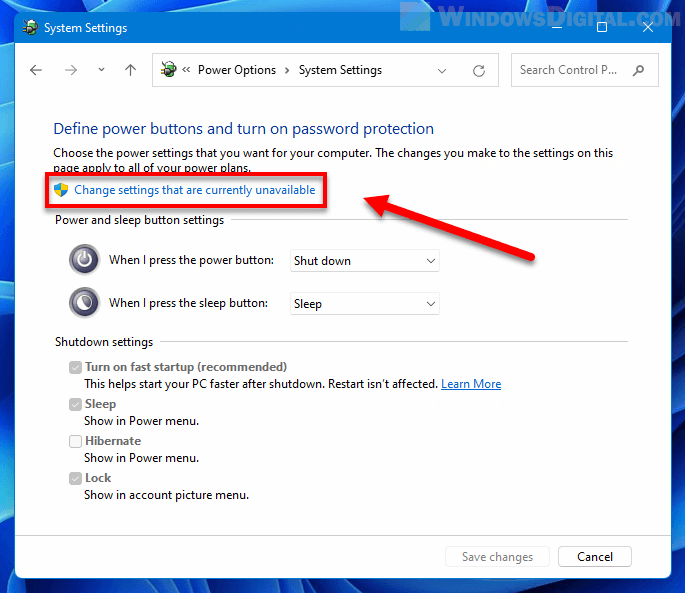
Power Options
"Change settings that are currently unavailable"
(which is a transitory state sfter switching on hiberfile,
and the menu having hibernation added to it as an option)
This is the interface that allows adding Hibernation to the
shutdown menu. To do this from the registry, is an actual bitch
(there are a couple hundred registry settings that control power states). While people have written up procedures for doing things that way,
it's not a common topic of discussion.
https://us1.discourse-cdn.com/spiceworks/optimized/4X/0/0/f/00ffd4fb8a2219c82c8e1897f64242d8ab94932b_2_690x409.png
If you have a hiberfil.sys and no Hibernate in the menu, then that is a likely state that the APC created. As that is the materials
it needs for the thing to work.
Paul
Paul wrote on 1/24/2026 10:16 PM:
On Sat, 1/24/2026 11:26 PM, Jeff Barnett wrote:
On 1/24/2026 7:23 PM, Paul wrote:
On Sat, 1/24/2026 8:29 PM, Jeff Barnett wrote:Paul, the power plan/profile that I've selected specifies "never" for hibernate. However, there is a ~27GB hiberfil.sys for my 64GB memory on the C disk. I presume that the APC software ensures that such a file exists and knows how to flip bits in the header to inform the BIOS that this is a hibernate. There was no hiberfil.sys with the "same" software and power plan/profile on my prior Windows 7 machines so I assume the necessary structures were consed when needed. I believe that APC takes responsibility to ensure this all works properly - I believe the majority of their users are office works using company machines. It would be lunacy on their part to expect them to know how to dick around with power plans, etc. In fact, their IT department has locked them out of anything at all interesting.
On 1/24/2026 5:37 PM, ...w¤?ñ?¤ wrote:
Jeff Barnett wrote on 1/24/2026 12:56 PM:
On 1/24/2026 10:07 AM, ...w¤?ñ?¤ wrote:
Jeff Barnett wrote on 1/24/2026 9:07 AM:
On 1/23/2026 12:44 AM, ...w¤?ñ?¤ wrote:
micky wrote on 1/22/2026 4:26 PM:I have Hibernation set to never in my power profile. However, I have an APC UPS that will hibernate the machine in case of an extended power outage; in other words, the APC software is able to work around that setting. Does this setup change anything said in this thread so far?
I suppose most of the readers of these newsgroups know that for a full
start from scratch it's required to run Restart, instead of Shutdown
followed by starting later.ÿ Even though I only learned this a year ago
and even though it's a bit counter-intuitive, you all know that, right,
(because if you're running with Fast Startup*** shutdown saves the >>>>>>>>>>> kernel and reuses it, but Restart never uses Fast Startup and it >>>>>>>>>>> rebuilds the kernel, with new values if the values have changed). >>>>>>>>>>>
But maybe you did not know that you can get the benefit of Restart and
still turn your machine off if you press Shift while clicking on >>>>>>>>>>> Shutdown.ÿÿ How about that!!
If Hibernation (and by extension, Fast Startup) is disabled (e.g., via powercfg -h off), the "Shutdown" button functions as a full, traditional shutdown - clears the system state(shuts down all processes) and clears temp memory and powers Off. Subsequent Powering on, re-initializes the o/s
ÿÿÿÿ- which, incidentally is the same results as Shift-Shutdown. >>>>>>>>>> ÿÿÿÿi.e. you don't need to the keystroke combo if Hibernation is disabled.
Restart(when Hiberation is disabled) does the exact same clearing but instead of shutting down, powers the device back on and re- initializes the o/s.
Afaik, the UPS Hibernation feature requires enabling Windows hibernation.
ÿÿÿÿi.e. When a power outage occurs, the UPS has to communicate with Windows and validate Windows hibernation state(enabled/disabled), if enabled instruct Windows to hibernate, once done the UPS provides backup battery power for the duration of its capability.
Lacking Windows hibernation, the UPS only provides battery power for the device(and Windows) for the duration of its backup battery capability.
ÿÿÿÿ - no Windows hibernation
I've not enabled hibernation (as said above) but the APC software seems to be able to do it anyway. Perhaps it changes the power profile when necessary. I remember one of the disk tester/diagnostic packages that turned sleep off when it was called and never bothered to restore it on its way out. So there is certainly some way to diddle the settings.
See Paul's response, that echo's my input.
ÿÿÿÿ=> Hibernation needs to be enabled in Windows.
I believe (from my own experience) that Paul is incorrect in this specific case. The APC software (OS level stuff) can when it decides it's time to shutdown because of battery drain, etc, can arrange that hibernation works whether the user has enabled it or not. I've noted it's happening a few times.
I think there has to be a hiberfile (C:\hiberfil.sys) and
it is typically equal in size to 50% of memory or a larger
percentage. Via compression, the RAM content written out to
the hiberfile is smaller than the physical size. Most sessions
on Windows are quite small, so only a fraction of the reserved
hiberfile space is used.
ÿÿÿÿ powercfg /aÿÿÿÿ # check supported ACPI states.
ÿÿÿÿÿÿÿÿÿÿÿÿÿÿÿÿÿÿÿÿ # Hibernation is S4. Mine is disabled right now.
ÿÿÿÿÿÿÿÿÿÿÿÿÿÿÿÿÿÿÿÿ # Aÿÿ shutdown /hÿÿ would generate an error of some sort.
ÿÿÿÿ powercfg /h onÿ # Add Hibernation, then verify with the first command >>>> ÿÿÿÿÿÿÿÿÿÿÿÿÿÿÿÿÿÿÿÿ # Check for hidden file on the root of C: with dir /ah in command prompt
There is also some procedure at startup, which may be writing
something to the header of the hiberfile. The hiberfile is "invalidated" >>>> as part of startup, such that it cannot be reused immediately to
restore the same session ("like it was GroundHog day").
Otherwise, without using the hibernation feature, little in the
way of wear, happens because of the existence of the hiberfile.
If you were installing the APC software, it is possible there is
sufficient elevation at install time, for the APC software to be
using powercfg and switching the hiberfile on and reserving the
necessary space.
Once the hiberfile exists, the normal set of system commands
should work, to generate a hiberfile. The command from the UPS
should be terse -- it isn't always a super-intelligent processing
thing. Any application loaded into the host OS, has to do the
more intelligent part. The UPS should not be sending this
command, as written. That would be an exploit waiting to happen.
ÿÿÿÿ shutdown /h
I don't think there is a way, to tell who did that :-)
You could check the Event Viewer, for the evidence, but I don't
know if it identifies the executable that is doing it.
In any case, the weird hiberfil.sys size, suggests Windows
didn't do that. I thought 50% was a "popular" Windows choice.
While there are ways to select custom percentages, there is
likely to be some lower limit on size choice.
And dicking around with power plans, is what is expected of you :-)
Really. I expect everyone here, has had a kick at that can,
at some point. That would be this stuff. People multi-booting,
need to disable Fast Startup for example.
ÿÿÿÿ Power Options
ÿÿÿÿ "Change settings that are currently unavailable"
ÿÿÿÿÿ (which is a transitory state sfter switching on hiberfile,
ÿÿÿÿÿÿ and the menu having hibernation added to it as an option)
This is the interface that allows adding Hibernation to the
shutdown menu. To do this from the registry, is an actual bitch
(there are a couple hundred registry settings that control power states).
While people have written up procedures for doing things that way,
it's not a common topic of discussion.
ÿÿÿ https://us1.discourse-cdn.com/spiceworks/optimized/4X/0/0/f/00ffd4fb8a2219c82c8e1897f64242d8ab94932b_2_690x409.png
If you have a hiberfil.sys and no Hibernate in the menu, then that is a
likely state that the APC created. As that is the materials
it needs for the thing to work.
ÿÿÿÿÿ Paul
After reading Jeff's and your reply...I noticed two items that seem to point to more info or comments needed.
Jeff stated - Power Plan profile specifies never for 'Hibernate'
ÿThat doesn't necessarily imply that hibernate was turned off, only that the Power Plan profile has a never Hibernate option.
- Afaics, the only option for 'never' hibernate exists in the Power Options(Balanced or Performance) profile in the Sleep category
ÿ* Hibernate after (On Battery or Plugged in)
ÿ* HIbernate appears in a Power profile under the Battery settings(Critical Battery action and Low Battery action) where 'Hibernate' is an option - the choice of 'Never' does not exist{Note: Low Battery action does contain a 'Do nothing' choice.
This device has 24GB RAM...a 50% hibernate would be around 12 GB.
ÿ- with hibernate enabled on this device, the hiberfil.sys is 4.7GB(~20%)...Jeff reported 27 GB for 64GB RAM(42%).
I'm still of the position that
a. if a hiberfil.sys exists, not mattering how it was created(Windows, user enabled, UPS Power unit), then Windows should show hibernation as being enabled via a admin Powershell or Command.com panel regardless of the presence of a 'Never' setting(somewhere in the Power Plan profile)
ÿ powercfg /a
and
b. if a hiberfile.sys exists, 'Hibernate' may/should also be present in the Power Options 'Choose what the power buttons do' settings(along with the options for Fast Startup, Sleep, Lock'.
Paul wrote on 1/24/2026 10:16 PM:Since multiple power plans are defined and only one is selected, a few observations are in order: 1) some plans may specify hibernate and
On Sat, 1/24/2026 11:26 PM, Jeff Barnett wrote:
On 1/24/2026 7:23 PM, Paul wrote:
On Sat, 1/24/2026 8:29 PM, Jeff Barnett wrote:Paul, the power plan/profile that I've selected specifies "never" for
On 1/24/2026 5:37 PM, ...w¤?ñ?¤ wrote:
Jeff Barnett wrote on 1/24/2026 12:56 PM:
On 1/24/2026 10:07 AM, ...w¤?ñ?¤ wrote:
Jeff Barnett wrote on 1/24/2026 9:07 AM:
On 1/23/2026 12:44 AM, ...w¤?ñ?¤ wrote:
micky wrote on 1/22/2026 4:26 PM:I have Hibernation set to never in my power profile. However, I >>>>>>>>> have an APC UPS that will hibernate the machine in case of an >>>>>>>>> extended power outage; in other words, the APC software is able >>>>>>>>> to work around that setting. Does this setup change anything >>>>>>>>> said in this thread so far?
I suppose most of the readers of these newsgroups know that >>>>>>>>>>> for a full
start from scratch it's required to run Restart, instead of >>>>>>>>>>> Shutdown
followed by starting later.ÿ Even though I only learned this >>>>>>>>>>> a year ago
and even though it's a bit counter-intuitive, you all know >>>>>>>>>>> that, right,
(because if you're running with Fast Startup*** shutdown >>>>>>>>>>> saves the
kernel and reuses it, but Restart never uses Fast Startup and it >>>>>>>>>>> rebuilds the kernel, with new values if the values have >>>>>>>>>>> changed).
But maybe you did not know that you can get the benefit of >>>>>>>>>>> Restart and
still turn your machine off if you press Shift while clicking on >>>>>>>>>>> Shutdown.ÿÿ How about that!!
If Hibernation (and by extension, Fast Startup) is disabled >>>>>>>>>> (e.g., via powercfg -h off), the "Shutdown" button functions >>>>>>>>>> as a full, traditional shutdown - clears the system
state(shuts down all processes) and clears temp memory and >>>>>>>>>> powers Off. Subsequent Powering on, re-initializes the o/s >>>>>>>>>> ÿÿÿÿ- which, incidentally is the same results as Shift-Shutdown. >>>>>>>>>> ÿÿÿÿi.e. you don't need to the keystroke combo if Hibernation >>>>>>>>>> is disabled.
Restart(when Hiberation is disabled) does the exact same
clearing but instead of shutting down, powers the device back >>>>>>>>>> on and re- initializes the o/s.
Afaik, the UPS Hibernation feature requires enabling Windows
hibernation.
ÿÿÿÿi.e. When a power outage occurs, the UPS has to communicate >>>>>>>> with Windows and validate Windows hibernation state(enabled/
disabled), if enabled instruct Windows to hibernate, once done >>>>>>>> the UPS provides backup battery power for the duration of its >>>>>>>> capability.
Lacking Windows hibernation, the UPS only provides battery power >>>>>>>> for the device(and Windows) for the duration of its backup
battery capability.
ÿÿÿÿ - no Windows hibernation
I've not enabled hibernation (as said above) but the APC software >>>>>>> seems to be able to do it anyway. Perhaps it changes the power
profile when necessary. I remember one of the disk tester/
diagnostic packages that turned sleep off when it was called and >>>>>>> never bothered to restore it on its way out. So there is
certainly some way to diddle the settings.
See Paul's response, that echo's my input.
ÿÿÿÿ=> Hibernation needs to be enabled in Windows.
I believe (from my own experience) that Paul is incorrect in this
specific case. The APC software (OS level stuff) can when it
decides it's time to shutdown because of battery drain, etc, can
arrange that hibernation works whether the user has enabled it or
not. I've noted it's happening a few times.
I think there has to be a hiberfile (C:\hiberfil.sys) and
it is typically equal in size to 50% of memory or a larger
percentage. Via compression, the RAM content written out to
the hiberfile is smaller than the physical size. Most sessions
on Windows are quite small, so only a fraction of the reserved
hiberfile space is used.
ÿÿÿÿ powercfg /aÿÿÿÿ # check supported ACPI states.
ÿÿÿÿÿÿÿÿÿÿÿÿÿÿÿÿÿÿÿÿ # Hibernation is S4. Mine is disabled right now.
ÿÿÿÿÿÿÿÿÿÿÿÿÿÿÿÿÿÿÿÿ # Aÿÿ shutdown /hÿÿ would generate an error of
some sort.
ÿÿÿÿ powercfg /h onÿ # Add Hibernation, then verify with the first
command
ÿÿÿÿÿÿÿÿÿÿÿÿÿÿÿÿÿÿÿÿ # Check for hidden file on the root of C: with
dir /ah in command prompt
There is also some procedure at startup, which may be writing
something to the header of the hiberfile. The hiberfile is
"invalidated"
as part of startup, such that it cannot be reused immediately to
restore the same session ("like it was GroundHog day").
Otherwise, without using the hibernation feature, little in the
way of wear, happens because of the existence of the hiberfile.
If you were installing the APC software, it is possible there is
sufficient elevation at install time, for the APC software to be
using powercfg and switching the hiberfile on and reserving the
necessary space.
Once the hiberfile exists, the normal set of system commands
should work, to generate a hiberfile. The command from the UPS
should be terse -- it isn't always a super-intelligent processing
thing. Any application loaded into the host OS, has to do the
more intelligent part. The UPS should not be sending this
command, as written. That would be an exploit waiting to happen.
ÿÿÿÿ shutdown /h
hibernate. However, there is a ~27GB hiberfil.sys for my 64GB memory
on the C disk. I presume that the APC software ensures that such a
file exists and knows how to flip bits in the header to inform the
BIOS that this is a hibernate. There was no hiberfil.sys with the
"same" software and power plan/profile on my prior Windows 7 machines
so I assume the necessary structures were consed when needed. I
believe that APC takes responsibility to ensure this all works
properly - I believe the majority of their users are office works
using company machines. It would be lunacy on their part to expect
them to know how to dick around with power plans, etc. In fact, their
IT department has locked them out of anything at all interesting.
I don't think there is a way, to tell who did that :-)
You could check the Event Viewer, for the evidence, but I don't
know if it identifies the executable that is doing it.
In any case, the weird hiberfil.sys size, suggests Windows
didn't do that. I thought 50% was a "popular" Windows choice.
While there are ways to select custom percentages, there is
likely to be some lower limit on size choice.
And dicking around with power plans, is what is expected of you :-)
Really. I expect everyone here, has had a kick at that can,
at some point. That would be this stuff. People multi-booting,
need to disable Fast Startup for example.
ÿÿÿÿ Power Options
ÿÿÿÿ "Change settings that are currently unavailable"
ÿÿÿÿÿ (which is a transitory state sfter switching on hiberfile,
ÿÿÿÿÿÿ and the menu having hibernation added to it as an option)
This is the interface that allows adding Hibernation to the
shutdown menu. To do this from the registry, is an actual bitch
(there are a couple hundred registry settings that control power states).
While people have written up procedures for doing things that way,
it's not a common topic of discussion.
ÿÿÿ https://us1.discourse-cdn.com/spiceworks/optimized/4X/0/0/
f/00ffd4fb8a2219c82c8e1897f64242d8ab94932b_2_690x409.png
If you have a hiberfil.sys and no Hibernate in the menu, then that is a
likely state that the APC created. As that is the materials
it needs for the thing to work.
ÿÿÿÿÿ Paul
After reading Jeff's and your reply...I noticed two items that seem to
point to more info or comments needed.
Jeff stated - Power Plan profile specifies never for 'Hibernate'
ÿThat doesn't necessarily imply that hibernate was turned off, only
that the Power Plan profile has a never Hibernate option.
- Afaics, the only option for 'never' hibernate exists in the Power Options(Balanced or Performance) profile in the Sleep category
ÿ* Hibernate after (On Battery or Plugged in)
ÿ* HIbernate appears in a Power profile under the Battery
settings(Critical Battery action and Low Battery action) where
'Hibernate' is an option - the choice of 'Never' does not exist{Note:
Low Battery action does contain a 'Do nothing' choice.
This device has 24GB RAM...a 50% hibernate would be around 12 GB.
ÿ- with hibernate enabled on this device, the hiberfil.sys is 4.7GB(~20%)...Jeff reported 27 GB for 64GB RAM(42%).
I'm still of the position that
a. if a hiberfil.sys exists, not mattering how it was created(Windows,
user enabled, UPS Power unit), then Windows should show hibernation as
being enabled via a admin Powershell or Command.com panel regardless of
the presence of a 'Never' setting(somewhere in the Power Plan profile)
ÿ powercfg /a
and
b. if a hiberfile.sys exists, 'Hibernate' may/should also be present in
the Power Options 'Choose what the power buttons do' settings(along with
the options for Fast Startup, Sleep, Lock'.
On Sun, 1/25/2026 1:05 AM, ...w¤?ñ?¤ wrote:
Paul wrote on 1/24/2026 10:16 PM:
On Sat, 1/24/2026 11:26 PM, Jeff Barnett wrote:
On 1/24/2026 7:23 PM, Paul wrote:
On Sat, 1/24/2026 8:29 PM, Jeff Barnett wrote:Paul, the power plan/profile that I've selected specifies "never" for hibernate. However, there is a ~27GB hiberfil.sys for my 64GB memory on the C disk. I presume that the APC software ensures that such a file exists and knows how to flip bits in the header to inform the BIOS that this is a hibernate. There was no hiberfil.sys with the "same" software and power plan/profile on my prior Windows 7 machines so I assume the necessary structures were consed when needed. I believe that APC takes responsibility to ensure this all works properly - I believe the majority of their users are office works using company machines. It would be lunacy on their part to expect them to know how to dick around with power plans, etc. In fact, their IT department has locked them out of anything at all interesting.
On 1/24/2026 5:37 PM, ...w¤?ñ?¤ wrote:
Jeff Barnett wrote on 1/24/2026 12:56 PM:
On 1/24/2026 10:07 AM, ...w¤?ñ?¤ wrote:
Jeff Barnett wrote on 1/24/2026 9:07 AM:
On 1/23/2026 12:44 AM, ...w¤?ñ?¤ wrote:
micky wrote on 1/22/2026 4:26 PM:I have Hibernation set to never in my power profile. However, I have an APC UPS that will hibernate the machine in case of an extended power outage; in other words, the APC software is able to work around that setting. Does this setup change anything said in this thread so far?
I suppose most of the readers of these newsgroups know that for a full
start from scratch it's required to run Restart, instead of Shutdown
followed by starting later.ÿ Even though I only learned this a year ago
and even though it's a bit counter-intuitive, you all know that, right,
(because if you're running with Fast Startup*** shutdown saves the >>>>>>>>>>>> kernel and reuses it, but Restart never uses Fast Startup and it >>>>>>>>>>>> rebuilds the kernel, with new values if the values have changed). >>>>>>>>>>>>
But maybe you did not know that you can get the benefit of Restart and
still turn your machine off if you press Shift while clicking on >>>>>>>>>>>> Shutdown.ÿÿ How about that!!
If Hibernation (and by extension, Fast Startup) is disabled (e.g., via powercfg -h off), the "Shutdown" button functions as a full, traditional shutdown - clears the system state(shuts down all processes) and clears temp memory and powers Off. Subsequent Powering on, re-initializes the o/s
ÿÿÿÿ- which, incidentally is the same results as Shift-Shutdown. >>>>>>>>>>> ÿÿÿÿi.e. you don't need to the keystroke combo if Hibernation is disabled.
Restart(when Hiberation is disabled) does the exact same clearing but instead of shutting down, powers the device back on and re- initializes the o/s.
Afaik, the UPS Hibernation feature requires enabling Windows hibernation.
ÿÿÿÿi.e. When a power outage occurs, the UPS has to communicate with Windows and validate Windows hibernation state(enabled/disabled), if enabled instruct Windows to hibernate, once done the UPS provides backup battery power for the duration of its capability.
Lacking Windows hibernation, the UPS only provides battery power for the device(and Windows) for the duration of its backup battery capability.
ÿÿÿÿ - no Windows hibernation
I've not enabled hibernation (as said above) but the APC software seems to be able to do it anyway. Perhaps it changes the power profile when necessary. I remember one of the disk tester/diagnostic packages that turned sleep off when it was called and never bothered to restore it on its way out. So there is certainly some way to diddle the settings.
See Paul's response, that echo's my input.
ÿÿÿÿ=> Hibernation needs to be enabled in Windows.
I believe (from my own experience) that Paul is incorrect in this specific case. The APC software (OS level stuff) can when it decides it's time to shutdown because of battery drain, etc, can arrange that hibernation works whether the user has enabled it or not. I've noted it's happening a few times.
I think there has to be a hiberfile (C:\hiberfil.sys) and
it is typically equal in size to 50% of memory or a larger
percentage. Via compression, the RAM content written out to
the hiberfile is smaller than the physical size. Most sessions
on Windows are quite small, so only a fraction of the reserved
hiberfile space is used.
ÿÿÿÿ powercfg /aÿÿÿÿ # check supported ACPI states.
ÿÿÿÿÿÿÿÿÿÿÿÿÿÿÿÿÿÿÿÿ # Hibernation is S4. Mine is disabled right now. >>>>> ÿÿÿÿÿÿÿÿÿÿÿÿÿÿÿÿÿÿÿÿ # Aÿÿ shutdown /hÿÿ would generate an error of some sort.
ÿÿÿÿ powercfg /h onÿ # Add Hibernation, then verify with the first command
ÿÿÿÿÿÿÿÿÿÿÿÿÿÿÿÿÿÿÿÿ # Check for hidden file on the root of C: with dir /ah in command prompt
There is also some procedure at startup, which may be writing
something to the header of the hiberfile. The hiberfile is "invalidated" >>>>> as part of startup, such that it cannot be reused immediately to
restore the same session ("like it was GroundHog day").
Otherwise, without using the hibernation feature, little in the
way of wear, happens because of the existence of the hiberfile.
If you were installing the APC software, it is possible there is
sufficient elevation at install time, for the APC software to be
using powercfg and switching the hiberfile on and reserving the
necessary space.
Once the hiberfile exists, the normal set of system commands
should work, to generate a hiberfile. The command from the UPS
should be terse -- it isn't always a super-intelligent processing
thing. Any application loaded into the host OS, has to do the
more intelligent part. The UPS should not be sending this
command, as written. That would be an exploit waiting to happen.
ÿÿÿÿ shutdown /h
I don't think there is a way, to tell who did that :-)
You could check the Event Viewer, for the evidence, but I don't
know if it identifies the executable that is doing it.
In any case, the weird hiberfil.sys size, suggests Windows
didn't do that. I thought 50% was a "popular" Windows choice.
While there are ways to select custom percentages, there is
likely to be some lower limit on size choice.
And dicking around with power plans, is what is expected of you :-)
Really. I expect everyone here, has had a kick at that can,
at some point. That would be this stuff. People multi-booting,
need to disable Fast Startup for example.
ÿÿÿÿ Power Options
ÿÿÿÿ "Change settings that are currently unavailable"
ÿÿÿÿÿ (which is a transitory state sfter switching on hiberfile,
ÿÿÿÿÿÿ and the menu having hibernation added to it as an option)
This is the interface that allows adding Hibernation to the
shutdown menu. To do this from the registry, is an actual bitch
(there are a couple hundred registry settings that control power states). >>> While people have written up procedures for doing things that way,
it's not a common topic of discussion.
ÿÿÿ https://us1.discourse-cdn.com/spiceworks/optimized/4X/0/0/f/00ffd4fb8a2219c82c8e1897f64242d8ab94932b_2_690x409.png
If you have a hiberfil.sys and no Hibernate in the menu, then that is a
likely state that the APC created. As that is the materials
it needs for the thing to work.
ÿÿÿÿÿ Paul
After reading Jeff's and your reply...I noticed two items that seem to point to more info or comments needed.
Jeff stated - Power Plan profile specifies never for 'Hibernate'
ÿThat doesn't necessarily imply that hibernate was turned off, only that the Power Plan profile has a never Hibernate option.
- Afaics, the only option for 'never' hibernate exists in the Power Options(Balanced or Performance) profile in the Sleep category
ÿ* Hibernate after (On Battery or Plugged in)
ÿ* HIbernate appears in a Power profile under the Battery settings(Critical Battery action and Low Battery action) where 'Hibernate' is an option - the choice of 'Never' does not exist{Note: Low Battery action does contain a 'Do nothing' choice.
This device has 24GB RAM...a 50% hibernate would be around 12 GB.
ÿ- with hibernate enabled on this device, the hiberfil.sys is 4.7GB(~20%)...Jeff reported 27 GB for 64GB RAM(42%).
I'm still of the position that
a. if a hiberfil.sys exists, not mattering how it was created(Windows, user enabled, UPS Power unit), then Windows should show hibernation as being enabled via a admin Powershell or Command.com panel regardless of the presence of a 'Never' setting(somewhere in the Power Plan profile)
ÿ powercfg /a
and
b. if a hiberfile.sys exists, 'Hibernate' may/should also be present in the Power Options 'Choose what the power buttons do' settings(along with the options for Fast Startup, Sleep, Lock'.
Powercfg /a
would indicate whether the "state" is ready. And it can beJeff Barnett
that way, without being added to a menu. And with the
"state" indicating approval, an application should be able
to access the state.
If you just have a hiberfil.sys (like if I make one right now
manually with fsutil or something), then that alone is not
enough to support hibernation as the APC utility is likely
to call a system routine that relies on the Registry for
its integrity. Writing out the hiberfile, has to be done
with the APC software "neutered", the execution state
of any normal thing must be in "stasis" while the hiberfile
is being filled up.
So Powercfg /a right now, should be admitting to "S4 support".
If my S4 is operational, I should be able to do
shutdown /h
even though my shutdown menu has no entry for that.
If I just create a hiberfil.sys file in C: as a bodge,
then shutdown /h will find there is no authorized S4 state.--
On 1/25/2026 12:23 AM, Paul wrote:
Powercfg /a
I think the above command tells what the motherboard supports, not what
is enabled. For example, I have not enabled fast boot in the BIOS but
that command shows it as possible.
Jeff Barnett
On 1/24/2026 11:05 PM, ...w¤?ñ?¤ wrote:
Paul wrote on 1/24/2026 10:16 PM:Since multiple power plans are defined and only one is selected, a few observations are in order: 1) some plans may specify hibernate and others may not and 2) just because the selected plan has not elected to enable hibernate does not mean that hiberfil.sys need not be available - a program or user can change the profile in use at any time or modify a plan's parameters. So the OSÿ must be rather loosey-goosey with the management of all this stuff.
On Sat, 1/24/2026 11:26 PM, Jeff Barnett wrote:
On 1/24/2026 7:23 PM, Paul wrote:
On Sat, 1/24/2026 8:29 PM, Jeff Barnett wrote:Paul, the power plan/profile that I've selected specifies "never" for hibernate. However, there is a ~27GB hiberfil.sys for my 64GB memory on the C disk. I presume that the APC software ensures that such a file exists and knows how to flip bits in the header to inform the BIOS that this is a hibernate. There was no hiberfil.sys with the "same" software and power plan/profile on my prior Windows 7 machines so I assume the necessary structures were consed when needed. I believe that APC takes responsibility to ensure this all works properly - I believe the majority of their users are office works using company machines. It would be lunacy on their part to expect them to know how to dick around with power plans, etc. In fact, their IT department has locked them out of anything at all interesting.
On 1/24/2026 5:37 PM, ...w¤?ñ?¤ wrote:
Jeff Barnett wrote on 1/24/2026 12:56 PM:
On 1/24/2026 10:07 AM, ...w¤?ñ?¤ wrote:
Jeff Barnett wrote on 1/24/2026 9:07 AM:
On 1/23/2026 12:44 AM, ...w¤?ñ?¤ wrote:
micky wrote on 1/22/2026 4:26 PM:I have Hibernation set to never in my power profile. However, I have an APC UPS that will hibernate the machine in case of an extended power outage; in other words, the APC software is able to work around that setting. Does this setup change anything said in this thread so far?
I suppose most of the readers of these newsgroups know that for a full
start from scratch it's required to run Restart, instead of Shutdown
followed by starting later.ÿ Even though I only learned this a year ago
and even though it's a bit counter-intuitive, you all know that, right,
(because if you're running with Fast Startup*** shutdown saves the >>>>>>>>>>>> kernel and reuses it, but Restart never uses Fast Startup and it >>>>>>>>>>>> rebuilds the kernel, with new values if the values have changed). >>>>>>>>>>>>
But maybe you did not know that you can get the benefit of Restart and
still turn your machine off if you press Shift while clicking on >>>>>>>>>>>> Shutdown.ÿÿ How about that!!
If Hibernation (and by extension, Fast Startup) is disabled (e.g., via powercfg -h off), the "Shutdown" button functions as a full, traditional shutdown - clears the system state(shuts down all processes) and clears temp memory and powers Off. Subsequent Powering on, re-initializes the o/s
ÿÿÿÿ- which, incidentally is the same results as Shift-Shutdown. >>>>>>>>>>> ÿÿÿÿi.e. you don't need to the keystroke combo if Hibernation is disabled.
Restart(when Hiberation is disabled) does the exact same clearing but instead of shutting down, powers the device back on and re- initializes the o/s.
Afaik, the UPS Hibernation feature requires enabling Windows hibernation.
ÿÿÿÿi.e. When a power outage occurs, the UPS has to communicate with Windows and validate Windows hibernation state(enabled/ disabled), if enabled instruct Windows to hibernate, once done the UPS provides backup battery power for the duration of its capability.
Lacking Windows hibernation, the UPS only provides battery power for the device(and Windows) for the duration of its backup battery capability.
ÿÿÿÿ - no Windows hibernation
I've not enabled hibernation (as said above) but the APC software seems to be able to do it anyway. Perhaps it changes the power profile when necessary. I remember one of the disk tester/ diagnostic packages that turned sleep off when it was called and never bothered to restore it on its way out. So there is certainly some way to diddle the settings.
See Paul's response, that echo's my input.
ÿÿÿÿ=> Hibernation needs to be enabled in Windows.
I believe (from my own experience) that Paul is incorrect in this specific case. The APC software (OS level stuff) can when it decides it's time to shutdown because of battery drain, etc, can arrange that hibernation works whether the user has enabled it or not. I've noted it's happening a few times.
I think there has to be a hiberfile (C:\hiberfil.sys) and
it is typically equal in size to 50% of memory or a larger
percentage. Via compression, the RAM content written out to
the hiberfile is smaller than the physical size. Most sessions
on Windows are quite small, so only a fraction of the reserved
hiberfile space is used.
ÿÿÿÿ powercfg /aÿÿÿÿ # check supported ACPI states.
ÿÿÿÿÿÿÿÿÿÿÿÿÿÿÿÿÿÿÿÿ # Hibernation is S4. Mine is disabled right now. >>>>> ÿÿÿÿÿÿÿÿÿÿÿÿÿÿÿÿÿÿÿÿ # Aÿÿ shutdown /hÿÿ would generate an error of some sort.
ÿÿÿÿ powercfg /h onÿ # Add Hibernation, then verify with the first command
ÿÿÿÿÿÿÿÿÿÿÿÿÿÿÿÿÿÿÿÿ # Check for hidden file on the root of C: with dir /ah in command prompt
There is also some procedure at startup, which may be writing
something to the header of the hiberfile. The hiberfile is "invalidated" >>>>> as part of startup, such that it cannot be reused immediately to
restore the same session ("like it was GroundHog day").
Otherwise, without using the hibernation feature, little in the
way of wear, happens because of the existence of the hiberfile.
If you were installing the APC software, it is possible there is
sufficient elevation at install time, for the APC software to be
using powercfg and switching the hiberfile on and reserving the
necessary space.
Once the hiberfile exists, the normal set of system commands
should work, to generate a hiberfile. The command from the UPS
should be terse -- it isn't always a super-intelligent processing
thing. Any application loaded into the host OS, has to do the
more intelligent part. The UPS should not be sending this
command, as written. That would be an exploit waiting to happen.
ÿÿÿÿ shutdown /h
I don't think there is a way, to tell who did that :-)
You could check the Event Viewer, for the evidence, but I don't
know if it identifies the executable that is doing it.
In any case, the weird hiberfil.sys size, suggests Windows
didn't do that. I thought 50% was a "popular" Windows choice.
While there are ways to select custom percentages, there is
likely to be some lower limit on size choice.
And dicking around with power plans, is what is expected of you :-)
Really. I expect everyone here, has had a kick at that can,
at some point. That would be this stuff. People multi-booting,
need to disable Fast Startup for example.
ÿÿÿÿ Power Options
ÿÿÿÿ "Change settings that are currently unavailable"
ÿÿÿÿÿ (which is a transitory state sfter switching on hiberfile,
ÿÿÿÿÿÿ and the menu having hibernation added to it as an option)
This is the interface that allows adding Hibernation to the
shutdown menu. To do this from the registry, is an actual bitch
(there are a couple hundred registry settings that control power states). >>> While people have written up procedures for doing things that way,
it's not a common topic of discussion.
ÿÿÿ https://us1.discourse-cdn.com/spiceworks/optimized/4X/0/0/ f/00ffd4fb8a2219c82c8e1897f64242d8ab94932b_2_690x409.png
If you have a hiberfil.sys and no Hibernate in the menu, then that is a
likely state that the APC created. As that is the materials
it needs for the thing to work.
ÿÿÿÿÿ Paul
After reading Jeff's and your reply...I noticed two items that seem to point to more info or comments needed.
Jeff stated - Power Plan profile specifies never for 'Hibernate'
ÿÿThat doesn't necessarily imply that hibernate was turned off, only that the Power Plan profile has a never Hibernate option.
- Afaics, the only option for 'never' hibernate exists in the Power Options(Balanced or Performance) profile in the Sleep category
ÿÿ* Hibernate after (On Battery or Plugged in)
ÿÿ* HIbernate appears in a Power profile under the Battery settings(Critical Battery action and Low Battery action) where 'Hibernate' is an option - the choice of 'Never' does not exist{Note: Low Battery action does contain a 'Do nothing' choice.
This device has 24GB RAM...a 50% hibernate would be around 12 GB.
ÿÿ- with hibernate enabled on this device, the hiberfil.sys is 4.7GB(~20%)...Jeff reported 27 GB for 64GB RAM(42%).
I'm still of the position that
a. if a hiberfil.sys exists, not mattering how it was created(Windows, user enabled, UPS Power unit), then Windows should show hibernation as being enabled via a admin Powershell or Command.com panel regardless of the presence of a 'Never' setting(somewhere in the Power Plan profile)
ÿÿ powercfg /a
and
b. if a hiberfile.sys exists, 'Hibernate' may/should also be present in the Power Options 'Choose what the power buttons do' settings(along with the options for Fast Startup, Sleep, Lock'.
I must note that I have no special knowledge on this topic and haven't read any M$ papers on it. Therefore I might be full of shit. My knowledge is simply that of a user reasoning from observation and a limited amount of experimentation.
On 1/24/2026 11:05 PM, ...w¤?ñ?¤ wrote:
Paul wrote on 1/24/2026 10:16 PM:Since multiple power plans are defined and only one is selected, a few observations are in order: 1) some plans may specify hibernate and others may not and 2) just because the selected plan has not elected to enable hibernate does not mean that hiberfil.sys need not be available - a
On Sat, 1/24/2026 11:26 PM, Jeff Barnett wrote:
On 1/24/2026 7:23 PM, Paul wrote:
On Sat, 1/24/2026 8:29 PM, Jeff Barnett wrote:Paul, the power plan/profile that I've selected specifies "never" for >>>> hibernate. However, there is a ~27GB hiberfil.sys for my 64GB memory
On 1/24/2026 5:37 PM, ...w¤?ñ?¤ wrote:
Jeff Barnett wrote on 1/24/2026 12:56 PM:
On 1/24/2026 10:07 AM, ...w¤?ñ?¤ wrote:
Jeff Barnett wrote on 1/24/2026 9:07 AM:
On 1/23/2026 12:44 AM, ...w¤?ñ?¤ wrote:
micky wrote on 1/22/2026 4:26 PM:I have Hibernation set to never in my power profile. However, I >>>>>>>>>> have an APC UPS that will hibernate the machine in case of an >>>>>>>>>> extended power outage; in other words, the APC software is able >>>>>>>>>> to work around that setting. Does this setup change anything >>>>>>>>>> said in this thread so far?
I suppose most of the readers of these newsgroups know that >>>>>>>>>>>> for a full
start from scratch it's required to run Restart, instead of >>>>>>>>>>>> Shutdown
followed by starting later.ÿ Even though I only learned this >>>>>>>>>>>> a year ago
and even though it's a bit counter-intuitive, you all know >>>>>>>>>>>> that, right,
(because if you're running with Fast Startup*** shutdown >>>>>>>>>>>> saves the
kernel and reuses it, but Restart never uses Fast Startup and it >>>>>>>>>>>> rebuilds the kernel, with new values if the values have >>>>>>>>>>>> changed).
But maybe you did not know that you can get the benefit of >>>>>>>>>>>> Restart and
still turn your machine off if you press Shift while clicking on >>>>>>>>>>>> Shutdown.ÿÿ How about that!!
If Hibernation (and by extension, Fast Startup) is disabled >>>>>>>>>>> (e.g., via powercfg -h off), the "Shutdown" button functions >>>>>>>>>>> as a full, traditional shutdown - clears the system
state(shuts down all processes) and clears temp memory and >>>>>>>>>>> powers Off. Subsequent Powering on, re-initializes the o/s >>>>>>>>>>> ÿÿÿÿ- which, incidentally is the same results as Shift-Shutdown. >>>>>>>>>>> ÿÿÿÿi.e. you don't need to the keystroke combo if Hibernation >>>>>>>>>>> is disabled.
Restart(when Hiberation is disabled) does the exact same >>>>>>>>>>> clearing but instead of shutting down, powers the device back >>>>>>>>>>> on and re- initializes the o/s.
Afaik, the UPS Hibernation feature requires enabling Windows >>>>>>>>> hibernation.
ÿÿÿÿi.e. When a power outage occurs, the UPS has to communicate >>>>>>>>> with Windows and validate Windows hibernation state(enabled/ >>>>>>>>> disabled), if enabled instruct Windows to hibernate, once done >>>>>>>>> the UPS provides backup battery power for the duration of its >>>>>>>>> capability.
Lacking Windows hibernation, the UPS only provides battery power >>>>>>>>> for the device(and Windows) for the duration of its backup
battery capability.
ÿÿÿÿ - no Windows hibernation
I've not enabled hibernation (as said above) but the APC software >>>>>>>> seems to be able to do it anyway. Perhaps it changes the power >>>>>>>> profile when necessary. I remember one of the disk tester/
diagnostic packages that turned sleep off when it was called and >>>>>>>> never bothered to restore it on its way out. So there is
certainly some way to diddle the settings.
See Paul's response, that echo's my input.
ÿÿÿÿ=> Hibernation needs to be enabled in Windows.
I believe (from my own experience) that Paul is incorrect in this >>>>>> specific case. The APC software (OS level stuff) can when it
decides it's time to shutdown because of battery drain, etc, can
arrange that hibernation works whether the user has enabled it or >>>>>> not. I've noted it's happening a few times.
I think there has to be a hiberfile (C:\hiberfil.sys) and
it is typically equal in size to 50% of memory or a larger
percentage. Via compression, the RAM content written out to
the hiberfile is smaller than the physical size. Most sessions
on Windows are quite small, so only a fraction of the reserved
hiberfile space is used.
ÿÿÿÿ powercfg /aÿÿÿÿ # check supported ACPI states.
ÿÿÿÿÿÿÿÿÿÿÿÿÿÿÿÿÿÿÿÿ # Hibernation is S4. Mine is disabled right now. >>>>> ÿÿÿÿÿÿÿÿÿÿÿÿÿÿÿÿÿÿÿÿ # Aÿÿ shutdown /hÿÿ would generate an error of >>>>> some sort.
ÿÿÿÿ powercfg /h onÿ # Add Hibernation, then verify with the first
command
ÿÿÿÿÿÿÿÿÿÿÿÿÿÿÿÿÿÿÿÿ # Check for hidden file on the root of C: with >>>>> dir /ah in command prompt
There is also some procedure at startup, which may be writing
something to the header of the hiberfile. The hiberfile is
"invalidated"
as part of startup, such that it cannot be reused immediately to
restore the same session ("like it was GroundHog day").
Otherwise, without using the hibernation feature, little in the
way of wear, happens because of the existence of the hiberfile.
If you were installing the APC software, it is possible there is
sufficient elevation at install time, for the APC software to be
using powercfg and switching the hiberfile on and reserving the
necessary space.
Once the hiberfile exists, the normal set of system commands
should work, to generate a hiberfile. The command from the UPS
should be terse -- it isn't always a super-intelligent processing
thing. Any application loaded into the host OS, has to do the
more intelligent part. The UPS should not be sending this
command, as written. That would be an exploit waiting to happen.
ÿÿÿÿ shutdown /h
on the C disk. I presume that the APC software ensures that such a
file exists and knows how to flip bits in the header to inform the
BIOS that this is a hibernate. There was no hiberfil.sys with the
"same" software and power plan/profile on my prior Windows 7 machines >>>> so I assume the necessary structures were consed when needed. I
believe that APC takes responsibility to ensure this all works
properly - I believe the majority of their users are office works
using company machines. It would be lunacy on their part to expect
them to know how to dick around with power plans, etc. In fact, their >>>> IT department has locked them out of anything at all interesting.
I don't think there is a way, to tell who did that :-)
You could check the Event Viewer, for the evidence, but I don't
know if it identifies the executable that is doing it.
In any case, the weird hiberfil.sys size, suggests Windows
didn't do that. I thought 50% was a "popular" Windows choice.
While there are ways to select custom percentages, there is
likely to be some lower limit on size choice.
And dicking around with power plans, is what is expected of you :-)
Really. I expect everyone here, has had a kick at that can,
at some point. That would be this stuff. People multi-booting,
need to disable Fast Startup for example.
ÿÿÿÿ Power Options
ÿÿÿÿ "Change settings that are currently unavailable"
ÿÿÿÿÿ (which is a transitory state sfter switching on hiberfile,
ÿÿÿÿÿÿ and the menu having hibernation added to it as an option)
This is the interface that allows adding Hibernation to the
shutdown menu. To do this from the registry, is an actual bitch
(there are a couple hundred registry settings that control power states). >>> While people have written up procedures for doing things that way,
it's not a common topic of discussion.
ÿÿÿ https://us1.discourse-cdn.com/spiceworks/optimized/4X/0/0/
f/00ffd4fb8a2219c82c8e1897f64242d8ab94932b_2_690x409.png
If you have a hiberfil.sys and no Hibernate in the menu, then that is a
likely state that the APC created. As that is the materials
it needs for the thing to work.
ÿÿÿÿÿ Paul
After reading Jeff's and your reply...I noticed two items that seem to
point to more info or comments needed.
Jeff stated - Power Plan profile specifies never for 'Hibernate'
ÿÿThat doesn't necessarily imply that hibernate was turned off, only
that the Power Plan profile has a never Hibernate option.
- Afaics, the only option for 'never' hibernate exists in the Power
Options(Balanced or Performance) profile in the Sleep category
ÿÿ* Hibernate after (On Battery or Plugged in)
ÿÿ* HIbernate appears in a Power profile under the Battery
settings(Critical Battery action and Low Battery action) where
'Hibernate' is an option - the choice of 'Never' does not exist{Note:
Low Battery action does contain a 'Do nothing' choice.
This device has 24GB RAM...a 50% hibernate would be around 12 GB.
ÿÿ- with hibernate enabled on this device, the hiberfil.sys is
4.7GB(~20%)...Jeff reported 27 GB for 64GB RAM(42%).
I'm still of the position that
a. if a hiberfil.sys exists, not mattering how it was created(Windows,
user enabled, UPS Power unit), then Windows should show hibernation as
being enabled via a admin Powershell or Command.com panel regardless of
the presence of a 'Never' setting(somewhere in the Power Plan profile)
ÿÿ powercfg /a
and
b. if a hiberfile.sys exists, 'Hibernate' may/should also be present in
the Power Options 'Choose what the power buttons do' settings(along
with the options for Fast Startup, Sleep, Lock'.
program or user can change the profile in use at any time or modify a
plan's parameters. So the OSÿ must be rather loosey-goosey with the management of all this stuff.
I must note that I have no special knowledge on this topic and haven't
read any M$ papers on it. Therefore I might be full of shit. My knowledge
is simply that of a user reasoning from observation and a limited amount
of experimentation.
I think the above command tells what the motherboard supports, not what
is enabled. For example, I have not enabled fast boot in the BIOS but
that command shows it as possible.
The following sleep states are available on this system:
Standby (S3)
Hibernate
Hybrid Sleep
The following sleep states are not available on this system:
Standby (S1)
The system firmware does not support this standby state.
Standby (S2)
The system firmware does not support this standby state.
Standby (S0 Low Power Idle)
The system firmware does not support this standby state.
Fast Startup
This action is disabled in the current system policy.
Jeff Barnett wrote on 1/25/2026 1:55 AM:It seems that "powercfg /h off" is quite different to hibernate set to
On 1/24/2026 11:05 PM, ...w¤?ñ?¤ wrote:
Paul wrote on 1/24/2026 10:16 PM:Since multiple power plans are defined and only one is selected, a few
On Sat, 1/24/2026 11:26 PM, Jeff Barnett wrote:
On 1/24/2026 7:23 PM, Paul wrote:
On Sat, 1/24/2026 8:29 PM, Jeff Barnett wrote:Paul, the power plan/profile that I've selected specifies "never"
On 1/24/2026 5:37 PM, ...w¤?ñ?¤ wrote:
Jeff Barnett wrote on 1/24/2026 12:56 PM:
On 1/24/2026 10:07 AM, ...w¤?ñ?¤ wrote:
Jeff Barnett wrote on 1/24/2026 9:07 AM:
On 1/23/2026 12:44 AM, ...w¤?ñ?¤ wrote:
micky wrote on 1/22/2026 4:26 PM:I have Hibernation set to never in my power profile. However, >>>>>>>>>>> I have an APC UPS that will hibernate the machine in case of >>>>>>>>>>> an extended power outage; in other words, the APC software is >>>>>>>>>>> able to work around that setting. Does this setup change >>>>>>>>>>> anything said in this thread so far?
I suppose most of the readers of these newsgroups know that >>>>>>>>>>>>> for a full
start from scratch it's required to run Restart, instead of >>>>>>>>>>>>> Shutdown
followed by starting later.ÿ Even though I only learned >>>>>>>>>>>>> this a year ago
and even though it's a bit counter-intuitive, you all know >>>>>>>>>>>>> that, right,
(because if you're running with Fast Startup*** shutdown >>>>>>>>>>>>> saves the
kernel and reuses it, but Restart never uses Fast Startup >>>>>>>>>>>>> and it
rebuilds the kernel, with new values if the values have >>>>>>>>>>>>> changed).
But maybe you did not know that you can get the benefit of >>>>>>>>>>>>> Restart and
still turn your machine off if you press Shift while >>>>>>>>>>>>> clicking on
Shutdown.ÿÿ How about that!!
If Hibernation (and by extension, Fast Startup) is disabled >>>>>>>>>>>> (e.g., via powercfg -h off), the "Shutdown" button functions >>>>>>>>>>>> as a full, traditional shutdown - clears the system
state(shuts down all processes) and clears temp memory and >>>>>>>>>>>> powers Off. Subsequent Powering on, re-initializes the o/s >>>>>>>>>>>> ÿÿÿÿ- which, incidentally is the same results as Shift- >>>>>>>>>>>> Shutdown.
ÿÿÿÿi.e. you don't need to the keystroke combo if
Hibernation is disabled.
Restart(when Hiberation is disabled) does the exact same >>>>>>>>>>>> clearing but instead of shutting down, powers the device >>>>>>>>>>>> back on and re- initializes the o/s.
Afaik, the UPS Hibernation feature requires enabling Windows >>>>>>>>>> hibernation.
ÿÿÿÿi.e. When a power outage occurs, the UPS has to
communicate with Windows and validate Windows hibernation >>>>>>>>>> state(enabled/ disabled), if enabled instruct Windows to
hibernate, once done the UPS provides backup battery power for >>>>>>>>>> the duration of its capability.
Lacking Windows hibernation, the UPS only provides battery >>>>>>>>>> power for the device(and Windows) for the duration of its >>>>>>>>>> backup battery capability.
ÿÿÿÿ - no Windows hibernation
I've not enabled hibernation (as said above) but the APC
software seems to be able to do it anyway. Perhaps it changes >>>>>>>>> the power profile when necessary. I remember one of the disk >>>>>>>>> tester/ diagnostic packages that turned sleep off when it was >>>>>>>>> called and never bothered to restore it on its way out. So
there is certainly some way to diddle the settings.
See Paul's response, that echo's my input.
ÿÿÿÿ=> Hibernation needs to be enabled in Windows.
I believe (from my own experience) that Paul is incorrect in this >>>>>>> specific case. The APC software (OS level stuff) can when it
decides it's time to shutdown because of battery drain, etc, can >>>>>>> arrange that hibernation works whether the user has enabled it or >>>>>>> not. I've noted it's happening a few times.
I think there has to be a hiberfile (C:\hiberfil.sys) and
it is typically equal in size to 50% of memory or a larger
percentage. Via compression, the RAM content written out to
the hiberfile is smaller than the physical size. Most sessions
on Windows are quite small, so only a fraction of the reserved
hiberfile space is used.
ÿÿÿÿ powercfg /aÿÿÿÿ # check supported ACPI states.
ÿÿÿÿÿÿÿÿÿÿÿÿÿÿÿÿÿÿÿÿ # Hibernation is S4. Mine is disabled right now. >>>>>> ÿÿÿÿÿÿÿÿÿÿÿÿÿÿÿÿÿÿÿÿ # Aÿÿ shutdown /hÿÿ would generate an error
of some sort.
ÿÿÿÿ powercfg /h onÿ # Add Hibernation, then verify with the first >>>>>> command
ÿÿÿÿÿÿÿÿÿÿÿÿÿÿÿÿÿÿÿÿ # Check for hidden file on the root of C:
with dir /ah in command prompt
There is also some procedure at startup, which may be writing
something to the header of the hiberfile. The hiberfile is
"invalidated"
as part of startup, such that it cannot be reused immediately to
restore the same session ("like it was GroundHog day").
Otherwise, without using the hibernation feature, little in the
way of wear, happens because of the existence of the hiberfile.
If you were installing the APC software, it is possible there is
sufficient elevation at install time, for the APC software to be
using powercfg and switching the hiberfile on and reserving the
necessary space.
Once the hiberfile exists, the normal set of system commands
should work, to generate a hiberfile. The command from the UPS
should be terse -- it isn't always a super-intelligent processing
thing. Any application loaded into the host OS, has to do the
more intelligent part. The UPS should not be sending this
command, as written. That would be an exploit waiting to happen.
ÿÿÿÿ shutdown /h
for hibernate. However, there is a ~27GB hiberfil.sys for my 64GB
memory on the C disk. I presume that the APC software ensures that
such a file exists and knows how to flip bits in the header to
inform the BIOS that this is a hibernate. There was no hiberfil.sys >>>>> with the "same" software and power plan/profile on my prior Windows >>>>> 7 machines so I assume the necessary structures were consed when
needed. I believe that APC takes responsibility to ensure this all
works properly - I believe the majority of their users are office
works using company machines. It would be lunacy on their part to
expect them to know how to dick around with power plans, etc. In
fact, their IT department has locked them out of anything at all
interesting.
I don't think there is a way, to tell who did that :-)
You could check the Event Viewer, for the evidence, but I don't
know if it identifies the executable that is doing it.
In any case, the weird hiberfil.sys size, suggests Windows
didn't do that. I thought 50% was a "popular" Windows choice.
While there are ways to select custom percentages, there is
likely to be some lower limit on size choice.
And dicking around with power plans, is what is expected of you :-)
Really. I expect everyone here, has had a kick at that can,
at some point. That would be this stuff. People multi-booting,
need to disable Fast Startup for example.
ÿÿÿÿ Power Options
ÿÿÿÿ "Change settings that are currently unavailable"
ÿÿÿÿÿ (which is a transitory state sfter switching on hiberfile,
ÿÿÿÿÿÿ and the menu having hibernation added to it as an option)
This is the interface that allows adding Hibernation to the
shutdown menu. To do this from the registry, is an actual bitch
(there are a couple hundred registry settings that control power
states).
While people have written up procedures for doing things that way,
it's not a common topic of discussion.
ÿÿÿ https://us1.discourse-cdn.com/spiceworks/optimized/4X/0/0/
f/00ffd4fb8a2219c82c8e1897f64242d8ab94932b_2_690x409.png
If you have a hiberfil.sys and no Hibernate in the menu, then that is a >>>> likely state that the APC created. As that is the materials
it needs for the thing to work.
ÿÿÿÿÿ Paul
After reading Jeff's and your reply...I noticed two items that seem
to point to more info or comments needed.
Jeff stated - Power Plan profile specifies never for 'Hibernate'
ÿÿThat doesn't necessarily imply that hibernate was turned off, only
that the Power Plan profile has a never Hibernate option.
- Afaics, the only option for 'never' hibernate exists in the Power
Options(Balanced or Performance) profile in the Sleep category
ÿÿ* Hibernate after (On Battery or Plugged in)
ÿÿ* HIbernate appears in a Power profile under the Battery
settings(Critical Battery action and Low Battery action) where
'Hibernate' is an option - the choice of 'Never' does not exist{Note:
Low Battery action does contain a 'Do nothing' choice.
This device has 24GB RAM...a 50% hibernate would be around 12 GB.
ÿÿ- with hibernate enabled on this device, the hiberfil.sys is
4.7GB(~20%)...Jeff reported 27 GB for 64GB RAM(42%).
I'm still of the position that
a. if a hiberfil.sys exists, not mattering how it was
created(Windows, user enabled, UPS Power unit), then Windows should
show hibernation as being enabled via a admin Powershell or
Command.com panel regardless of the presence of a 'Never'
setting(somewhere in the Power Plan profile)
ÿÿ powercfg /a
and
b. if a hiberfile.sys exists, 'Hibernate' may/should also be present
in the Power Options 'Choose what the power buttons do'
settings(along with the options for Fast Startup, Sleep, Lock'.
observations are in order: 1) some plans may specify hibernate and
others may not and 2) just because the selected plan has not elected
to enable hibernate does not mean that hiberfil.sys need not be
available - a program or user can change the profile in use at any
time or modify a plan's parameters. So the OSÿ must be rather loosey-
goosey with the management of all this stuff.
I must note that I have no special knowledge on this topic and haven't
read any M$ papers on it. Therefore I might be full of shit. My
knowledge is simply that of a user reasoning from observation and a
limited amount of experimentation.
For powercfg /a with Hibernation enabled (i.e. powercfg /h on)
PS C:\WINDOWS\system32> powercfg /a
The following sleep states are available on this system:
ÿÿÿ Standby (S3)
ÿÿÿ Hibernate
ÿÿÿ Hybrid Sleep
The following sleep states are not available on this system:
ÿÿÿ Standby (S1)
ÿÿÿÿÿÿÿ The system firmware does not support this standby state.
ÿÿÿ Standby (S2)
ÿÿÿÿÿÿÿ The system firmware does not support this standby state.
ÿÿÿ Standby (S0 Low Power Idle)
ÿÿÿÿÿÿÿ The system firmware does not support this standby state.
ÿÿÿ Fast Startup
ÿÿÿÿÿÿÿ This action is disabled in the current system policy.
For Powercfg /a with Hibernation disabled (i.e. powercfg /h off)
The following sleep states are available on this system:
ÿÿÿ Standby (S3)
The following sleep states are not available on this system:
ÿÿÿ Standby (S1)
ÿÿÿÿÿÿÿ The system firmware does not support this standby state.
ÿÿÿ Standby (S2)
ÿÿÿÿÿÿÿ The system firmware does not support this standby state.
ÿÿÿ Hibernate
ÿÿÿÿÿÿÿ Hibernation has not been enabled.
ÿÿÿ Standby (S0 Low Power Idle)
ÿÿÿÿÿÿÿ The system firmware does not support this standby state.
ÿÿÿ Hybrid Sleep
ÿÿÿÿÿÿÿ Hibernation is not available.
ÿÿÿ Fast Startup
ÿÿÿÿÿÿÿ Hibernation is not available.
has not been enabled.Note the results when Hibernation is Off, indicates Hibernation
ÿ- Looks like the current condition, not what the motherboard supports.
| Sysop: | Jacob Catayoc |
|---|---|
| Location: | Pasay City, Metro Manila, Philippines |
| Users: | 5 |
| Nodes: | 4 (0 / 4) |
| Uptime: | 24:10:10 |
| Calls: | 117 |
| Calls today: | 117 |
| Files: | 368 |
| D/L today: |
560 files (257M bytes) |
| Messages: | 70,913 |
| Posted today: | 26 |