Hi All,
W11 25H2
Anyone know how I can run
ÿÿÿÿ "control panel\All Control Panel Items\Devices and Printers"
from the command line?
Yours in Confusion,
-T
W11 25H2
Anyone know how I can run
"control panel\All Control Panel Items\Devices and Printers"
from the command line?
Andy Burns wrote:
T wrote:
Anyone know how I can run
ÿÿÿÿÿ "control panel\All Control Panel Items\Devices and Printers"
from the command line?
maybe
explorer "shell:::{A8A91A66-3A7D-4424-8D24-04E180695C7A}"
That is missing the tool bar at the top with add new etc.
T <T@invalid.invalid> wrote:
W11 25H2
Anyone know how I can run
"control panel\All Control Panel Items\Devices and Printers"
from the command line?
Maybe use the old-style Control Panel shortcut of:
rundll32.exe shell32.dll,SHHelpShortcuts_RunDLL PrintersFolder
or
shell:printersfolder
(in File Explorer address bar,
or a shortcut to "explore.exe shell:printersfolder")
Andy gave the shell directive with Class ID to open the Control Panel
page. You can enter that into the address bar of File Explorer, in the
Run Dialog (Win+R), or use a shortcut to run:
explorer.exe shell:::{A8A91A66-3A7D-4424-8D24-04E180695C7A}
In Powershell, use:
Start-Process -FilePath ?control.exe? -ArgumentList ?printers?
or
Start-Process "explorer.exe" "shell:PrintersFolder"
Those work in Windows 10, and probably in Windows 11, too.
T <T@invalid.invalid> wrote:
Andy Burns wrote:
T wrote:
Anyone know how I can run
ÿÿÿÿÿ "control panel\All Control Panel Items\Devices and Printers"
from the command line?
maybe
explorer "shell:::{A8A91A66-3A7D-4424-8D24-04E180695C7A}"
That is missing the tool bar at the top with add new etc.
In Windows 10, when I run control.exe, click on "Devices and Printers",
that dialog does not show a "New" button. It does have "Add a device"
and "Add a printer" buttons, or use the File menu to add devices or
printers. Maybe they changed the UI for the dialog in Windows 11. When
you navigate Control Panel (control.exe) to "Devices and Printers", you
see a "New" button?
On 1/22/26 11:01 PM, ...w¤?ñ?¤ wrote:
VanguardLH wrote on 1/22/2026 1:41 PM:
T <T@invalid.invalid> wrote:
Andy Burns wrote:
T wrote:
Anyone know how I can run
ÿÿÿÿÿÿ "control panel\All Control Panel Items\Devices and Printers" >>>>>>
from the command line?
maybe
explorer "shell:::{A8A91A66-3A7D-4424-8D24-04E180695C7A}"
That is missing the tool bar at the top with add new etc.
In Windows 10, when I run control.exe, click on "Devices and Printers",
that dialog does not show a "New" button.ÿ It does have "Add a device"
and "Add a printer" buttons, or use the File menu to add devices or
printers.ÿ Maybe they changed the UI for the dialog in Windows 11.ÿ When >>> you navigate Control Panel (control.exe) to "Devices and Printers", you
see a "New" button?
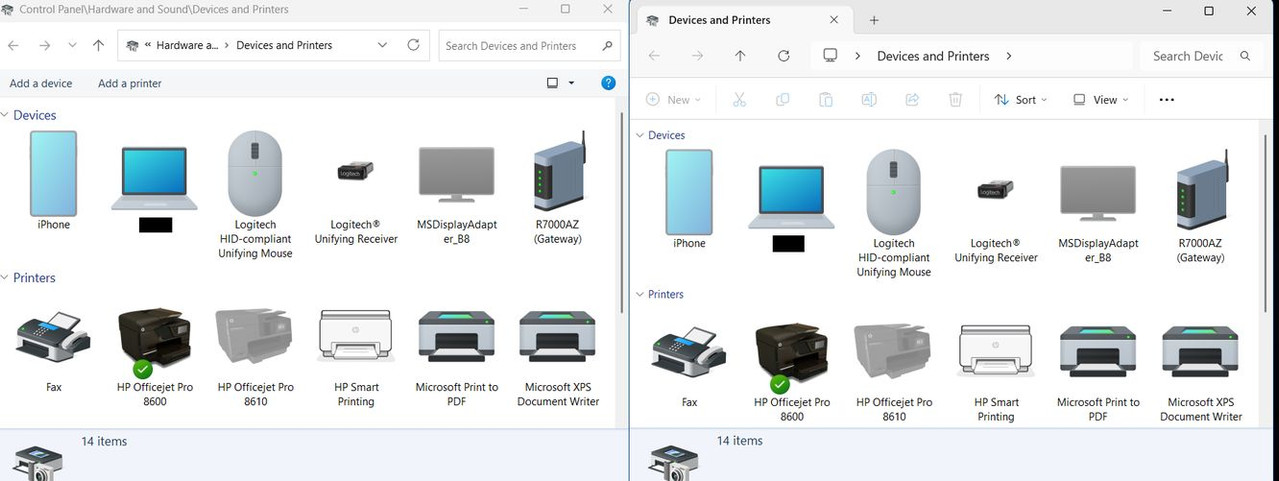
Different routes(to Devices and Printers in Win11) provide different
results.
ÿÿ- Note: below I'm abbreviating 'Devices and Printers' term in the
comments about the linked picture as DevPrt
ÿÿ-
See linked pic.
<https://i.postimg.cc/90CqZw3R/Dev-Prt-Both.jpg>
- The left side pic is the result when accessing DevPrt via two routes
in Win11's. both routes(1 and 2) yield the same dialog box.
ÿÿ1. Settings\Bluetooth and Devices\Devices\More devices and printer
ÿÿ2. Control Panel shortcut\Bluetooth and Devices\Devices\More devices
and printers
- The right side pic is the result when accessing DevPrt in Win11 via
the earlier mentioned 'explorer shell' route.
- The left side pic via (1 or 2) does not have the 'greyed out new'
icon but does have the usual options(Add device, Add printer)
- The right side pic via command.com (as admin) route has the 'New'
icon(which is inactive/greyed out).
You'll also notices some other differences
ÿÿ- the left side pic shows a square icon(More Options for sizing the
respective icons).
ÿÿ- the right side pic shows more greyed-out icons, plus Sort,
View(same icon sizing items), and an ellipsis(3 dots) for a few File
Explorer-type features.
You can make your own guesses on why the differences.
ÿÿ- shell command vs. settings?
ÿÿ- old code vs. newer code?
ÿÿ- never intended to be the same via command vs Settings
ÿÿ- more Win10/11 migration to Settings GUI
ÿÿ- Hoodoo magic
OpenShell's "Devices and Printers" gets me the one I want.
Andy Burns wrote:
T wrote:
I am after how to do it from the command line.
Slightly puzzled why you want to use the command line to invoke the
printer GUI?
For most people adding a new printer is something done once every few
years, not several times a day!
You are forgetting that I have a lot of
customers. Installing printers is a
common task. W11 and printers is a match
made in ...
I have a list of run commands that I use, instead of
screwing around going through w7/w10/w11 ever changing
GUI's. Getting to Printers and Devices is still eluding me.
Paul's suggestion is close. But I'd like the whole potato
that OpenShell gives me.
| Sysop: | Jacob Catayoc |
|---|---|
| Location: | Pasay City, Metro Manila, Philippines |
| Users: | 5 |
| Nodes: | 4 (0 / 4) |
| Uptime: | 24:14:14 |
| Calls: | 117 |
| Calls today: | 117 |
| Files: | 368 |
| D/L today: |
560 files (257M bytes) |
| Messages: | 70,913 |
| Posted today: | 26 |