• Re: nvme screw?

    From VanguardLH@3:633/10 to All on Monday, January 19, 2026 01:31:10
    T <T@invalid.invalid> wrote:

    what is that tiny screw used to fasten the NVMe
    drive on a lenovo ThinkStation P3 Tower Gen 2
    (Intel) Workstation?

    And where can I purchase about ten of them?

    I'm assuming NVMe means you are using an m.2 slot.

    https://www.amazon.com/Screws-M-2-SSD-NVMe-M2-Laptop/dp/B0DKV88S4D/ref=sr_1_8?th=1

    --- PyGate Linux v1.5.2
    * Origin: Dragon's Lair, PyGate NNTP<>Fido Gate (3:633/10)
  • From Paul@3:633/10 to All on Monday, January 19, 2026 03:10:10
    On Sun, 1/18/2026 11:40 PM, T wrote:
    what is that tiny screw used to fasten the NVMe
    drive on a lenovo ThinkStation P3 Tower Gen 2
    (Intel) Workstation?

    And where can I purchase about ten of them?

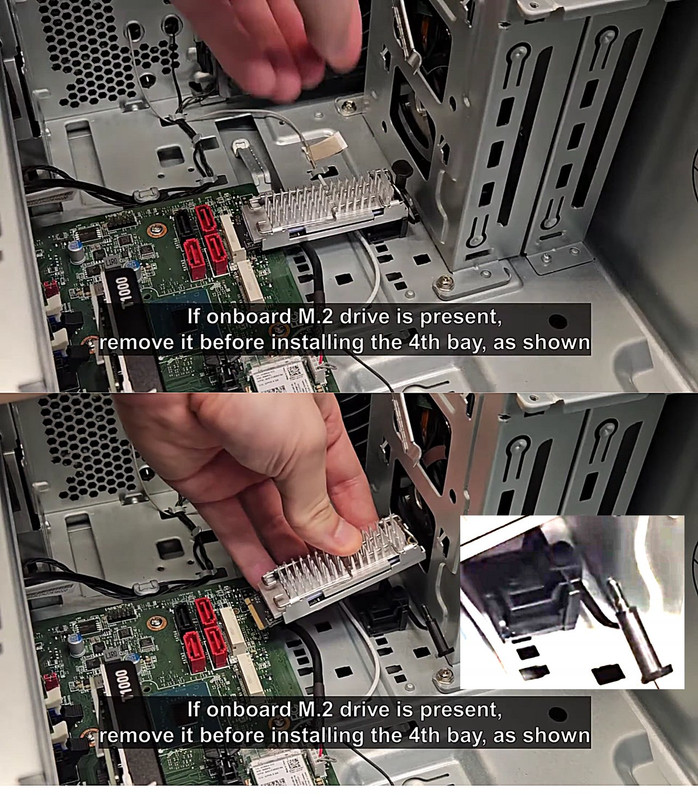
    [Picture] Use Download Original to collect the picture

    https://i.postimg.cc/4dZ0s6nf/lenovo-nvme.jpg

    That particular one is not standard. And as the metal pin
    has a retention band on it, the pin does not appear to
    screw in either.

    For conventional motherboards, they use the same angular-entry
    NVMe connector, but the retention screw is:

    The screw used to retain an M.2 drive is usually a "flat head M2.0 x 2.5mm"

    Even at the "fastener store" here (not a Home Depot) they don't
    sell #2 for example in the trays. It's a custom order and you
    buy a box of 100. You would go to the computer store, and
    see what the system builder uses for boxes of screws. Maybe they
    have bags of ten for sale.

    That means the threaded section is 0.1" long or so, and I don't have
    a good tool for that. I use my magnetic screwdriver, and a regular fine tip
    hex drive screwdriver bit. I could use a jewellers screwdriver but then
    I wouldn't have the magnet. And most of the time, I'm trying to drive
    that screw while the tool is on an angle, and the head hardly mates
    properly. You have to be careful not to slip off and ding something.

    The motherboards actually come with "the stud" plus the screw that
    goes into the stud. The stud is already screwed to the motherboard,
    like in the 110mm location. The screws come in a tiny zip-lok bag
    and you only crack open the bag of screws when attempting to
    install an NVMe and not before. You can see in the picture,
    if you had one of these, installing that flat head screw (to hold down
    the rather large shoulder surface on the module) is going to be
    a pain in the ass.

    https://www.amazon.ca/Standoff-Mounting-Screws-Gigabyte-Motherboards/dp/B0DG2873WB

    Sometimes when working with these materials for the first time, you unscrew
    the stud by accident, and make some weird conclusion about the materials.
    When really, the tiny screw did not come loose when it should have. When reinstalling the stud, do not over-torque it. It just needs enough of a
    twist to hold it steady. In the item there, they have included different
    stud styles, to match whatever crazy motherboard you bought.

    But the Youtube video I got that from,

    https://www.youtube.com/watch?v=st_47WV6zMU

    the two sleds have custom mechanical bits, with the intention being,
    "a bit of parts sales" for Lenovo.

    I could see a heatsink kit and plastic doohickey costing $30, when a
    convention motherboard already includes the materials needed for all sleds.
    You can move the stud from one motherboard hole to another, if for example,
    you don't buy a 110mm and you buy something else.

    On this Dell, there is a plastic push-pin of some sort. I wonder what the cycle-rating on that is. There are two co-linear sleds on this design,
    and when you install a 110mm, it covers one of the slots so only
    one NVMe can be installed.

    https://goughlui.com/wp-content/uploads/2024/10/202410042236239492-1536x667.jpg

    The manufacturers recognize what a shambles the thing is, which is why everyone has a different twist on a retention solution. Most will go with the standard "tiny annoying screw". Just make sure the power is off, as that screw can fall just about anywhere.

    Paul

    --- PyGate Linux v1.5.2
    * Origin: Dragon's Lair, PyGate NNTP<>Fido Gate (3:633/10)
  • From Paul@3:633/10 to All on Monday, January 19, 2026 14:54:19
    On Mon, 1/19/2026 1:02 PM, T wrote:


    ÿ The "Lenovo ThinkStation P3 Tower Gen 2 (Intel) Workstation"
    mounted NVMe drive comes with a super tiny screw.

    ÿ Lately, I have been presented with old computers they want
    upgraded to something better and faster.ÿ They have a ton
    of specialty software on them.ÿ This mean "Key codes?ÿ Source
    codes? Disks?ÿ You've got to be kidding me!"ÿ It is an
    impossible assignment.

    But, being one clever SOB, pull the NVMe drive out of the new
    computer, put it in a USB3 carrier, plug it into the old
    computer, fire up Clonezilla in rescue mode to copy past
    bad spots, and clone the old computer to the new NVMe drive.
    Put the NVMe drive back in the new computer, upgrade to W11
    and presto.ÿ They are back in business.

    Problem, the micro screw.ÿ It is very, very easy to lose.
    I take it out with a magnetic screwdriver, leave it on a
    magnet until I have to reinstall it.ÿ One wrong shake of
    eh hand or bump of the table and it disappears forever.

    I can not tell it the turkey is an M1.2, M1.4 or the
    larger M2 or if it is ever a metric screw or not.

    -T


    The local computer store has a "kit" with studs, but also
    a bag of "M2x2.7mm", which is roughly 0.10" of thread. It's
    a flat head, as you need the flat head to act as a shoulder
    over the U-shaped cutout in the PCB. The cutout is intended
    to be grounded. The bag of screws includes 9 screws, which
    are likely to be SS metal or chrome-steel. The studs are
    usually made of a softer metal.

    NVMe M.2 SSD Mounting Screw Kit

    The fastener store, does not usually carry #2 or M2.
    If you want those, they're a custom order and a box of 100
    or so. When you buy 100, you usually get them cheaper,
    so it does not follow that a huge financial hit is there.

    Buying these small kits at the computer store, while
    convenient, is not good usage of money -- the kit above
    includes a screwdriver, mainly to justify a higher
    sticker price.

    It was like resistors at Radio Shack. The blister pack with
    two resistors was $1.00 . The "resistor kit" having fifty
    resistors in it was $2.50 . The resistor kit was Noahs Arc,
    having two resistors of each value. You were getting
    twenty five different values from 1 ohm to 10 megohms or so.
    I think you can imagine how many blister packs I bought,
    after the Noahs Arc version showed up (0!).

    So while you might solve the immediate problem at the
    local computer store, buying a box of those for $10 to $15
    is likely a better long term deal.

    I can see in laptop design, why the product would be
    designed that way. In a desktop there is more room for innovation.

    Paul

    --- PyGate Linux v1.5.2
    * Origin: Dragon's Lair, PyGate NNTP<>Fido Gate (3:633/10)
  • From Paul@3:633/10 to All on Tuesday, January 20, 2026 18:34:19
    On Tue, 1/20/2026 1:56 PM, T wrote:
    On 1/20/26 10:27 AM, T wrote:
    On 1/18/26 8:40 PM, T wrote:
    what is that tiny screw used to fasten the NVMe
    drive on a lenovo ThinkStation P3 Tower Gen 2
    (Intel) Workstation?

    And where can I purchase about ten of them?


    Okay, word back from Lenovo is that it is an
    M2 by 4 mm.ÿÿ And they want 18 U$D for it.


    These guys look like it for 8U$D.

    100Pcs M2 x 4mm Pan Head Phillips Machine Screws, 304 Stainless Steel https://www.amazon.com/dp/B07YS43PK9

    What will I do with the other 99 screws?

    Now, take a stud, and measure how deep the screw
    goes into it. Is there sufficient depth in the
    brass stud for a 4mm long screw ??? Remember that
    the screw is for retention of the module and is
    intended to pull the module flat against the stud.

    The depth feeler on my calipher won't fit in there,
    but you can take a sewing needle, the blunt end,
    and use that to take a depth reading. If you have a
    drill index, the smallest bit in the drill index will
    likely fit in the hole.

    You don't want to be cutting the end off the screw
    to make it work. With the box of Imperial #2 I've got, I cut the
    end off quite a few of them (as a function of application).
    My threading tool for the #2 isn't the best, and only
    the top portion of a threaded hole works properly, so the
    tiny screws have to be cut down in order to work. I typically
    use this for building boxes out of Plexiglass or Perspex.
    With a thick enough plastic, you can drill a hole for a #2
    end-on with the plastic, then thread the plastic and hold two
    pieces together with a screw.

    Paul

    --- PyGate Linux v1.5.2
    * Origin: Dragon's Lair, PyGate NNTP<>Fido Gate (3:633/10)