But 90s hardware was a beast, and often everything that could go
wrong, would. It's a wonder any of us in the 90s managed to get our
computers working at all, much less play games on them. I like
tinkering with the old stuff, but man-oh-man, am I glad that's not the
norm these days! ;-)
But 90s hardware was a beast, and often everything that could go
wrong, would. It's a wonder any of us in the 90s managed to get our
computers working at all, much less play games on them. I like
tinkering with the old stuff, but man-oh-man, am I glad that's not the
norm these days! ;-)
Right now, I'm struggling with my damn PS/2+USB adapters since my >25.5 >years old Belkin OmniCube 2-port KVM broke on USA's 250th birthday. I
got a new IOGEAR's KVM (HDMI+USB), but having problems with its PS/2
mouse and keyboard even with three different brands and adapters. Argh.
I think I need to give up and just buy USB keyboard, but which one? You
can read more about it in my thread in alt.comp.periphs.keyboard, >alt.comp.hardware.homebuilt, and alt.comp.hardware.pc-homebuilt
newsgroups.
I've had a few KVM switchers over the years. I don't use them anymore
but I remember that I had a black one that was called a OmniView or
something like that. It was big, black and heavy and required power I
think. Probably similar to your OmniCube.
On Thu, 09 Jul 2026 17:28:04 -0400, Spalls Hurgenson ><spallshurgenson@gmail.com> wrote:
But 90s hardware was a beast, and often everything that could go
wrong, would. It's a wonder any of us in the 90s managed to get our >>computers working at all, much less play games on them. I like
tinkering with the old stuff, but man-oh-man, am I glad that's not the
norm these days! ;-)
Yeah, your story reminded me of all the times I had to fiddle with my >secondary machine just so I could play old DOS games. I had sound
cards, video cards, power supplies, hard drives, CD\DVD burners,
various cables, etc.. ready to go if something in my DOS machine
failed. I collected all this crap from years of gaming.
I just do not have the patience for it anymore. DosBox is the best
thing that has ever happened to DOS gaming. I can play everything from
the original Wizardry all the way through to today's games on ONE
modern computer. Amen to that.
On Fri, 10 Jul 2026 01:00:13 -0000 (UTC), ant@zimage.comANT (Ant)
wrote:
Right now, I'm struggling with my damn PS/2+USB adapters since my >25.5 >years old Belkin OmniCube 2-port KVM broke on USA's 250th birthday. I
got a new IOGEAR's KVM (HDMI+USB), but having problems with its PS/2
mouse and keyboard even with three different brands and adapters. Argh.
I think I need to give up and just buy USB keyboard, but which one? You >can read more about it in my thread in alt.comp.periphs.keyboard, >alt.comp.hardware.homebuilt, and alt.comp.hardware.pc-homebuilt >newsgroups.
I've had a few KVM switchers over the years. I don't use them anymore
but I remember that I had a black one that was called a OmniView or
something like that. It was big, black and heavy and required power I
think. Probably similar to your OmniCube.
I also had a four port one that did not require power. I don't
remember much about it other then the color scheme which was gray and
blue. I think it was from Linksys.
The last keyboard I purchased was this one, though it is not currently available on Amazon -->
https://www.amazon.com/dp/B0DK6R6HXP?ref=ppx_yo2ov_dt_b_fed_asin_title
On Fri, 10 Jul 2026 09:17:24 -0400, Mike S. <Mike_S@nowhere.com> said
this thing:
I've had a few KVM switchers over the years. I don't use them anymore
but I remember that I had a black one that was called a OmniView or >something like that. It was big, black and heavy and required power I >think. Probably similar to your OmniCube.
I think I had that one. It had a hulking bit of metal with a big knob
to switch between the different PCs. It was so satisfying to switch
between computers.
The only KVM I still own at home is a POC dual-head from Belkin. It's
so old that it still uses PS2 ports. It doesn't even have a proper
toggle; you have to use a magic key-combo to switch inputs. But these
days I just find it easier to use some sort of remote access and
connect over the network than to string cables between the PCs. It is, obviously, not a perfect solution for all situations (what if no
network? What if there is hardware fault before network loads? etc.)
but my current usage doesn't really need anything else.
But I do miss that satisfying CLUNK as you switched between inputs. It
felt like magic to turn the knob and suddenly you were looking at an
entirely different computer screen. ;-)
On Fri, 10 Jul 2026 09:03:34 -0400, Mike S. <Mike_S@nowhere.com> said
this thing:
On Thu, 09 Jul 2026 17:28:04 -0400, Spalls Hurgenson ><spallshurgenson@gmail.com> wrote:
But 90s hardware was a beast, and often everything that could go
wrong, would. It's a wonder any of us in the 90s managed to get our >>computers working at all, much less play games on them. I like
tinkering with the old stuff, but man-oh-man, am I glad that's not the >>norm these days! ;-)
Yeah, your story reminded me of all the times I had to fiddle with my >secondary machine just so I could play old DOS games. I had sound
cards, video cards, power supplies, hard drives, CD\DVD burners,
various cables, etc.. ready to go if something in my DOS machine
failed. I collected all this crap from years of gaming.
I just do not have the patience for it anymore. DosBox is the best
thing that has ever happened to DOS gaming. I can play everything from
the original Wizardry all the way through to today's games on ONE
modern computer. Amen to that.
I'm a huge fan of DOSBox (and DOSBox-X), but for the early Win9x era,
there really isn't quite the same option. Between the hackery used by
many games of that era to eke out every bit of CPU performance and the rapidly changing hardware standards, it can be hard to get games of
that era to run smoothly (or, in some cases, at all!), and even
emulation isn't always a solution. Nor did the flakiness of the Win9x operating system help either; sometimes you'd install one game and it
would make changes that would render the next game unplayable. Often
the best option with emulation was to have a separate OS image for
each game; messy and it uses a lot of extra space.
That said, emulators can do a lot. 86Box is amazing with the range of hardware it supports, and eXoWin9x is an amazing project. But
sometimes original hardware is still required... and besides, it's fun
to play around with that old gear!
Even if it doesn't always work out the way I want it to.
(Also, if I want to use my old Sidewinder3D Pro joystick, plugging it
into an old computer is the only way to do that).
Spalls Hurgenson <spallshurgenson@gmail.com> wrote:
On Fri, 10 Jul 2026 09:17:24 -0400, Mike S. <Mike_S@nowhere.com> said
this thing:
I've had a few KVM switchers over the years. I don't use them anymore
but I remember that I had a black one that was called a OmniView or
something like that. It was big, black and heavy and required power I
think. Probably similar to your OmniCube.
I think I had that one. It had a hulking bit of metal with a big knob
to switch between the different PCs. It was so satisfying to switch
between computers.
Is that the switching left and right one? My OmniCube was the physical >button and double scroll lock key presses (used 99% of my switches).
Also, I used them at work too because of multiple PCs.
Magic key-combo? Double scroll lock key presses? :P I miss it in my new
KVM. I have a bad feeling this new KVM is not going to last long
especially with its very thin cables and using the switch button too
much. I can't even replace the cables that are glued into the switch
box. I'd have to replace the whole unit if I need to. :(
Spalls Hurgenson <spallshurgenson@gmail.com> wrote:
(Also, if I want to use my old Sidewinder3D Pro joystick, plugging it
into an old computer is the only way to do that).
Is that USB? No drivers in modern OSes? I still have my USB MS Sidewinder joystick that I barely used from CompUSA!
(a.k.a., another attempt to upgrade my old computer fizzles out)
Every now and then, I fiddle about with my old Windows98 computer.
Sometimes I swap video-cards, or change the fans; I've added and
removed RAM. Sometimes I just tinker with settings. It's fun, if
that's the sort of thing you find fun...and I do!. But the thing I
really want to do is add more disk space.
Having attempted this before and being defeated by BIOS disk-size >limitations, this time I decided that if I can't get a /bigger/ drive,
I'll just add a /second/ drive. This wasn't as easy as it should have
been; incorrect jumper settings (not helped by the sticker on the
drive describing the jumper setting being /backwards/) were a major
speed bump. So too was the fact that my IDE cable turned out to be
damaged. It accessed the master drive fine, but anything hooked up to
the second connector was invisible to the machine. A cable swap solved
that problem, but it took longer for me to trouble shoot that than I'd
like to admit. Who suspects an IDE cable of being bad?.
But eventually, the BIOS happily reported two drives installed, with
proper capacities recorded. It even formatted correctly! Except...
Why was Windows crashing suddenly? And what's this? The BIOS reports
only 260MB when it should be 384MB? What's with all this freaky
flakiness on what used to be a stable machine?
Yeah... it turns out that my power-supply --already on the edge-- just
wasn't up to taking on the added load of spinning up a second
hard-drive. A quick poke with the multimeter confirmed it; I'd maxed
out the PSU. And whaddaya know, the only spare ATX power-supplies I
have are either physically too large for the chassis, or don't have
enough connectors, or are even more underpowered than the block
already in the machine.
Reverting all my changes (minus the IDE cable swap, of course) got me
a working machine again... except without that added storage space.
I'd replace the PSU, but... man, have you seen the prices of these
things? Especially if you want an older design with lots of MOLEX
connectors. Even the refurbished models are expensive! More than I
want to pay for a hobby machine that gets turned on only five or ten
times a year.
So instead, I am -again- sticking with what I have. I may not have the
extra disk space, but at least the machine is running. The disks may
have defeated me once again, but the battle isn't over yet. You just
wait; one day I'm going to have a Windows98 PC with more than 120GB of >disk-space!!!!
#
You know, if there's one thing this little expedition back into 1990s >hardware /really/ reminded me of, it is how LUCKY we are with modern >computers. These days, you plug something in and it'll probably Just
Work (tm). All the cables are keyed nowadays, so no worries about
plugging in anything wrong. Our firmwares are updated automatically so
they know about new hardware settings even before their owners do. And
forget about jumpers and IRQs and DMA settings. The hardest part when >upgrading new computers is the cable management.
[Well, that and just affording the new hardware. And
maybe some of it catching on fire. But other than
that, no worries.]
But 90s hardware was a beast, and often everything that could go
wrong, would. It's a wonder any of us in the 90s managed to get our
computers working at all, much less play games on them. I like
tinkering with the old stuff, but man-oh-man, am I glad that's not the
norm these days! ;-)
(a.k.a., another attempt to upgrade my old computer fizzles out)
Every now and then, I fiddle about with my old Windows98 computer.
Sometimes I swap video-cards, or change the fans; I've added and
removed RAM. Sometimes I just tinker with settings. It's fun, if
that's the sort of thing you find fun...and I do!. But the thing I
really want to do is add more disk space.
Having attempted this before and being defeated by BIOS disk-size >limitations, this time I decided that if I can't get a /bigger/ drive,
I'll just add a /second/ drive. This wasn't as easy as it should have
been; incorrect jumper settings (not helped by the sticker on the
drive describing the jumper setting being /backwards/) were a major
speed bump. So too was the fact that my IDE cable turned out to be
damaged. It accessed the master drive fine, but anything hooked up to
the second connector was invisible to the machine. A cable swap solved
that problem, but it took longer for me to trouble shoot that than I'd
like to admit. Who suspects an IDE cable of being bad?.
But eventually, the BIOS happily reported two drives installed, with
proper capacities recorded. It even formatted correctly! Except...
Why was Windows crashing suddenly? And what's this? The BIOS reports
only 260MB when it should be 384MB? What's with all this freaky
flakiness on what used to be a stable machine?
Yeah... it turns out that my power-supply --already on the edge-- just
wasn't up to taking on the added load of spinning up a second
hard-drive. A quick poke with the multimeter confirmed it; I'd maxed
out the PSU. And whaddaya know, the only spare ATX power-supplies I
have are either physically too large for the chassis, or don't have
enough connectors, or are even more underpowered than the block
already in the machine.
On Fri, 10 Jul 2026 01:00:13 -0000 (UTC), ant@zimage.comANT (Ant)
wrote:
The last keyboard I purchased was this one, though it is not currently available on Amazon -->
https://www.amazon.com/dp/B0DK6R6HXP?ref=ppx_yo2ov_dt_b_fed_asin_title
You know, if there's one thing this little expedition back into 1990s hardware /really/ reminded me of, it is how LUCKY we are with modern computers. These days, you plug something in and it'll probably Just
Work (tm). All the cables are keyed nowadays, so no worries about
plugging in anything wrong. Our firmwares are updated automatically so
they know about new hardware settings even before their owners do. And
forget about jumpers and IRQs and DMA settings. The hardest part when upgrading new computers is the cable management.
I think I had that one. It had a hulking bit of metal with a big knob
to switch between the different PCs. It was so satisfying to switch
between computers.
On 7/10/2026 6:17 AM, Mike S. wrote:
On Fri, 10 Jul 2026 01:00:13 -0000 (UTC), ant@zimage.comANT (Ant)
wrote:
The last keyboard I purchased was this one, though it is not currently
available on Amazon -->
https://www.amazon.com/dp/B0DK6R6HXP?ref=ppx_yo2ov_dt_b_fed_asin_title
That's almost he same one I have, except mine is wired, and has some
keys on the top I've literally never used.
https://www.amazon.com/Redragon-K580-Mechanical-Anti-ghosting-Dedicated/dp/B07G11G2X8
You could do what I did back in the day when I ran into a similar
situation - I just sat the second power supply on top of the full tower
with cables running in to power said second (or was it third?) HD.
Not the prettiest situation, but it worked.
Duct taping the second PS to the top is optional, unless in a high
traffic area where you might bang into it and knock it off.
That's almost he same one I have, except mine is wired, and has some
keys on the top I've literally never used.
https://www.amazon.com/Redragon-K580-Mechanical-Anti-ghosting-Dedicated/dp/B07G11G2X8
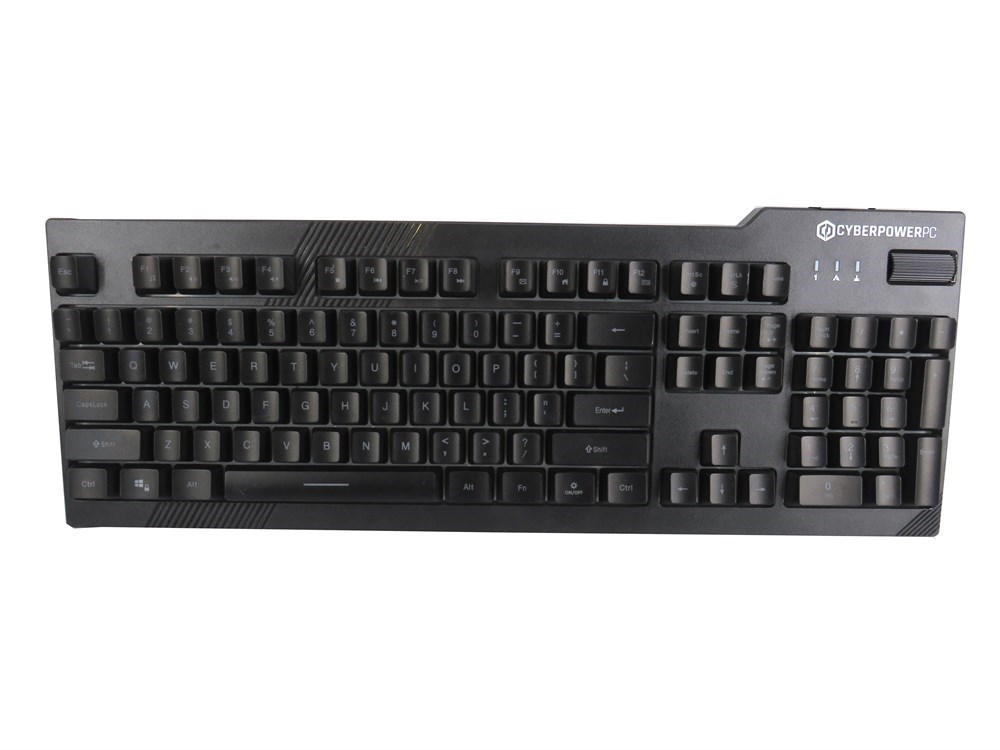
Mine's far, far cheaper: >https://shopsalvationarmyblob.blob.core.windows.net/assets/media/5155af38-d984-4597-a102-edc33d99be80_largesize.jpg
No mechanical keyswitches for me; I got premium-quality rubber-dome >technology! ;-)
But I really do like the scroll-wheel that controls the sound-volume
(also, it has a numpad. I can't live without a numpad)
Keyboard fetishists probably would quail at the idea of having to use
such a terrible board, but it works well enough for me. I never really
cared much for mechanical keyswitches myself anyway.
Spalls Hurgenson <spallshurgenson@gmail.com> writes:
But I really do like the scroll-wheel that controls the sound-volume
(also, it has a numpad. I can't live without a numpad)
I remember some keyboard reviewer really liked the volume knob. I had
that too for some time, I think it was a Dell keyboard I got from
work. But back then, I used the amp remote to adjust the volume because, well, what else would you use? Thought I, back then.
I kind of see the point. Some time ago I booted ancient PC/IX on an
emulator, a Unix-like operating system for the original IBM PC. There is
no Unix-traditional "vi" editor, instead they shipped something
else. Which is hard to use, especially as it uses the keypad and my
usual keyboard is TKL...
Keyboard fetishists probably would quail at the idea of having to use
such a terrible board, but it works well enough for me. I never really cared much for mechanical keyswitches myself anyway.
At some point I really wanted the old school IBM model M. Mostly to wake
me up if I accidentally pressed and held the space bar while reading
Usenet News over a modem, that "clunk" sound always worked... But didn't
get around to it. Then when those and other IBM keyboards were available again from that guy who found a warehouse full of them, I actually got a model F. But that turned out to have one broken key and anyways, it's
not a full PC keyboard. So fun for a while but didn't stick with it.
Then, I had married and didn't want to wake up my wife with any late
night gaming sessions with a clicky keyboard so ended up with a fnatic miniStreak, populated with the silent version of Cherry MX Reds which
aren't clicky at all. Backlit too which I had really been wanting for a while.
Spalls Hurgenson <spallshurgenson@gmail.com> writes:
But I really do like the scroll-wheel that controls the sound-volume
(also, it has a numpad. I can't live without a numpad)
I remember some keyboard reviewer really liked the volume knob. I had
that too for some time, I think it was a Dell keyboard I got from
work. But back then, I used the amp remote to adjust the volume because, >well, what else would you use? Thought I, back then.
Backlit too which I had really been wanting for a
while.
I remember using vi in college in Linux and Unix. I hated it and still
do today. I don't use emacs too. I do nano (formerly pico). :P
My former employer's cubicle neighbor co(lleague/worker)s hated my loud
fast typings on clicky Dell PC104 keyboaeds. I told them how am I
supposed to work fast? ;) My college friend said my typings sounded like
a machine gun. LOL!
| Sysop: | Jacob Catayoc |
|---|---|
| Location: | Pasay City, Metro Manila, Philippines |
| Users: | 4 |
| Nodes: | 4 (0 / 4) |
| Uptime: | 496008:16:00 |
| Calls: | 178 |
| Files: | 605 |
| D/L today: |
7 files (18,398K bytes) |
| Messages: | 70,124 |