Yesterday for the first time when I tried to save something to
contacts my new android phone gave me a choice of contacts apps. They
were both called Contacts and their icons looked almost the same , a silhouette from the front in blue and the only difference was that
one was a lighter shade of blue ,. Have you encountered this?
I didn't want my contacts to be spread out over two different apps.
That would really be confusing.
On 9/8/2026 10:51 PM, micky wrote:
Yesterday for the first time when I tried to save something to
contacts my new android phone gave me a choice of contacts apps. They
were both called Contacts and their icons looked almost the same , a
silhouette from the front in blue and the only difference was that
one was a lighter shade of blue ,. Have you encountered this?
The Contacts app in my 7 year old Samsung phone is listed as a Verizon
app. When I bring up its info screen it doesn't say who makes it but
gives the version number of 13.1.30.10 if that's a clue?
I didn't want my contacts to be spread out over two different apps.
That would really be confusing.
On my Android tablets I've installed the Google contacts app from the
Google Play Store. It's version 4.86.23 (plus 9 more numbers) so doesn't appear to be related to the version number of the Verizon app. But the
Google Contacts apps on my tablets all sync and work just fine with my phone's Verizon Contacts app.
I've decided to leave well enough alone and not try to put the current
Google Contacts app on my phone as long as the installed Verizon version keeps working. That and the fact that the 'Phone' app also claims to be Verizon and its info screen shows the exact same version number
(13.1.30.10) as the Contact app info screen leading me to believe that
it might be wise that they be used together?
AJL wrote:
On 9/8/2026 10:51 PM, micky wrote:
Yesterday for the first time when I tried to save something to
contacts my new android phone gave me a choice of contacts apps. They
were both called Contacts and their icons looked almost the same , a
silhouette from the front in blue and the only difference was that
one was a lighter shade of blue ,. Have you encountered this?
The Contacts app in my 7 year old Samsung phone is listed as a Verizon
app. When I bring up its info screen it doesn't say who makes it but
gives the version number of 13.1.30.10 if that's a clue?
I didn't want my contacts to be spread out over two different apps.
That would really be confusing.
On my Android tablets I've installed the Google contacts app from the
Google Play Store. It's version 4.86.23 (plus 9 more numbers) so doesn't
appear to be related to the version number of the Verizon app. But the
Google Contacts apps on my tablets all sync and work just fine with my
phone's Verizon Contacts app.
I've decided to leave well enough alone and not try to put the current
Google Contacts app on my phone as long as the installed Verizon version
keeps working. That and the fact that the 'Phone' app also claims to be
Verizon and its info screen shows the exact same version number
(13.1.30.10) as the Contact app info screen leading me to believe that
it might be wise that they be used together?
Hi AJL,
Like you, I don't have Google Contacts installed currently, but my phone is
a mirror of all past installations, so it was on my phone at one point.
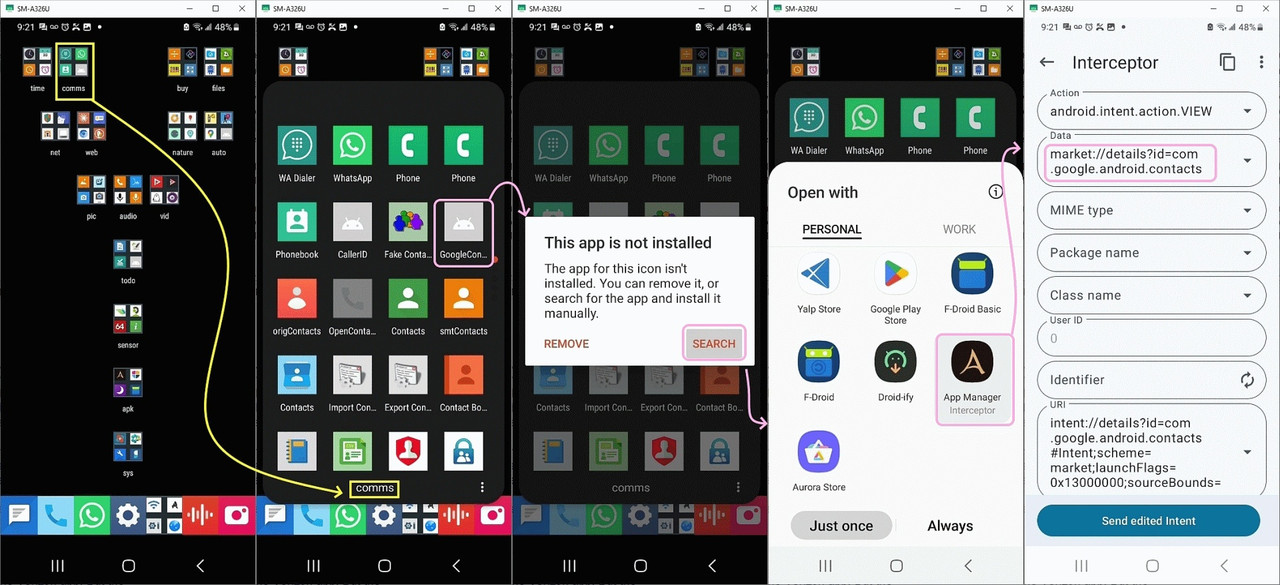
<https://i.postimg.cc/rydmmZZt/googlecontacts.jpg>
Given I'm always helpful to others, I went to the appreciable trouble to >screenshot & annotate the situation for the OP, mirroring your experience.
I don't see the original thread for some reason, but to answer the OP...
There are some app categories, which, by their very nature, tend to have
the exact same icon-shortcut names and even the same color/shape icons.
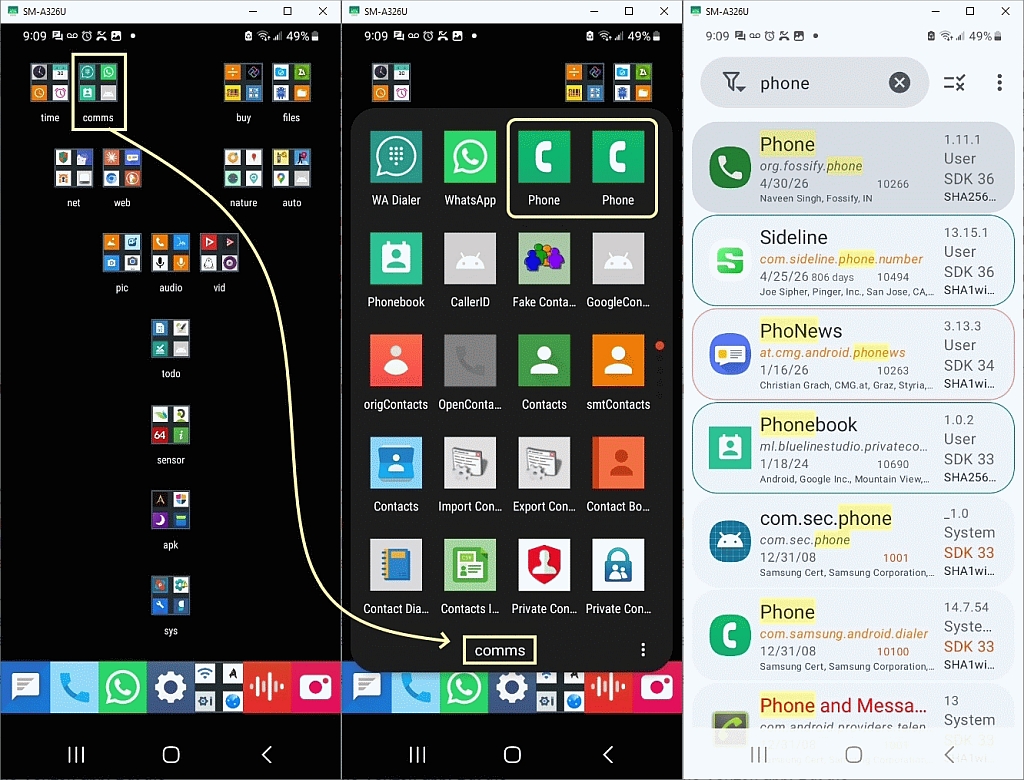
<https://i.postimg.cc/5tH5pSNf/phone.jpg>
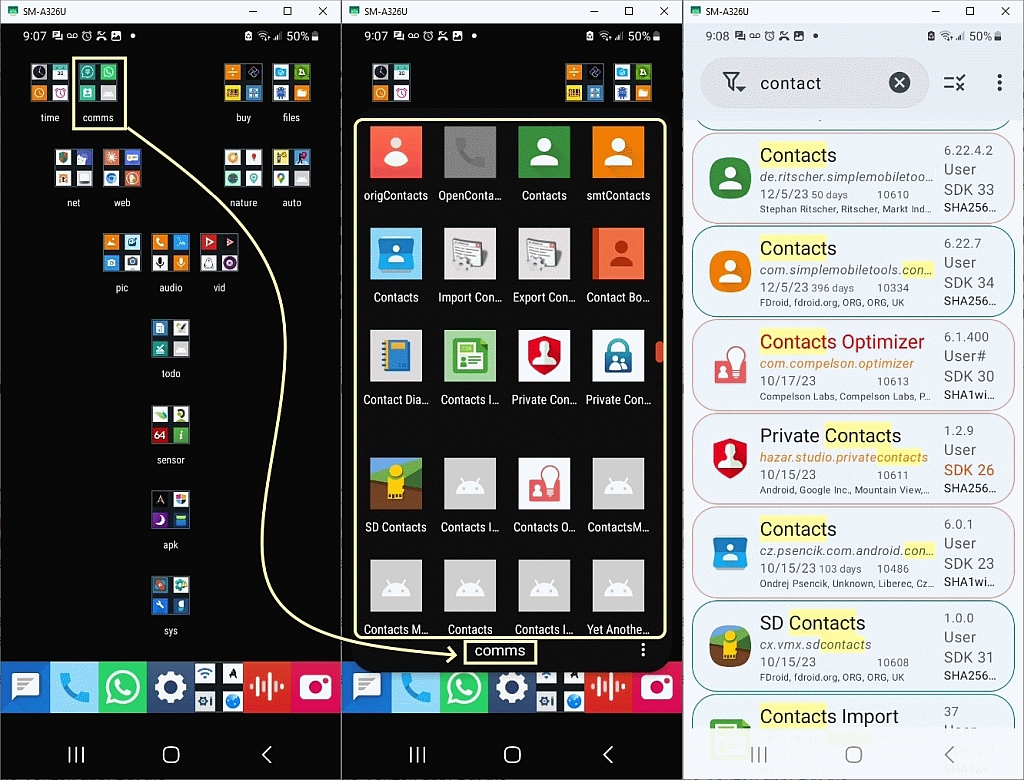
There is only 1 way to tell them apart for sure, which is the package name.
<https://i.postimg.cc/fTKvbbr4/contacts.jpg>
As for Google Contacts, per se, it used to be installed on my phone, as we >can tell from the grayed-out icon below which points to the repository.
<https://i.postimg.cc/rydmmZZt/googlecontacts.jpg>
When I click on that grayed out icon, it installs the app if I want it.
<market://details?id=com.google.android.contacts>
I think everyone should have their phone set up as efficiently as mine.
AJL wrote:
my main point in responding was that the icon isn't what's unique.
In fact, app-icon PHONE ^ CONTACTS icons are particularly commonly reused.
The two green phone icons, for example, in this screenshot, are different.
<https://i.postimg.cc/5tH5pSNf/phone.jpg>
Even I can't tell them apart without looking at the underlying intents.
As for the original topic, you've heard me extol the virtues of
Muntashirakon AM, but for others, this program tells you the package name.
<https://muntashir.dev/AppManager/en/>
There are other ways to find out the package manager, of course, but I
think anyone who does NOT use Muntashirakon App Manager, isn't efficient.
AJL wrote:
Maria Sophia wrote:
My Verizon and Google 'Contacts' icons were very similar but still
slightly different. My problem was to remember which was which.
Your problem is identifying which is which, only once. a. Because
once you identify which is which, you can *change* the icon. b.
And/or you can change what it says below the icon.
The two green phone icons, for example, in this screenshot, are
different. <https://i.postimg.cc/5tH5pSNf/phone.jpg> Even I can't
tell them apart without looking at the underlying intents.
The popup on your link using my Android Chrome browser was
annoying. You should warn folks. However when I used Firefox with
the uBlock Origin extension no popup. I should always use that
here, huh...
I love that you're a rare breed on Usenet who is balanced in what you
say. So I get it. You're trying to be helpful. I appreciate that
helpful note. You think I don't know it. And therefore, you think I
need to know it. But, trust me. I'm well aware that some people see
annoying popups. So you do know browsers, but I'm not gonna warn
people 'cuz it's common knowledge that if you don't know what you're
doing, almost any web page has annoying stuff on it. I can't fix
every person's knowledge of browsers. :) FYI: I don't see any popup
but I certainly *believe* you that you saw it. So I'm not disputing
that you see annoying stuff on some browser setups.
But people who know how to use browsers don't see it. I can't fix
stupid. (I'm not saying *you* are stupid, as you fixed it.) But
thanks for (trying to) let me know.
As for the original topic, you've heard me extol the virtues of
Muntashirakon AM, but for others, this program tells you the
package name. <https://muntashir.dev/AppManager/en/> There are
other ways to find out the package manager, of course, but I
think anyone who does NOT use Muntashirakon App Manager, isn't
efficient.
Above my pay level. But speaking of app managers I'm using my
Amazon Fire HD10 tablet to post this and I'm surprised how easy it
is to install apps from just about anywhere on this thing. I can
sideload apps from the outside or from my installed sideloaded
Google Play store app and the tablet puts them all in its Fire OS
app manager and treats them just like as if they were from its own
Amazon Appstore. And no outright refusals to load an outside apk
like some of my other Android toys. Ease of use great. Security?
Perhaps not so much?
If your headers are correct, I see you're posting from User-Agent: PhoNews/3.13.4 (Android/11)
As for the Amazone tablet loading any APK, that's wonderful, as Lord
knows, Google is doing its damndest to make it harder and harder to
side load.
BTW, I hate that word 'sideload' as it's just normal loading, but
people seem to use it
Maria Sophia wrote:[...]
BTW, I hate that word 'sideload' as it's just normal loading, but
people seem to use it
Dunno why. 'sideload' is a legitimate word. I just checked a few English dictionaries and it's there.
Frank Slootweg wrote:
and gives some examples, which 'Arlen' probably won't like.
Newsgroups: alt.comp.os.windows-10,comp.mobile.android,alt.comp.microsoft.windows
Subject: Re: This is another request to ask Frank Slootweg to stop trolling this ng
Date: Fri, 11 Sep 2026 12:55:32 -0600
Message-ID: <1181ir5$2203$1@nnrp.usenet.blueworldhosting.com>
AJL wrote:
Maria Sophia wrote:
If your headers are correct, I see you're posting from
User-Agent: PhoNews/3.13.4 (Android/11)
Yep. The Fire OS (Android fork) is currently based on Android 11
and so PhoNews thinks it's Android 11 and says so in the headers.
Whenever I post from any of my Android tablet toys you can always
tell what Android version it uses cause PhoNews is a snitch...
Heh heh... usually you can change that stuff, but I don't know about
doing so in PhoNews. But I, for one, decry a snitch who gives away
header privacy!
I'm surprised Amazon is so liberal with modifying their tablets.
There's certainly no secret about how to put Google on them. Or
sideload them. I'm sure Amazon could stop it with an update if they
really wanted to...
I think it's GREAT that you can add to our combined tribal experience
on the Amazon devices as I've never even *seen* an Amazon or Chrome
tablet!
'sideload' is a legitimate word. I just checked a few English
dictionaries and it's there.
It's a word, for sure, but what's so 'side' ish about loading
normally?
AJL wrote:
The reason my Amazon tablet is my favorite is that it's
lightweight, has rounded (not sharp squared) comfortable corners,
wide bezels (for fat fingers), a plastic case (not ever cold or
clammy), is reasonably fast, FHD for great videos, and plenty of
speaker volume.
I also have an old tablet, which was a Costco Samsung which I gave to
an Apple owner who gave it back after a year or two, so it's mine
now. :) That's in addition to half a dozen older iPads, as I use them
for Google Voice, which is really neat as Google can't take it over
like on Android.
The Android 16 tablet I only use for NewPipe videos so I don't mess
with it that much. I haven't even factory wiped it, actually, which I
need to do.
As it's still logged into the original recipient.
BTW two movies I recently watched on it this week: Bad Day at Black
Rock and The Ballad of Buster Scruggs. Both highly recommended.
1. Bad Day at Black Rock (1955) Genre: Neo-Western / Mystery Thriller Summary: A one-armed stranger named John Macreedy (played by Spencer
Tracy) arrives in the isolated, dusty desert town of Black Rock by
train, looking for a local World War II veteran. He is immediately
met with hostility, evasion and veiled threats from the tight-knit townspeople. Macreedy soon uncovers a dark, shameful secret that the residents are desperate to keep hidden at all costs.
2. The Ballad of Buster Scruggs (2018) Genre: Western Anthology /
Dark Comedy-Drama
Summary: Written and directed by the Coen brothers, this film is a
collection of six distinct, standalone tales set in the American Old
West. Ranging from lighthearted musical comedy and tragic romance to
grim survival and eerie encounters, the vignettes explore human
nature, greed, and mortality against the rugged backdrop of the
frontier .
But then this Thunderbird app I'm currently posting with also snitches
on its version number in the headers and since I use the same old
version number all the time (to avoid updates) my privacy is (gasp) also compromised... 8-O
AJL wrote:
this Thunderbird app I'm currently posting with also snitches on
its version number in the headers and since I use the same old
version number all the time (to avoid updates) my privacy is
(gasp) also compromised... 8-O
Your 'stone-age' version is also kind enough to report the underlying
OS,
which comes in handy in groups where some people ask questions, but
don't bother to mention their OS, such as in news.software.readers.
Frank Slootweg wrote:
AJL wrote:
this Thunderbird app I'm currently posting with also snitches on
its version number in the headers and since I use the same old
version number all the time (to avoid updates) my privacy is
(gasp) also compromised... 8-O
Your 'stone-age' version is also kind enough to report the underlying
OS,
It does say Windows but I don't recognize any of the other numbers. What
more info does that snitch?
On 9/8/2026 10:51 PM, micky wrote:
Yesterday for the first time when I tried to save something to
contacts my new android phone gave me a choice of contacts apps. They
were both called Contacts and their icons looked almost the same , a
silhouette from the front in blue and the only difference was that
one was a lighter shade of blue ,. Have you encountered this?
The Contacts app in my 7 year old Samsung phone is listed as a Verizon
app. When I bring up its info screen it doesn't say who makes it but
gives the version number of 13.1.30.10 if that's a clue?
I didn't want my contacts to be spread out over two different apps.
That would really be confusing.
On my Android tablets I've installed the Google contacts app from the
Google Play Store. It's version 4.86.23 (plus 9 more numbers) so doesn't >appear to be related to the version number of the Verizon app. But the
Google Contacts apps on my tablets all sync and work just fine with my >phone's Verizon Contacts app.
I've decided to leave well enough alone and not try to put the current
Google Contacts app on my phone as long as the installed Verizon version >keeps working. That and the fact that the 'Phone' app also claims to be >Verizon and its info screen shows the exact same version number
(13.1.30.10) as the Contact app info screen leading me to believe that
it might be wise that they be used together?
AJL wrote:
What more info does that snitch?
I'm not an expert in Usenet headers but what I can glean from your
headers, only from what your headers report, are the following
visual observations.
1. Your header identifies you as AJL <noemail@none.com> where most newsreaders require an email, although it's usually spoofed.
2. Thunderbird 45.0 is being advertised by your User-Agent header.
That is a claim made by the client but it could be falsified.
3. It's a 32-bit Windows application running on 64-bit Windows.
4. rv:45.0 is the Mozilla/Gecko runtime version associated with that
old Thunderbird build. 5. Gecko/20100101 is largely a compatibility/user-agent token. It does not mean the machine dates
from 2010. 6. The combination of charset=windows-1252, format=flowed
and Content-Transfer-Encoding: 7bit is consistent with the older Mozilla/Thunderbird-era software, which doesn't tell us much, but
the MIME headers are consistent with the claimed newsreader.
7. The Date: header says the sender's claimed local time was
08:32:36 -0700. The corresponding UTC time is 15:32:36.
8. Your machine is set to the -0700 timezone offset, which, in
September, is consistent with Pacific Daylight Time (PDT)
9. The Injection-Date is also 15:32:40 UTC, only four seconds later.
That suggests the posting software/server preserved a plausible
client timestamp, though it doesn't prove the clock was accurate.
10. Your PATH (some of which can be spoofed) indicates the flow
between a. Your posting host was "a6cd7ce76502b24500f03c493873f13a"
b. Your posting account was "U2FsdGVkX1/ooDefZcb8oiDcPO2zbn2w" c. nntp.eternal-september.org -> feeder.eternal-september.org -> eternal-september.org -> feeder8.news.weretis.net -> weretis.net -> nntp.giganews.com -> border-4.nntp.ord.giganews.com -> mine -> me
Summarized, you posted via an Eternal September account which then
propagated through Weretis, then Giganews, until it got to my
server.
Perhaps "ord" indicates Chicago O'Hare, so perhaps the Giganews
server is located nearby, but that would be simply a heuristic
wild-ass guess. Regarding the posting host and account, I didn't
bother to check Eternal September headers, over time, but they could
be static, i.e., only assigned to you, or, perhaps they're changed
every day, or every post. Didn't check. I never bother decrypting
the obfuscated posting host (i.e., your IP address) and account, but
we can see U2FsdGVkX1 which is the familiar Base64 representation of
data beginning with Salted_, which is somewhat characteristic of
OpenSSL's traditional salted encryption format. So it does not look
like a conventional SHA-1/SHA-256 hash, which, if it's a hash that
Wolfgang M. Weyand <wolfgang@eternal-september.org> (aka Ray Banana)
devised himself, is likely long ago broken by typical TLAs, which, I
realize, none of us care about, but it's something you should just
know. Likewise, your IP address (posting host) is 32 hexadecimal
characters, which looks like an MD5-sized value, but appearance
isn't enough to establish that it's MD5. As with the account, it
could be Wolfgang's obfuscated 128-bit value or simply an arbitrary identifier for you. Note: If we look at an old post from you, we can
tell if it's static. If it's static, then changing all of the other
headers will still identify that it's you, which, I know you don't
care about but it's a datapoint in terms of understanding what a
Usenet header can reveal about your location. With respect to
privacy, if the posting account is static, I can find all your posts
from the beginning of time, thru that server using that account, and,
if I cared to invest in the energy of decrypting the IP address
(which I certainly do not), then it's maybe possible to find out your
IP address.
Again, I'm only telling you this to answer your question about what
your headers snitch about you, as I have no desire to hunt you down
by them. :)
AJL wrote:
Frank Slootweg wrote:
Your 'stone-age' [TB] version is also kind enough to report the
underlying OS,
It does say Windows but I don't recognize any of the other
numbers. What more info does that snitch?
It says: User-Agent: Mozilla/5.0 (Windows NT 10.0; WOW64; rv:45.0) Gecko/20100101 Thunderbird/45.0
The "NT 10.0" bit signifies that it's Windows 10 or 11 (they share (effectively) the same kernel, hence the same 10.0 version number).
WOW64 (Windows 32-bit on Windows 64-bit) is a compatibility subsystem
of the Windows operating system that allows 32-bit applications to
run on 64-bit Windows systems. So your OS is 64-bit, but Thunderbird
is 32-bit. The rest is all Thunderbird (not Windows) related.
AJL wrote:
The Contacts app in my 7 year old Samsung phone is listed as a
Verizon app. When I bring up its info screen it doesn't say who
makes it but gives the version number of 13.1.30.10 if that's a
clue?
I'm sure it's a clue. I have a 1-year old Motorola phone and it
says version 1.7.34 If they're only on version 1, they must have done
a really good job on their first try, or maybe they only realized
recently that people want to save phone numbers. Or maybe they
scrapped the earlier version and are working up something new.
micky wrote:
AJL wrote:
The Contacts app in my 7 year old Samsung phone is listed as a
Verizon app. When I bring up its info screen it doesn't say who
makes it but gives the version number of 13.1.30.10 if that's a
clue?
I'm sure it's a clue. I have a 1-year old Motorola phone and it
says version 1.7.34 If they're only on version 1, they must have done
a really good job on their first try, or maybe they only realized
recently that people want to save phone numbers. Or maybe they
scrapped the earlier version and are working up something new.
I'm not sure how version numbers work but your 1 year old phone version >1.7.34 could have had 34 updates if it started at 1.7.00. Nah, probably >not... ;)
In comp.mobile.android, on Sat, 12 Sep 2026 13:16:20 -0700, AJL ><noemail@none.com> wrote:
micky wrote:
AJL wrote:
The Contacts app in my 7 year old Samsung phone is listed as a
Verizon app. When I bring up its info screen it doesn't say who
makes it but gives the version number of 13.1.30.10 if that's a
clue?
I'm sure it's a clue. I have a 1-year old Motorola phone and it
says version 1.7.34 If they're only on version 1, they must have done
a really good job on their first try, or maybe they only realized
recently that people want to save phone numbers. Or maybe they
scrapped the earlier version and are working up something new.
I'm not sure how version numbers work but your 1 year old phone version >>1.7.34 could have had 34 updates if it started at 1.7.00. Nah, probably >>not... ;)
I din't think to say that this was an AT&T phone to begin with. Still >displays the ATT logo on start-up, and I think shutdown.
I'm using the Nova launcher and it keeps sending me apps, but this
is the first time it sort of installed one. They usually have "ad i"
in the upper right corner. There is other advertising too.
In comp.mobile.android, on Sun, 13 Sep 2026 05:06:14 +0300, micky <NONONOmisc07@fmguy.com> wrote:
In comp.mobile.android, on Sat, 12 Sep 2026 13:16:20 -0700, AJL >><noemail@none.com> wrote:
micky wrote:
AJL wrote:
The Contacts app in my 7 year old Samsung phone is listed as a
Verizon app. When I bring up its info screen it doesn't say who
makes it but gives the version number of 13.1.30.10 if that's a
clue?
I'm sure it's a clue. I have a 1-year old Motorola phone and it
says version 1.7.34 If they're only on version 1, they must have done
a really good job on their first try, or maybe they only realized
recently that people want to save phone numbers. Or maybe they
scrapped the earlier version and are working up something new.
I'm not sure how version numbers work but your 1 year old phone version >>>1.7.34 could have had 34 updates if it started at 1.7.00. Nah, probably >>>not... ;)
I din't think to say that this was an AT&T phone to begin with. Still >>displays the ATT logo on start-up, and I think shutdown.
As always, I'm a little slow. The place to see if I had two contact
apps is the, I think the name is, app drawer, and I do. The first one
is the one I said. The second one wants permission to access my
contacts, and I said no. Then it wants permission to make and manage
phone caslls and I said No. Then it said I had Disabled a required permission, and it closed, so I don't know the version.
In this larger format, the icon for the second one is much darker blue
than the first. Only his arms are lighter blue.
I'm using the Nova launcher and it keeps sending me apps, but this is
the first time it sort of installed one. They usuuall have "ad i" in
the upper right corner. There is other advertising too.
AJL wrote:
the Galaxy Store app won't let me delete or disable the store.
1. You can delete the account
2. You can delete the store
3. Already-installed apps remain on your device
Newsgroups: comp.mobile.android Subject: PSA: How to delete the
Samsung account & Galaxy Store & what happens to apps? Date: Sun, 13
Sep 2026 11:20:52 +0545 Message-ID: <1185cno$1835$1@nnrp.usenet.blueworldhosting.com>
And I'm not even positive that the unwanted apps are coming from the
Galaxy Store though it's likely. Google would never do such a thing,
right?
AJL wrote:
the Galaxy Store app won't let me delete or disable the store.
I misunderstood you because you said "it won't let me".
I corrected that. It will let you.
Heh heh heh... you need to understand Android just a tad bit more...
:)
BTW, you can query any package to ask what program it thinks
installed it. I do this all the time because I spoof that metadata
value all the time. adb shell dumpsys package com.aurora.store |
findstr /i installerPackageName => installerPackageName=foobar
AJL <noemail@none.com> wrote:
I'm not even positive that the unwanted apps are coming from the
Galaxy Store though it's likely. Google would never do such a
thing, right?
For Samsung phones, the 'App info' page [1] of an app has an 'App
details in store' entry. That entry often reveals the source of an
app. For example for (Google) Drive it says "App downloaded from
Google Play Store" and for Galaxy Store it says "App downloaded from
Galaxy Store". Note that this does not always work. For some app,
mainly built-in ones, this entry is absent. In other cases, the
content is different. For example for the default Calculator it says
"App downloaded from App update". But if you think the source is
Samsung or Google and want to know which, it mostly works.
[1] Settings -> Apps -> <tap on any app>
| Sysop: | Jacob Catayoc |
|---|---|
| Location: | Pasay City, Metro Manila, Philippines |
| Users: | 4 |
| Nodes: | 4 (0 / 4) |
| Uptime: | 497098:43:49 |
| Calls: | 182 |
| Files: | 744 |
| D/L today: |
6 files (5,132K bytes) |
| Messages: | 73,535 |