crasso@nycap.rr.com wrote:
Did I change something or is this invasion uSofts doing?
I you go into
Start > Settings > Windows update > Update history
in each of the four sections (quality, driver, definitions, other) what
are the KB numbers that were installed on Tuesday?
There are some updates that MS treat as mandatory, but mine didn't get
any this week, it's still patiently waiting for me to let it install
them ...
I ran into a problem on my old Abit Win7 pc on the
Amazon web site (turned out they had a pop-up window covering part of
my screen), so, anyway I decided to try it in Win11 on my new
Asus Win11 build. I accomplished my Amazon return ok on this machine.
But then... suddenly the Win11 OS bogged down to near standstill. I
stupidly rebooted, took ages, but when it came back up Win11 was still
real boggy. I eventually made it into Settings-WindowsUpdates and
found it merrily downloading uSoft's Tuesday patch. WHICH I HAD NOT
TOLD IT TO DO!!!! My usual practice is to go to Settings AT MY LEISURE
and wait for their huge disk thrashing patch to download and install
while I wait. Did I change something or is this invasion uSofts doing?
On Tue, 9/8/2026 4:42 PM, crasso@nycap.rr.com wrote:
I ran into a problem on my old Abit Win7 pc on the
Amazon web site (turned out they had a pop-up window covering part of
my screen), so, anyway I decided to try it in Win11 on my new
Asus Win11 build. I accomplished my Amazon return ok on this machine.
But then... suddenly the Win11 OS bogged down to near standstill. I
stupidly rebooted, took ages, but when it came back up Win11 was still
real boggy. I eventually made it into Settings-WindowsUpdates and
found it merrily downloading uSoft's Tuesday patch. WHICH I HAD NOT
TOLD IT TO DO!!!! My usual practice is to go to Settings AT MY LEISURE
and wait for their huge disk thrashing patch to download and install
while I wait. Did I change something or is this invasion uSofts doing?
The Settings : Windows Update dialog has a new format.
Available updates
These updates will complete automatically. Learn more [URL]
2026-09 .NET Framework Security Update (KB5126052)
2026-09 Security Update (KB5124008) (26200.9445)
That suggests the Download/Install steps are already done.
Mine is waiting for a reboot right now.
Windows Home can have a different behavior than Windows Pro.
Without checking, my spider sense says they'll both be the same.
I can switch on the Test Machine [W11Pro,slooo] and check.
The Learn More link is:
https://support.microsoft.com/en-us/servicing/os/windows/docs/2026/07/kb5121772-one-restart-a-month-for-windows-updates
"After the updates are ready, Windows schedules the restart outside your active hours."
Presumably, this is a step backwards, as we're glommed onto the concept
of active hours again. If my week long simulation is running, what now.
On Tue, 9/8/2026 10:25 PM, Paul wrote:
On Tue, 9/8/2026 4:42 PM, crasso@nycap.rr.com wrote:
I ran into a problem on my old Abit Win7 pc on the
Amazon web site (turned out they had a pop-up window covering part of
my screen), so, anyway I decided to try it in Win11 on my new
Asus Win11 build. I accomplished my Amazon return ok on this machine.
But then... suddenly the Win11 OS bogged down to near standstill. I
stupidly rebooted, took ages, but when it came back up Win11 was still
real boggy. I eventually made it into Settings-WindowsUpdates and
found it merrily downloading uSoft's Tuesday patch. WHICH I HAD NOT
TOLD IT TO DO!!!! My usual practice is to go to Settings AT MY LEISURE
and wait for their huge disk thrashing patch to download and install
while I wait. Did I change something or is this invasion uSofts doing?
The Settings : Windows Update dialog has a new format.
Available updates
These updates will complete automatically. Learn more [URL]
2026-09 .NET Framework Security Update (KB5126052)
2026-09 Security Update (KB5124008) (26200.9445)
That suggests the Download/Install steps are already done.
Mine is waiting for a reboot right now.
Windows Home can have a different behavior than Windows Pro.
Without checking, my spider sense says they'll both be the same.
I can switch on the Test Machine [W11Pro,slooo] and check.
The Learn More link is:
https://support.microsoft.com/en-us/servicing/os/windows/docs/2026/07/kb5121772-one-restart-a-month-for-windows-updates
"After the updates are ready, Windows schedules the restart outside your active hours."
Presumably, this is a step backwards, as we're glommed onto the concept
of active hours again. If my week long simulation is running, what now.
OK, the Win11Pro status is not the same.
2026-09 Security Update (KB5124008) (26200.9445) Install <=== it auto-downloaded
Blocked by ActiveHours
2026-09 .NET Framework Security Update (KB5126052) Completed
Windows Malicious Software Removal Tool x64 - v5.145 (KB890830) Completed
It did do the downloads, without any invitation from me.
It hasn't had a chance to put up the "automatically" lines, yet.
I likely have to wait until active hours expire, for the sequence to finish. The shutdown menu is in the "normal" mode at the moment, no handcuffs
on what options are available for restart. That's how I could
shut it down, without it pulling any stunts.
Paul wrote:
OK, now that my active hours are up, I started the machine again. W11Pro.
On the one hand, that new decoration claims that the Security Update will
install on its own. But right now, it's waiting for a click. And this
is the update that would require a reboot.
The machine that was waiting for a click to download and install
yesterday was the 'Home' one, it is set to get latest updates asap, it >requested another click to restart. It has active hours 06:00 to 00:00,
it was after 02:00 when I checked what it was doing after reading
crasso's post.
When I started using my 'Pro' machine this morning, it had downloaded, >installed and restarted all by itself, it is set to _not_ get latest
updates asap, and has active hours 06:00 to 20:00.
My Windows is Win 11 Pro
version 10.0.26200
I think what bugs me is I do not leave the machine on all the time
like most of you guys. It was supposed to be a direct replacement for
my 2008 Abit machine, but it will only run Win11, courtesy of uSoft intimidation, so I spend 98% of my time in Abit's Win7, only turn the
ASus buiid now and then. It's my backup for when Abit conks out. So I
OBJECT when it starts downloading without permission which bogs the
machine way down . Yes, it pauses AFTER the download for me to choose
the reboot.
crasso@nycap.rr.com wrote:So simple why didn't I think of that?!?!
[...]
My Windows is Win 11 Pro
version 10.0.26200
I think what bugs me is I do not leave the machine on all the time
like most of you guys. It was supposed to be a direct replacement for
my 2008 Abit machine, but it will only run Win11, courtesy of uSoft
intimidation, so I spend 98% of my time in Abit's Win7, only turn the
ASus buiid now and then. It's my backup for when Abit conks out. So I
OBJECT when it starts downloading without permission which bogs the
machine way down . Yes, it pauses AFTER the download for me to choose
the reboot.
Given that you have Pro, you have more options (than Home) to
prevent/delay updates. There was some recent discussion "Subject: Re: >Microsoft testing" about that in the alt.comp.os.windows-10 group (check
for posts from VanguardLH and me).
But given your special scenario - Windows 11 system is off most of the
time -, I advise the following:
- Before turning off the Windows 11 system, turn off it's network
connection.
- When turning it on, go to Settings -> Windows Update -> Pause updates
and pause the updates for as long as you want (upto 5 weeks).
Then turn networking back on.
- Because the updates are paused, new updates won't be checked/
downloaded/installed and hence you won't be asked to restart, nor will
the system restart by itself.
- Rinse and repeat ad infinitum.
Hope this helps.
On 13/09/2026 4:15 am, Frank Slootweg wrote:
crasso@nycap.rr.com wrote:
[...]
My Windows is Win 11 Pro
version 10.0.26200
I think what bugs me is I do not leave the machine on all the time
like most of you guys. It was supposed to be a direct replacement for
my 2008 Abit machine, but it will only run Win11, courtesy of uSoft
intimidation, so I spend 98% of my time in Abit's Win7, only turn the
ASus buiid now and then. It's my backup for when Abit conks out. So I
OBJECT when it starts downloading without permission which bogs the
machine way down . Yes, it pauses AFTER the download for me to choose
the reboot.
ÿÿ Given that you have Pro, you have more options (than Home) to
prevent/delay updates. There was some recent discussion "Subject: Re:
Microsoft testing" about that in the alt.comp.os.windows-10 group (check
for posts from VanguardLH and me).
ÿÿ But given your special scenario - Windows 11 system is off most of the
time -, I advise the following:
- Before turning off the Windows 11 system, turn off it's network
ÿÿ connection.
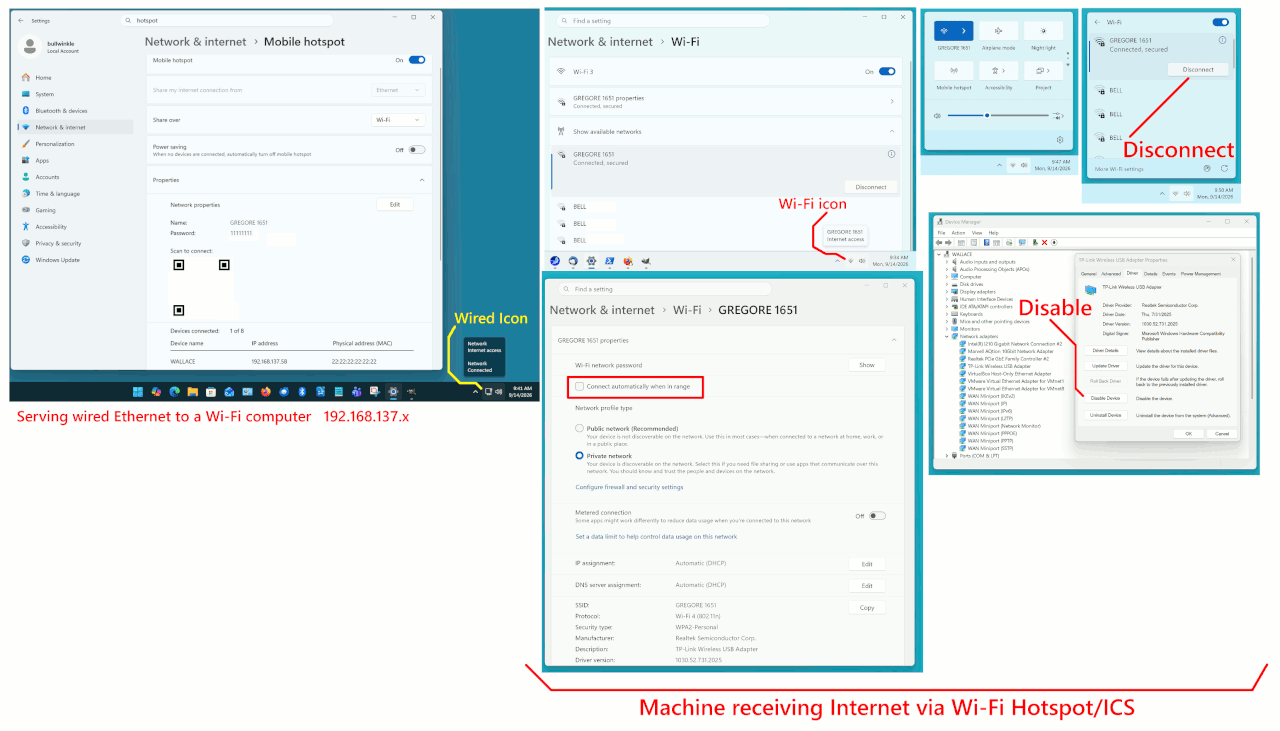
I'm almost certain that I disable my Network Connection almost every evening when I finish my Interneting (and before I start playing MS Games) but, maybe once a week, when I reboot the Computer next Day, the Internet Access is already enabled .... as it was tonight when I booted up.
Does Win-11 have an inbuilt function that allows MS to turn the Internet Connection WHEN *THEY* WANT IT?? ;-P
Not that it particularly matters, in my case, as virtually the first thing I do after booting my Computer is turn on the Internet and start my SeaMonkey Suite.
Paul wrote:
When you click Disable on a network adapter, Windows performs the same action as
any of the following:
ÿÿÿ Disable-NetAdapter in PowerShell
ÿÿÿ Right?click --> Disable in ncpa.cpl [same as Settings : Network & Internet : Advanced Network Settings : [Disable button per NIC] ]
ÿÿÿ Device Manager --> Disable device
When would it not stay disabled?
Alternatively, Daniel may be turning off the WiFi slider, and that has options to automatically re-connect after 1, 4 or 24 hours (or never).
Down in the bottom right of screen, near the clock, I have four Icons, Speaker, Wi-Fi, Windows Security and Show Hidden Icons (which gives me access to my AVG anti-virus and Bluetooth connections).
Normally the Speakers are minimised and, as I've typed, I try to remember to switch off the Internet Access when I finish each night.
This evening, when I booted the Computer, the Internet Access was Enabled .... even though I AM CERTAIN I DISABLED IT LAST NIGHT.
Bloody Computers!! ;-)
Paul wrote:
If the control in the tray area is an actual Wifi Disable, then using
the control should also affect the Device Manager enabled/disabled
status of the Wifi device.
I don't find that to be the case ...
The adapter device as seen in devmgmt.msc and ncpa.cpl always show the
same enabled/disabled state as each other, but the wifi state in the tray icon
can be "on" or "off" when the adapter is enabled, however if the adapter state
is disabled, wifi state doesn't even exist, so can't be "on".
Paul wrote:
ÿÿ Airplane mode:ÿÿÿ Not visible on a desktop, a mobile device thing
I don't have a desktop with bluetooth, but I wouldn't be surprised if airplane mode showed up on a desktop that does?
Paul wrote:
ÿÿ Airplane mode:ÿÿÿ Not visible on a desktop, a mobile device thing
I don't have a desktop with bluetooth, but I wouldn't be surprised if airplane mode showed up on a desktop that does?
On 14/09/2026 8:42 pm, Daniel70 wrote:
On 14/09/2026 7:25 pm, Andy Burns wrote:
Daniel70 wrote:
Andy Burns wrote:
Daniel may be turning off the WiFi slider, and that has options to automatically re-connect after 1, 4 or 24 hours (or never).
Where might I find "the WiFi slider"??
I press a button marked "Disconnect".
The slider is just above your disconnect button ...
<http://andyburns.uk/misc/win11-wifi-slider.png>
Never fiddled with that before .... but thanks.
Each remembered WiFi connection has a "Connect automatically" tickbox, do you have that unticked?
When I connect, there are several connections offered (Neighbourhood Wi-Fi connections, I guess) and I select *MY* Wi-Fi and select 'Connect'.
Normally, I'd have to select the "Connect" box but, as I've typed before, occasionally when I booted up the next day, I'd already be connected.
The last two days it has happened automatically.
Tonight, I actually had to select "Connect" .... so, hopefully, MS
has finished fiddling with my computer and things are back to normal
On 14/09/2026 9:38 pm, Andy Burns wrote:
Daniel70 wrote:
Paul, I would if I could ..... but, on the Device Manager screen, I see
24 things listed all the way from 'Audio inputs and outputs' down to
'Universal Serial Bus controllers' and 'Universal Serial Bus devices'
.... but nothing starting with 'V', 'W', 'X', 'Y' or 'Z'
Assuming the default view of "devices by type", your wifi adapter will show under "network adapters", e.g. mine is Intel AX201
<http://andyburns.uk/misc/win11-wifi-device-manager.png>
I did (accidentally) look at that 'network adapters' list last night and nothing in the list of eleven adapters jumped out at me.
I'm guessing, though, that it'll be either
a.ÿÿÿ Realtek PCIe GbE Family Controller, or,
b.ÿÿÿ Realtek RtL8852BE WiFi 6 802.11ax PCIe Adapter
.... which looks like the one as, as I've typed before, there is a WiFi link to the Modem.
| Sysop: | Jacob Catayoc |
|---|---|
| Location: | Pasay City, Metro Manila, Philippines |
| Users: | 4 |
| Nodes: | 4 (0 / 4) |
| Uptime: | 497100:06:53 |
| Calls: | 182 |
| Files: | 744 |
| D/L today: |
15 files (5,345K bytes) |
| Messages: | 73,582 |