On Wed, 7/22/2026 11:17 AM, knuttle wrote:
Periodically I need a copy of a document while working on my laptop.
Is there a attachment that can be placed on the laptop camera with a
fiber optic extension that could be moved over the document. With the attachement, you would activate the camera, then hold the fiber optic extension
over the document, when the screen show what you want, you could take the picture.
Yes you can hold the document in front of the camera while trying to see
the laptop screen to judge if it is of a usable quality, and shows what you want, but ............
Why not use your iPhone ? It has all the capture capability
a person could ever want.
But what this is going to show you, is the limitations of
your laptop screen.
If you convert the document in question to an image first,
at a higher resolution, this gives an opportunity for a higher
resolution sampling. Or, you zoom in to a portion of the document
and shoot a 2D panorama (using either snippingtool.exe in Windows
or use your iPhone on a tripod for stability).
*******
Typically, this becomes apparent, if you take a 4K picture
into Word, shrink it so it fits. A PDF of the resulting document,
the Letter PDF is 612x792 pixels or so. The 4K picture is
"sampled" while you are viewing the PDF. If you zoom into
the screen view, more of the native pixels of the 4K picture
become apparent. Since TrueType fonts have spline curves for
their edges, you can just keep zooming in on those and they
still look smooth. Until some pixel or quantization limit of
the software is hit (the dimensions of everything have limits,
images with over 4 billion pixels in Photoshop, require a different
format called .psb ).
When the original image is poor (320x240 image stuffed into doc),
as you zoom in, it looks pixelated. While you could attempt to
interpolate, this does not create "extra information", and the
same pixelation is still basically present.
*******
On Linux, on Xorg, you can do this.
xrandr --output HDMI-0 --panning 6144x6144
I could attempt to do this on Devuan, on the other machine (native X11 Xorg graphics).
It has an SSD with seven OSes on it right now, one of them
with MythTV freshly installed. I can make bigger virtual screens
and then take a screenshot of the bigger virtual screen,
to get more "virtual resolution". This is an impossible
environment to work in, so this capability is mostly a bar bet.
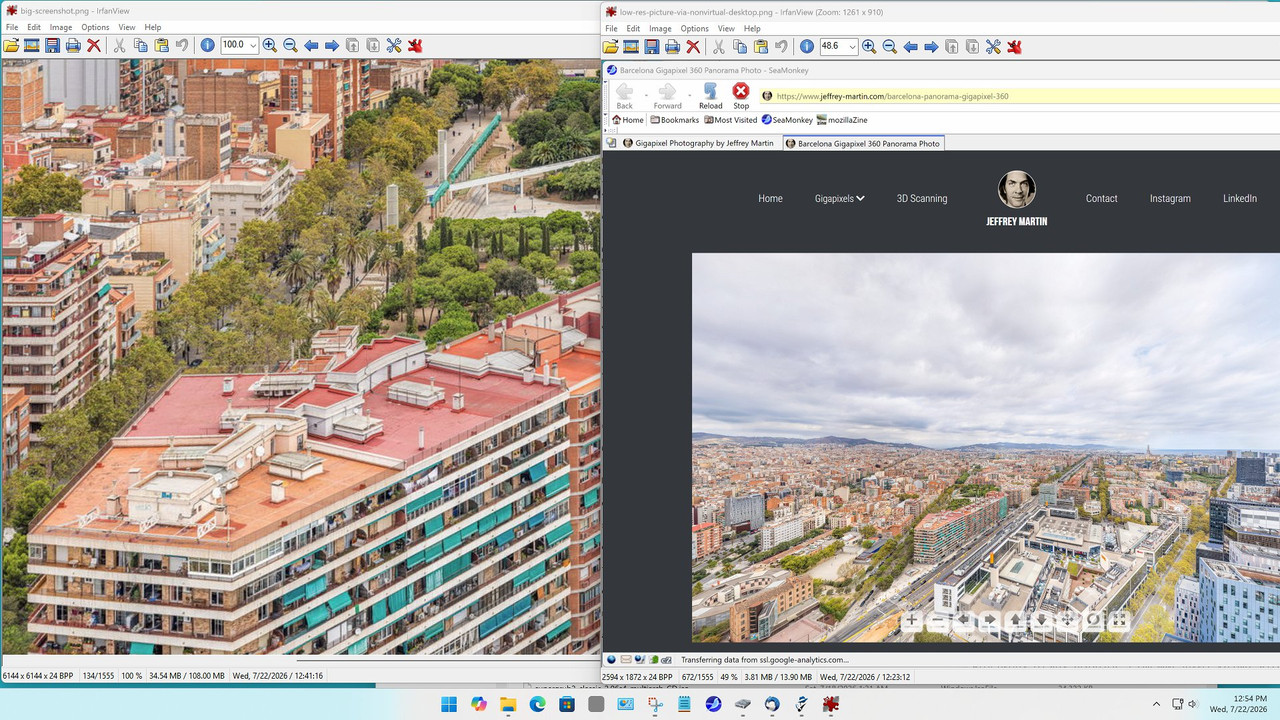
# First, I'll shoot this in a regular browser, using snippingtool.exe
https://www.jeffrey-martin.com/barcelona-panorama-gigapixel-360
# And then use the full screen mode of that web page, on the 6144x6144 screen
# That's a 6144x6144 surface, displayed on my tiny 1280x1024 LCD screen! You have
# to "pan" to view a subsection of the desktop, a tiny square of it.
# Versus the limitations of my 3840x2160 daily driver screen.
Since the image hosting sites would object to the file size, I'll
leave this to your imagination.
Name: low-res-picture-via-nonvirtual-desktop.png
Size: 3,998,836 bytes (3905 KiB)
Name: big-screenshot.png
Size: 36,222,999 bytes (34 MiB)
No matter what you think of the quality, there is 12 times as
much content (roughly) in one picture as the other. Sure, I could
zoom in, on the 3840x2160 screen, take my iPhone, take picture
after picture, and join them in a 2D panorama, but that would take
time.
And this works, the "really big screen tricK" only works, if
there is resolution in the source picture that can be harvested.
If you magnify a 640x480 a million times, all you get is really
really big "blocks" for the individual pixels. Only if a picture
is a gigapixel type picture, does using the large virtual screen
come close to "stealing the picture" :-)
I have limited the res. here, so the picture only take 500KB.
But it still illustrates the concept, that if a "thing" has the
inherent pixels in it, you can find a way of harvesting them...
without zooming in and doing a 2D matrix of screenshots with
your iPhone. The portion on the left, allows much higher magnification
(or quality printing) later on.
[Picture] comparison-big-vs-little-screen.jpg
https://imgur.com/a/jxcIks6
https://i.postimg.cc/m2DDq0sS/comparison-big-vs-little-screen.jpg
Some source material, never had the hidden resolution in the
first place, and all that zooming one of those does, is give extremely
large "blocks" with no additional information. Notice I selected
a gigapixel site, in the hopes it had pixels to share with us,
and this one happens to allow it. I've had stingy sites, stop
my experiment at roughly 4K and they would not allow attempts
at larger screens.
In Linux, I can make the surface larger than 6144x6144, but you
start getting artifacts if you make it too much larger.
Windows has also had capabilities like this, but they were removed
at some point, maybe Win8 or so at a guess. There used to be a
custom resolution dialog, and it would put you in panning mode.
But Hollywood likely did not approve such things, and it disappeared
roughly the same time as the "analog hole" disappeared. There
would be pressure on other OSes, to remove such things. I haven't
tested, but maybe Wayland cannot do that. It would not surprise me.
Paul
--- PyGate Linux v1.5.18
* Origin: Dragon's Lair, PyGate NNTP<>Fido Gate (3:633/10)