I can't get a text file to print completely.
What editor would force everything to print? win11 Pro, fully updated,
but I'm pretty sure the problem will be the same in win10. (I'll send
the file to my win10 computer and try it.)
So far I've used Notepad++ and Libreoffice. Notepad++ stopped after 2
pages of 15. Libreoffice did better, but using double sided printing,
it prints the first 2 pages on both sides, but leaves the back of each
later page blank, And it seems it skips text at that point, it's not
that it just wastes one side of the paper. (Prints a total of 6.5 pages)
I just tried an elevated cmd window with the command
print "C:\Data\WhatsApp Chat with +1 (442) nnn-nnnn.txt" lpt1
and I get "Unable to initialize device PRN" which google says relates
to Python. I don't have Python. Do I want it?? Just 4 years ago,
within win10, I could print a file this way from the cmd box to a
printer without any of the printer software installed on my computer. No mention of initializing or Python. Maybe Powershell will work better?
Nope, same error message.
Is LPT1 the wrong nomenclature? I also tried it with the printer name,
the port name, and the IP address and got the same error message every
time.
Background:
A friend lent me his Android phone and I wanted to copy about 12 of his whatsapp chats to my PC. (I think last Jan or February I posted about
the troubles getting it to the PC. One or two went with one method and
the others required the second method.)
Now I want to print them. They were each in separate zip filse which
expanded to a .txt file. Eleven of them, I opened each in Notepad++ and printed with no problem.
The 12th and by far the longest and most important one would only
print 2 pages out of 15. Tried 3 times**.
So instead I edited the same file with LibreOfffice and more of it printed, almost 7 pages but still not 15.
It's 2-sided printing and the first 2 pages are on the same sheet of paper, but after that only one side gets printed on, and there are text
gaps between the end of one page and the start of the next page, as if everything that is missing should be on the blank back of the sheet.
Yet I've looked at the file on the screen in both Notepad++ and Librefoffice and unlike the emogies that stymied Notepad++, I don't see anything suspicious.
**Extra quandary. (Very curious but even a good answer here is not as important as above, getting the file to print completely) Got no warning message on the PC like my printer usually gives, or on the printer,
except once I found a new segment of the taskbar that said that I needed
to update Outlook in order to make progress.
I googled the message and sure enough that's a valid message. I
googled "Does Notepad++ use Outlook", and found out that it can if I set
it up, but I'd never set it up. In fact, I don't have Outlook or Word
or anything from that group! So where did that message come from? Was
this phishing?
After trying Notepad++ I looked at the file, 99.9% text, but there were
a couple smiley emoticons or emojees (I don't know the difference), one heart, and one praying hands. In colors like red or yellow. And maybe
the first one was 1/15th of the way down.
stopped after 1 page (of 15) 3 times. It displayed just fine.
After trying Notepad++ I looked at the file, 99.9% text, but there were
a couple smiley emoticons or emojees (I don't know the difference), one heart, and one praying hands. In colors like red or yellow. And maybe
the first one was 1/15th of the way down.
stopped after 1 page (of 15) 3 times. It displayed just fine.
So far I've used Notepad++ and Libreoffice. Notepad++
I can't get a text file to print completely.
.....
print "C:\Data\WhatsApp Chat with +1 (442) nnn-nnnn.txt" lpt1
....
Is LPT1 the wrong nomenclature? I also tried it with the printer name,
I can't get a text file to print completely.
What editor would force everything to print? win11 Pro, fully updated,
but I'm pretty sure the problem will be the same in win10. (I'll send
the file to my win10 computer and try it.)
So far I've used Notepad++ and Libreoffice. Notepad++ stopped after 2
pages of 15. Libreoffice did better, but using double sided printing,
it prints the first 2 pages on both sides, but leaves the back of each
later page blank, And it seems it skips text at that point, it's not
that it just wastes one side of the paper. (Prints a total of 6.5 pages)
I just tried an elevated cmd window with the command
print "C:\Data\WhatsApp Chat with +1 (442) nnn-nnnn.txt" lpt1
and I get "Unable to initialize device PRN" which google says relates
to Python. I don't have Python. Do I want it?? Just 4 years ago,
within win10, I could print a file this way from the cmd box to a
printer without any of the printer software installed on my computer. No mention of initializing or Python. Maybe Powershell will work better?
Nope, same error message.
Is LPT1 the wrong nomenclature? I also tried it with the printer name,
the port name, and the IP address and got the same error message every
time.
Background:
A friend lent me his Android phone and I wanted to copy about 12 of his whatsapp chats to my PC. (I think last Jan or February I posted about
the troubles getting it to the PC. One or two went with one method and
the others required the second method.)
Now I want to print them. They were each in separate zip filse which
expanded to a .txt file. Eleven of them, I opened each in Notepad++ and printed with no problem.
The 12th and by far the longest and most important one would only
print 2 pages out of 15. Tried 3 times**.
So instead I edited the same file with LibreOfffice and more of it
printed, almost 7 pages but still not 15.
It's 2-sided printing and the first 2 pages are on the same sheet of
paper, but after that only one side gets printed on, and there are text
gaps between the end of one page and the start of the next page, as if everything that is missing should be on the blank back of the sheet.
Yet I've looked at the file on the screen in both Notepad++ and Librefoffice and unlike the emogies that stymied Notepad++, I don't see anything suspicious.
**Extra quandary. (Very curious but even a good answer here is not as important as above, getting the file to print completely) Got no warning message on the PC like my printer usually gives, or on the printer,
except once I found a new segment of the taskbar that said that I needed
to update Outlook in order to make progress.
I googled the message and sure enough that's a valid message. I
googled "Does Notepad++ use Outlook", and found out that it can if I set
it up, but I'd never set it up. In fact, I don't have Outlook or Word
or anything from that group! So where did that message come from? Was
this phishing?
After trying Notepad++ I looked at the file, 99.9% text, but there were
a couple smiley emoticons or emojees (I don't know the difference), one heart, and one praying hands. In colors like red or yellow. And maybe
the first one was 1/15th of the way down.
stopped after 1 page (of 15) 3 times. It displayed just fine.
I can't get a text file to print completely.
What editor would force everything to print? win11 Pro, fully updated,
but I'm pretty sure the problem will be the same in win10. (I'll send
the file to my win10 computer and try it.)
So far I've used Notepad++ and Libreoffice. Notepad++ stopped after 2
pages of 15. Libreoffice did better, but using double sided printing,
it prints the first 2 pages on both sides, but leaves the back of each
later page blank, And it seems it skips text at that point, it's not
that it just wastes one side of the paper. (Prints a total of 6.5 pages)
I just tried an elevated cmd window with the command
print "C:\Data\WhatsApp Chat with +1 (442) nnn-nnnn.txt" lpt1
and I get "Unable to initialize device PRN" which google says relates
to Python. I don't have Python. Do I want it?? Just 4 years ago,
within win10, I could print a file this way from the cmd box to a
printer without any of the printer software installed on my computer. No
mention of initializing or Python. Maybe Powershell will work better?
Nope, same error message.
Is LPT1 the wrong nomenclature? I also tried it with the printer name,
the port name, and the IP address and got the same error message every
time.
The 12th and by far the longest and most important one would only
print 2 pages out of 15. Tried 3 times**.
So instead I edited the same file with LibreOfffice and more of it
printed, almost 7 pages but still not 15.
It's 2-sided printing and the first 2 pages are on the same sheet of
paper, but after that only one side gets printed on, and there are text
gaps between the end of one page and the start of the next page, as if everything that is missing should be on the blank back of the sheet.
Yet I've looked at the file on the screen in both Notepad++ and Librefoffice and unlike the emogies that stymied Notepad++, I don't see anything suspicious.
**Extra quandary. (Very curious but even a good answer here is not as important as above, getting the file to print completely) Got no warning message on the PC like my printer usually gives, or on the printer,
except once I found a new segment of the taskbar that said that I needed
to update Outlook in order to make progress.
I googled the message and sure enough that's a valid message. I
googled "Does Notepad++ use Outlook", and found out that it can if I set
it up, but I'd never set it up. In fact, I don't have Outlook or Word
or anything from that group! So where did that message come from? Was
this phishing?
After trying Notepad++ I looked at the file, 99.9% text, but there were
a couple smiley emoticons or emojees (I don't know the difference), one
heart, and one praying hands. In colors like red or yellow. And maybe
the first one was 1/15th of the way down.
stopped after 1 page (of 15) 3 times. It displayed just fine.
On 2026/7/18 18:36:48, micky wrote:[]
I can't get a text file to print completely.
It _sounds_ like there is/are some special byte(s) in the file that are[]
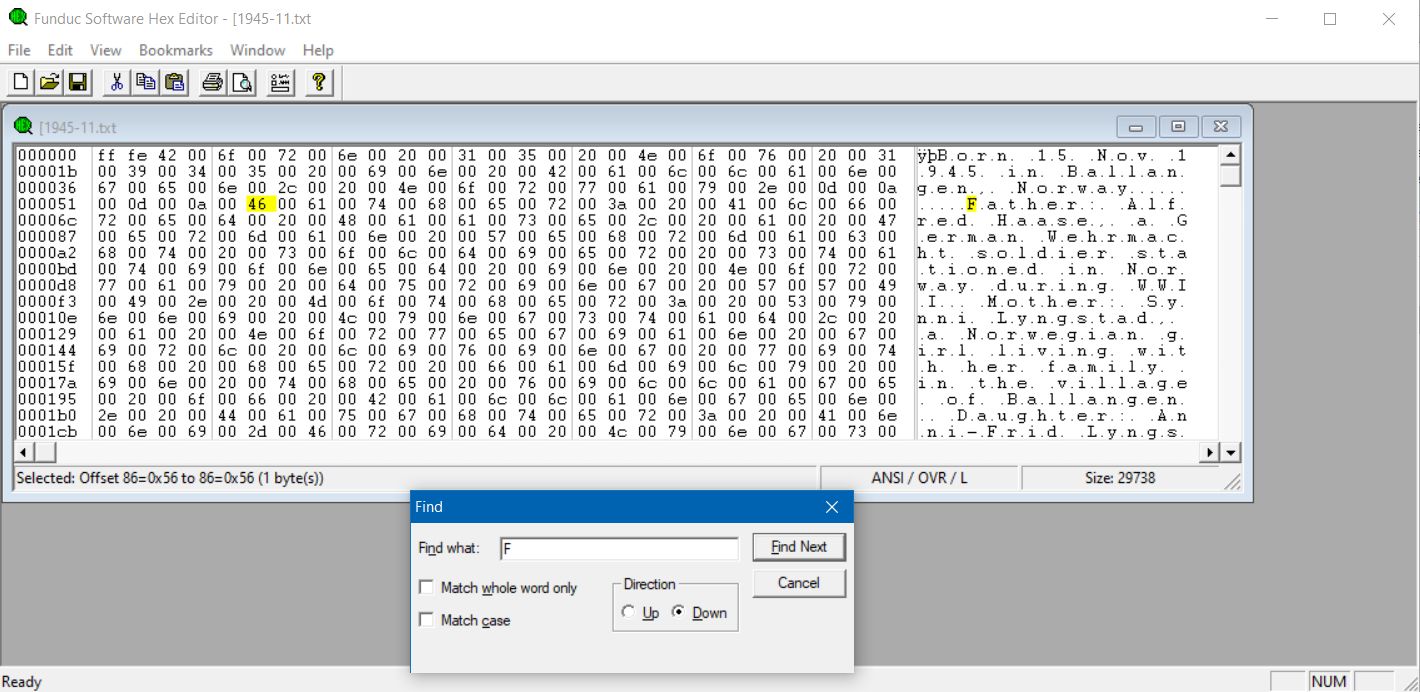
not plain text. Do you have a hex viewer (ideally editor)? I have
FSHexEdit, but there are plenty such. If you do, and you can find
something odd, replace it with byte(s) of hex 20 (decimal 32) - which is
a space. (Work on a copy of the file.)
I can't get a text file to print completely.
What editor would force everything to print? win11 Pro, fully updated,
but I'm pretty sure the problem will be the same in win10. (I'll send
the file to my win10 computer and try it.)
So far I've used Notepad++ and Libreoffice. Notepad++ stopped after 2
pages of 15. Libreoffice did better, but using double sided printing,
it prints the first 2 pages on both sides, but leaves the back of each
later page blank, And it seems it skips text at that point, it's not
that it just wastes one side of the paper. (Prints a total of 6.5 pages)
I just tried an elevated cmd window with the command
print "C:\Data\WhatsApp Chat with +1 (442) nnn-nnnn.txt" lpt1
and I get "Unable to initialize device PRN" which google says relates
to Python. I don't have Python. Do I want it?? Just 4 years ago,
within win10, I could print a file this way from the cmd box to a
printer without any of the printer software installed on my computer. No mention of initializing or Python. Maybe Powershell will work better?
Nope, same error message.
Is LPT1 the wrong nomenclature? I also tried it with the printer name,
the port name, and the IP address and got the same error message every
time.
Background:
A friend lent me his Android phone and I wanted to copy about 12 of his whatsapp chats to my PC. (I think last Jan or February I posted about
the troubles getting it to the PC. One or two went with one method and
the others required the second method.)
Now I want to print them. They were each in separate zip filse which
expanded to a .txt file. Eleven of them, I opened each in Notepad++ and printed with no problem.
The 12th and by far the longest and most important one would only
print 2 pages out of 15. Tried 3 times**.
So instead I edited the same file with LibreOfffice and more of it printed, almost 7 pages but still not 15.
It's 2-sided printing and the first 2 pages are on the same sheet of paper, but after that only one side gets printed on, and there are text
gaps between the end of one page and the start of the next page, as if everything that is missing should be on the blank back of the sheet.
Yet I've looked at the file on the screen in both Notepad++ and Librefoffice and unlike the emogies that stymied Notepad++, I don't see anything suspicious.
**Extra quandary. (Very curious but even a good answer here is not as important as above, getting the file to print completely) Got no warning message on the PC like my printer usually gives, or on the printer,
except once I found a new segment of the taskbar that said that I needed
to update Outlook in order to make progress.
I googled the message and sure enough that's a valid message. I
googled "Does Notepad++ use Outlook", and found out that it can if I set
it up, but I'd never set it up. In fact, I don't have Outlook or Word
or anything from that group! So where did that message come from? Was
this phishing?
After trying Notepad++ I looked at the file, 99.9% text, but there were
a couple smiley emoticons or emojees (I don't know the difference), one heart, and one praying hands. In colors like red or yellow. And maybe
the first one was 1/15th of the way down.
stopped after 1 page (of 15) 3 times. It displayed just fine.
micky <NONONOmisc07@fmguy.com> wrote:
[...]
After trying Notepad++ I looked at the file, 99.9% text, but there were
a couple smiley emoticons or emojees (I don't know the difference), one
heart, and one praying hands. In colors like red or yellow. And maybe
the first one was 1/15th of the way down.
stopped after 1 page (of 15) 3 times. It displayed just fine.
Similar to Roger's advice:
As it *displays* fine in Notepad++, print it in Notepad+++, but use
"Microsoft Print to PDF" as the 'printer'.
Now look at the PDF, if that still looks fine, just print the PDF from
whatever PDF-viewer you use (I just use (Microsoft) Edge).
So any emojis, smileys or other 'silly' graphics stuff will be taken
care of the PDF-renderer.
HTH.
[]
If you _haven't_ got a hex editor, then in whatever you _are_ viewing it
in, go to the trouble point, and delete from just after the beginning of
the first line of text after it, back to just before the end of the last
line before it, retype the charaters you've deleted (plus a few
newlines), and try again. That _should_ delete anything unusual.
In alt.comp.os.windows-10, on 18 Jul 2026 18:21:42 GMT, Frank Slootweg <this@ddress.is.invalid> wrote:[]
As it *displays* fine in Notepad++, print it in Notepad+++, but use
"Microsoft Print to PDF" as the 'printer'.
Oh, this is so easy.
Now look at the PDF, if that still looks fine, just print the PDF from
whatever PDF-viewer you use (I just use (Microsoft) Edge).
This was easy too. I used Firefox, and it only printed 2 of what it
said would be 12 pages. So I switched to Edge, and it only printed 1. Although when I got them off the printer, both had only printed the same amount, one side of one page.
Any other ideas? Below I talk about doing it almost a paragraph at a[]
time if I have to.
Oh, I'm looking this up again now, but if you know off the top of your
head: How do I write straight to the printer, using a cmd box or
PowerShell bos. This didzn't work:
The first smiley is more than a page after it stops printing. And the
copy printed from Libreoffice, did print most or all of the graphics.
And I've looked at the text just before it stops printing and for 30
lines afterwards, and I've looked before and after the places it starts printing again, and I don't see anything different.
On 2026/7/19 0:55:5, micky wrote:
In alt.comp.os.windows-10, on 18 Jul 2026 18:21:42 GMT, Frank Slootweg[]
<this@ddress.is.invalid> wrote:
As it *displays* fine in Notepad++, print it in Notepad+++, but use
"Microsoft Print to PDF" as the 'printer'.
Oh, this is so easy.
So you have a PDF that appears to show the same text?
Now look at the PDF, if that still looks fine, just print the PDF from
whatever PDF-viewer you use (I just use (Microsoft) Edge).
This was easy too. I used Firefox, and it only printed 2 of what it
said would be 12 pages. So I switched to Edge, and it only printed 1.
Although when I got them off the printer, both had only printed the same
amount, one side of one page.
Now try - in Firefox or Edge, or perhaps a standalone PDF viewer like
Acrobat or whatever else you have - printing it *from page 3 onwards*.
(3 to 12 if you have to say.) Edge and most PDF viewers have the
facility to select which pages to print.
[]
Any other ideas? Below I talk about doing it almost a paragraph at a
time if I have to.
Oh, I'm looking this up again now, but if you know off the top of your
head: How do I write straight to the printer, using a cmd box or
PowerShell bos. This didzn't work:
The first smiley is more than a page after it stops printing. And the
copy printed from Libreoffice, did print most or all of the graphics.
If there are graphics in it, IT ISN'T A TEXT FILE. but if the stop point
is before where you think the graphics were, then there's probably
something invisible in it. Look with a hex editor, and null it out with >spaces (hex character 20). It should contain no byte above 7E, nor below
20 other than 0D and 0A (and possibly 09).
And I've looked at the text just before it stops printing and for 30
lines afterwards, and I've looked before and after the places it starts
printing again, and I don't see anything different.
You've looked with things that look at text. Look with a Hex
viewer/editor. https://www.searchandreplace.com/fshexedit.htm is one such.
[]
Failing that, print - from Acrobat or other PDF viewer, or Edge or
Firefox - one page at a time. Don't mess with double-sided - if
absolutely necessary to have double-sided, print the odd pages, one at a >time, then you can feed the paper back into the printer to get even
pages printed on the other sides.
This was easy too. I used Firefox, and it only printed 2 of what it
said would be 12 pages. So I switched to Edge, and it only printed 1. Although when I got them off the printer, both had only printed the same amount, one side of one page.
Any other ideas? Below I talk about doing it almost a paragraph at a
time if I have to.
Oh, I'm looking this up again now, but if you know off the top of your
head: How do I write straight to the printer, using a cmd box or
PowerShell bos. This didzn't work:
print "C:\Data\Scam\WhatsApp Chat with +1 (442) 446-nnnn.txt" lpt1
and it didn't work when I changed lpt1 to the printer name, the port
name or the IP address.
On 07/18/2026 1:36 PM, micky wrote:
I can't get a text file to print completely.You say you tried libreOffice. When it was opened in LibreOffice Could
What editor would force everything to print? win11 Pro, fully updated,
but I'm pretty sure the problem will be the same in win10. (I'll send
the file to my win10 computer and try it.)
So far I've used Notepad++ and Libreoffice. Notepad++ stopped after 2
pages of 15. Libreoffice did better, but using double sided printing,
it prints the first 2 pages on both sides, but leaves the back of each
later page blank, And it seems it skips text at that point, it's not
that it just wastes one side of the paper. (Prints a total of 6.5 pages)
I just tried an elevated cmd window with the command
print "C:\Data\WhatsApp Chat with +1 (442) nnn-nnnn.txt" lpt1
and I get "Unable to initialize device PRN" which google says relates
to Python. I don't have Python. Do I want it?? Just 4 years ago,
within win10, I could print a file this way from the cmd box to a
printer without any of the printer software installed on my computer. No
mention of initializing or Python. Maybe Powershell will work better?
Nope, same error message.
Is LPT1 the wrong nomenclature? I also tried it with the printer name,
the port name, and the IP address and got the same error message every
time.
Background:
A friend lent me his Android phone and I wanted to copy about 12 of his
whatsapp chats to my PC. (I think last Jan or February I posted about
the troubles getting it to the PC. One or two went with one method and
the others required the second method.)
Now I want to print them. They were each in separate zip filse which
expanded to a .txt file. Eleven of them, I opened each in Notepad++ and
printed with no problem.
The 12th and by far the longest and most important one would only
print 2 pages out of 15. Tried 3 times**.
So instead I edited the same file with LibreOfffice and more of it
printed, almost 7 pages but still not 15.
It's 2-sided printing and the first 2 pages are on the same sheet of
paper, but after that only one side gets printed on, and there are text
gaps between the end of one page and the start of the next page, as if
everything that is missing should be on the blank back of the sheet.
Yet I've looked at the file on the screen in both Notepad++ and
Librefoffice and unlike the emogies that stymied Notepad++, I don't see
anything suspicious.
**Extra quandary. (Very curious but even a good answer here is not as
important as above, getting the file to print completely) Got no warning
message on the PC like my printer usually gives, or on the printer,
except once I found a new segment of the taskbar that said that I needed
to update Outlook in order to make progress.
I googled the message and sure enough that's a valid message. I
googled "Does Notepad++ use Outlook", and found out that it can if I set
it up, but I'd never set it up. In fact, I don't have Outlook or Word
or anything from that group! So where did that message come from? Was
this phishing?
After trying Notepad++ I looked at the file, 99.9% text, but there were
a couple smiley emoticons or emojees (I don't know the difference), one
heart, and one praying hands. In colors like red or yellow. And maybe
the first one was 1/15th of the way down.
stopped after 1 page (of 15) 3 times. It displayed just fine.
you see see all of the text in the file? Are the all character readable?
What is the extension of the file you friend gave you?
Can you import it into your phone and see all of the text.
In the worst case and if you can get the whole thing readable in
notepad. If you can scroll through the file, looking for repeating odd >characters. If so these are probably the end of conversation marker.
Go through and copy the text BETWEEN the repeated characters copy them
to a second copy of notepad or LibreOffice and print that text. repeat >until you have printed the whole file.
On 18/07/2026 18:36, micky wrote:
So far I've used Notepad++ and Libreoffice. Notepad++
Have you tried using Microsoft Notepad? Why not? Is it because you think >it's spying on you?
If you're using Windows 11 and you still have WordPad installed, it's >another Microsoft product worth trying.
Windows 10 has both Notepad and WordPad, so try using those instead.
Both Windows 10 and 11 allow you to save/print files as PDFs, so try
doing this to avoid wasting paper and toner unnecessarily.
To print to a LPT1 printer you need this simple command:
copy /B yourfile.txt LPT1
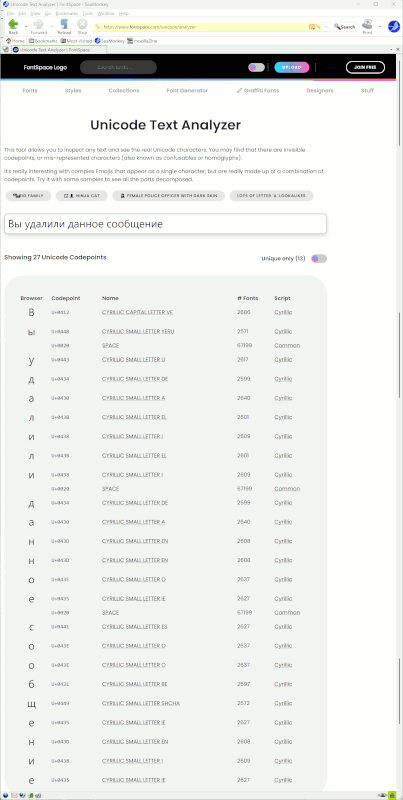
Narrow No-Break Space (Unicode
character U+202F)
On Sat, 7/18/2026 9:46 PM, micky wrote:
Narrow No-Break Space (Unicode
character U+202F)
Freaky stuff. Should be fun doing a "Replace"
in a text editor.
https://en.wikipedia.org/wiki/Non-breaking_space
Maybe eventually the max width of a line was exceeded ?
Paul
I can't get a text file to print completely.
I will try to find the problem and get back to you all, but I've looked already and I know I'll lose interest soon.
In alt.comp.os.windows-11, on Sun, 19 Jul 2026 01:50:34 +0100, "J. P. Gilliver" <G6JPG@255soft.uk> wrote:[]
Now try - in Firefox or Edge, or perhaps a standalone PDF viewer like
Acrobat or whatever else you have - printing it *from page 3 onwards*.
Good idea.
If there are graphics in it, IT ISN'T A TEXT FILE. but if the stop point
is before where you think the graphics were, then there's probably
something invisible in it. Look with a hex editor, and null it out with
spaces (hex character 20). It should contain no byte above 7E, nor below
20 other than 0D and 0A (and possibly 09).
Very good idea. Would take some time. I have until Tuesday.
And I've looked at the text just before it stops printing and for 30
lines afterwards, and I've looked before and after the places it starts
printing again, and I don't see anything different.
--viewer/editor. https://www.searchandreplace.com/fshexedit.htm is one such. >> []
Failing that, print - from Acrobat or other PDF viewer, or Edge or
Firefox - one page at a time. Don't mess with double-sided - if
absolutely necessary to have double-sided, print the odd pages, one at a
time, then you can feed the paper back into the printer to get even
pages printed on the other sides.
Also a good idea.
In alt.comp.os.windows-11, on Sat, 18 Jul 2026 17:44:42 -0400, knuttle <keith_nuttle@yahoo.com> wrote:[]
On 07/18/2026 1:36 PM, micky wrote:
I can't get a text file to print completely.
Well, I hope to reply to each of you, but because you are the last
poster replying directly to me, I will say what's probably the end of
the story.
I sent an email to myself with the file attached. Opened it with
Notepad++ on the upstairs win10 computer, and printed it from there, and
it printed completely on the first try!!!! 2-sided even, Almost 13
pages, 7 sheets.
A victory for win10!!!. I hope you win10 guys appreciate this.
And a good reazon for me not to have retired my older computer.
Unlike win11, in one small aspect it didn't display or print as well in win10. Because it's a chat, every line starts with the date and time. Between the time numbers and AM or PM, in one of the programs on win11,
it showed the outline of a little square box, but in win10 Notepad++ on screen and printed, it shows NNBSP. Narrow No-Break Space (Unicode
character U+202F)
In the printed version it's darkly shaded and the letters are very
hard to make out. It makes every line 4 characters longer but I don't
think that matters here. I updated Notepad++ to the most recent
version, but it didn't change. Downstairs, nothing shows on the screen
in any but that one program, and for all the various Page 1's that I
printed, it's just one blank space between the numbers,
for example 9:45 PM.
But this was not the cause of the problem because thisappears for every entry, almost every sentence, from the first line until the last.
I will try to find the problem and get back to you all, but I've looked already and I know I'll lose interest soon.
Thanks again eveyone.
I just tried an elevated cmd window with the command
print "C:\Data\WhatsApp Chat with +1 (442) nnn-nnnn.txt" lpt1
and I get "Unable to initialize device PRN" which google says relates
to Python. I don't have Python. Do I want it?? Just 4 years ago,
within win10, I could print a file this way from the cmd box to a
printer without any of the printer software installed on my computer. No mention of initializing or Python. Maybe Powershell will work better?
Nope, same error message.
Is LPT1 the wrong nomenclature? I also tried it with the printer name,
the port name, and the IP address and got the same error message every
time.
On 2026/7/19 2:46:46, micky wrote:
Unlike win11, in one small aspect it didn't display or print as well in
win10. Because it's a chat, every line starts with the date and time.
Between the time numbers and AM or PM, in one of the programs on win11,
it showed the outline of a little square box, but in win10 Notepad++ on
screen and printed, it shows NNBSP. Narrow No-Break Space (Unicode
character U+202F)
Clearly NOT a "text file".
On 7/19/2026 3:46 AM, micky wrote:
I can't get a text file to print completely.
I will try to find the problem and get back to you all, but I've looked
already and I know I'll lose interest soon.
I think, the problem is not the text file or the program
you use to print it, but the HW of the printer, the communication
(what do you use, USB or WLAN) or the printer driver.
Seems you can print at least one page, so for a fast
work around:
Open the text file in any program where you can specify the
pages to print (any word processing program or even Firefox).
Print page one, then in a new print job print page 3, then
page 5 and so on. Then reinsert the paper to print page 2,4,..
on the back site.
In alt.comp.os.windows-11, on Sun, 19 Jul 2026 01:50:34 +0100, "J. P. Gilliver" <G6JPG@255soft.uk> wrote:
On 2026/7/19 0:55:5, micky wrote:
In alt.comp.os.windows-10, on 18 Jul 2026 18:21:42 GMT, Frank Slootweg[]
<this@ddress.is.invalid> wrote:
As it *displays* fine in Notepad++, print it in Notepad+++, but use
"Microsoft Print to PDF" as the 'printer'.
Oh, this is so easy.
So you have a PDF that appears to show the same text?
Yes.
heart, and one praying hands. In colors like red or yellow. And maybeAnything like smileys/emoticons, or colour, are not part of text.
the first one was 1/15th of the way down.
On 2026-07-19 03:17, micky wrote:[]
In alt.comp.os.windows-11, on Sun, 19 Jul 2026 01:50:34 +0100, "J. P.
Gilliver" <G6JPG@255soft.uk> wrote:
So you have a PDF that appears to show the same text?
Yes.
And printing from the PDF tool works? Using Adobe Reader, perhaps?
If it doesn't, there is another way. Use a tool to convert all pages of
the PDF to JPG, then print each JPG separately.
I can not say what tool to do the conversion to JPG in Windows. I know
how to do it in Linux. Somebody else would know.
Looking with a text editor is not that useful. Even if the text is
ASCII, characters below 20 are trouble, but those above 127 are legit.
However, likely the text is Unicode. Not possible to interpret unless
you are an expert.
On 2026-07-18 22:48, J. P. Gilliver wrote:
heart, and one praying hands. In colors like red or yellow. And maybeAnything like smileys/emoticons, or colour, are not part of text.
the first one was 1/15th of the way down.
It is UTF-8 text.
On 2026/7/19 21:50:2, Carlos E. R. wrote:
On 2026-07-18 22:48, J. P. Gilliver wrote:Does UTF-8 do colour?
heart, and one praying hands. In colors like red or yellow. And maybe >>>> the first one was 1/15th of the way down.Anything like smileys/emoticons, or colour, are not part of text.
It is UTF-8 text.
On 2026/7/19 21:15:50, Carlos E. R. wrote:
On 2026-07-19 03:17, micky wrote:[]
In alt.comp.os.windows-11, on Sun, 19 Jul 2026 01:50:34 +0100, "J. P.
Gilliver" <G6JPG@255soft.uk> wrote:
Well, if all else fails, the PrtScn key (followed by a paste into anySo you have a PDF that appears to show the same text?
Yes.
And printing from the PDF tool works? Using Adobe Reader, perhaps?
If it doesn't, there is another way. Use a tool to convert all pages of
the PDF to JPG, then print each JPG separately.
I can not say what tool to do the conversion to JPG in Windows. I know
how to do it in Linux. Somebody else would know.
image editor - I use IrfanView for nearly everything; then a crop of edgestuff if necessary) would do, though the quality wouldn't be great
if it's a long block of text or a low-res screen.
But micky's got it to work (via his W10 computer).
Looking with a text editor is not that useful. Even if the text is
ASCII, characters below 20 are trouble, but those above 127 are legit.
Despite some people using the term "extended ASCII", ASCII was never
extended beyond 7F. Though some encodings that go beyond 7F _call_
themselves ASCII, I think.
However, likely the text is Unicode. Not possible to interpret unlessIndeed.
you are an expert.
On 2026-07-19 23:05, J. P. Gilliver wrote:
On 2026/7/19 21:15:50, Carlos E. R. wrote:
On 2026-07-19 03:17, micky wrote:[]
In alt.comp.os.windows-11, on Sun, 19 Jul 2026 01:50:34 +0100, "J. P.
Gilliver" <G6JPG@255soft.uk> wrote:
Well, if all else fails, the PrtScn key (followed by a paste into anySo you have a PDF that appears to show the same text?
Yes.
And printing from the PDF tool works? Using Adobe Reader, perhaps?
If it doesn't, there is another way. Use a tool to convert all pages of
the PDF to JPG, then print each JPG separately.
I can not say what tool to do the conversion to JPG in Windows. I know
how to do it in Linux. Somebody else would know.
image editor - I use IrfanView for nearly everything; then a crop of
edgestuff if necessary) would do, though the quality wouldn't be great
if it's a long block of text or a low-res screen.
Yes, but prtscn would not get the entire page unless zoomed out. Better to do a conversion PDF ? PNG, much better quality. I'm sure there are programs in Windows to do it. At worst, install something like gimp.
But micky's got it to work (via his W10 computer).
Yes, I read it later.
Looking with a text editor is not that useful. Even if the text is
ASCII, characters below 20 are trouble, but those above 127 are legit.
Oops. meant to write HEX editor.
Despite some people using the term "extended ASCII", ASCII was never
extended beyond 7F. Though some encodings that go beyond 7F _call_
themselves ASCII, I think.
In Spain, we used the entire 8 bit space, ie, 255 chars, except the lower part that were control codes. In the IBM-PC world, the upper 127 chars were used, even in the USA, for things like line drawings and some accented letters. The codepage command changed the map of the upper 127 chars. In the IBM-PC world, the 8 bit text was always legal.
However, likely the text is Unicode. Not possible to interpret unlessIndeed.
you are an expert.
On 2026-07-19 23:05, J. P. Gilliver wrote:[]
On 2026/7/19 21:15:50, Carlos E. R. wrote:
I can not say what tool to do the conversion to JPG in Windows. I knowWell, if all else fails, the PrtScn key (followed by a paste into any
how to do it in Linux. Somebody else would know.
image editor - I use IrfanView for nearly everything; then a crop of
edgestuff if necessary) would do, though the quality wouldn't be great
if it's a long block of text or a low-res screen.
Yes, but prtscn would not get the entire page unless zoomed out. Better
to do a conversion PDF ? PNG, much better quality. I'm sure there are programs in Windows to do it. At worst, install something like gimp.
But micky's got it to work (via his W10 computer).
Yes, I read it later.
Looking with a text editor is not that useful. Even if the text is
ASCII, characters below 20 are trouble, but those above 127 are legit.
Oops. meant to write HEX editor.
Despite some people using the term "extended ASCII", ASCII was never
extended beyond 7F. Though some encodings that go beyond 7F _call_
themselves ASCII, I think.
In Spain, we used the entire 8 bit space, ie, 255 chars, except the
lower part that were control codes. In the IBM-PC world, the upper 127
chars were used, even in the USA, for things like line drawings and some accented letters. The codepage command changed the map of the upper 127 chars. In the IBM-PC world, the 8 bit text was always legal.
However, likely the text is Unicode. Not possible to interpret unlessIndeed.
you are an expert.
On 2026-07-19 23:06, J. P. Gilliver wrote:[]
Does UTF-8 do colour?
Yes, certainly. See my signature below.
Or this: ?????????????????????
Which means, even if we found a crude utility, and it "seemed to work here", it might not work for Micky. That was one reason I wanted to find a sample file,
to see whether it matched the horrors described.
On 2026/7/19 22:24:33, Carlos E. R. wrote:
On 2026-07-19 23:05, J. P. Gilliver wrote:[]
On 2026/7/19 21:15:50, Carlos E. R. wrote:
Oh, I definitely agree. That was just a quick and dirty way of doing itI can not say what tool to do the conversion to JPG in Windows. I know >>>> how to do it in Linux. Somebody else would know.Well, if all else fails, the PrtScn key (followed by a paste into any
image editor - I use IrfanView for nearly everything; then a crop of
edgestuff if necessary) would do, though the quality wouldn't be great
if it's a long block of text or a low-res screen.
Yes, but prtscn would not get the entire page unless zoomed out. Better
to do a conversion PDF ? PNG, much better quality. I'm sure there are
programs in Windows to do it. At worst, install something like gimp.
if nothing else was available. As you say, you'd have to zoom out to get
the whole page, which would terrible the quality.
Ah, I was a bit puzzled!
But micky's got it to work (via his W10 computer).
Yes, I read it later.
Looking with a text editor is not that useful. Even if the text is
ASCII, characters below 20 are trouble, but those above 127 are legit.
Oops. meant to write HEX editor.
Oh yes, the upper 128 byte values have lots of alternative character
Despite some people using the term "extended ASCII", ASCII was never
extended beyond 7F. Though some encodings that go beyond 7F _call_
themselves ASCII, I think.
In Spain, we used the entire 8 bit space, ie, 255 chars, except the
lower part that were control codes. In the IBM-PC world, the upper 127
chars were used, even in the USA, for things like line drawings and some
accented letters. The codepage command changed the map of the upper 127
chars. In the IBM-PC world, the 8 bit text was always legal.
sets - as you say, box drawing ones and the like; and, there's a pretty common one that has most of the accented, umlauted, tilded, and so on characters for many European languages (even the ? for my ?koda [car]).
I've often seen this particular set referred to as "extended ASCII";
however, strictly ASCII was/is an American standard (American Standard
Code for Information Interchange), which I read once somewhere was never _officially_ extended beyond 127 (delete).
On 2026/7/19 22:24:9, Carlos E. R. wrote:
On 2026-07-19 23:06, J. P. Gilliver wrote:[]
Does UTF-8 do colour?
Yes, certainly. See my signature below.
Or this: ?????????????????????
You learn something every day!
I had to zoom in to see what's in your .sig; since they are flags, do I assume that UTF-8 is much bigger than 128 or 256 character spaces, as
flags alone would take up most of that number?
On 2026/7/19 22:24:9, Carlos E. R. wrote:
On 2026-07-19 23:06, J. P. Gilliver wrote:[]
Does UTF-8 do colour?
Yes, certainly. See my signature below.
Or this: ?????????????????????
You learn something every day!
I had to zoom in to see what's in your .sig; since they are flags, do I assume that UTF-8 is much bigger than 128 or 256 character spaces, as
flags alone would take up most of that number?
On 2026/7/19 22:24:9, Carlos E. R. wrote:
On 2026-07-19 23:06, J. P. Gilliver wrote:[]
Does UTF-8 do colour?
Yes, certainly. See my signature below.
Or this: ?????????????????????
You learn something every day!
I had to zoom in to see what's in your .sig; since they are flags, do I assume that UTF-8 is much bigger than 128 or 256 character spaces, as
flags alone would take up most of that number?
On 2026-07-19 23:06, J. P. Gilliver wrote:
On 2026/7/19 21:50:2, Carlos E. R. wrote:
On 2026-07-18 22:48, J. P. Gilliver wrote:Does UTF-8 do colour?
heart, and one praying hands. In colors like red or yellow. And maybe >>>>> the first one was 1/15th of the way down.Anything like smileys/emoticons, or colour, are not part of text.
It is UTF-8 text.
Yes, certainly. See my signature below.
Or this: ?????????????????????
--
Cheers,
Carlos E.R.
ES??, EU??;
On 7/19/2026 1:36 AM, micky wrote:
I can't get a text file to print completely.
.....
print "C:\Data\WhatsApp Chat with +1 (442) nnn-nnnn.txt" lpt1
....
Is LPT1 the wrong nomenclature? I also tried it with the printer name,
You are having problem with the PRINT
command (via "LPT1"), not about
printing a big text file.
You sure that your text file
is really a plain-text file
without strange codes and/or
non-printable cahracters?
That affects PRINT command.
On 7/19/2026 3:46 AM, micky wrote:
I can't get a text file to print completely.
I will try to find the problem and get back to you all, but I've looked
already and I know I'll lose interest soon.
I think, the problem is not the text file or the program
you use to print it, but the HW of the printer, the communication
(what do you use, USB or WLAN) or the printer driver.
Seems you can print at least one page, so for a fast
work around:
Open the text file in any program where you can specify the
pages to print (any word processing program or even Firefox).
Print page one, then in a new print job print page 3, then
page 5 and so on. Then reinsert the paper to print page 2,4,..
on the back site.
I'm using WLAN from both computers. I assumed I was using the same
printer driver. I installed in each the software that the Brother
webpage provides for the printer, but maybe Brother provided something >different for win10 vs. 11?
They do make one choose OS, 7 different versions including 11 and 10-32
or -4 bit. Is it almost guaranteed that they have to be different
because 10 and 11 are different? Once they have two versions, they
might update the 11 version and not do so to 10.
Yes, of course they did, since the NNBSP doesn't show in 11. So maybe
while trying to make something better in 11, they made something else
worse.
But this was not the cause of the problem because thisappears for every
entry, almost every sentence, from the first line until the last.
No, there was obviously some other control character, that you'd be able
to see with a hex viewer - if you bother now. (I'd say at least install
a hex viewer/editor, if you haven't already - it can be useful in the >future.)
In alt.comp.os.windows-11, on Sun, 19 Jul 2026 23:24:09 +0200, "Carlos
E. R." <robin_listas@es.invalid> wrote:
On 2026-07-19 23:06, J. P. Gilliver wrote:
On 2026/7/19 21:50:2, Carlos E. R. wrote:
On 2026-07-18 22:48, J. P. Gilliver wrote:Does UTF-8 do colour?
heart, and one praying hands. In colors like red or yellow. And maybe >>>>>> the first one was 1/15th of the way down.Anything like smileys/emoticons, or colour, are not part of text.
It is UTF-8 text.
Yes, certainly. See my signature below.
Or this: ???®???¯???????????????????¦???®???¯???????????????????¦???®???¯???????????????????¦
--
Cheers,
Carlos E.R.
ES???¦????, EU???¦???§;
FWIW, I use Forte Agent, which is text only, so I don't see smileys,
flags, or color here. I could use Thunderbird but I trust you are
telling me the truth. ;-) What shows quoted in this reply is not the
same as what showed in your post also. Many of the characters are
different.
In alt.comp.os.windows-11, on Sun, 19 Jul 2026 23:24:09 +0200, "Carlos
E. R." <robin_listas@es.invalid> wrote:
On 2026-07-19 23:06, J. P. Gilliver wrote:
On 2026/7/19 21:50:2, Carlos E. R. wrote:
On 2026-07-18 22:48, J. P. Gilliver wrote:Does UTF-8 do colour?
heart, and one praying hands. In colors like red or yellow. And maybe >>>>>> the first one was 1/15th of the way down.Anything like smileys/emoticons, or colour, are not part of text.
It is UTF-8 text.
Yes, certainly. See my signature below.
Or this: ???®???¯???????????????????¦???®???¯???????????????????¦???®???¯???????????????????¦
--
Cheers,
Carlos E.R.
ES???¦????, EU???¦???§;
FWIW, I use Forte Agent, which is text only,
so I don't see smileys,
flags, or color here. I could use Thunderbird but I trust you are
telling me the truth. ;-) What shows quoted in this reply is not the
same as what showed in your post also. Many of the characters are
different.
Well, I hope to reply to each of you, but because you are the last
poster replying directly to me, I will say what's probably the end of
the story.
I sent an email to myself with the file attached. Opened it with
Notepad++ on the upstairs win10 computer, and printed it from there, and
it printed completely on the first try!!!! 2-sided even, Almost 13
pages, 7 sheets.
A victory for win10!!!. I hope you win10 guys appreciate this.
And a good reazon for me not to have retired my older computer.
On 2026-07-19 03:46, micky wrote:
Well, I hope to reply to each of you, but because you are the last
poster replying directly to me, I will say what's probably the end of
the story.
I sent an email to myself with the file attached. Opened it with
Notepad++ on the upstairs win10 computer, and printed it from there, and
it printed completely on the first try!!!!˙ 2-sided even, Almost 13
pages, 7 sheets.
A victory for win10!!!.˙ I hope you win10 guys appreciate this.
And a good reazon for me not to have retired my older computer.
If the email client interpreted the file as "text", it then can do a translation on the text, in effect cleaning out the codes that break printing.
On Sat, 18 Jul 2026 13:36:48 -0400, micky wrote:
I just tried an elevated cmd window with the command
print "C:\Data\WhatsApp Chat with +1 (442) nnn-nnnn.txt" lpt1
and I get "Unable to initialize device PRN" which google says relates
to Python. I don't have Python. Do I want it?? Just 4 years ago,
within win10, I could print a file this way from the cmd box to a
printer without any of the printer software installed on my computer. No
mention of initializing or Python. Maybe Powershell will work better?
Nope, same error message.
Is LPT1 the wrong nomenclature? I also tried it with the printer name,
the port name, and the IP address and got the same error message every
time.
You'll need to use `net use` to map a network shared printer to a new DOS >device name. Use `net view \\computername` to get the shared printer name on >that <computername>.
If I'm not mistaken, a? shared printer which is not mapped via `net use` >won't have a DOS device name.
You can use `net use` to check whether or not, a shared printer is already >mapped and has an assigned DOS device name.
They do make one choose OS, 7 different versions including 11 and
10-32 or -4 bit.
WHAT?? MS brought out a four bit OS?? WOW!! ;-P Talk about a VERY select >Clientele.
Is it almost guaranteed that they have to be different because 10 and
11 are different? Once they have two versions, they might update the
11 version and not do so to 10.
I noticed you replied to yourself, micky. I thought THAT might have been
you correcting you .... but NO! ;-P
On 2026-07-20 13:19, micky wrote:
In alt.comp.os.windows-11, on Sun, 19 Jul 2026 23:24:09 +0200, "Carlos
E. R." <robin_listas@es.invalid> wrote:
On 2026-07-19 23:06, J. P. Gilliver wrote:
On 2026/7/19 21:50:2, Carlos E. R. wrote:
On 2026-07-18 22:48, J. P. Gilliver wrote:Does UTF-8 do colour?
heart, and one praying hands. In colors like red or yellow. And maybe >>>>>>> the first one was 1/15th of the way down.Anything like smileys/emoticons, or colour, are not part of text.
It is UTF-8 text.
Yes, certainly. See my signature below.
Or this: ?????????????????????
--
Cheers,
Carlos E.R.
ES??, EU??;
FWIW, I use Forte Agent, which is text only,
My signature is text only. You are using an obsolete client that doesn't >understand modern text only posts (that use unicode)
so I don't see smileys,
flags, or color here. I could use Thunderbird but I trust you are
telling me the truth. ;-) What shows quoted in this reply is not the
same as what showed in your post also. Many of the characters are
different.
On Mon, 7/20/2026 7:19 AM, micky wrote:
In alt.comp.os.windows-11, on Sun, 19 Jul 2026 23:24:09 +0200, "Carlos
E. R." <robin_listas@es.invalid> wrote:
On 2026-07-19 23:06, J. P. Gilliver wrote:
On 2026/7/19 21:50:2, Carlos E. R. wrote:
On 2026-07-18 22:48, J. P. Gilliver wrote:Does UTF-8 do colour?
heart, and one praying hands. In colors like red or yellow. And maybe >>>>>>> the first one was 1/15th of the way down.Anything like smileys/emoticons, or colour, are not part of text.
It is UTF-8 text.
Yes, certainly. See my signature below.
Or this: ?????????????????????
--
Cheers,
Carlos E.R.
ES??, EU??;
FWIW, I use Forte Agent, which is text only, so I don't see smileys,
flags, or color here. I could use Thunderbird but I trust you are
telling me the truth. ;-) What shows quoted in this reply is not the
same as what showed in your post also. Many of the characters are
different.
If Forte Agent can save out a USENET message as a .eml file,
you can open the .eml file in Notepad and the colors and so on
will show up. While Thunderbird can do it too, you'd have to set up >Thunderbird to access the message. Whereas Notepad just needs
the file to work.
In Carlos signature, looking with a hex editor, are two letters ASCII, >followed by F0 9F 87 AA and F0 9F 87 B8 , which are individual
letters, a little smaller in size than the ASCII-like materials to the
left of them.
The colored squares are similar in design F0 9F 9F AB and
use four bytes each, for one colored square.
Even if the .eml doesn't have a BOM at the very beginning of the
file (like FF FE), Notepad can still figure out the encoding and
open it properly.
If the SoftBank encoding of emoji are present in a file, then
Notepad cannot parse that and neither can Thunderbird, as the
three byte codes in question do not follow standards. As a result,
the individual bytes appear as "weird characters" instead.
Paul
On Sat, 7/18/2026 10:54 PM, Paul wrote:
On Sat, 7/18/2026 9:46 PM, micky wrote:
Narrow No-Break Space (Unicode
character U+202F)
Freaky stuff. Should be fun doing a "Replace"
in a text editor.
https://en.wikipedia.org/wiki/Non-breaking_space
Maybe eventually the max width of a line was exceeded ?
Paul
https://stackoverflow.com/questions/36219878/whatsapp-export-is-there-a-unicode-emoticon-compressing-convention
Looking into the hexadecimal representation of the emoticons (only):
0 1 2 3 4 5 6 7 8 ... Dump
ee 81 9a ee 84 8c ee 84 9c ?.??? Softbank encoding <=== WhatsApp
instead of
0 1 2 3 4 5 6 7 8 9 a b ... Dump
f0 9f 92 a9 f0 9f 91 bd f0 9f 92 80 ??? Unicode version
and that means there could be some turbulence near the
non-text bits.
When they say things like this, they're also avoiding
all the details of what hides in there.
"WhatsApp uses UTF-8 encoding for `_chat.txt` exports."
Paul
In alt.comp.os.windows-11, on Sun, 19 Jul 2026 09:27:55 +0100, "J. P. >Gilliver" <G6JPG@255soft.uk> wrote:...
But this was not the cause of the problem because thisappears for every
entry, almost every sentence, from the first line until the last.
No, there was obviously some other control character, that you'd be able
to see with a hex viewer - if you bother now. (I'd say at least install
a hex viewer/editor, if you haven't already - it can be useful in the >>future.)
I have one in the prior computer AxD, or HxD or something.
Okay, installed, but the time-consuming part is looking for the problem >bytes. I'll get back to you.
Ah, I was a bit puzzled!Oops. meant to write HEX editor.Looking with a text editor is not that useful. Even if the text is
ASCII, characters below 20 are trouble, but those above 127 are legit. >>>
Sorry! Sometimes the mind orders something but the hand has a different >mind. And the eyes see what was ordered, not what was actually typed.
In alt.comp.os.windows-10, on Sat, 18 Jul 2026 19:30:22 +0100, Print
Text <invalid@invalid.invalid> wrote:
On 18/07/2026 18:36, micky wrote:
So far I've used Notepad++ and Libreoffice. Notepad++
Have you tried using Microsoft Notepad? Why not? Is it because you think >>it's spying on you?
No, LOL It's because somehow it always takes too much paper, but I
tried it just now because you are suggesting I should and it was going
to print 35 page instead of 17. It's not just a waste of paper. I
think it's off-putting to anyone including the hearing officer when I
hand him a stack that thick.
If you're using Windows 11 and you still have WordPad installed, it's >>another Microsoft product worth trying.
I installed Wordpad. I knew about these variious programs but I was
hoping one of you knew in advance one that is known to bulldoze through
the kind of problem I'm having.
Windows 10 has both Notepad and WordPad, so try using those instead.
I'll get back to you.
Both Windows 10 and 11 allow you to save/print files as PDFs, so try
doing this to avoid wasting paper and toner unnecessarily.
To print to a LPT1 printer you need this simple command:
copy /B yourfile.txt LPT1
Yes, using copy instead of print. I forgot that it should be copy, an
actual DOS command. However it says
The system cannot find the file specified. I made a new copy of the
file with a simple name that coudl not be misspelled. Could "lpt1" be
the file that cannot be found? YES!!!! It could be, because when I
changed to the port name instead of LPT1, it copied it!!!. But... :-(
when I went to the printer there was nothing there.
Problem not really solved but evaded. See the end of my reply to
Knuttle.
It takes the SoftBank emoji and makes "three weird characters" from the
three byte sequence it sees.
This is not cleaning as such, just as ForteAgent converting UTF-8 messages >into "text" by interpreting individual bytes using some other code page,
is not cleaning. It's spew.
The reason the older WhatsApp cannot be handled directly, is the Softbank >emoji encoding is not a standard, so any "standard" interpreter will do
the wrong thing when it hits them. If an individual byte happens to be
an End-of-Text, you could cause a parser to die on the spot. And we'd need
an expert to tell us how or why that is happening. Only the file Micky has, >has this property. I got a WhatsApp sample, and the sample I got was
in pretty good shape, so not all their _chat.txt are a mess. The emoji in
my sample, were four byte ones.
Only Micky can figure this out, as he has the file.
These files apparently come from some database, so these are
database records extracted and "placed in a text file". WhatsApp
does not know or care, what character sequence is in each sample,
and it is "up to the user to decide what to do with it". So rather than
the claim that "they dropped all the formatting", it is rather a
matter of just taking the content of a database entry, and "shoving"
it into a text file.
Paul
man ascii in Linux says:
ASCII is the American Standard Code for Information
Interchange. It is a 7-bit code. Many 8-bit codes
(e.g., ISO/IEC 8859-1) contain ASCII as their lower half.
The international counterpart of ASCII is known
as ISO/IEC 646-IRV.
-RichardWon't you come into the garden? I would like my roses to see you.
I read that line a few minutes ago and didn't even notice a problem. The sentence made me think about a hex editor that I dl'd and installed a
couple hours ago.
-RichardWon't you come into the garden? I would like my roses to see you.
If Forte Agent can save out a USENET message as a .eml file,
you can open the .eml file in Notepad and the colors and so on
will show up. While Thunderbird can do it too, you'd have to set up Thunderbird to access the message. Whereas Notepad just needs
the file to work.
On 2026-07-20 13:19, micky wrote:[]
[]FWIW, I use Forte Agent, which is text only,
My signature is text only. You are using an obsolete client that doesn't understand modern text only posts (that use unicode)
-RichardWon't you come into the garden? I would like my roses to see you.
Well, the drivers have the same version number and approximate length
win10 11/28/2012 (1.11) 23.04 MB
win11 11/28/2012 (1.11) 23.04 MB
But I didn't download and compare them, and they print NNBSP differently
so they must be different, right?
-RichardWon't you come into the garden? I would like my roses to see you.
In alt.comp.os.windows-10, on Mon, 20 Jul 2026 07:53:09 -0400, micky <NONONOmisc07@fmguy.com> wrote:
In alt.comp.os.windows-11, on Sun, 19 Jul 2026 09:27:55 +0100, "J. P....
Gilliver" <G6JPG@255soft.uk> wrote:
But this was not the cause of the problem because thisappears for every >>>> entry, almost every sentence, from the first line until the last.
No, there was obviously some other control character, that you'd be able >>> to see with a hex viewer - if you bother now. (I'd say at least install
a hex viewer/editor, if you haven't already - it can be useful in the
future.)
I have one in the prior computer AxD, or HxD or something.
Okay, installed, but the time-consuming part is looking for the problem
bytes. I'll get back to you.
Okay, it's installed, but I don't know what to look for. Some 2-letter
hex numbers are in black and some in grey, but there are loads of them
in grey so that's not enough to go on. There is a Data Inspector off to
the right, but I don't know what that is for.
On 2026/7/20 13:25:42, Carlos E. R. wrote:
On 2026-07-20 13:19, micky wrote:[]
[]FWIW, I use Forte Agent, which is text only,
My signature is text only. You are using an obsolete client that doesn't
understand modern text only posts (that use unicode)
This is one of those disputes that will never be resolved; some people >consider anything containing character outside ASCII not to be text,
others (like you) still consider it text. Given that, apparently, even >Notepad knows about them (when did that start?),
we dinosaurs/pedants
probably ought to give in.
In alt.comp.os.windows-10, on Mon, 20 Jul 2026 22:51:56 +1000, Daniel70 <daniel47@nomail.afraid.org> wrote:
They do make one choose OS, 7 different versions including 11 and
10-32 or -4 bit.
WHAT?? MS brought out a four bit OS?? WOW!! ;-P Talk about a VERY select
Clientele.
I think it's for children.
Is it almost guaranteed that they have to be different because 10 and
11 are different? Once they have two versions, they might update the
11 version and not do so to 10.
I noticed you replied to yourself, micky. I thought THAT might have been
you correcting you .... but NO! ;-P
I talk to myself, too!
-RichardWon't you come into the garden? I would like my roses to see you.
I have one in the prior computer AxD, or HxD or something. In a way I
wanted to copy over ever piece of software from the prior computer, in
the same way I copied almost all my data**, but I didn't.
Okay, installed, but the time-consuming part is looking for the problem bytes. I'll get back to you.
-RichardWon't you come into the garden? I would like my roses to see you.
You're trying to print from the command line without using any software?!
Just print it from inside Notepad++ like any normal person would.
On 2026/7/20 13:25:42, Carlos E. R. wrote:
On 2026-07-20 13:19, micky wrote:[]
[]FWIW, I use Forte Agent, which is text only,
My signature is text only. You are using an obsolete client that doesn't
understand modern text only posts (that use unicode)
This is one of those disputes that will never be resolved; some people consider anything containing character outside ASCII not to be text,
others (like you) still consider it text. Given that, apparently, even Notepad knows about them (when did that start?), we dinosaurs/pedants probably ought to give in.
On 2026-07-20 20:05, J. P. Gilliver wrote:
On 2026/7/20 13:25:42, Carlos E. R. wrote:
On 2026-07-20 13:19, micky wrote:[]
[]FWIW, I use Forte Agent, which is text only,
My signature is text only. You are using an obsolete client that doesn't >> understand modern text only posts (that use unicode)
This is one of those disputes that will never be resolved; some people consider anything containing character outside ASCII not to be text,
others (like you) still consider it text. Given that, apparently, even Notepad knows about them (when did that start?), we dinosaurs/pedants probably ought to give in.
In my country, text was always 8 bit. Without characters above the 127,
we simply can not write Spanish.
So, it is not ascii (american standard), but it is text.
And then, there are languages that are not supported by just the 255 charset, they need other sets. Arabic and Chinese are two examples.
Carlos E. R. <robin_listas@es.invalid> wrote:
On 2026-07-20 20:05, J. P. Gilliver wrote:
On 2026/7/20 13:25:42, Carlos E. R. wrote:
On 2026-07-20 13:19, micky wrote:[]
[]FWIW, I use Forte Agent, which is text only,
My signature is text only. You are using an obsolete client that doesn't >>>> understand modern text only posts (that use unicode)
This is one of those disputes that will never be resolved; some people
consider anything containing character outside ASCII not to be text,
others (like you) still consider it text. Given that, apparently, even
Notepad knows about them (when did that start?), we dinosaurs/pedants
probably ought to give in.
In my country, text was always 8 bit. Without characters above the 127,
we simply can not write Spanish.
No, it wasn't, but you're just too 'young' to realize that there was a time when there was just ASCII (or even EBCDIC or Baudot code)! :-)
Face it, computers were mostly a US thing and the US did not need
local language characters. So any computer in Spain (and other
countries) had to live with the limitations of US computers and
peripherals (terminals, printers, etc.).
On 2026/7/20 14:30:5, micky wrote:
In alt.comp.os.windows-10, on Mon, 20 Jul 2026 22:51:56 +1000, Daniel70I think the original one-chip microprocessor - the Intel 4004 (not to be confused with the CMOS 4000 series device of the same name!) - _was_ a
<daniel47@nomail.afraid.org> wrote:
They do make one choose OS, 7 different versions including 11 and
10-32 or -4 bit.
WHAT?? MS brought out a four bit OS?? WOW!! ;-P Talk about a VERY select >>> Clientele.
I think it's for children.
Is it almost guaranteed that they have to be different because 10 and
11 are different? Once they have two versions, they might update the
11 version and not do so to 10.
I noticed you replied to yourself, micky. I thought THAT might have been >>> you correcting you .... but NO! ;-P
I talk to myself, too!
4-bit. IIRR, it was in a (then) standard 16-pin DIL package, too.
On 2026/7/20 12:53:9, micky wrote:
[]
I have one in the prior computer AxD, or HxD or something. In a way I
wanted to copy over ever piece of software from the prior computer, in
the same way I copied almost all my data**, but I didn't.
You mean just by copying over a folder structure? You haven't really
been able to do that since about Windows 95; unfortunately, when you
install software, as well as making its own folder and putting files in
it, it also scatters other files elsewhere, makes changes to the
registry, adds to the startup menu, and goodness knows what else; just copying like data, you're almost certain to miss something somewhere.
And the settings it tweaks are probably different for different versions
of Windows, too.
If they offer a "portable" version, those _may_ be copyable, but most software even if it had a portable option doesn't _use_ that version by default.
[]
Okay, installed, but the time-consuming part is looking for the problem
bytes. I'll get back to you.
Doesn't HXD show the text representation alongside the hex values? I'd
look in that for the text just before the problem area, then see what
follows it.
On 2026-07-20 21:51, Frank Slootweg wrote:
Carlos E. R. <robin_listas@es.invalid> wrote:
On 2026-07-20 20:05, J. P. Gilliver wrote:
On 2026/7/20 13:25:42, Carlos E. R. wrote:
On 2026-07-20 13:19, micky wrote:[]
[]FWIW, I use Forte Agent, which is text only,
My signature is text only. You are using an obsolete client that doesn't >>>> understand modern text only posts (that use unicode)
This is one of those disputes that will never be resolved; some people >>> consider anything containing character outside ASCII not to be text,
others (like you) still consider it text. Given that, apparently, even >>> Notepad knows about them (when did that start?), we dinosaurs/pedants
probably ought to give in.
In my country, text was always 8 bit. Without characters above the 127,
we simply can not write Spanish.
No, it wasn't, but you're just too 'young' to realize that there was a time when there was just ASCII (or even EBCDIC or Baudot code)! :-)
Face it, computers were mostly a US thing and the US did not need
local language characters. So any computer in Spain (and other
countries) had to live with the limitations of US computers and
peripherals (terminals, printers, etc.).
To me, actual computing started with the IBM-PC, and this machine always used 8 bit text. Whatever happened before is irrelevant.
And we are talking in a Windows group, so here ASCII is not a thing.
Carlos E. R. <robin_listas@es.invalid> wrote:
On 2026-07-20 21:51, Frank Slootweg wrote:
Carlos E. R. <robin_listas@es.invalid> wrote:
On 2026-07-20 20:05, J. P. Gilliver wrote:
On 2026/7/20 13:25:42, Carlos E. R. wrote:
On 2026-07-20 13:19, micky wrote:[]
[]FWIW, I use Forte Agent, which is text only,
My signature is text only. You are using an obsolete client that doesn't >>>>>> understand modern text only posts (that use unicode)
This is one of those disputes that will never be resolved; some people >>>>> consider anything containing character outside ASCII not to be text, >>>>> others (like you) still consider it text. Given that, apparently, even >>>>> Notepad knows about them (when did that start?), we dinosaurs/pedants >>>>> probably ought to give in.
In my country, text was always 8 bit. Without characters above the 127, >>>> we simply can not write Spanish.
No, it wasn't, but you're just too 'young' to realize that there was a >>> time when there was just ASCII (or even EBCDIC or Baudot code)! :-)
Face it, computers were mostly a US thing and the US did not need
local language characters. So any computer in Spain (and other
countries) had to live with the limitations of US computers and
peripherals (terminals, printers, etc.).
To me, actual computing started with the IBM-PC, and this machine always
used 8 bit text. Whatever happened before is irrelevant.
And we are talking in a Windows group, so here ASCII is not a thing.
BUT :-), the IBM-PC used non-(de jure)standard 8-bit character sets
(and so did/does Windows), these may be Windows groups but you mostly
use Linux and your (colours) example was UTF-8, so this 'discussion' is
going in all directions! :-)
Anyway, my comments were/are mostly in jest. I'm a bit older than you
and my experience with computers started in the early 70s, when local language characters were non-existing.
Carlos E. R. <robin_listas@es.invalid> wrote:
On 2026-07-20 21:51, Frank Slootweg wrote:
Carlos E. R. <robin_listas@es.invalid> wrote:
On 2026-07-20 20:05, J. P. Gilliver wrote:
On 2026/7/20 13:25:42, Carlos E. R. wrote:
On 2026-07-20 13:19, micky wrote:[]
[]FWIW, I use Forte Agent, which is text only,
My signature is text only. You are using an obsolete client that doesn't >>>>>> understand modern text only posts (that use unicode)
This is one of those disputes that will never be resolved; some people >>>>> consider anything containing character outside ASCII not to be text, >>>>> others (like you) still consider it text. Given that, apparently, even >>>>> Notepad knows about them (when did that start?), we dinosaurs/pedants >>>>> probably ought to give in.
In my country, text was always 8 bit. Without characters above the 127, >>>> we simply can not write Spanish.
No, it wasn't, but you're just too 'young' to realize that there was a >>> time when there was just ASCII (or even EBCDIC or Baudot code)! :-)
Face it, computers were mostly a US thing and the US did not need
local language characters. So any computer in Spain (and other
countries) had to live with the limitations of US computers and
peripherals (terminals, printers, etc.).
To me, actual computing started with the IBM-PC, and this machine always
used 8 bit text. Whatever happened before is irrelevant.
And we are talking in a Windows group, so here ASCII is not a thing.
BUT :-), the IBM-PC used non-(de jure)standard 8-bit character sets
(and so did/does Windows), these may be Windows groups but you mostly
use Linux and your (colours) example was UTF-8, so this 'discussion' is
going in all directions! :-)
Anyway, my comments were/are mostly in jest. I'm a bit older than you
and my experience with computers started in the early 70s, when local language characters were non-existing.
On 2026/7/20 13:25:42, Carlos E. R. wrote:
On 2026-07-20 13:19, micky wrote:[]
[]FWIW, I use Forte Agent, which is text only,
My signature is text only. You are using an obsolete client that doesn't
understand modern text only posts (that use unicode)
This is one of those disputes that will never be resolved; some people consider anything containing character outside ASCII not to be text,
others (like you) still consider it text.
On 2026-07-21 14:57, Frank Slootweg wrote:
Carlos E. R. <robin_listas@es.invalid> wrote:
On 2026-07-20 21:51, Frank Slootweg wrote:
Carlos E. R. <robin_listas@es.invalid> wrote:
On 2026-07-20 20:05, J. P. Gilliver wrote:
On 2026/7/20 13:25:42, Carlos E. R. wrote:
On 2026-07-20 13:19, micky wrote:[]
[]FWIW, I use Forte Agent, which is text only,
My signature is text only. You are using an obsolete client that doesn't
understand modern text only posts (that use unicode)
This is one of those disputes that will never be resolved; some people >>>>> consider anything containing character outside ASCII not to be text, >>>>> others (like you) still consider it text. Given that, apparently, even >>>>> Notepad knows about them (when did that start?), we dinosaurs/pedants >>>>> probably ought to give in.
In my country, text was always 8 bit. Without characters above the 127, >>>> we simply can not write Spanish.
No, it wasn't, but you're just too 'young' to realize that there was a
time when there was just ASCII (or even EBCDIC or Baudot code)! :-)
Face it, computers were mostly a US thing and the US did not need
local language characters. So any computer in Spain (and other
countries) had to live with the limitations of US computers and
peripherals (terminals, printers, etc.).
To me, actual computing started with the IBM-PC, and this machine always >> used 8 bit text. Whatever happened before is irrelevant.
(before that machine there was around here the ZX-81, the Spectrum, and
the Amstrad. All 8 bit, I believe, but of their own making :-) )
And we are talking in a Windows group, so here ASCII is not a thing.
BUT :-), the IBM-PC used non-(de jure)standard 8-bit character sets
(and so did/does Windows), these may be Windows groups but you mostly
use Linux and your (colours) example was UTF-8, so this 'discussion' is going in all directions! :-)
But not alt.folklore.computers, where you find people that reminisce in using 7 bit charsets :-p
Anyway, my comments were/are mostly in jest. I'm a bit older than you and my experience with computers started in the early 70s, when local language characters were non-existing.
Yes, those years I was alive, but not using computers. My father did, though, and took me once to the room with the big IBM at his job place.
I think I read one of his training books.
Carlos E. R. <robin_listas@es.invalid> wrote:
On 2026-07-21 14:57, Frank Slootweg wrote:
Carlos E. R. <robin_listas@es.invalid> wrote:
On 2026-07-20 21:51, Frank Slootweg wrote:
Carlos E. R. <robin_listas@es.invalid> wrote:
On 2026-07-20 20:05, J. P. Gilliver wrote:
On 2026/7/20 13:25:42, Carlos E. R. wrote:
On 2026-07-20 13:19, micky wrote:[]
[]FWIW, I use Forte Agent, which is text only,
My signature is text only. You are using an obsolete client that doesn't
understand modern text only posts (that use unicode)
This is one of those disputes that will never be resolved; some people >>>>>>> consider anything containing character outside ASCII not to be text, >>>>>>> others (like you) still consider it text. Given that, apparently, even >>>>>>> Notepad knows about them (when did that start?), we dinosaurs/pedants >>>>>>> probably ought to give in.
In my country, text was always 8 bit. Without characters above the 127, >>>>>> we simply can not write Spanish.
No, it wasn't, but you're just too 'young' to realize that there was a
time when there was just ASCII (or even EBCDIC or Baudot code)! :-)
Face it, computers were mostly a US thing and the US did not need >>>>> local language characters. So any computer in Spain (and other
countries) had to live with the limitations of US computers and
peripherals (terminals, printers, etc.).
To me, actual computing started with the IBM-PC, and this machine always >>>> used 8 bit text. Whatever happened before is irrelevant.
(before that machine there was around here the ZX-81, the Spectrum, and
the Amstrad. All 8 bit, I believe, but of their own making :-) )
Yes, they were 8-bit *computers*, but did they use *text* with 8-bit
local language characters, like your Spanish example? Probably not. They probably had some graphic 'characters', line drawing 'characters', etc..
FWIW, I had a ZX-81 (Times 1000) and MSX and MSX-2 computers.
And we are talking in a Windows group, so here ASCII is not a thing.
BUT :-), the IBM-PC used non-(de jure)standard 8-bit character sets
(and so did/does Windows), these may be Windows groups but you mostly
use Linux and your (colours) example was UTF-8, so this 'discussion' is
going in all directions! :-)
But not alt.folklore.computers, where you find people that reminisce in
using 7 bit charsets :-p
Well, they aren't Linux groups either, so if you go off-topic, so can
we (yes we, see Paul's example)! :-)
FYI, I mostly *do* use 7-bit characters, i.e.ASCII. It suffices for
most English text and most Dutch text. Dutch only occasionally uses the double-dot above a letter (similar to the German Umlaut), that's in. If
I have to use that diacritical, I use ISO-8859-1. UTF-8 is way over the
top for such simple use. Only if I need to use names - of people,
places, etc. - I might use more local language characters, for example
for the maintainer of my newsreader! :-)
Anyway, my comments were/are mostly in jest. I'm a bit older than you >>> and my experience with computers started in the early 70s, when local
language characters were non-existing.
Yes, those years I was alive, but not using computers. My father did,
though, and took me once to the room with the big IBM at his job place.
I think I read one of his training books.
J. P. Gilliver <G6JPG@255soft.uk> wrote:n't
On 2026/7/20 13:25:42, Carlos E. R. wrote:
On 2026-07-20 13:19, micky wrote:[]
FWIW, I use Forte Agent, which is text only,
My signature is text only. You are using an obsolete client that does
understand modern text only posts (that use unicode)[]
This is one of those disputes that will never be resolved; some people
consider anything containing character outside ASCII not to be text,
others (like you) still consider it text.
It's not really a dispute, ASCII is only complete for English. In any
international context it is a poor compromise. That's why utf-8 is the standard.
On 2026/7/21 18:53:55, Chris wrote:
J. P. Gilliver <G6JPG@255soft.uk> wrote:
On 2026/7/20 13:25:42, Carlos E. R. wrote:
On 2026-07-20 13:19, micky wrote:[]
[]FWIW, I use Forte Agent, which is text only,
My signature is text only. You are using an obsolete client that doesn't >>>> understand modern text only posts (that use unicode)
This is one of those disputes that will never be resolved; some people
consider anything containing character outside ASCII not to be text,
others (like you) still consider it text.
It's not really a dispute, ASCII is only complete for English. In any
And only American English at that; it included $ but not �, for example.
Back in the day, several devices substituted � for $, or sometimes for #
- sometimes under control of a switch.
international context it is a poor compromise. That's why utf-8 is the_A_ standard.
standard.
"A maze of twisty standards, all alike." (Now that's another link to
remote mainframes, for me.)
When it comes to poop, Microsoft has you covered.[]
I can't get a text file to print completely.
What editor would force everything to print? win11 Pro, fully updated,
but I'm pretty sure the problem will be the same in win10. (I'll send
the file to my win10 computer and try it.)
On 2026/7/21 18:53:55, Chris wrote:
J. P. Gilliver <G6JPG@255soft.uk> wrote:
On 2026/7/20 13:25:42, Carlos E. R. wrote:
On 2026-07-20 13:19, micky wrote:[]
[]FWIW, I use Forte Agent, which is text only,
My signature is text only. You are using an obsolete client that doesn't >>> understand modern text only posts (that use unicode)
This is one of those disputes that will never be resolved; some people
consider anything containing character outside ASCII not to be text,
others (like you) still consider it text.
It's not really a dispute, ASCII is only complete for English. In any
And only American English at that; it included $ but not ?, for example.
Back in the day, several devices substituted ? for $, or sometimes for #
- sometimes under control of a switch.
international context it is a poor compromise. That's why utf-8 is the standard.
_A_ standard.
"A maze of twisty standards, all alike." (Now that's another link to
remote mainframes, for me.)
When it comes to poop, Microsoft has you covered.including-poop/
https://www.howtogeek.com/895323/windows-11-is-changing-some-emoji-
Paul
J. P. Gilliver <G6JPG@255soft.uk> wrote:
On 2026/7/21 18:53:55, Chris wrote:
J. P. Gilliver <G6JPG@255soft.uk> wrote:
On 2026/7/20 13:25:42, Carlos E. R. wrote:
On 2026-07-20 13:19, micky wrote:[]
[]FWIW, I use Forte Agent, which is text only,
My signature is text only. You are using an obsolete client that doesn't >>>>> understand modern text only posts (that use unicode)
This is one of those disputes that will never be resolved; some people >>>> consider anything containing character outside ASCII not to be text,
others (like you) still consider it text.
It's not really a dispute, ASCII is only complete for English. In any
And only American English at that; it included $ but not �, for example.
Back in the day, several devices substituted � for $, or sometimes for #
- sometimes under control of a switch.
To be fair, it doesn't really 'include' the US, nor 'exclude' the UK, because there are different dollar currencies and also different pound currencies. So just use the right three-letter currency names, i.e. USD,
GBP, AUD, EGP, etc. and avoid any ambiguity.
But yes, ASCII *is* US-centric. Even so centric that it assumes the
'A' equates to the US! :-)
international context it is a poor compromise. That's why utf-8 is the_A_ standard.
standard.
Exactly!
"A maze of twisty standards, all alike." (Now that's another link to
remote mainframes, for me.)
Just minutes ago, I was looking at a place in Booking.com. The place is "Do?a something". Well, they are unable to write that, and instead they write "Dona something". Do you know how ridiculous that is, for a site
that does big business in Spain? The pages are otherwise correctly
written in Spanish, using accents and other special letters.
Carlos E. R. <robin_listas@es.invalid> wrote:
[...]
Just minutes ago, I was looking at a place in Booking.com. The place is
"Do¤a something". Well, they are unable to write that, and instead they
write "Dona something". Do you know how ridiculous that is, for a site
that does big business in Spain? The pages are otherwise correctly
written in Spanish, using accents and other special letters.
Booking.com is a Dutch company, so you get what you pay for! :-)
I just tried and they also have problems with 'difficult' Dutch names,
for example "'s-Hertogenbosch", sometimes the leading apostrophe (') is missing.
OTOH, is it an apostrophe or a single quote!? :-)
But don't get me started about buggy websites. I'm only surprised if a website *isn't* buggy. There nearly always is *some* stupid error, malfunction, etc., etc..
Carlos E. R. <robin_listas@es.invalid> wrote:
[...]
Just minutes ago, I was looking at a place in Booking.com. The place is
"Do¤a something". Well, they are unable to write that, and instead they
write "Dona something". Do you know how ridiculous that is, for a site
that does big business in Spain? The pages are otherwise correctly
written in Spanish, using accents and other special letters.
Booking.com is a Dutch company, so you get what you pay for! :-)
On 07/23/2026 9:42 AM, Frank Slootweg wrote:
Carlos E. R. <robin_listas@es.invalid> wrote:Yes, Booking.com is a Dutch company located in Amsterdam *and* a
[...]
Just minutes ago, I was looking at a place in Booking.com. The place is
"Do¤a something". Well, they are unable to write that, and instead they
write "Dona something". Do you know how ridiculous that is, for a site
that does big business in Spain? The pages are otherwise correctly
written in Spanish, using accents and other special letters.
˙˙ Booking.com is a Dutch company, so you get what you pay for! :-)
subsidiary of an American company - Booking Holdings in Norwalk, Connecticut[CT].
˙- Note: the initial company(1999), before acquisitons, mergers,
renaming was Priceline.com(founded in Stamford, CT)
Side Note: a $1000 investment in Priceline in 1999 is worth approx
$45000 today - enough for sufficient pcs, operating systems,
smartphones, and plenty of other related products.
On 2026/7/20 15:53:10, Brian Gregory wrote:
You're trying to print from the command line without using any software?!That probably requires a printer driver. Copy <file> PRN (or something
Just print it from inside Notepad++ like any normal person would.
like that) will work with any printer that can accept plain text; I was
under the impression that many modern ones can't (i. e. _have_ to be
sent what is basically graphics), but maybe I'm wrong.
On 20/07/2026 20:02, J. P. Gilliver wrote:
On 2026/7/20 15:53:10, Brian Gregory wrote:
You're trying to print from the command line without using any software?! >>>That probably requires a printer driver. Copy <file> PRN (or something
Just print it from inside Notepad++ like any normal person would.
like that) will work with any printer that can accept plain text; I was
under the impression that many modern ones can't (i. e. _have_ to be
sent what is basically graphics), but maybe I'm wrong.
So micky has a printer that has no Windows driver?
You're trying to print from the command line without using any software?!
Just print it from inside Notepad++ like any normal person would.
In alt.comp.os.windows-11, on Mon, 20 Jul 2026 15:53:10 +0100, Brian
Gregory <void-invalid-dead-dontuse@email.invalid> wrote:
You're trying to print from the command line without using any software?!
Just print it from inside Notepad++ like any normal person would.
As I said in the first post, it didn't print the whole thing that way.
That's the essence of the problem.
I don't like the implication that I'm not normal.
On 2026-07-23 19:41, ....winston wrote:
On 07/23/2026 9:42 AM, Frank Slootweg wrote:
Carlos E. R. <robin_listas@es.invalid> wrote:Yes, Booking.com is a Dutch company located in Amsterdam *and* a
[...]
Just minutes ago, I was looking at a place in Booking.com. The place is >>>> "Do¤a something". Well, they are unable to write that, and instead they >>>> write "Dona something". Do you know how ridiculous that is, for a site >>>> that does big business in Spain? The pages are otherwise correctly
written in Spanish, using accents and other special letters.
˙˙ Booking.com is a Dutch company, so you get what you pay for! :-)
subsidiary of an American company - Booking Holdings in Norwalk,
Connecticut[CT].
˙˙- Note: the initial company(1999), before acquisitons, mergers,
renaming was Priceline.com(founded in Stamford, CT)
Side Note: a $1000 investment in Priceline in 1999 is worth approx
$45000 today - enough for sufficient pcs, operating systems,
smartphones, and plenty of other related products.
If the software was made in the USA, and the index is made in ascii, it
can not cope with other letters.
On 07/23/2026 9:42 AM, Frank Slootweg wrote:
Carlos E. R. <robin_listas@es.invalid> wrote:
[...]
Just minutes ago, I was looking at a place in Booking.com. The place is
"Do?a something". Well, they are unable to write that, and instead they
write "Dona something". Do you know how ridiculous that is, for a site
that does big business in Spain? The pages are otherwise correctly
written in Spanish, using accents and other special letters.
Booking.com is a Dutch company, so you get what you pay for! :-)
Yes, Booking.com is a Dutch company located in Amsterdam *and* a
subsidiary of an American company - Booking Holdings in Norwalk, Connecticut[CT].
- Note: the initial company(1999), before acquisitons, mergers,
renaming was Priceline.com(founded in Stamford, CT)
Side Note: a $1000 investment in Priceline in 1999 is worth approx
$45000 today - enough for sufficient pcs, operating systems,
smartphones, and plenty of other related products.
On 07/23/2026 1:55 PM, Carlos E. R. wrote:
On 2026-07-23 19:41, ....winston wrote:With respect to Spanish word spellings.
On 07/23/2026 9:42 AM, Frank Slootweg wrote:
Carlos E. R. <robin_listas@es.invalid> wrote:Yes, Booking.com is a Dutch company located in Amsterdam *and* a
[...]
Just minutes ago, I was looking at a place in Booking.com. The
place is
"Do¤a something". Well, they are unable to write that, and instead
they
write "Dona something". Do you know how ridiculous that is, for a site >>>>> that does big business in Spain? The pages are otherwise correctly
written in Spanish, using accents and other special letters.
˙˙ Booking.com is a Dutch company, so you get what you pay for! :-)
subsidiary of an American company - Booking Holdings in Norwalk,
Connecticut[CT].
˙˙- Note: the initial company(1999), before acquisitons, mergers,
renaming was Priceline.com(founded in Stamford, CT)
Side Note: a $1000 investment in Priceline in 1999 is worth approx
$45000 today - enough for sufficient pcs, operating systems,
smartphones, and plenty of other related products.
If the software was made in the USA, and the index is made in ascii,
it can not cope with other letters.
A few years ago, I attended a 2-day cooking class at a local church. The class was a part of a fundraiser. The class was on making an Oaxaxcan
Mole and taught by a 70 yr old woman. Do¤a Brisa.˙ The recipe was
available as a txt file on Google Docs.
Downloaded, saved it as *.txt and printed. The spacing, line break, and alignment on the output for a variety of lines and words(some containing
a Virguilla and acento agudo) was varied contrary to the display in
Notepad. Pasting text in to Word, saving as PDF then printing provided a uniform and expected output.˙ No effort taken to look for other possible suspect characters that may have caused print issues.
The Mole had 34 total ingredients, overnight soak in refrigerator before next day finishing.
On Sat, 18 Jul 2026 13:36:48 -0400, micky wrote:
I just tried an elevated cmd window with the command
print "C:\Data\WhatsApp Chat with +1 (442) nnn-nnnn.txt" lpt1
and I get "Unable to initialize device PRN" which google says relates
to Python. I don't have Python. Do I want it?? Just 4 years ago,
within win10, I could print a file this way from the cmd box to a
printer without any of the printer software installed on my computer. No
mention of initializing or Python. Maybe Powershell will work better?
Nope, same error message.
Is LPT1 the wrong nomenclature? I also tried it with the printer name,
the port name, and the IP address and got the same error message every
time.
You'll need to use `net use` to map a network shared printer to a new DOS >device name. Use `net view \\computername` to get the shared printer name on >that <computername>.
If I'm not mistaken, a? shared printer which is not mapped via `net use` >won't have a DOS device name.
You can use `net use` to check whether or not, a shared printer is already >mapped and has an assigned DOS device name.
In alt.comp.os.windows-11, on Sun, 19 Jul 2026 17:40:34 +0700, JJ <jj4public@gmail.com> wrote:
On Sat, 18 Jul 2026 13:36:48 -0400, micky wrote:
I just tried an elevated cmd window with the command
print "C:\Data\WhatsApp Chat with +1 (442) nnn-nnnn.txt" lpt1
and I get "Unable to initialize device PRN" which google says relates >>> to Python. I don't have Python. Do I want it?? Just 4 years ago,
within win10, I could print a file this way from the cmd box to a
printer without any of the printer software installed on my computer. No >>> mention of initializing or Python. Maybe Powershell will work better?
Nope, same error message.
Is LPT1 the wrong nomenclature? I also tried it with the printer name,
the port name, and the IP address and got the same error message every
time.
You'll need to use `net use` to map a network shared printer to a new DOS
device name. Use `net view \\computername` to get the shared printer name on >> that <computername>.
If I'm not mistaken, a˙ shared printer which is not mapped via `net use`
won't have a DOS device name.
You can use `net use` to check whether or not, a shared printer is already >> mapped and has an assigned DOS device name.
Okay. I'll try that.
ASI (Artificial Semi-Intelligence said to use
net use lpt1: \\ComputerName\ShareName /persistent:yes
I had to hunt for my computername, that I had named it, and that was at
the top of Settings/System and also in Settings/System/About.
Then I had to figure out what a sharename was. Google said it was in my printer properties under the share tab. Interestingly, the printer has
both Properties and Printer Properties. The first one didn't have a
share tab but the second one had one. I changed the printer to sharing
and named it Brother.
So the mapping command was
net use lpt1: \\Laptop-Dell2025\Brother /persistent:yes
And the print command was
copy "C:\Data\Jack\Whatsapptest.txt" lpt1
On Thu, 7/23/2026 5:47 PM, micky wrote:
In alt.comp.os.windows-11, on Mon, 20 Jul 2026 15:53:10 +0100, Brian
Gregory <void-invalid-dead-dontuse@email.invalid> wrote:
You're trying to print from the command line without using any software?! >>>
Just print it from inside Notepad++ like any normal person would.
As I said in the first post, it didn't print the whole thing that way.
That's the essence of the problem.
I don't like the implication that I'm not normal.
We know the answer to this mission, lies in the binary-like
garbage in that file. Something in there is telling the
print job to stop.
https://manpages.ubuntu.com/manpages/questing/man1/uniname.1.html
uniname Android.txt > Android-out.txt
And there is a "lines" parameter which defaults to 24, when it comes
to emitting the header line.
character byte UTF-32 encoded as glyph name
110 178 00043F D0 BF ? CYRILLIC SMALL LETTER PE
111 180 000440 D1 80 ? CYRILLIC SMALL LETTER ER
112 182 00043E D0 BE ? CYRILLIC SMALL LETTER O
....winston <winstonmvp@gmail.com> wrote:https://www.bookingholdings.com/about/history/
On 07/23/2026 9:42 AM, Frank Slootweg wrote:
Carlos E. R. <robin_listas@es.invalid> wrote:Yes, Booking.com is a Dutch company located in Amsterdam *and* a
[...]
Just minutes ago, I was looking at a place in Booking.com. The place is >>>> "Do¤a something". Well, they are unable to write that, and instead they >>>> write "Dona something". Do you know how ridiculous that is, for a site >>>> that does big business in Spain? The pages are otherwise correctly
written in Spanish, using accents and other special letters.
Booking.com is a Dutch company, so you get what you pay for! :-)
subsidiary of an American company - Booking Holdings in Norwalk,
Connecticut[CT].
- Note: the initial company(1999), before acquisitons, mergers,
renaming was Priceline.com(founded in Stamford, CT)
No, Priceline *acquired* Booking.com in July 2005, Priceline was not
"the initial company".
<https://en.wikipedia.org/wiki/Booking.com#History>
On 2026-07-24 07:10, ....winston wrote:
On 07/23/2026 1:55 PM, Carlos E. R. wrote:
On 2026-07-23 19:41, ....winston wrote:With respect to Spanish word spellings.
On 07/23/2026 9:42 AM, Frank Slootweg wrote:
Carlos E. R. <robin_listas@es.invalid> wrote:Yes, Booking.com is a Dutch company located in Amsterdam *and* a
[...]
Just minutes ago, I was looking at a place in Booking.com. The
place is
"Do¤a something". Well, they are unable to write that, and instead >>>>>> they
write "Dona something". Do you know how ridiculous that is, for a >>>>>> site
that does big business in Spain? The pages are otherwise correctly >>>>>> written in Spanish, using accents and other special letters.
˙˙ Booking.com is a Dutch company, so you get what you pay for! :-)
subsidiary of an American company - Booking Holdings in Norwalk,
Connecticut[CT].
˙˙- Note: the initial company(1999), before acquisitons, mergers,
renaming was Priceline.com(founded in Stamford, CT)
Side Note: a $1000 investment in Priceline in 1999 is worth approx
$45000 today - enough for sufficient pcs, operating systems,
smartphones, and plenty of other related products.
If the software was made in the USA, and the index is made in ascii,
it can not cope with other letters.
A few years ago, I attended a 2-day cooking class at a local church.
The class was a part of a fundraiser. The class was on making an
Oaxaxcan Mole and taught by a 70 yr old woman. Do¤a Brisa.˙ The recipe
was available as a txt file on Google Docs.
Downloaded, saved it as *.txt and printed. The spacing, line break,
and alignment on the output for a variety of lines and words(some
containing a Virguilla and acento agudo) was varied contrary to the
display in Notepad. Pasting text in to Word, saving as PDF then
printing provided a uniform and expected output.˙ No effort taken to
look for other possible suspect characters that may have caused print
issues.
The Mole had 34 total ingredients, overnight soak in refrigerator
before next day finishing.
So, printing plain texts in Windows is now a problem :-}
On 07/24/2026 6:25 AM, Frank Slootweg wrote:
....winston <winstonmvp@gmail.com> wrote:
On 07/23/2026 9:42 AM, Frank Slootweg wrote:
Carlos E. R. <robin_listas@es.invalid> wrote:Yes, Booking.com is a Dutch company located in Amsterdam *and* a
[...]
Just minutes ago, I was looking at a place in Booking.com. The place is >>>> "Do?a something". Well, they are unable to write that, and instead they >>>> write "Dona something". Do you know how ridiculous that is, for a site >>>> that does big business in Spain? The pages are otherwise correctly
written in Spanish, using accents and other special letters.
Booking.com is a Dutch company, so you get what you pay for! :-)
subsidiary of an American company - Booking Holdings in Norwalk,
Connecticut[CT].
- Note: the initial company(1999), before acquisitons, mergers,
renaming was Priceline.com(founded in Stamford, CT)
No, Priceline *acquired* Booking.com in July 2005, Priceline was not "the initial company".
<https://en.wikipedia.org/wiki/Booking.com#History>https://www.bookingholdings.com/about/history/
Booking Holdings
Formerly:
Priceline.com Incorporated (1998?2014)
The Priceline Group Inc. (2014?2018)
History
In 1996, Jay S. Walker founded the company in Stamford, Connecticut,
which launched Priceline.com(1997), an online travel site, that used a
Name Your Own Price bidding model.[4]
In March 1999, the company became a public company via an initial public offering, making Walker, who owned a 35% stake in the company, a multi-billionaire.[5][4]
In July 2005, the company acquired Booking.com for $133 million and was merged with ActiveHotels.com, a European online hotel reservation
company, purchased by Priceline Group for $161 million in September 2004.[8]
In April 2014, the name of the company was changed from priceline.com. Incorporated to The Priceline Group Inc.[2]
In February 2018, the company changed its name to Booking Holdings
On 2026-07-24 07:10, ....winston wrote:
On 07/23/2026 1:55 PM, Carlos E. R. wrote:
On 2026-07-23 19:41, ....winston wrote:With respect to Spanish word spellings.
On 07/23/2026 9:42 AM, Frank Slootweg wrote:If the software was made in the USA, and the index is made in ascii, it can not cope with other letters.
Carlos E. R. <robin_listas@es.invalid> wrote:Yes, Booking.com is a Dutch company located in Amsterdam *and* a subsidiary of an American company - Booking Holdings in Norwalk, Connecticut[CT].
[...]
Just minutes ago, I was looking at a place in Booking.com. The place is >>>>>> "Do¤a something". Well, they are unable to write that, and instead they >>>>>> write "Dona something". Do you know how ridiculous that is, for a site >>>>>> that does big business in Spain? The pages are otherwise correctly >>>>>> written in Spanish, using accents and other special letters.
˙˙ Booking.com is a Dutch company, so you get what you pay for! :-)
˙˙- Note: the initial company(1999), before acquisitons, mergers, renaming was Priceline.com(founded in Stamford, CT)
Side Note: a $1000 investment in Priceline in 1999 is worth approx $45000 >>>> today - enough for sufficient pcs, operating systems, smartphones, and plenty
of other related products.
A few years ago, I attended a 2-day cooking class at a local church. The class
was a part of a fundraiser. The class was on making an Oaxaxcan Mole and taught by
a 70 yr old woman. Do¤a Brisa.˙ The recipe was available as a txt file on Google Docs.
Downloaded, saved it as *.txt and printed. The spacing, line break, and alignment
on the output for a variety of lines and words(some containing a Virguilla and
acento agudo) was varied contrary to the display in Notepad. Pasting text in to
Word, saving as PDF then printing provided a uniform and expected output.˙ No effort
taken to look for other possible suspect characters that may have caused print issues.
The Mole had 34 total ingredients, overnight soak in refrigerator before next day finishing.
So, printing plain texts in Windows is now a problem :-}
So, printing plain texts in Windows is now a problem :-}
On 2026-07-24 03:12, Paul wrote:
On Thu, 7/23/2026 5:47 PM, micky wrote:
In alt.comp.os.windows-11, on Mon, 20 Jul 2026 15:53:10 +0100, Brian
Gregory <void-invalid-dead-dontuse@email.invalid> wrote:
You're trying to print from the command line without using any software?! >>>>
Just print it from inside Notepad++ like any normal person would.
As I said in the first post, it didn't print the whole thing that way.
That's the essence of the problem.
I don't like the implication that I'm not normal.
We know the answer to this mission, lies in the binary-like
garbage in that file. Something in there is telling the
print job to stop.
˙˙˙ https://manpages.ubuntu.com/manpages/questing/man1/uniname.1.html
This is a strange command I knew nothing about. Interesting.
˙˙˙ uniname Android.txt > Android-out.txt
And there is a "lines" parameter which defaults to 24, when it comes
to emitting the header line.
character˙ byte˙˙˙˙˙˙ UTF-32˙˙ encoded as˙˙˙˙ glyph˙˙ name
˙˙˙˙˙˙ 110˙˙˙˙˙˙˙ 178˙ 00043F˙˙ D0 BF˙˙˙˙˙˙˙˙˙ ?˙˙˙˙˙ CYRILLIC SMALL LETTER PE
˙˙˙˙˙˙ 111˙˙˙˙˙˙˙ 180˙ 000440˙˙ D1 80˙˙˙˙˙˙˙˙˙ ?˙˙˙˙˙ CYRILLIC SMALL LETTER ER
˙˙˙˙˙˙ 112˙˙˙˙˙˙˙ 182˙ 00043E˙˙ D0 BE˙˙˙˙˙˙˙˙˙ ?˙˙˙˙˙ CYRILLIC SMALL LETTER O
Does it print the line just once, or once for each time the character appears on the file?
I'll write a note to myself about this program. [...] Done.
On 2026-07-24 14:34, micky wrote:[]
So the mapping command was
net use lpt1: \\Laptop-Dell2025\Brother /persistent:yes
And the print command was
copy "C:\Data\Jack\Whatsapptest.txt" lpt1
No, this kind of command can no longer work. Rather, open the file in
some editor that shows it complete, then tell it to print choosing what printer to use.
On 2026/7/24 13:40:32, Carlos E. R. wrote:
On 2026-07-24 14:34, micky wrote:[]
So the mapping command was
net use lpt1: \\Laptop-Dell2025\Brother /persistent:yes
And the print command was
copy "C:\Data\Jack\Whatsapptest.txt" lpt1
I was going to say "have you tried with a colon on the end (i. e.
'LPT1:')", but ...
No, this kind of command can no longer work. Rather, open the file in
... I suspected that was the case. Does it not work because modern
printers don't know what to do if fed plain ASCII, or because the now
complex routing is a lot more, well, complex than a parallel (or
serial!) port used to be? Or both?
some editor that shows it complete, then tell it to print choosing whatThat's what, in effect, most of this thread has been about :-)
printer to use.
On Fri, 7/24/2026 8:21 AM, Carlos E. R. wrote:
On 2026-07-24 07:10, ....winston wrote:
On 07/23/2026 1:55 PM, Carlos E. R. wrote:
On 2026-07-23 19:41, ....winston wrote:With respect to Spanish word spellings.
On 07/23/2026 9:42 AM, Frank Slootweg wrote:If the software was made in the USA, and the index is made in ascii, it can not cope with other letters.
Carlos E. R. <robin_listas@es.invalid> wrote:Yes, Booking.com is a Dutch company located in Amsterdam *and* a subsidiary of an American company - Booking Holdings in Norwalk, Connecticut[CT].
[...]
Just minutes ago, I was looking at a place in Booking.com. The place is >>>>>>> "Do¤a something". Well, they are unable to write that, and instead they >>>>>>> write "Dona something". Do you know how ridiculous that is, for a site >>>>>>> that does big business in Spain? The pages are otherwise correctly >>>>>>> written in Spanish, using accents and other special letters.
˙˙ Booking.com is a Dutch company, so you get what you pay for! :-) >>>>>>
˙˙- Note: the initial company(1999), before acquisitons, mergers, renaming was Priceline.com(founded in Stamford, CT)
Side Note: a $1000 investment in Priceline in 1999 is worth approx $45000 >>>>> today - enough for sufficient pcs, operating systems, smartphones, and plenty
of other related products.
A few years ago, I attended a 2-day cooking class at a local church. The class
was a part of a fundraiser. The class was on making an Oaxaxcan Mole and taught by
a 70 yr old woman. Do¤a Brisa.˙ The recipe was available as a txt file on Google Docs.
Downloaded, saved it as *.txt and printed. The spacing, line break, and alignment
on the output for a variety of lines and words(some containing a Virguilla and
acento agudo) was varied contrary to the display in Notepad. Pasting text in to
Word, saving as PDF then printing provided a uniform and expected output.˙ No effort
taken to look for other possible suspect characters that may have caused print issues.
The Mole had 34 total ingredients, overnight soak in refrigerator before next day finishing.
So, printing plain texts in Windows is now a problem :-}
There might be a difference in the line spacing, between the various tools.
I notice in Thunderbird for example, if I paste the unicode output from an LLM-AI, the line spacing is not uniform. If a line has an em-dash and I change
that to a hyphen, the line height might change. By removing various "things" in the LLM-AI paste, I can return pretty well all the lines to the same
line height.
If you made the line spacing wide enough, to accommodate all superscript and subscript possibilities, then people would complain the "line spacing is too wide".
There would be whining. So you can't win really.
Only a typographer could tell us what was going on, and how to fix it. People cutting type in a newspaper environment, would not put up with this, but computers
make all this stuff too easy to do (vary the line spacing in the hopes
that the tops of special characters in a bottom row, do not "collide" with the
descenders of the row above).
On 7/24/2026 8:21 PM, Carlos E. R. wrote:
So, printing plain texts in Windows is now a problem :-}
Not following all the posts here:
The complaint was about Windows Command Prompt,
not Windows native apps like Notepad or any
PDF Reader including Firefox & Edge?
With respect to Spanish word spellings.The class was a part of a fundraiser. The class was on making an
A few years ago, I attended a 2-day cooking class at a local church.
Downloaded, saved it as *.txt and printed. The spacing, line break,and alignment on the output for a variety of lines and words(some
The Mole had 34 total ingredients, overnight soak in refrigeratorbefore next day finishing.
On 2026/7/24 13:40:32, Carlos E. R. wrote:
On 2026-07-24 14:34, micky wrote:[]
So the mapping command was
net use lpt1: \\Laptop-Dell2025\Brother /persistent:yes
And the print command was
copy "C:\Data\Jack\Whatsapptest.txt" lpt1
I was going to say "have you tried with a colon on the end (i. e.
'LPT1:')", but ...
No, this kind of command can no longer work. Rather, open the file in
... I suspected that was the case. Does it not work because modern
printers don't know what to do if fed plain ASCII, or because the now
complex routing is a lot more, well, complex than a parallel (or
serial!) port used to be? Or both?
some editor that shows it complete, then tell it to print choosing whatThat's what, in effect, most of this thread has been about :-)
printer to use.
On 2026-07-24 21:06, J. P. Gilliver wrote:[]
I was going to say "have you tried with a colon on the end (i. e.
'LPT1:')", but ...
No, this kind of command can no longer work. Rather, open the file in
... I suspected that was the case. Does it not work because modern
printers don't know what to do if fed plain ASCII, or because the now
complex routing is a lot more, well, complex than a parallel (or
serial!) port used to be? Or both?
Because "copy file printer" can not handle complex situations like
Unicode or rich text.
And if there is an EOF character, it stops printing.
some editor that shows it complete, then tell it to print choosing whatThat's what, in effect, most of this thread has been about :-)
printer to use.
On 2026-07-24 21:06, J. P. Gilliver wrote:
On 2026/7/24 13:40:32, Carlos E. R. wrote:
On 2026-07-24 14:34, micky wrote:[]
So the mapping command was
˙˙˙˙ net use lpt1: \\Laptop-Dell2025\Brother /persistent:yes
And the print command was
˙˙˙˙ copy "C:\Data\Jack\Whatsapptest.txt" lpt1
I was going to say "have you tried with a colon on the end (i. e.
'LPT1:')", but ...
No, this kind of command can no longer work. Rather, open the file in
... I suspected that was the case. Does it not work because modern
printers don't know what to do if fed plain ASCII, or because the now
complex routing is a lot more, well, complex than a parallel (or
serial!) port used to be? Or both?
Because "copy file printer" can not handle complex situations like
Unicode or rich text.
And if there is an EOF character, it stops printing.
On 2026/7/24 21:1:58, Carlos E. R. wrote:
On 2026-07-24 21:06, J. P. Gilliver wrote:[]
I forgot the /B switch that someone mentioned earlier in the thread.I was going to say "have you tried with a colon on the end (i. e.
'LPT1:')", but ...
No, this kind of command can no longer work. Rather, open the file in
... I suspected that was the case. Does it not work because modern
printers don't know what to do if fed plain ASCII, or because the now
complex routing is a lot more, well, complex than a parallel (or
serial!) port used to be? Or both?
Because "copy file printer" can not handle complex situations like
Unicode or rich text.
And if there is an EOF character, it stops printing.
Without it, COPY is indeed a text command (old definition of text -
probably 7-bit, ASCII!), and indeed the EOF character would end it. With
the /B (binary) switch, I think COPY uses the file size to know when to
stop.
On 2026-07-24 23:09, J. P. Gilliver wrote:
On 2026/7/24 21:1:58, Carlos E. R. wrote:
On 2026-07-24 21:06, J. P. Gilliver wrote:[]
I forgot the /B switch that someone mentioned earlier in the thread.I was going to say "have you tried with a colon on the end (i. e.
'LPT1:')", but ...
... I suspected that was the case. Does it not work because modern
No, this kind of command can no longer work. Rather, open the file in >>>>
printers don't know what to do if fed plain ASCII, or because the now
complex routing is a lot more, well, complex than a parallel (or
serial!) port used to be? Or both?
Because "copy file printer" can not handle complex situations like
Unicode or rich text.
And if there is an EOF character, it stops printing.
Without it, COPY is indeed a text command (old definition of text -
probably 7-bit, ASCII!), and indeed the EOF character would end it. With
the /B (binary) switch, I think COPY uses the file size to know when to
stop.
8 bit.
I remember pin printers handling the 8 bits, and having a bank of switches to select the codepage, ie, what to print for chars above 127. And this was in the 80's.
Older printers designed for non IBM-PCs might have been 7 bits.
On 7/24/2026 8:21 PM, Carlos E. R. wrote:
So, printing plain texts in Windows is now a problem :-}
Not following all the posts here:
The complaint was about Windows Command Prompt,
not Windows native apps like Notepad or any
PDF Reader including Firefox & Edge?
winston <winstonmvp@gmail.com> wrote:
On 07/24/2026 6:25 AM, Frank Slootweg wrote:
....winston <winstonmvp@gmail.com> wrote:https://www.bookingholdings.com/about/history/
On 07/23/2026 9:42 AM, Frank Slootweg wrote:
Carlos E. R. <robin_listas@es.invalid> wrote:Yes, Booking.com is a Dutch company located in Amsterdam *and* a
[...]
Just minutes ago, I was looking at a place in Booking.com. The place is >>>>>> "Do¤a something". Well, they are unable to write that, and instead they >>>>>> write "Dona something". Do you know how ridiculous that is, for a site >>>>>> that does big business in Spain? The pages are otherwise correctly >>>>>> written in Spanish, using accents and other special letters.
Booking.com is a Dutch company, so you get what you pay for! :-) >>>>>
subsidiary of an American company - Booking Holdings in Norwalk,
Connecticut[CT].
- Note: the initial company(1999), before acquisitons, mergers,
renaming was Priceline.com(founded in Stamford, CT)
No, Priceline *acquired* Booking.com in July 2005, Priceline was not >>> "the initial company".
<https://en.wikipedia.org/wiki/Booking.com#History>
So?
Booking Holdings
Formerly:
Priceline.com Incorporated (1998?2014)
The Priceline Group Inc. (2014?2018)
History
In 1996, Jay S. Walker founded the company in Stamford, Connecticut,
which launched Priceline.com(1997), an online travel site, that used a
Name Your Own Price bidding model.[4]
In March 1999, the company became a public company via an initial public
offering, making Walker, who owned a 35% stake in the company, a
multi-billionaire.[5][4]
In July 2005, the company acquired Booking.com for $133 million and was
merged with ActiveHotels.com, a European online hotel reservation
company, purchased by Priceline Group for $161 million in September 2004.[8]
This says exactly what I said (and what my Wikipedia reference says): Priceline *acquired* Booking.com in July 2005, Priceline was *not*
"the initial company".
"the initial company" was Booking.com, which was formed in 2000, i.e. *before* Priceline acquired it. (And Booking.com was a merger of the
earlier companies (Bookings.nl, Bookings Online and Bookings.org).)
In April 2014, the name of the company was changed from priceline.com.
Incorporated to The Priceline Group Inc.[2]
In February 2018, the company changed its name to Booking Holdings
In alt.comp.os.windows-11, on Sat, 18 Jul 2026 13:36:48 -0400, micky <NONONOmisc07@fmguy.com> wrote:
I can't get a text file to print completely.
What editor would force everything to print? win11 Pro, fully updated,
but I'm pretty sure the problem will be the same in win10. (I'll send
the file to my win10 computer and try it.)
What I said earlier about most of them printing correctly from win11
using Notepad++ turned out to be wrong. They all printed, but when I
went to mark them up for the hearing officer, again I found big chunks missing. Emailed them all to the upstairs win10 computer and printed
them there. This time I did use Notepad, the font was not bigger than
with other methods (even though it was in win11) and it did not print
the NNBSPes, just a blank space.
It's an advantage that short ones are giving this problem too, if I want
to track down the problem, because there will be much less to examine,
but I spent hours today reading them all, highlighting in green, and
orange, and red the parts that make the point that my friend is
financially incompetent (and ready to give 1000 to a scammer, that
everyone has explained to him is a scammer, if he only had the money),
and then copying the highlighting to a copy for the hearing officer and
s copy for the young man's father. The hearing will probably take 15 minutes, it may cost me my friendship with the young man, and I'm sick
of all this. Maybe after a couple days I'll be interested again in
searching for the cause of the printing problem.
Sequence of events:
Priceline was the original company.
Priceline.com was the initial service
Priceline went public and incorporated
Priceline acquired Booking.com
Priceline renamed and incorporated as Priceline Group Inc.
Priceline Group renamed as Booking Holdings.
Booking Holdings current and parent company is and remains Priceline regardless of Booking.com history before being acquired.
On 2026/7/24 13:40:32, Carlos E. R. wrote:
On 2026-07-24 14:34, micky wrote:[]
So the mapping command was
net use lpt1: \\Laptop-Dell2025\Brother /persistent:yes
And the print command was
copy "C:\Data\Jack\Whatsapptest.txt" lpt1
I was going to say "have you tried with a colon on the end (i. e.
'LPT1:')", but ...
No, this kind of command can no longer work. Rather, open the file in
... I suspected that was the case. Does it not work because modern
printers don't know what to do if fed plain ASCII, or because the now
complex routing is a lot more, well, complex than a parallel (or
serial!) port used to be? Or both?
some editor that shows it complete, then tell it to print choosing what printer to use.
That's what, in effect, most of this thread has been about :-)
Carlos E. R. wrote:
I haven't noticed anything. Mostly I paste from ChatGPT into Thunderbird
html composer (in Linux).
I have not noticed issues with the long dash. 'X-' But here I'm using
fixed width and no html.
I notice the problem, in spades, that Paul speaks about, only not in TB.
I combine "stuff" from lots of sources, and unicode crap abounds in them. Those non-breaking hyphens show up as tofu, for example, and that
festugenah em dash is a pita because sites use it instead of a comma.
My solution is to run all my copypasta thru a normalizer which makes all
the inconsistent text consistent, before I edit the results for posting.
On Fri, 7/24/2026 5:15 PM, Carlos E. R. wrote:
On 2026-07-24 23:09, J. P. Gilliver wrote:
On 2026/7/24 21:1:58, Carlos E. R. wrote:
On 2026-07-24 21:06, J. P. Gilliver wrote:[]
I forgot the /B switch that someone mentioned earlier in the thread.I was going to say "have you tried with a colon on the end (i. e.
'LPT1:')", but ...
... I suspected that was the case. Does it not work because modern
No, this kind of command can no longer work. Rather, open the file in >>>>>
printers don't know what to do if fed plain ASCII, or because the now >>>>> complex routing is a lot more, well, complex than a parallel (or
serial!) port used to be? Or both?
Because "copy file printer" can not handle complex situations like
Unicode or rich text.
And if there is an EOF character, it stops printing.
Without it, COPY is indeed a text command (old definition of text -
probably 7-bit, ASCII!), and indeed the EOF character would end it. With >>> the /B (binary) switch, I think COPY uses the file size to know when to
stop.
8 bit.
I remember pin printers handling the 8 bits, and having a bank of switches to select the codepage, ie, what to print for chars above 127. And this was in the 80's.
Older printers designed for non IBM-PCs might have been 7 bits.
Common printers aren't reviewed in any useful way anymore,
so who knows what protocols or parsing opportunities, work.
I found a thread, where someone was claiming the copy to remote LPR1
trick, "drove" a printer that was USB connected on a remote machine.
There have also been claims in the past, that some printers
can print a PDF sent to them, and the printer has a PDF parser
inside. But that is not likely to be a $100 inkjet. Previously,
a party trick was handling PostScript and LPR, for the PostScript
printers. Some of those printers had a 25MHz processor inside (RISC).
J. P. Gilliver <G6JPG@255soft.uk> wrote:[]
... I suspected that was the case. Does it not work because modern
printers don't know what to do if fed plain ASCII, or because the now
complex routing is a lot more, well, complex than a parallel (or
serial!) port used to be? Or both?
Exactly. A 'modern' (read: last two decades or so) printer expects to
be fed PCL (Printer Command Language) or some such protocol by a printer driver. The LPT device does not have such a protocol.
winston <winstonmvp@gmail.com> wrote:
[...]
Sequence of events:
Priceline was the original company.
Priceline.com was the initial service
Priceline went public and incorporated
Priceline acquired Booking.com
Priceline renamed and incorporated as Priceline Group Inc.
Priceline Group renamed as Booking Holdings.
Booking Holdings current and parent company is and remains Priceline
regardless of Booking.com history before being acquired.
We're clearly on different pages. I was talking about the history of Booking.com, which should be clear from my very first comment:
"Booking.com is a Dutch company, so you get what you pay for! :-)"
EOD. Better luck next time.
On 2026/7/25 11:26:46, Frank Slootweg wrote:
J. P. Gilliver <G6JPG@255soft.uk> wrote:[]
... I suspected that was the case. Does it not work because modern
printers don't know what to do if fed plain ASCII, or because the now
complex routing is a lot more, well, complex than a parallel (or
serial!) port used to be? Or both?
Exactly. A 'modern' (read: last two decades or so) printer expects to
be fed PCL (Printer Command Language) or some such protocol by a printer
driver. The LPT device does not have such a protocol.
Is your "Exactly" because they don't know what to do with plain ASCII,
or because you are agreeing with the routing suggestion (by which I
meant USB, wifi, network etc. ports)? I _think_ you meant the former.
So what _would_ a modern printer do if sent some plain ASCII (including newlines, and perhaps a Ctrl-Z at the end) - assuming the routing via
USB or whatever was handled?
[]
## Why this works on some printers but not others[]
If you have ever used `copy /b file LPT1:` on old dot?matrix printers, it works because
those printers *natively* understood ASCII and simple control codes.
Modern USB printers do not. They expect a fully rendered page from the driver.
Carlos E. R. wrote:
My solution is to run all my copypasta thru a normalizer which makes all >>> the inconsistent text consistent, before I edit the results for posting.
Your problem is of your own creation: you use software that doesn't
handle unicode.
I don't have any problem copy pasting stuff from anywhere.
Hi Carlos,
I never disagree with a logically sensible statement, and, on the other
hand, I often disagree with statements which are illogically phrased.
Yours is both. :)
On the one hand, you're completely correct that my "software" doesn't
handle Unicode well, so that is certainly a creation of my own doing.
But, on the other hand, even if the software handled Unicode gracefully, mixing Unicode with ASCII would still make it an inconsistent mess.
The normalizer solves both problems.
But back to Paul's issue, what he's talking about is real.
I was simply confirming that Paul's statements are exactly what I also see.
On 2026/7/25 16:49:8, Paul wrote:
[]
## Why this works on some printers but not others[]
If you have ever used `copy /b file LPT1:` on old dot?matrix printers, it works because
those printers *natively* understood ASCII and simple control codes.
Modern USB printers do not. They expect a fully rendered page from the driver.
It used to be: printers expected plain text bytes _by default_, and
printed the text (if they were a dot matrix printer rather than a
daisywheel or golfball, using a character generator within the printer);
if you wanted them to produce anything _other_ than plain text, you had
to send a control sequence _embedded in your text_ (often called an
"Escape sequence", because they started with the escape character, 27).
Nowadays, many (perhaps most) printers _expect_ the computer to have
created a graphical representation of what is to be printed, and
wouldn't know what to do with plain text if they _did_ receive it.
(Incidentally, "dot matrix" is _not_ a good name for those printers
which had a vertical row of pins in a print head - because _all_
printers [_except_ daisywheels and golfballs, and typesetting machines
if anyone still uses those] print a matrix of dots. I used to call them "impact printers", but it's just occurred to me that golfball/daisywheel
ones are impact too.)
Carlos E. R. wrote:
But, on the other hand, even if the software handled Unicode gracefully, >>> mixing Unicode with ASCII would still make it an inconsistent mess.
Why would I mix? I only use unicode.
Again, I never disagree with a logically defensible sensible statement.
If you never copy from a variety of sources, then your editing will likely
be consistent in that those sources, if they all use Unicode, will match
your punctuation formats (e.g., non-breaking hyphens, curly quotes, etc.).
But I happen to edit from as many sources as my data comes from.
Some of those sources utilize ascii quotes. Others curly quotes.
For consistency, I normalize them to a single set of characters.
I choose ASCII since everything is compatible with ASCII.
But what do *you* do, when you combine various sources, some of which use
one type of punctuation, while the others use a different punctuation type?
On 2026-07-25 01:56, Paul wrote:
On Fri, 7/24/2026 5:15 PM, Carlos E. R. wrote:
On 2026-07-24 23:09, J. P. Gilliver wrote:
On 2026/7/24 21:1:58, Carlos E. R. wrote:
On 2026-07-24 21:06, J. P. Gilliver wrote:[]
I forgot the /B switch that someone mentioned earlier in the thread.I was going to say "have you tried with a colon on the end (i. e.
'LPT1:')", but ...
No, this kind of command can no longer work. Rather, open the
file in
... I suspected that was the case. Does it not work because modern >>>>>> printers don't know what to do if fed plain ASCII, or because the now >>>>>> complex routing is a lot more, well, complex than a parallel (or
serial!) port used to be? Or both?
Because "copy file printer" can not handle complex situations like
Unicode or rich text.
And if there is an EOF character, it stops printing.
Without it, COPY is indeed a text command (old definition of text -
probably 7-bit, ASCII!), and indeed the EOF character would end it.
With
the /B (binary) switch, I think COPY uses the file size to know when to >>>> stop.
8 bit.
I remember pin printers handling the 8 bits, and having a bank of
switches to select the codepage, ie, what to print for chars above
127. And this was in the 80's.
Older printers designed for non IBM-PCs might have been 7 bits.
Common printers aren't reviewed in any useful way anymore,
so who knows what protocols or parsing opportunities, work.
I found a thread, where someone was claiming the copy to remote LPR1
trick, "drove" a printer that was USB connected on a remote machine.
There have also been claims in the past, that some printers
can print a PDF sent to them, and the printer has a PDF parser
inside. But that is not likely to be a $100 inkjet. Previously,
a party trick was handling PostScript and LPR, for the PostScript
printers. Some of those printers had a 25MHz processor inside (RISC).
Yes, my printer can handle postscript sent directly to it. Raw copy as
is. Tried in Linux, probably works also in Windows. I think it also
copes with plain text, but not unicode; however, I don't remember if I actually tested this and what was the result, that would be over 10
years ago.
Modern printers of the kind can handle PDF directly. I do not know if
this is instead of PS.
It is an HP laserjet printer.
On 2026-07-25 18:17, J. P. Gilliver wrote:
On 2026/7/25 16:49:8, Paul wrote:
[]
## Why this works on some printers but not others[]
If you have ever used `copy /b file LPT1:` on old dot?matrix printers, it works because
those printers *natively* understood ASCII and simple control codes.
Modern USB printers do not. They expect a fully rendered page from the driver.
It used to be: printers expected plain text bytes _by default_, and
printed the text (if they were a dot matrix printer rather than a
daisywheel or golfball, using a character generator within the printer);
if you wanted them to produce anything _other_ than plain text, you had
to send a control sequence _embedded in your text_ (often called an
"Escape sequence", because they started with the escape character, 27).
That was on impact printers (including dot matrix printers), because
they processed a line (or a char) at a time. It is not on a laser printer.
J. P. Gilliver <G6JPG@255soft.uk> wrote:
On 2026/7/24 13:40:32, Carlos E. R. wrote:
On 2026-07-24 14:34, micky wrote:[]
So the mapping command was
net use lpt1: \\Laptop-Dell2025\Brother /persistent:yes
And the print command was
copy "C:\Data\Jack\Whatsapptest.txt" lpt1
I was going to say "have you tried with a colon on the end (i. e.
'LPT1:')", but ...
No, this kind of command can no longer work. Rather, open the file in
... I suspected that was the case. Does it not work because modern
printers don't know what to do if fed plain ASCII, or because the now
complex routing is a lot more, well, complex than a parallel (or
serial!) port used to be? Or both?
Exactly. A 'modern' (read: last two decades or so) printer expects to
be fed PCL (Printer Command Language) or some such protocol by a printer >driver. The LPT device does not have such a protocol.
some editor that shows it complete, then tell it to print choosing what >> > printer to use.That's what, in effect, most of this thread has been about :-)
I can't get a text file to print completely.
What editor would force everything to print? win11 Pro, fully updated,
but I'm pretty sure the problem will be the same in win10. (I'll send
the file to my win10 computer and try it.)
Different variables and comments in reference to language and special
....
Notepad, PDF).
Please try to follow along.
I can't get a text file to print completely....
Carlos E. R. wrote:
I just copy paste.
Tell me two sample links to pages that show both types of text, and I
will try to copy paste in my way.
Unicode:
<https://gist.github.com/jpassaro/bf400b0410810a071a7fb3509ef6c2c3>
<https://www.unicode.org/charts/nameslist/n_2000.html>
Ascii:
<https://www.columbia.edu/kermit/ascii.html>
<https://www.asciitable.com/>
If you mean that some places use "quotes" while other sites use
?quotes, I might bother to change to the second type, which is the
modern style recommendation. Possibly LibreOffice might have macros to
do this.
Yup. First you used straight quotes & then curly quotes.
I know it's a test, but my point is that it's inconsistent.
Everything nowdays handles Unicode correctly.
Almost everything.
But the inconsistency will remain if you copy from multiple sources with different punctuation characters.
I was taught to select a grammatical style and stick to it.
a. For example, I deplore the Oxford comma.
b. And I don't use em dashes when a comma would suffice.
c. And I put my periods (full stops) outside the ending quotes.
etc.
Worse, I don't mix curly punctuation with straight punctuation.
Especially in source code that I write (it confuses programs).
On 2026-07-25 17:15, Maria Sophia wrote:
Carlos E. R. wrote:
My solution is to run all my copypasta thru a normalizer which makes all >>> the inconsistent text consistent, before I edit the results for posting. >>Your problem is of your own creation: you use software that doesn't
handle unicode.
I don't have any problem copy pasting stuff from anywhere.
Hi Carlos,
I never disagree with a logically sensible statement, and, on the other hand, I often disagree with statements which are illogically phrased.
Yours is both. :)
On the one hand, you're completely correct that my "software" doesn't handle Unicode well, so that is certainly a creation of my own doing.
But, on the other hand, even if the software handled Unicode gracefully, mixing Unicode with ASCII would still make it an inconsistent mess.
Why would I mix? I only use unicode.
The normalizer solves both problems.
But back to Paul's issue, what he's talking about is real.
I was simply confirming that Paul's statements are exactly what I also see.
On 2026/7/25 11:26:46, Frank Slootweg wrote:
J. P. Gilliver <G6JPG@255soft.uk> wrote:[]
... I suspected that was the case. Does it not work because modern
printers don't know what to do if fed plain ASCII, or because the now
complex routing is a lot more, well, complex than a parallel (or
serial!) port used to be? Or both?
Exactly. A 'modern' (read: last two decades or so) printer expects to
be fed PCL (Printer Command Language) or some such protocol by a printer driver. The LPT device does not have such a protocol.
Is your "Exactly" because they don't know what to do with plain ASCII,
or because you are agreeing with the routing suggestion (by which I
meant USB, wifi, network etc. ports)? I _think_ you meant the former.
So what _would_ a modern printer do if sent some plain ASCII (including newlines, and perhaps a Ctrl-Z at the end) - assuming the routing via
USB or whatever was handled?
In alt.comp.os.windows-11, on 25 Jul 2026 10:26:46 GMT, Frank Slootweg <this@ddress.is.invalid> wrote:
J. P. Gilliver <G6JPG@255soft.uk> wrote:
On 2026/7/24 13:40:32, Carlos E. R. wrote:
On 2026-07-24 14:34, micky wrote:[]
So the mapping command was
net use lpt1: \\Laptop-Dell2025\Brother /persistent:yes
And the print command was
copy "C:\Data\Jack\Whatsapptest.txt" lpt1
I was going to say "have you tried with a colon on the end (i. e.
'LPT1:')", but ...
... I suspected that was the case. Does it not work because modern
No, this kind of command can no longer work. Rather, open the file in >>
printers don't know what to do if fed plain ASCII, or because the now
complex routing is a lot more, well, complex than a parallel (or
serial!) port used to be? Or both?
Exactly. A 'modern' (read: last two decades or so) printer expects to
be fed PCL (Printer Command Language) or some such protocol by a printer >driver. The LPT device does not have such a protocol.
Well, 4 years ago I used a USB cable to connect and used
copy filename lpt1 (perhaps with a /b. I don't remember) to
print to a very nice, fairly large, seeemingly recent printer, and it
worked fine. It was the printer I found in the room I rented. It might
have been a laser printer. Yes, I wwent back to my downloads file from
Spring of 2022, April, and found the owners manual. It was a Samsung SCX-4x24 or 4x28. I dowoloaded the manual looking for help, but never installed the software because I was trying not to fill my drive with
extra stuff, and I just used copy.
The owners manaul knows about win7 and Server 2008, but doesn't mention anything later.
I wrote the file in some windows program. I'm not sure the line breaks
were at the same spot as on the screen but the paragraph breaks were and
the reult looked fine.
some editor that shows it complete, then tell it to print choosing what >> > printer to use.That's what, in effect, most of this thread has been about :-)
J. P. Gilliver <G6JPG@255soft.uk> wrote:
On 2026/7/25 11:26:46, Frank Slootweg wrote:
J. P. Gilliver <G6JPG@255soft.uk> wrote:[]
... I suspected that was the case. Does it not work because modern
printers don't know what to do if fed plain ASCII, or because the now
complex routing is a lot more, well, complex than a parallel (or
serial!) port used to be? Or both?
Exactly. A 'modern' (read: last two decades or so) printer expects to >>> be fed PCL (Printer Command Language) or some such protocol by a printer >>> driver. The LPT device does not have such a protocol.
Is your "Exactly" because they don't know what to do with plain ASCII,
or because you are agreeing with the routing suggestion (by which I
meant USB, wifi, network etc. ports)? I _think_ you meant the former.
Yes, I mean(t) the former.
So what _would_ a modern printer do if sent some plain ASCII (including
newlines, and perhaps a Ctrl-Z at the end) - assuming the routing via
USB or whatever was handled?
As you wrote elsewhere, a modern printer *could* theorically handle a plain ASCII input stream, providid it had the logic/processing
capability do do the neccessary work, especially for laserprinters and
inkjet printer (which are normally bi-directional).
But that's theory. In practice, I think they will just fail.
J. P. Gilliver <G6JPG@255soft.uk> wrote:
On 2026/7/25 11:26:46, Frank Slootweg wrote:
J. P. Gilliver <G6JPG@255soft.uk> wrote:[]
... I suspected that was the case. Does it not work because modern
printers don't know what to do if fed plain ASCII, or because the now
complex routing is a lot more, well, complex than a parallel (or
serial!) port used to be? Or both?
Exactly. A 'modern' (read: last two decades or so) printer expects to
be fed PCL (Printer Command Language) or some such protocol by a printer >>> driver. The LPT device does not have such a protocol.
Is your "Exactly" because they don't know what to do with plain ASCII,
or because you are agreeing with the routing suggestion (by which I
meant USB, wifi, network etc. ports)? I _think_ you meant the former.
Yes, I mean(t) the former.
So what _would_ a modern printer do if sent some plain ASCII (including
newlines, and perhaps a Ctrl-Z at the end) - assuming the routing via
USB or whatever was handled?
As you wrote elsewhere, a modern printer *could* theorically handle a
plain ASCII input stream, providid it had the logic/processing
capability do do the neccessary work, especially for laserprinters and
inkjet printer (which are normally bi-directional).
But that's theory. In practice, I think they will just fail.
micky <NONONOmisc07@fmguy.com> wrote:
In alt.comp.os.windows-11, on 25 Jul 2026 10:26:46 GMT, Frank Slootweg
<this@ddress.is.invalid> wrote:
J. P. Gilliver <G6JPG@255soft.uk> wrote:
On 2026/7/24 13:40:32, Carlos E. R. wrote:
On 2026-07-24 14:34, micky wrote:[]
So the mapping command was
net use lpt1: \\Laptop-Dell2025\Brother /persistent:yes
And the print command was
copy "C:\Data\Jack\Whatsapptest.txt" lpt1
I was going to say "have you tried with a colon on the end (i. e.
'LPT1:')", but ...
... I suspected that was the case. Does it not work because modern
No, this kind of command can no longer work. Rather, open the file in >>>>
printers don't know what to do if fed plain ASCII, or because the now
complex routing is a lot more, well, complex than a parallel (or
serial!) port used to be? Or both?
Exactly. A 'modern' (read: last two decades or so) printer expects to
be fed PCL (Printer Command Language) or some such protocol by a printer >>> driver. The LPT device does not have such a protocol.
Well, 4 years ago I used a USB cable to connect and used
copy filename lpt1 (perhaps with a /b. I don't remember) to
print to a very nice, fairly large, seeemingly recent printer, and it
worked fine. It was the printer I found in the room I rented. It might
have been a laser printer. Yes, I wwent back to my downloads file from
Spring of 2022, April, and found the owners manual. It was a Samsung
SCX-4x24 or 4x28. I dowoloaded the manual looking for help, but never
installed the software because I was trying not to fill my drive with
extra stuff, and I just used copy.
As Google shows (search on "define: lpt1"), LPT1 is the first (hence
1), *parallel* (i.e. a parallel interface) 'Line Printer'.
So you must have either used a parallel port or some hardware or
software which emulates a parallel port.
For example I used a USB-to-parallel cable (with built-in electronics)
to connect an old parallel HP LaserJet to a USB port of my laptop. I
just used that printer with the Windows Printer Spooler, but it might
have also worked as LPT1.
The owners manaul knows about win7 and Server 2008, but doesn't mention
anything later.
I wrote the file in some windows program. I'm not sure the line breaks
were at the same spot as on the screen but the paragraph breaks were and
the reult looked fine.
some editor that shows it complete, then tell it to print choosing what >>>>> printer to use.That's what, in effect, most of this thread has been about :-)
I posted two days ago about this scenario by testing it. My laserjet
prints text (not ascii) if sent directly to it. It is using the latin-1
aka 850 codepage, 8 bits.
It is a modern printer of about 10 years of age.
Why does it have this feature, no idea, I see no practical use to it.
On 2026/7/26 21:3:35, Carlos E. R. wrote:
[]
I posted two days ago about this scenario by testing it. My laserjetIt allows you to print text from anything that can send data to it,
prints text (not ascii) if sent directly to it. It is using the latin-1
aka 850 codepage, 8 bits.
It is a modern printer of about 10 years of age.
Why does it have this feature, no idea, I see no practical use to it.
without needing a driver. Useful if, for example, you've got some text
you need to print, but have no internet to get a driver, or if the manufacturer has gone out of business or stopped (or never started) supporting the combination of that printer model and your OS.
On Sun, 7/26/2026 2:42 PM, Frank Slootweg wrote:
micky <NONONOmisc07@fmguy.com> wrote:
In alt.comp.os.windows-11, on 25 Jul 2026 10:26:46 GMT, Frank Slootweg
<this@ddress.is.invalid> wrote:
J. P. Gilliver <G6JPG@255soft.uk> wrote:
On 2026/7/24 13:40:32, Carlos E. R. wrote:
On 2026-07-24 14:34, micky wrote:[]
So the mapping command was
net use lpt1: \\Laptop-Dell2025\Brother /persistent:yes
And the print command was
copy "C:\Data\Jack\Whatsapptest.txt" lpt1
I was going to say "have you tried with a colon on the end (i. e.
'LPT1:')", but ...
... I suspected that was the case. Does it not work because modern
No, this kind of command can no longer work. Rather, open the file in >>>>>
printers don't know what to do if fed plain ASCII, or because the now >>>>> complex routing is a lot more, well, complex than a parallel (or
serial!) port used to be? Or both?
Exactly. A 'modern' (read: last two decades or so) printer expects to >>>> be fed PCL (Printer Command Language) or some such protocol by a printer >>>> driver. The LPT device does not have such a protocol.
Well, 4 years ago I used a USB cable to connect and used
copy filename lpt1 (perhaps with a /b. I don't remember) to
print to a very nice, fairly large, seeemingly recent printer, and it
worked fine. It was the printer I found in the room I rented. It might
have been a laser printer. Yes, I wwent back to my downloads file from
Spring of 2022, April, and found the owners manual. It was a Samsung
SCX-4x24 or 4x28. I dowoloaded the manual looking for help, but never
installed the software because I was trying not to fill my drive with
extra stuff, and I just used copy.
As Google shows (search on "define: lpt1"), LPT1 is the first (hence
1), *parallel* (i.e. a parallel interface) 'Line Printer'.
So you must have either used a parallel port or some hardware or
software which emulates a parallel port.
For example I used a USB-to-parallel cable (with built-in electronics)
to connect an old parallel HP LaserJet to a USB port of my laptop. I
just used that printer with the Windows Printer Spooler, but it might
have also worked as LPT1.
The owners manaul knows about win7 and Server 2008, but doesn't mention >>> anything later.
I wrote the file in some windows program. I'm not sure the line breaks
were at the same spot as on the screen but the paragraph breaks were and >>> the reult looked fine.
some editor that shows it complete, then tell it to print choosing what >>>>>> printer to use.That's what, in effect, most of this thread has been about :-)
The USB print adapter, only works with printers, and is not a
general purpose parallel port (four modes). Just in case you were thinking that was the case, the hardware is missing the software to do that.
It supports one specific mode, supported by the class-driver for
the purpose of printing.
If you want a real parallel port (different driver), you'll have to work a bit harder
to get it. Oxford Semiconductor (UK), known here as OxSemi, made a fine
PCIe chip for the job, with two serial ports, one parallel port, and
various chip part numbers (where one of the port types could be turned
off, or both port types were turned on), offered an easy way to have
a parallel port. I have one, which only does parallel, and it was
to be used with my FPGA kit and JTAG programming adapter (which plugs
into a parallel port). OxSemi was "bought and crushed" as a strategy,
so they're not available any more, and best case, you'd be looking for
a chip from an Indian fab as a replacement for it. And after COVID
and tariffs, who knows what plugin card companies still exist. A lot
of smaller Chinese semi companies (fabless ones) were also wiped out
by recent events. If you're looking for semiconductors, you'd better
be an AI Techbro these days. Like, try and find even a decent SATA
adapter, and the pickings available are pretty weird (lots of stuff
that isn't full-bandwidth, which I hate).
As an example of the esoteric, the Meinburg NTP software, now
has an interface, to use a real parallel port and some signal
on it, to pick up the 1PPS signal from a GPS. The "normal" interface
on the GPS, is a serial port at 9600 baud (TX,RX,GND). The 1PPS signal
is tightly synchronized to the one second pulse determination, and
going through the parallel port card, is considered to be a "fast path"
to reaching the driver. And for that, you can't use a USB printer adapter,
as it doesn't support that mode (and the latency through the print
adapter would be too high), and you have to dig through your
junk pile to find a PCIe parallel port (four modes) to plug into your desktop.
Paul
On 2026-07-26 22:32, J. P. Gilliver wrote:
On 2026/7/26 21:3:35, Carlos E. R. wrote:
[]
I posted two days ago about this scenario by testing it. My laserjetIt allows you to print text from anything that can send data to it,
prints text (not ascii) if sent directly to it. It is using the latin-1
aka 850 codepage, 8 bits.
It is a modern printer of about 10 years of age.
Why does it have this feature, no idea, I see no practical use to it.
without needing a driver. Useful if, for example, you've got some text
you need to print, but have no internet to get a driver, or if the
manufacturer has gone out of business or stopped (or never started)
supporting the combination of that printer model and your OS.
If I wanted to print plain text directly from the computer, raw, I would
not choose a laser, a one page at a time printer. It would be an inkjet
or a ribbon printer. Even a thermal printer. Anything that can print a
line at a time. Even better, a char at a time.
On 2026/7/26 21:48:46, Carlos E. R. wrote:
On 2026-07-26 22:32, J. P. Gilliver wrote:I agree. However, if stuck somewhere without access to anything but the
On 2026/7/26 21:3:35, Carlos E. R. wrote:
[]
I posted two days ago about this scenario by testing it. My laserjetIt allows you to print text from anything that can send data to it,
prints text (not ascii) if sent directly to it. It is using the latin-1 >>>> aka 850 codepage, 8 bits.
It is a modern printer of about 10 years of age.
Why does it have this feature, no idea, I see no practical use to it.
without needing a driver. Useful if, for example, you've got some text
you need to print, but have no internet to get a driver, or if the
manufacturer has gone out of business or stopped (or never started)
supporting the combination of that printer model and your OS.
If I wanted to print plain text directly from the computer, raw, I would
not choose a laser, a one page at a time printer. It would be an inkjet
or a ribbon printer. Even a thermal printer. Anything that can print a
line at a time. Even better, a char at a time.
laser - for example, if you're in a business facility that provides a printer, but your laptop/tablet/whatever has no driver for the provided printer. Yes, ideally, you'd prefer a line - or even character - at a
time printer, especially if you are wanting to type; however, if you had
the text already in a file ...
| Sysop: | Jacob Catayoc |
|---|---|
| Location: | Pasay City, Metro Manila, Philippines |
| Users: | 4 |
| Nodes: | 4 (0 / 4) |
| Uptime: | 496008:15:35 |
| Calls: | 178 |
| Files: | 605 |
| D/L today: |
7 files (18,398K bytes) |
| Messages: | 70,118 |