• CoreTemp 1.20 problem

    From sticks@3:633/10 to All on Sunday, April 12, 2026 12:09:16
    I updated CoreTemp to version 1.20 and cannot seem to get it to allow
    showing both CPU usage and highest core temp. I used to be able to
    display all of that plus memory usage in the taskbar. Now if I click an additional circle it just goes to that one and doesn't allow both.
    Anyone else using CoreTemp notice this.


    --
    Science Doesn?t Support Darwin. Scientists Do


    --- PyGate Linux v1.5.13
    * Origin: Dragon's Lair, PyGate NNTP<>Fido Gate (3:633/10)
  • From Paul@3:633/10 to All on Sunday, April 12, 2026 15:56:47
    On Sun, 4/12/2026 1:09 PM, sticks wrote:
    I updated CoreTemp to version 1.20 and cannot seem to get it to allow showing both CPU usage and highest core temp.ÿ I used to be able to display all of that plus memory usage in the taskbar.ÿ Now if I click an additional circle it just goes to that one and doesn't allow both. Anyone else using CoreTemp notice this.


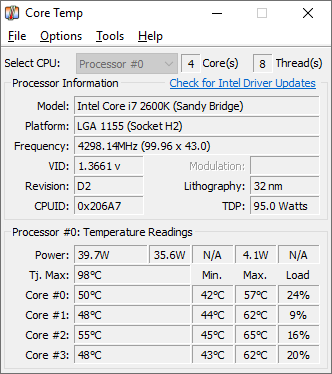
    Is this some Addon to it, or the main program ?

    https://www.alcpu.com/CoreTemp/addons.html

    The desktop one is here.

    https://www.alcpu.com/CoreTemp/main_data/coretemp.png

    Paul

    --- PyGate Linux v1.5.13
    * Origin: Dragon's Lair, PyGate NNTP<>Fido Gate (3:633/10)
  • From sticks@3:633/10 to All on Sunday, April 12, 2026 16:13:22
    On 4/12/2026 2:56 PM, Paul wrote:
    On Sun, 4/12/2026 1:09 PM, sticks wrote:
    I updated CoreTemp to version 1.20 and cannot seem to get it to allow showing both CPU usage and highest core temp.ÿ I used to be able to display all of that plus memory usage in the taskbar.ÿ Now if I click an additional circle it just goes to that one and doesn't allow both. Anyone else using CoreTemp notice this.

    Is this some Addon to it, or the main program ?

    https://www.alcpu.com/CoreTemp/addons.html

    The desktop one is here.

    https://www.alcpu.com/CoreTemp/main_data/coretemp.png

    No, that's an add-on and unnecessary.
    I decided in your honor to let AI have a chance and Google gave me this: --------
    How to Restore Your Missing Icons
    To bring back the CPU load and memory usage icons in version 1.20,
    follow these steps:

    Open Settings: Go to Options > Settings in the main Core Temp window.
    Navigate to Notification Area: Click on the Notification Area tab.
    Enable Extra Sensors: Look for the "Extra icons" section. Here, you
    must manually check the boxes for:
    Processor load
    RAM utilization (Memory usage)
    Apply Changes: Click OK. Your icons should reappear in the system
    tray.

    Why Did This Change?
    The version 1.20 update introduced a new notification tray configuration
    that allows users to show or hide any available sensor individually.
    Because of this structural change, the developers noted that all
    existing color and display configurations were reset to a "clean slate"
    during the upgrade
    -------

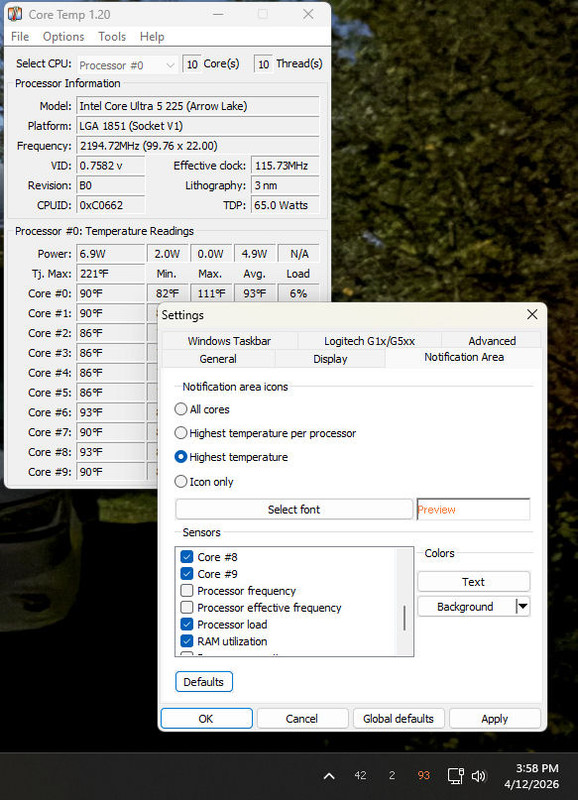
    This advice turned out to be 100% correct. What I had failed to do is
    scroll down in the "sensors" box. They are back to how I want them now

    <https://i.postimg.cc/fRjRG4MT/Core-Temp-Settings.jpg>

    Both boxes in the picture go away and all you get is the three settings
    in the taskbar. In this case Ram utilization, CPU load, and highest
    core temp. I changed the colors after this pic and rearranged them, but
    you get the idea.

    Thanks!


    --
    Science Doesn?t Support Darwin. Scientists Do


    --- PyGate Linux v1.5.13
    * Origin: Dragon's Lair, PyGate NNTP<>Fido Gate (3:633/10)
  • From Paul@3:633/10 to All on Sunday, April 12, 2026 22:59:38
    On Sun, 4/12/2026 5:13 PM, sticks wrote:
    On 4/12/2026 2:56 PM, Paul wrote:
    On Sun, 4/12/2026 1:09 PM, sticks wrote:
    I updated CoreTemp to version 1.20 and cannot seem to get it to allow showing both CPU usage and highest core temp.ÿ I used to be able to display all of that plus memory usage in the taskbar.ÿ Now if I click an additional circle it just goes to that one and doesn't allow both. Anyone else using CoreTemp notice this.

    Is this some Addon to it, or the main program ?

    https://www.alcpu.com/CoreTemp/addons.html

    The desktop one is here.

    https://www.alcpu.com/CoreTemp/main_data/coretemp.png

    No, that's an add-on and unnecessary.
    I decided in your honor to let AI have a chance and Google gave me this: --------
    How to Restore Your Missing Icons
    To bring back the CPU load and memory usage icons in version 1.20, follow these steps:

    ÿÿÿ Open Settings: Go to Options > Settings in the main Core Temp window.
    ÿÿÿ Navigate to Notification Area: Click on the Notification Area tab.
    ÿÿÿ Enable Extra Sensors: Look for the "Extra icons" section. Here, you must manually check the boxes for:
    ÿÿÿÿÿÿÿ Processor load
    ÿÿÿÿÿÿÿ RAM utilization (Memory usage)
    ÿÿÿ Apply Changes: Click OK. Your icons should reappear in the system tray.

    Why Did This Change?
    The version 1.20 update introduced a new notification tray configuration that allows users to show or hide any available sensor individually. Because of this structural change, the developers noted that all existing color and display configurations were reset to a "clean slate" during the upgrade
    -------

    This advice turned out to be 100% correct.ÿ What I had failed to do is scroll down in the "sensors" box.ÿ They are back to how I want them now

    <https://i.postimg.cc/fRjRG4MT/Core-Temp-Settings.jpg>

    Both boxes in the picture go away and all you get is the three settings in the taskbar.ÿ In this case Ram utilization, CPU load, and highest core temp.ÿ I changed the colors after this pic and rearranged them, but you get the idea.

    Thanks!

    That picture shows good context. The red color for the thermal one
    is a good choice, even though 93F is a bit less than human body temperature,
    so as processor temperatures go, that's pretty low.

    I don't run that many queries through the AI separately. The Google AI Summary one, appears sometimes and not others, and it occasionally has a full answer. The Google links these days, are mostly worthless by themselves, I don't
    get too many answers that way. What's really shocking though, is some
    topics absolutely refuse to appear in a search, as if there is an active
    effort to filter them off. I have tried and tried to get a Disk Management image for the laptop Micky has, and it just does not appear.

    https://www.techpowerup.com/cpu-specs/core-ultra-5-225.c3783

    Hybrid Cores: P-Cores: 6
    (Arrow Lake) E-Cores: 4

    AI Boost NPU 3: 13 TOPS
    TDP: 65 W
    PL1: 65 W
    PL2: 121 W

    On a desktop, that should be relatively easy to cool.

    Paul

    --- PyGate Linux v1.5.14
    * Origin: Dragon's Lair, PyGate NNTP<>Fido Gate (3:633/10)